

外掛說明
WP-Feedmail is used to display a subscription form to the sidebar where visitors can subscribe to google feedburner directly. Also the subscribers list can be available under Feedmail Tab.
Feedburner id can be configured from the admin menu, It also stores the detailes of all the feedmail subscribers.
— Features —
Easly Configure your feedburner settings.
Simple widget which can be easily customize with custom style.
List of all subscribers in the admin area.
Support
If you need help, visit the WP-Feedmails support page at:
http://www.casperweb.in/wordpress/plugins/wp-feedmail/
Version 1.1.1, Released 2012-08-25
Copyright (C) 2012-2014 Vipin P.G – http://www.casperweb.in/
螢幕擷圖
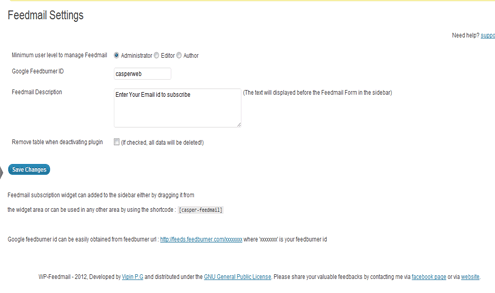
Configuration page for feedmail. 
Feedmail Subscribers list. 
Feedmail Subscription form.
安裝方式
- Upload the entire wp-feedmail folder to your plugins directory
- Activate feedmail from the plugin page
常見問題集
- How do I display the feedmail form in the sidebar ?
Feedmail subscription widget can added to the sidebar either by dragging it from
the widget area or can be used in any other area by using the shortcode : [casper-feedmail]
- How do I get my google feedburner id ?
Google feedburner id can be easily obtained from feedburner url : http://feeds.feedburner.com/xxxxxxxx where ‘xxxxxxxx’ is your feedburner id.
使用者評論
這個外掛目前沒有任何使用者評論。
參與者及開發者

變更記錄
1.1.1 [2012-09-08]: Second version – Bugs fixed. Conflict with other application issue solved.
1.0.1 [2012-08-25]: First version