
外掛說明
Do you want to display your latest tweet on your blog?
Don’t like the look of other Twitter widgets or feeds?
Try Twitter Bubble.
License
Copyright (c) 2009 Morten Høybye Frederiksen morten@wasab.dk
Permission to use, copy, modify, and distribute this software for any
purpose with or without fee is hereby granted, provided that the above
copyright notice and this permission notice appear in all copies.
THE SOFTWARE IS PROVIDED “AS IS” AND THE AUTHOR DISCLAIMS ALL WARRANTIES
WITH REGARD TO THIS SOFTWARE INCLUDING ALL IMPLIED WARRANTIES OF
MERCHANTABILITY AND FITNESS. IN NO EVENT SHALL THE AUTHOR BE LIABLE FOR
ANY SPECIAL, DIRECT, INDIRECT, OR CONSEQUENTIAL DAMAGES OR ANY DAMAGES
WHATSOEVER RESULTING FROM LOSS OF USE, DATA OR PROFITS, WHETHER IN AN
ACTION OF CONTRACT, NEGLIGENCE OR OTHER TORTIOUS ACTION, ARISING OUT OF
OR IN CONNECTION WITH THE USE OR PERFORMANCE OF THIS SOFTWARE.
螢幕擷圖
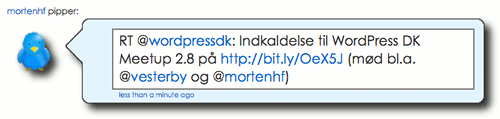
Example
安裝方式
- Download Plugin .zip-file.
- Unzip and upload to the plugin directory, usually at
wp-content/plugins/. - Activate the plugin from the WordPress “Plugin” administration screen.
- Go to the WordPress “Widget” administration screen, and drag the Twitter Bubble widget onto the sidebar of your choice.
- Input your twitter user name, optionally enter a prefix text that will be displayed before the bubble, and adjust the font size if necessary.
- Hit “Save”.
常見問題集
- The bubble doesn’t show up nicely in my sidebar, what is wrong?
-
It is likely that your sidebar is simply too narrow. The bubble requires a width of at least 230 pixels,
and works best with at around 400 pixels or more. - It keeps showing the text “Loading…”?
-
Make sure your theme uses the hooks
wp_head()andwp_footer, otherwise the necessary CSS and JavaScript won’t be sent to your browser. - Who came up with the bubble design?
-
A very similar looking design was first spotted at the homepage of Danish politician Ida Auken.
- Can I put it somewhere else besides the sidebar?
-
Yes. Simply add the template tag
<?php twitter_bubble('<yourtwitterusername', 'optional prefix: '); ?>somewhere
in your theme.
If your theme doesn’t support the hookswp_head()andwp_footer, you will also need to place calls totwitter_bubble_head() andtwitter_bubble_footer()` in the header and footer, respectively. - I have translated the plugin into another language, now what?
-
Great, thanks! Please do leave a comment on the plugin’s homepage
www.mfd-consult.dk/twitter-bubble or send an e-mail with details; I’ll
make sure it’s included in the next version. - What’s in the pipeline?
-
A real roadmap isn’t in place, but the following features are currently on the to-do list:
* Translation of (copy of) JavaScript from Twitter.
* Multiuser support. - Another question?
-
If your question isn’t answered here, please do leave a comment in the forum or on the plugin’s homepage:
www.mfd-consult.dk/twitter-bubble
使用者評論
這個外掛目前沒有任何使用者評論。
參與者及開發者

變更記錄
1.2
- Added non-widget support.
- Added Danish translation.
1.1
- Optimized layout to make it possible to use with a narrow sidebar.
- Added font-size option to widget interface.
- Now only outputs Twitter Badge JavaScript when widget is shown.
- Fixed incompatibility with plugins that alter the default WordPress widget/sidebar functionality.
- Prepared for translations.
1.0
- Initial release.