

外掛說明
Preloader
The ultimate Preloader plugin for WordPress. Smart, flexible, and made for easy control.
Add a preloader to your website easily in only 3 steps. Simple, fast, and compatible with all major browsers.
Features
On June 19, 2025, we released version “2.0.0”. Features:
- Easy to use – set up your preloader in just 3 steps.
- Upload your own GIF image or choose from 2 free templates.
- Customize preloader size and background color.
- Select where to show the preloader (entire site, blog page, posts, etc).
- Choose who sees the preloader: everyone, visitors only, or logged in users only.
- Works with any WordPress theme – no need to re-integrate after theme updates or changes.
- Compatible with all major browsers.
- Lightweight and optimized for performance.
- Clear documentation and helpful FAQ section.
- Upgrade to Premium version to get flexible display options, 30+ professional templates, and other features.
Live Demo & Usage Guide
You May Also Like – From Our Plugins
Video Popup Plugin – Create unlimited, elegant, and responsive popups for YouTube, Vimeo, MP4 & WebM videos on click or On-Page Load:
https://wordpress.org/plugins/video-popup/
Extend Link Plugin – Link Options for WordPress Editor:
https://wordpress.org/plugins/extend-link/
螢幕擷圖
安裝方式
Installation & Configuration
- Upload the ‘the-preloader’ folder to the ‘/wp-content/plugins/’ directory.
- Activate the plugin through the Plugins menu in WordPress.
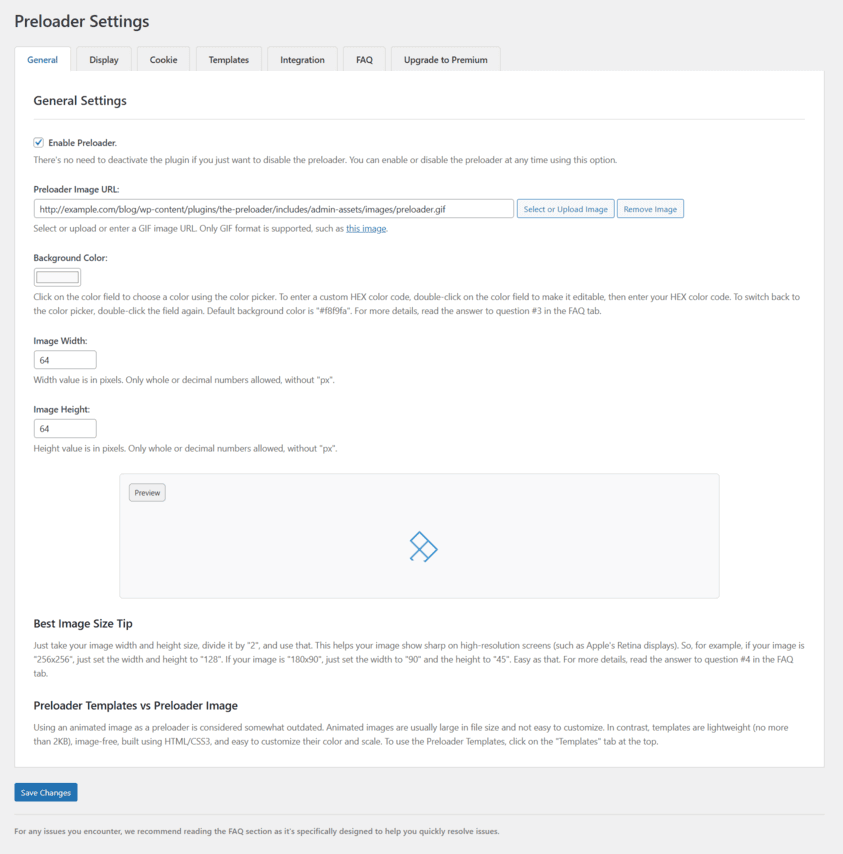
- Go to the Preloader menu > General tab, enable the preloader, upload your GIF image, and adjust its settings.
- Or, go to the Templates tab to choose from two free templates.
- Go to the Display tab to select where to show the preloader (entire site, posts, etc), and choose who sees the preloader (everyone, visitors only, or logged in users only).
- Save changes.
- Clear your site’s cache if you’re using a caching plugin.
Finally, if the preloader doesn’t show, click on the “Integration” tab, and follow the instructions there.
For common issues and helpful tips, check the FAQ tab.
常見問題集
-
FAQ
-
For common issues and helpful tips, go to Preloader > FAQ tab.
使用者評論


參與者及開發者

變更記錄
2.0.2
- Improved performance.
The plugin is now faster with improved performance. After updating, no action is required on your part.
2.0.1
- Optimized plugin initialization.
- Added a new menu icon.
After updating, no action is required on your part. Enjoy!
2.0.0
- Everything has changed in this version! Explore it yourself.
- Go to the Preloader menu > General tab, enable the Preloader and adjust your settings.
- For common issues and helpful tips, go to Preloader > FAQ tab.
- How to Use v2.0.0
1.0.9
- Fixed header.php file URL in settings page.
- Improved preloader performance in JavaScript.
1.0.8
- Preloader Image Size Extension is ready!
1.0.7
- Added < noscript > tag in to hide preloader when JavaScript is disabled.
1.0.6
- Fixed preloader delay issue.
- Note: After updating, please go to Plugins menu > Preloader and add the preloader HTML element after the body tag in your theme’s header.php file.
1.0.5
- Fixed script location – all scripts now properly loaded in head tag.
1.0.4
- Added support for Front Page.
- Added support for 404 Error Page.
1.0.3
- Added conditional JavaScript loading.
1.0.2
- Fixed critical issue.
- Added new display location settings (homepage only, posts only, etc.).
- Added PHP file protection.
- Added uninstall functionality.
1.0.1
- Removed is_admin() function.
1.0.0
- Initial release.