

外掛說明
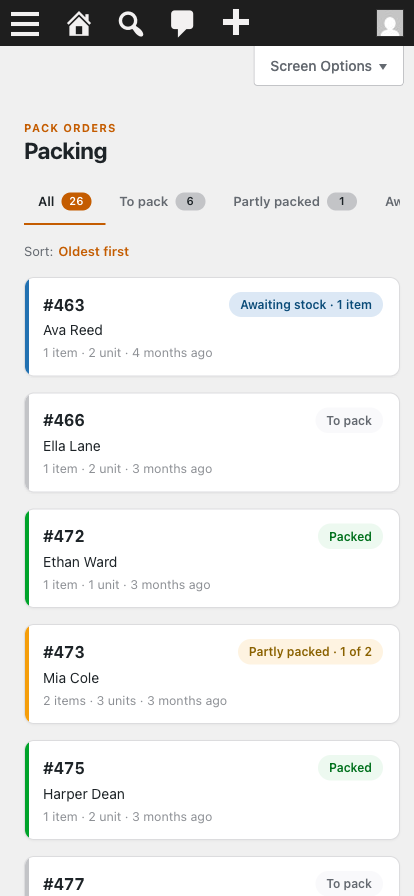
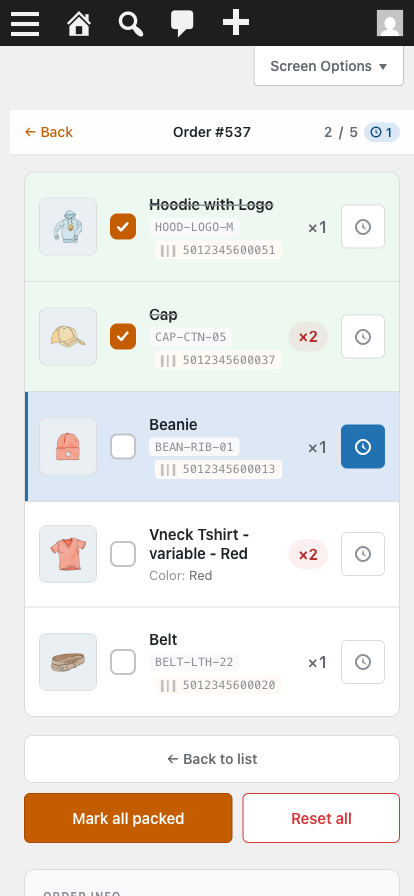
Pack Orders for WooCommerce turns any WooCommerce order into a simple packing checklist you work through on your phone. Open an order, see the line items as big tappable rows, and tick each one off as it goes in the box. The packed state is saved to the order and survives across devices, so you can start on the shop floor and finish at the bench without losing your place.
It is built for small-store owners who pack their own orders. No printer, no labels, no workflow to learn — just a clear list and a checkbox per item.
What it does
- Mobile-first packing checklist — a dedicated, distraction-free packing page with large tap targets, built to be used one-handed on a phone.
- Per-item packed state — tick items individually, “Mark all packed”, or “Reset all”. State is saved instantly and shared across every device and user.
- Flag missing items — out of stock? Mark the item Awaiting and the order is shown as blocked, so you never ship it short.
- Awaiting list — one screen listing every item currently awaiting stock across all your orders.
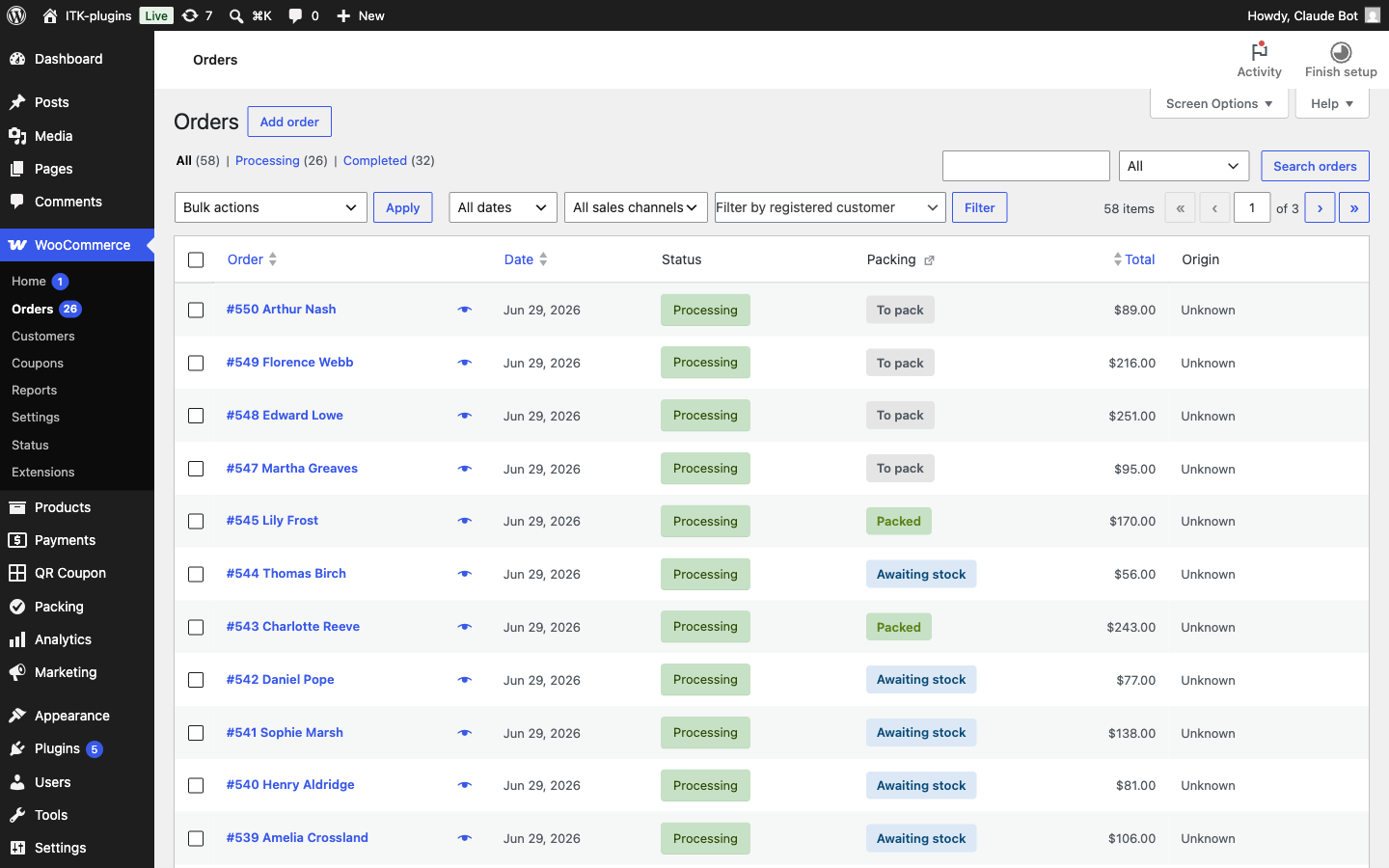
- Derived packing status — each order is shown as To pack, Partly packed, Awaiting, or Packed, calculated from the items, never guessed.
- Orders-screen column — a read-only packing-status column on the native WooCommerce Orders screen, clickable straight through to the packing page.
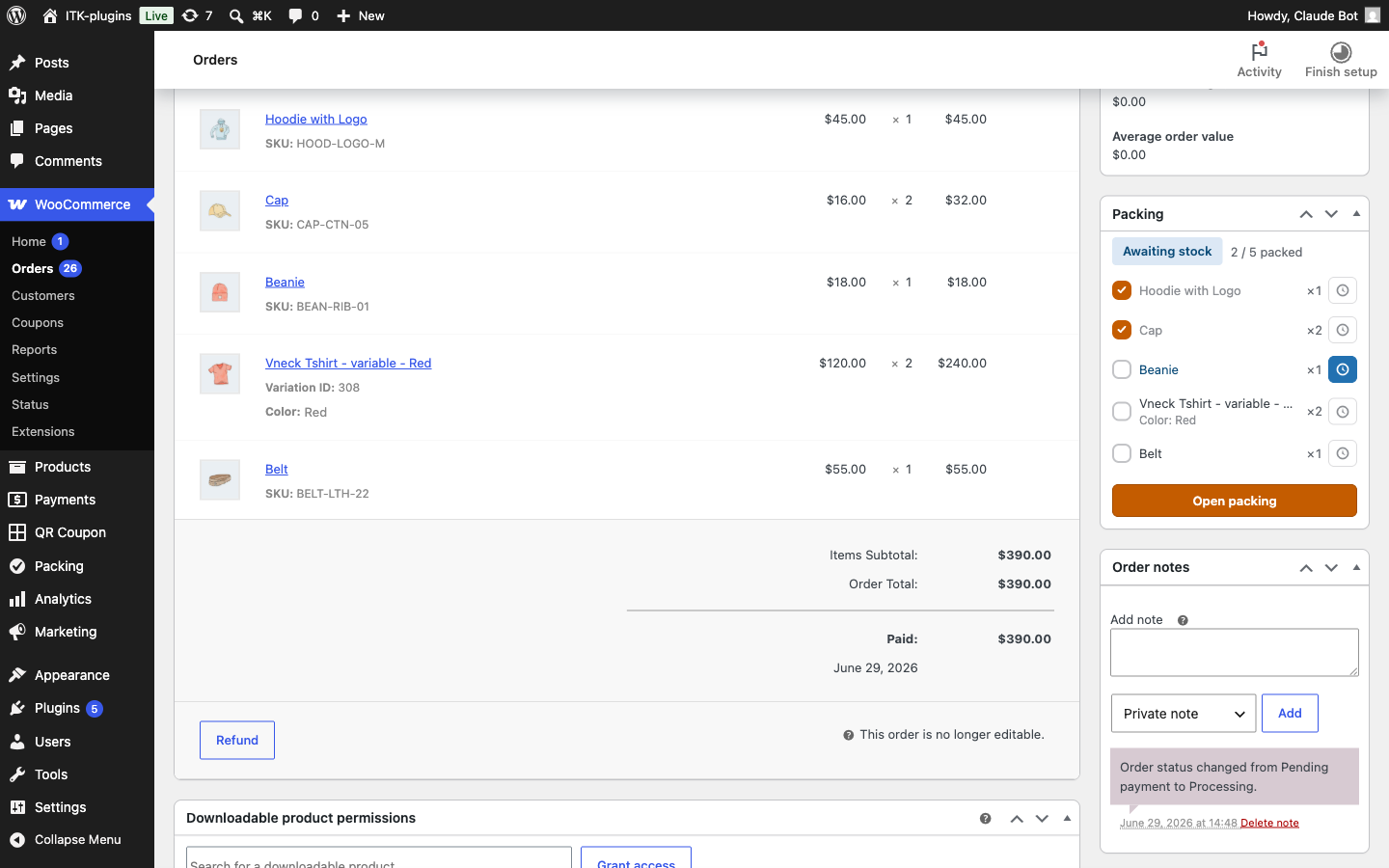
- Order edit meta box — a “Packing” panel on the single-order screen showing status and progress, with a button to open the packing page.
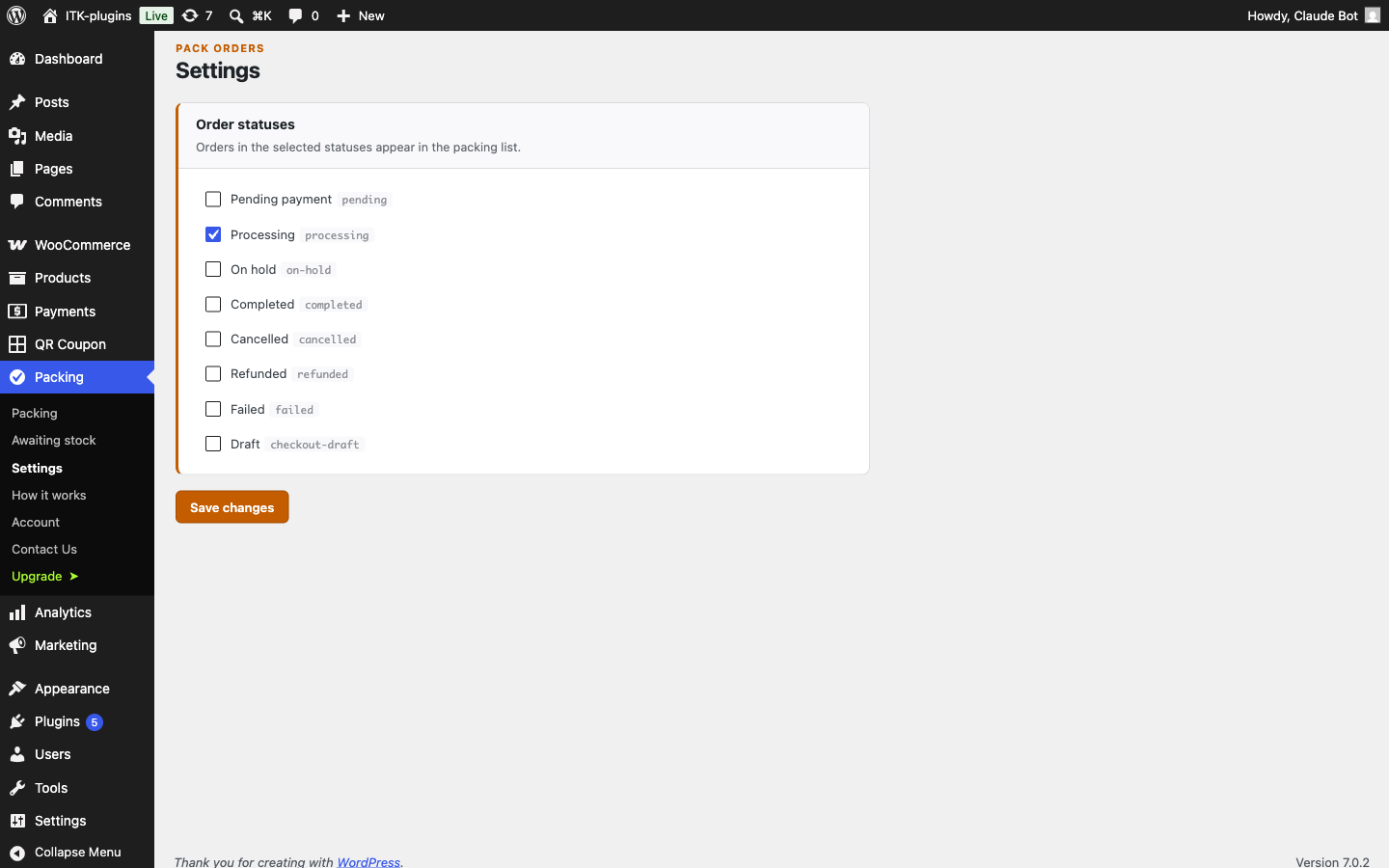
- Configurable statuses — choose which order statuses count as “needs packing” (defaults to Processing) on the Settings page.
- HPOS compatible — works with both High-Performance Order Storage and the legacy order storage.
It never changes your order status
Packing is a parallel layer. Marking items packed never moves the order between WooCommerce statuses — that stays entirely under your control. Packed state is stored on the order’s own line items, so it travels with the order and shows the same progress to everyone on your team.
Free version
The free version is a complete packing tool: the mobile checklist, per-item packed and Awaiting states, the derived status shown everywhere (packing page, Orders column, order meta box), the Awaiting list, and configurable packing statuses. Everything you need to pack your own orders — free, forever.
Premium upgrade (Flow)
Flow is a separately available upgrade for stores that re-order stock from suppliers. It builds on everything you flag as Awaiting and adds:
- Suppliers — keep a supplier directory with email, phone, account number, and notes, and assign products to a supplier one at a time or in bulk.
- Re-order list — every item awaiting stock, grouped by supplier and ready to order. Export a CSV, email the supplier, or print it.
- Supplier-order batches — turn a re-order into a tracked supplier order, then mark items received as deliveries arrive.
- Auto-flag backorders — backordered items are marked Awaiting automatically as orders come in.
- Pick list — one consolidated gather list across every order, so you pick each product once instead of hopping between orders.
The free version is fully functional on its own; Flow is optional.
Learn more about Flow — features, pricing, and documentation (https://plugins.itk-agency.com/pack-orders/).
Privacy and external services
Packing state is stored in your own WooCommerce order data — it is never sent off your site, and the plugin does no tracking of your customers or orders.
The plugin uses the Freemius platform (https://freemius.com) for software licensing, updates, and optional usage analytics. Nothing is sent to Freemius unless you opt in on the activation screen — you can skip the opt-in and the plugin stays fully functional. If you do opt in, your site URL, the administrator email address and name, and environment details (WordPress, PHP and WooCommerce versions, active plugins and theme, and site language) are shared with Freemius for support, compatibility checks, and product improvement. The paid upgrade additionally contacts Freemius to validate your licence and deliver its updates. See the Freemius Privacy Policy (https://freemius.com/privacy/) and Terms of Service (https://freemius.com/terms/).
Disclaimer
This plugin is an independent project and is not affiliated with, endorsed by, or sponsored by Automattic or the WooCommerce project. “WooCommerce” is a trademark of Automattic Inc., used here only to describe compatibility.
螢幕擷圖
安裝方式
- Upload the plugin folder to
/wp-content/plugins/, or install it directly from the WordPress dashboard under Plugins Add New. - Activate the plugin through the Plugins screen.
- WooCommerce must be active — this plugin requires it.
- (Optional) Go to Packing Settings to choose which order statuses appear in the packing list.
- Open Packing from the admin menu, pick an order, and start ticking off items — on your phone for the real experience.
常見問題集
-
Does this change my order’s status when I finish packing?
-
No. Packing is tracked completely separately from WooCommerce order status. Marking an order fully packed never moves it to a different status — that remains your decision.
-
Where is the packed state stored?
-
On the order’s own line items, as hidden order-item meta. That means it stays attached to the order, is the same for every user, and shows consistent progress whether you open the order on your phone, your laptop, or a colleague’s screen.
-
Does it work with High-Performance Order Storage (HPOS)?
-
Yes. The plugin uses WooCommerce’s order APIs throughout and works with both HPOS and the legacy order storage.
-
Will it slow my store down?
-
No. Everything runs in the WordPress admin — there is no customer-facing code and no custom database tables. Packing state is stored in WooCommerce’s own order data, so your storefront is completely unaffected.
-
Which orders show up in the packing list?
-
By default, orders in the Processing status. You can change which statuses count as “needs packing” on the Packing Settings page.
-
Do downloadable or virtual products appear in the checklist?
-
No. Only shippable items need packing, so virtual and downloadable products are skipped automatically — the checklist stays focused on what actually goes in the box.
-
What does marking an item “Awaiting” do?
-
It flags that the item can’t be packed yet — usually because it’s out of stock. The order is shown as blocked (it can’t be completed) and the item appears on the Awaiting list, so nothing ships short and you have a single view of everything you’re waiting on.
-
Who can access the packing screens?
-
Anyone who can manage WooCommerce orders (the
edit_shop_orderscapability — shop managers and administrators by default). The same gate applies to every action that changes packed state. -
Does the plugin send any data to external services?
-
Your packing data never leaves your site. The plugin uses Freemius for licensing and updates, with optional usage analytics that are only sent if you opt in on the activation screen — skip the opt-in and nothing is shared. See “Privacy and external services” above for the details.
-
What happens to packed data when I uninstall?
-
Uninstalling removes only the plugin’s own settings. It does not bulk-delete packed state from your orders, so reinstalling later leaves existing orders’ packing progress intact.
-
Where can I find documentation?
-
Developer documentation — the data model, the REST API, and the extensibility hooks — is at https://plugins.itk-agency.com/pack-orders/developers/.
-
Yes. The free plugin here is complete and self-contained. A separately available upgrade, Flow, adds supplier management with bulk product assignment, a supplier-grouped re-order list with CSV export, email, and print, supplier-order batches, automatic backorder flagging, and a consolidated pick list — for stores that re-order stock from suppliers. See features and pricing (https://plugins.itk-agency.com/pack-orders/).
使用者評論
這個外掛目前沒有任何使用者評論。
參與者及開發者

變更記錄
1.0.0
- Initial release.
- Mobile-first packing checklist with per-item packed state, “Mark all packed”, and “Reset all”.
- Flag items as Awaiting when they’re out of stock, plus an Awaiting list across all orders.
- Packing status (To pack / Partly packed / Awaiting / Packed) derived from order line items.
- Read-only, clickable packing-status column on the WooCommerce Orders screen.
- “Packing” meta box on the single-order edit screen.
- Settings page to configure which order statuses count as “needs packing”.
- HPOS and legacy order storage compatible.
- Packing data stays on your site; optional Freemius analytics are opt-in only.