

外掛說明
Kabook Rebuy Discount rewards loyal customers automatically. If someone already purchased a downloadable product from your store and comes back for it again — to refresh a license, grab an updated file, or simply support you a second time — this plugin quietly applies a discount for them, no coupon codes, no manual work.
It was built with one goal: simplicity. Set a discount percentage once, and the plugin handles the rest — detecting the rebuy, adjusting the price in the cart, and keeping a clear record for you on the order.
Why store owners like it
- Zero customer friction — no codes to remember or enter, the discount just appears.
- One setting, no configuration maze — a single percentage is all that’s required to go live.
- Full visibility for you — every rebuy discount is logged as an Order Note and shown in a dedicated details box on the order screen, so you always know exactly what was discounted and why.
- Plays nicely with your store — built on WooCommerce’s standard CRUD API, compatible with High-Performance Order Storage (HPOS), and safe to run alongside invoice, PDF, and reporting plugins.
- Ready to speak your language — fully translatable, and ready to receive community translations via translate.wordpress.org.
Features
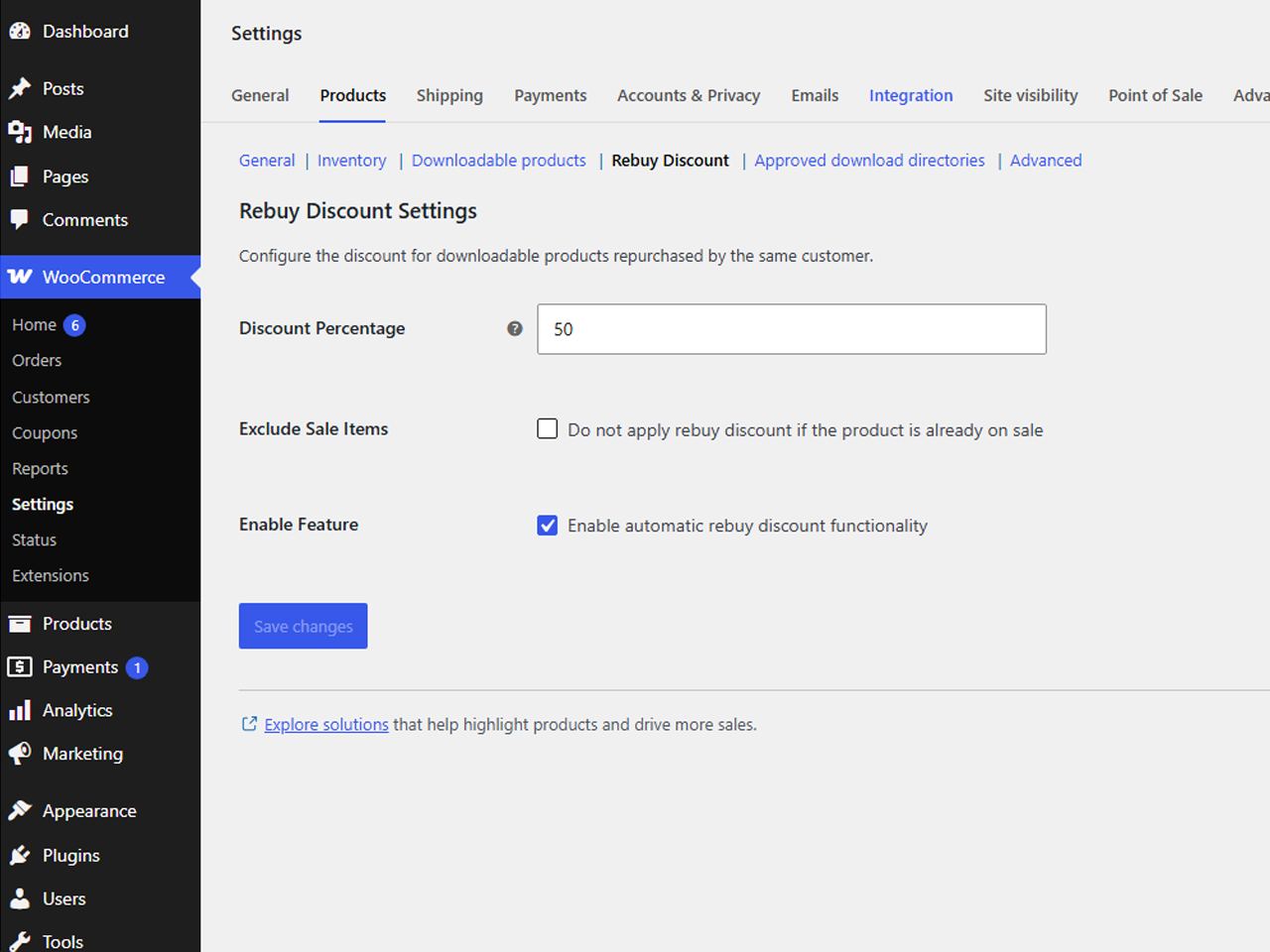
- Set a global percentage discount for rebuys.
- Option to exclude items that are already on sale, so discounts never stack unintentionally.
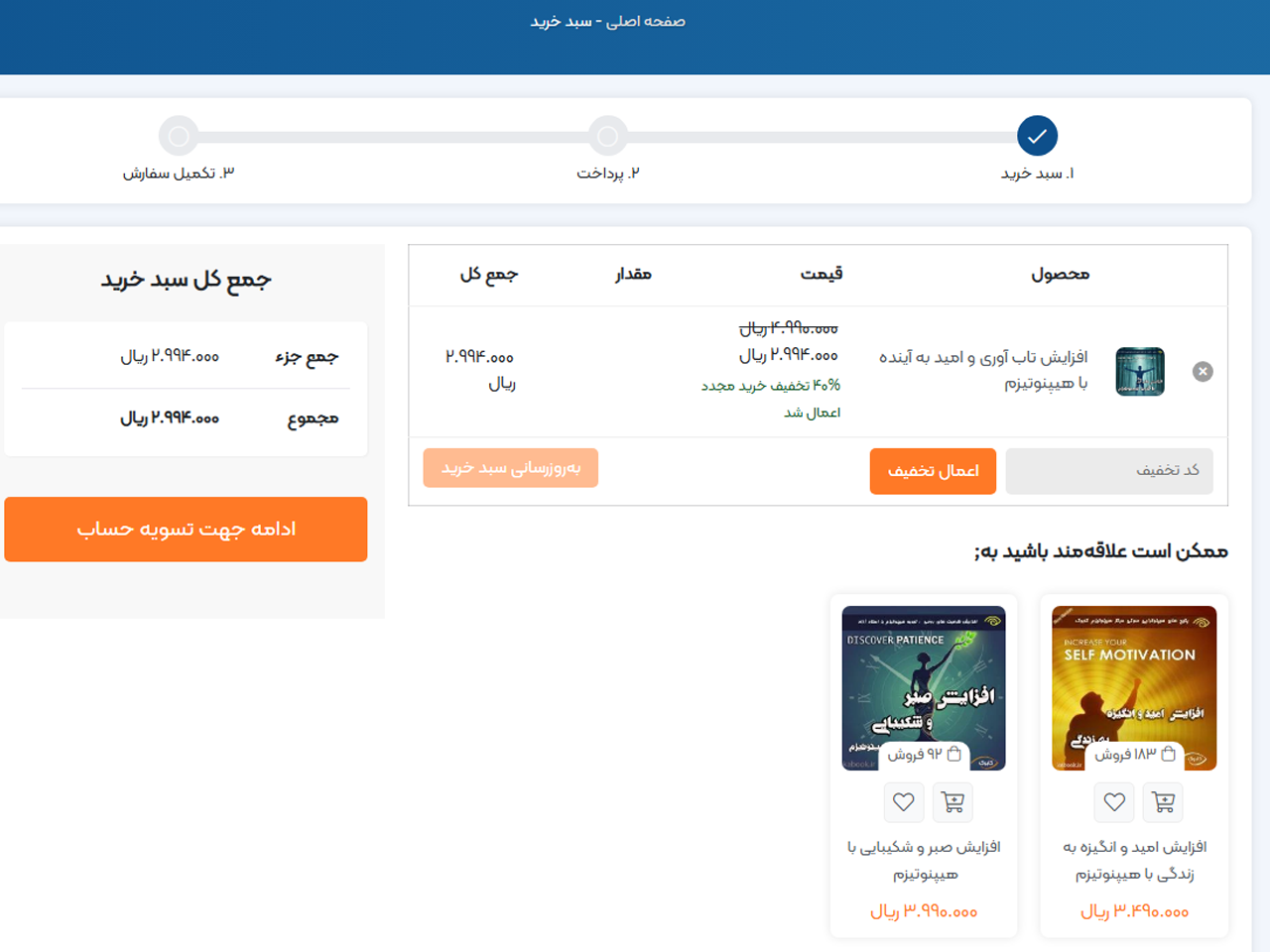
- Clear visual notice in the Cart showing the original and discounted price.
- A dedicated “Rebuy Discount Details” box on the WooCommerce order screen, plus a matching summary on the customer’s order-received/view-order page.
- An automatic Order Note recording exactly which products were discounted, by how much, and for what total — perfect for support and bookkeeping.
- Fully integrated into WooCommerce Settings Products, no separate admin page to hunt for.
- Compatible with WooCommerce High-Performance Order Storage (HPOS).
This plugin requires WooCommerce to be installed and active.
What’s next
Version 1.0.0 focuses on downloadable products, where a “rebuy” is the clearest and safest case to automate. If this approach proves useful to the community, upcoming versions are planned to bring the same effortless experience to physical products as well, with extra settings to fine-tune eligibility (order count thresholds, product categories, time-based rules, and more) — all while keeping the same “one setting and it just works” philosophy at its core.
Your feedback shapes what gets built next, so if there’s something you’d love to see, a support thread or a review is the best way to let me know.
Enjoying the plugin?
If Kabook Rebuy Discount is saving you time, a review would mean a lot — it’s the main way small plugins like this get noticed, and it directly motivates the roadmap above. Ratings, feedback, and feature requests are always welcome.
You’re also welcome to check out my other plugins on WordPress.org.
螢幕擷圖
安裝方式
- Upload the plugin files to the
/wp-content/plugins/kabook-rebuy-discountdirectory, or install the plugin through the WordPress plugins screen. - Activate the plugin through the ‘Plugins’ screen in WordPress.
- Go to WooCommerce Settings Products Rebuy Discount to set your discount percentage and you’re done.
常見問題集
-
Does this work for physical products?
-
Not in this version — it currently targets downloadable products only, using
is_downloadable()to ensure it targets digital goods. Support for physical products is on the roadmap for a future release; see “What’s next” above. -
Is this compatible with WooCommerce High-Performance Order Storage (HPOS)?
-
Yes, the plugin declares compatibility and stores all order data through the WooCommerce CRUD API.
-
Will this show up correctly in invoice/PDF plugins?
-
Yes. Rebuy discount data is kept at the order level (not as raw item meta), so it won’t leak untranslated internal fields into third-party invoice or packing-slip templates. A full summary is also recorded as a standard Order Note.
-
Does the discount stack with sale prices?
-
That’s up to you — there’s a setting to exclude products that are already on sale, so you stay in control of your margins.
使用者評論
這個外掛目前沒有任何使用者評論。
參與者及開發者

變更記錄
1.0.0
- Initial release.