

外掛說明
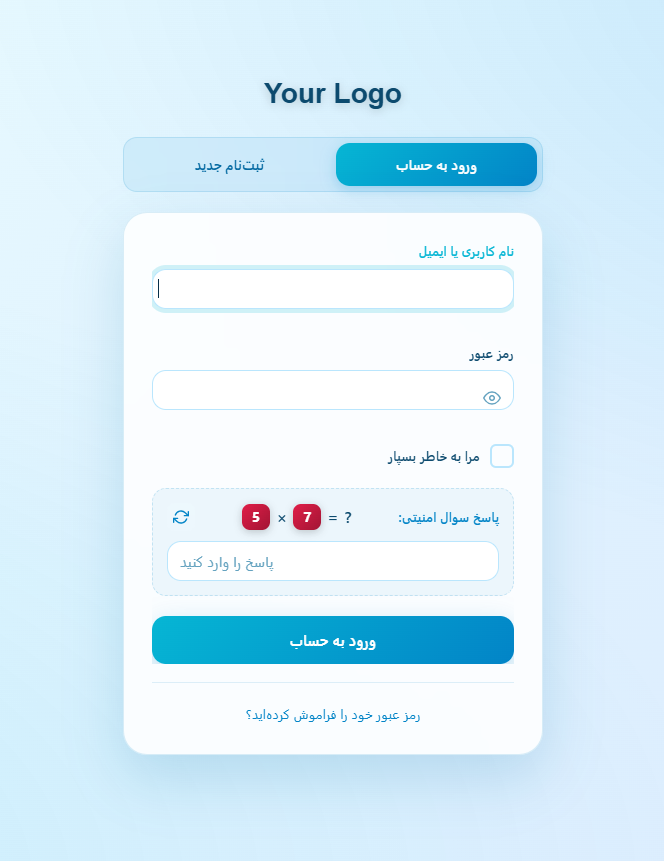
HootiNet Login is an RTL-first WordPress plugin that redesigns the default login, registration, and lost password pages with a modern, beautiful interface. It is specially optimized for Persian and Arabic websites while working perfectly with any WordPress site.
Key Features:
- Two Login Page Themes – Modern (glassmorphism card) and Split (two-column layout with welcome image)
- Split Theme Extras – Welcome image from media library, glassmorphism welcome card, cross-switch dance animation between forms, and centered glass form for lost password
- Ready-Made Color Palettes – 5 attractive palettes (Ocean, Royal, Sunset, Forest, Rose) with automatic dark and light mode support
- Dark / Light Mode – Each palette automatically adapts to both dark and light modes with optimized contrast
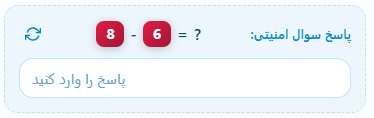
- Math Captcha – Random math operations (+, -, ×) to protect login, registration, and lost password forms from spam
- Hide Login URL – Hide default WordPress login URLs (wp-login.php, wp-admin) and use a custom slug. Default URLs show a real 404 page
- Form Switching Animations – Choose between fade, slide, scale, or no animation with adjustable speed
- Typography Controls – Adjust font sizes for labels, inputs, buttons, links, and captcha
- RTL Ready – Fully optimized for right-to-left languages
- Responsive Design – Works perfectly on all devices
- Easy Settings Panel – Clean card-based admin interface with live preview and per-theme settings
HootiNet Login is developed by HootiNet and is actively maintained. For support and more information, visit https://hootinet.ir
螢幕擷圖



安裝方式
- Upload the plugin files to
/wp-content/plugins/hootinet-login/, or install the plugin through the WordPress plugins screen directly. - Activate the plugin through the ‘Plugins’ screen in WordPress.
- Go to HootiNet Login > Settings to configure the plugin.
常見問題集
-
Can I use this plugin with any WordPress theme?
-
Yes, HootiNet Login works with any WordPress theme.
-
Is it possible to hide the default WordPress login URL?
-
Yes, you can enable the “Hide Login URL” feature and set a custom slug. Default WordPress URLs such as wp-login.php and wp-admin will show a 404 page for non-logged-in users.
-
Does the plugin support RTL languages?
-
Yes, the plugin is fully optimized for RTL (Right-to-Left) languages like Persian and Arabic.
-
Can I customize the colors?
-
Yes, you can choose one of the 5 ready-made color palettes. Each palette supports both dark and light modes with optimized colors for each mode.
-
How do I enable the Split two-column theme?
-
Go to HootiNet Login > Settings and select “Split” in the “Login Page Theme” field. The Split settings (side image, welcome texts, overlay, text style and animation speed) appear instantly when the theme is selected.
-
Does the math captcha work with all forms?
-
Yes, the math captcha protects the login, registration, and lost password forms.
使用者評論
這個外掛目前沒有任何使用者評論。
參與者及開發者

變更記錄
3.3.0
- Added: New Split two-column login theme with welcome image and glassmorphism card
- Added: Cross-switch dance animation between login and register forms without page refresh
- Added: Lost password view with full background image and centered glassmorphism form
- Added: Split theme settings (side image via media library, image fit mode, welcome title/description with character limits, text color style, overlay opacity, animation speed)
- Added: Conditional display of Split settings in admin panel (shown only when Split theme is selected)
- Added: Vazirmatn free font for the Split theme
- Improved: Form rendering refactored for multi-theme support
- Fixed: Split columns now locked to exact 50/50 so the cross animation lands flush without gaps or clipping
3.2.1
- Fixed: Removed the raw style block from the fallback 404 page and replaced it with inline style attributes to fully comply with wp_enqueue guidelines
- Added: Official plugin assets (icons, banners, and screenshots) for the WordPress.org plugin page
3.2.0
- Added: Five ready-made color palettes (Ocean, Royal, Sunset, Forest, Rose)
- Added: Full dark mode and light mode support for every palette
- Added: New card-based admin settings panel with live preview
- Added: Login template infrastructure for future themes
- Changed: Removed individual color picker fields in favor of palette-based theming
- Changed: Removed custom CSS field for improved security
- Improved: Escaping and sanitization across all files
- Improved: RTL and responsive compatibility
- Fixed: Various security and code quality issues
3.0.0
- Added: Custom gradient controls for buttons, tabs, cards, and background
- Added: Adjustable gradient angles for all elements
- Added: Custom mode for full color and gradient control
- Added: Theme presets (Dark/Light) with locked colors
- Improved: Admin settings panel organized into 5 sections
- Improved: Better typography control
2.2.2
- Added: Random math captcha operations (+, -, ×)
- Added: Animation speed setting
- Added: Typography controls
- Added: wp-admin hiding for non-logged-in users
- Improved: Dark/Light mode automatic color switching
2.2.1
- Initial release