
外掛說明
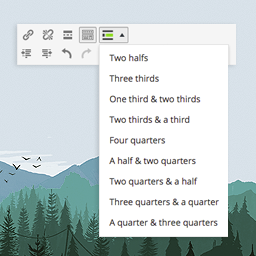
A responsive and easy-to-use tool for dividing your content in your posts/pages. This ultra-lightweight plugin allows you to put your content in columns of various widths. What you see is what you get, and it’s totally free.
Usage example
1. Create rows using [GDC_row]
[GDC_row][/GDC_row]
2. Add columns using [GDC_column]
[GDC_row]

[GDC_column size="third"]
Your content here
[/GDC_column]

[GDC_column size="third"]
Your content here
[/GDC_column]

[GDC_column size="third"]
Your content here
[/GDC_column]

[/GDC_row]
Available sizes
- half
- third
- two-thirds
- quarter
- three-quarters
See more code examples on the documentation page.
Support
Find help in our forums for this plugin (we’ll answer you fast, promise).
螢幕擷圖


安裝方式
Installation
- In your WordPress admin panel, go to Plugins > New Plugin
- Find our Grid Shortcodes plugin by WP Darko and click Install now
- Alternatively, download the plugin and upload the contents of grid-shortcodes.zip to your plugin directory, which usually is /wp-content/plugins/
- Activate the plugin
Usage example
1. Create rows using [GDC_row]
[GDC_row][/GDC_row]
2. Add columns using [GDC_column]
[GDC_row]

[GDC_column size="third"]
Your content here
[/GDC_column]

[GDC_column size="third"]
Your content here
[/GDC_column]

[GDC_column size="third"]
Your content here
[/GDC_column]

[/GDC_row]
- half
- third
- two-thirds
- quarter
- three-quarters
See more example on the documentation page.
常見問題集
-
Usage example
-
1. Create rows using [GDC_row]
-
[GDC_row][/GDC_row] -
2. Add columns using [GDC_column]
-
[GDC_row] [GDC_column size="third"] Your content here [/GDC_column] [GDC_column size="third"] Your content here [/GDC_column] [GDC_column size="third"] Your content here [/GDC_column] [/GDC_row] -
Available sizes
-
- half
- third
- two-thirds
- quarter
- three-quarters
See more example on the documentation page.
-
Support
-
Find help on our support platform for this plugin (we’ll answer you fast, promise).
使用者評論

2022 年 1 月 28 日
Easy to use an very simple to configure.

2019 年 10 月 24 日
1 則留言
Trabaja con los bloques de Gutenberg y acepta html. Fantastico

2019 年 7 月 19 日
1 則留言
Finally someone has developed this simple and very useful plugin.
Thank you so much, dev!

2018 年 12 月 10 日
I've been looking for a grid plugin that works with WordPress 5. This plugin is perfect for the job. Very lightweight, with ample documentation and examples. Awesome.

2018 年 1 月 22 日
1 則留言
I searched for a plugin like this for almost years.
It does exactly what it says, in a solid and simple approach.
Sometimes simplicity is difficult to find.
Thank you very much for this plugin.

2018 年 1 月 4 日
This plugin is absolutely brilliant. Sometimes all you need is a simple way to divide the content area and that's what this plugin does. I will say that it would be even more brilliant if you added parameters to set the background color and the text color.
And btw, I ran it through the tenon.io accessibility analyzer and it came out with zero errors, so that's a bonus.
參與者及開發者

變更記錄
1.1.1
- Fixed minor vulnerability issue
1.1
- Stripping out paragraphs and new lines between columns (thanks @makbeta).
1.0
- Initial release