這個外掛並未在最新的 3 個 WordPress 主要版本上進行測試。開發者可能不再對這個外掛進行維護或提供技術支援,並可能會與更新版本的 WordPress 產生使用上的相容性問題。

GoToMenu – Menu Navigator

外掛說明

GoToMenu – Menu Navigator GoToMenu – Menu Navigator is a WordPress plugin that boosts efficiency by offering rapid access to any registered menu. A simple F2 keypress opens a search box, letting users quickly find and open their desired menu. Save time and streamline workflow by skipping manual menu scrolling.

Key Features:

  • Adds a settings page under “GoToMenu” in the WordPress admin area.
  • Includes a toggle field called “Enable for Frontend” to enable or disable the plugin’s functionality on the frontend.
  • Includes a toggle field called “Enable for backend” to enable or disable the plugin’s functionality on the backend.
  • When enabled, users (including guest users) can press the F2 key to open a modal displaying a list of available menus.
  • Users can select a menu from the dropdown list and navigate directly to the selected menu’s page.
  • Fully accessible and keyboard-friendly, with support for navigating the modal using keyboard keys.

License

This plugin is licensed under the GPLv2 or later. See the License URI for more details.

螢幕擷圖
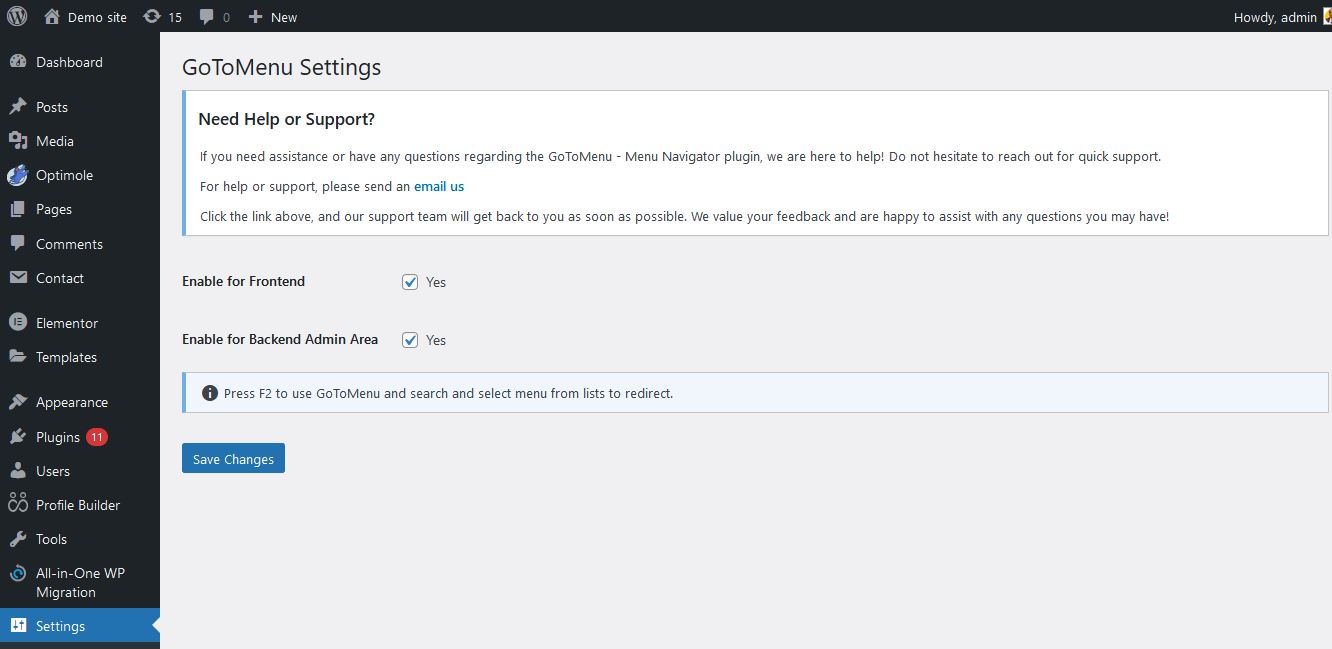
  • GoToMenu Settings Page: The settings page where you can enable or disable the plugin’s frontend functionality.
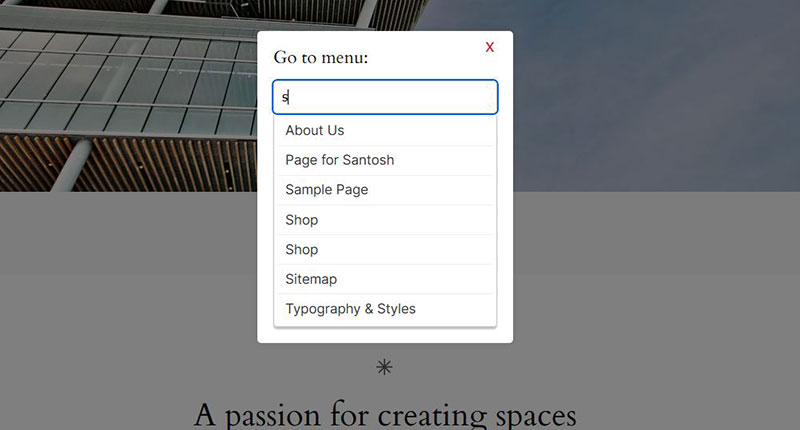
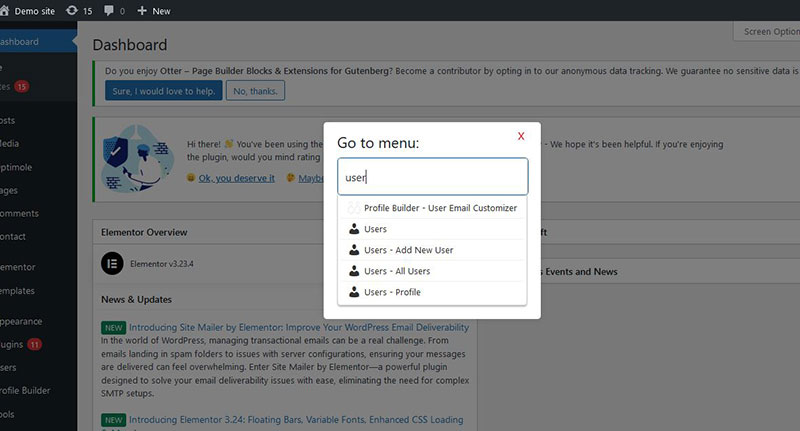
  • GoToMenu Modal: The modal that appears when users press the F2 key, allowing them to select a menu and navigate to the corresponding page.

安裝方式

  1. Upload the gotomenu folder to the /wp-content/plugins/ directory, or install the plugin through the WordPress plugins screen directly.
  2. Activate the plugin through the ‘Plugins’ screen in WordPress.
  3. Go to the “GoToMenu” settings page in the WordPress admin area.
  4. Toggle “Enable for Frontend” to activate the plugin’s functionality on the Frontend.
  5. Toggle “Enable for backend” to activate the plugin’s functionality on the Backend WP Admin Area.

常見問題集

How do I enable the GoToMenu functionality on my site?

After installing and activating the plugin, go to the “GoToMenu” settings page in the WordPress admin area and toggle the “Enable for Frontend” option.

Who can use the F2 key to access the GoToMenu modal?

All users, including guest users, can use the F2 key to open the modal and navigate the menus if the “Enable for Frontend” option is activated.

Can I customize the keyboard shortcut used to open the GoToMenu modal?

Currently, the plugin only supports the F2 key as the shortcut to open the modal. Customization options may be added in future updates.

使用者評論

2024 年 10 月 19 日 2 則留言
I recently got my hands on the newly released GoToMenu – Menu Navigator plugin for WordPress, and I must say, it’s a fantastic addition to streamline the navigation experience both in the backend and frontend. The plugin does exactly what the name suggests – it allows you to quickly access any registered menu by pressing the F2 key. Whether you’re deep into your WordPress dashboard or even on the frontend (if you’ve enabled that option), this handy shortcut opens up a search box, letting you pick and jump to any menu page within seconds. No more endless scrolling through the admin sidebar menus—seriously, such a time-saver! It’s got a settings page under “GoToMenu” in the admin area, which gives you full control. You can enable or disable the plugin separately for the frontend and backend—very convenient depending on your needs. The plugin also works flawlessly for all users, including guests if you enable it. What I love most is how simple and intuitive it is. Press F2, and boom, you’re off to whichever menu you need. And if you’re a keyboard shortcut enthusiast like me, you’ll appreciate how accessible and easy it is to navigate through the modal using just your keyboard. Overall, the GoToMenu – Menu Navigator plugin is a must-have for anyone looking to cut down on their navigation time and boost workflow efficiency in WordPress. It’s lightweight, straightforward, and highly functional.
閱讀全部 1 則使用者評論

參與者及開發者

以下人員參與了開源軟體〈GoToMenu – Menu Navigator〉的開發相關工作。

參與者

將〈GoToMenu – Menu Navigator〉外掛本地化為台灣繁體中文版

對開發相關資訊感興趣?

任何人均可瀏覽程式碼、查看 SVN 存放庫,或透過 RSS 訂閱開發記錄

變更記錄

1.0.0

  • Initial release of GoToMenu.
  • Added the “Enable for Frontend” setting.
  • Implemented the F2 key functionality to open a modal with a dropdown list of available menus.