

外掛說明
打破傳統表單外掛的框架!Forminator 是一款簡單易用的 WordPress 表單建置外掛,適用於各種類型的網站與情境。無論是聯絡表單、訂單表單、金流付款表單、電子郵件訂閱表單、意見回饋小工具、具備即時統計結果的互動式投票、BuzzFeed 風格的趣味測驗、服務估價器,還是支援 PayPal 與 Stripe 付款選項的會員註冊表單,Forminator 都能讓你以最輕鬆的方式快速打造。
這是一套適合所有人的神奇 WordPress 表單編輯器!
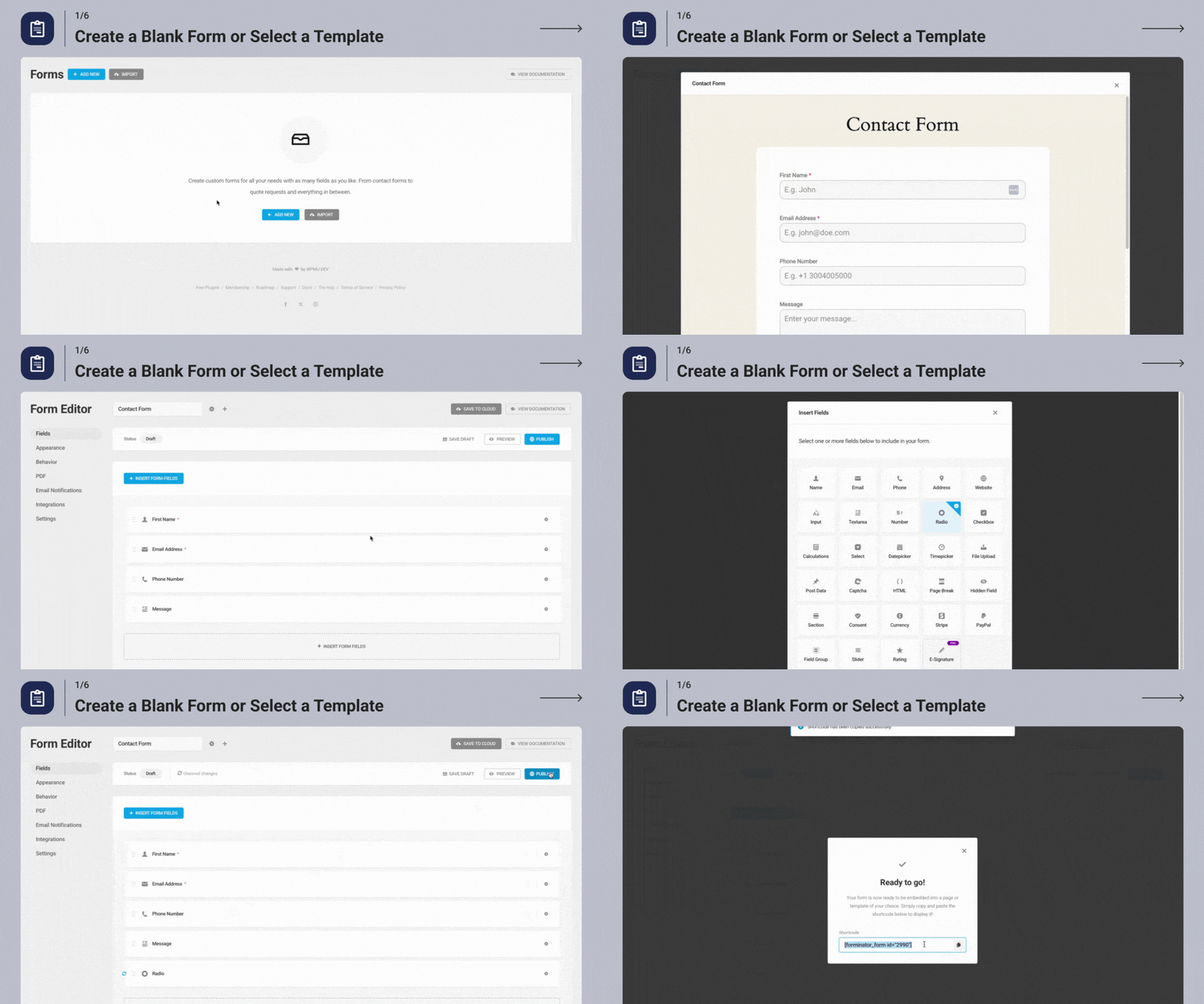
Forminator 的視覺化拖放編輯器,讓你在 WordPress 網站上輕鬆設定並加入表單。透過 Forminator 收集資訊、讓內容更具互動性,並創造更高轉換率。
立即升級至 Forminator Pro,全面解鎖所有表單欄位與進階附加元件。
透過獨家 Pro 功能全面升級,享受 Stripe 訂閱表單、動態 PDF 產生器,以及簡便的地理位置定位與自動完成功能。深入瞭解 Pro 版。
Forminator 表單、調查問卷、測驗、投票、計算機等豐富功能……
- 表單 – 滿足所有自訂表單需求,隨心所欲加入任意數量的欄位。
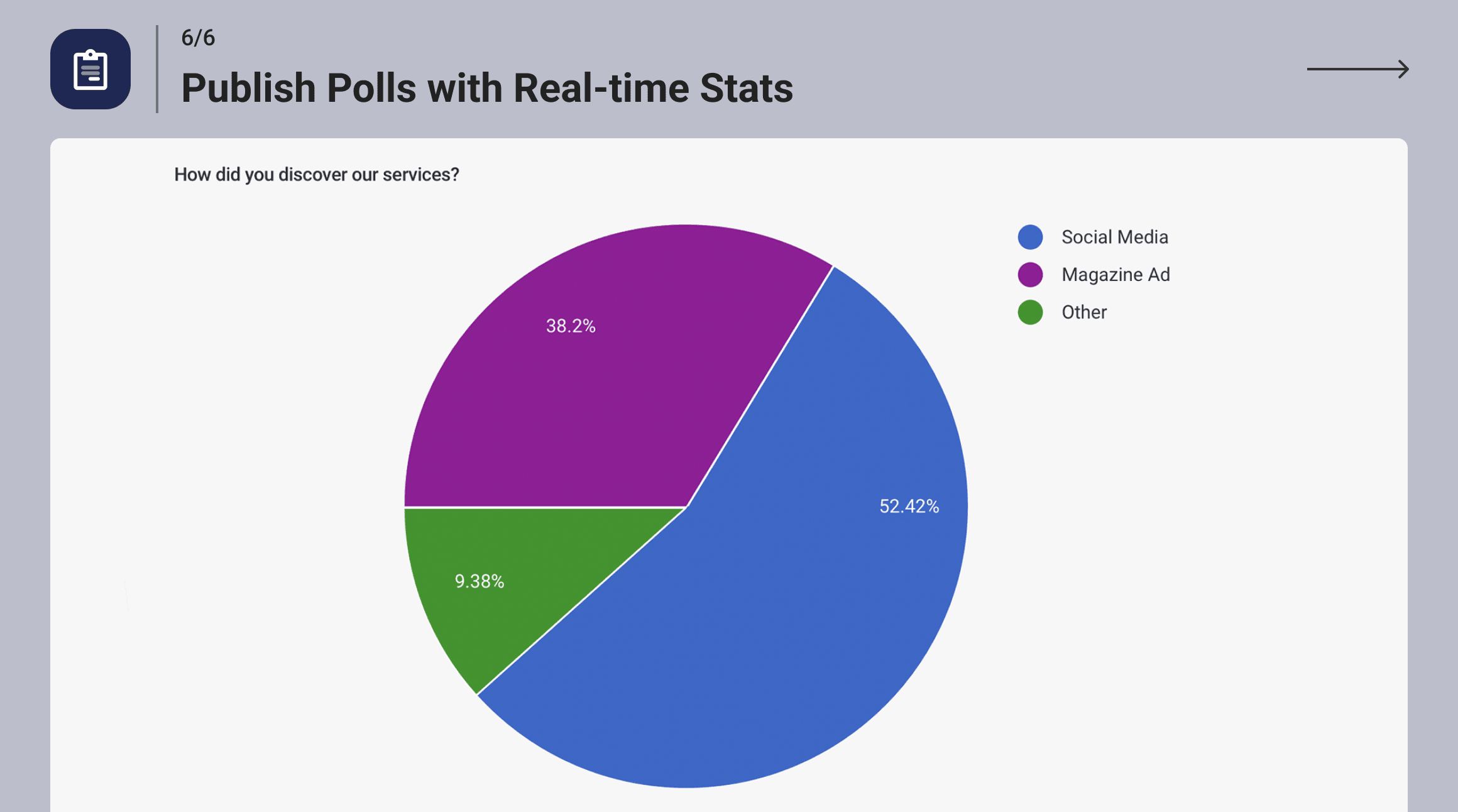
- 投票 – 互動式投票以收集訪客意見,提供豐富的動態選項與設定。
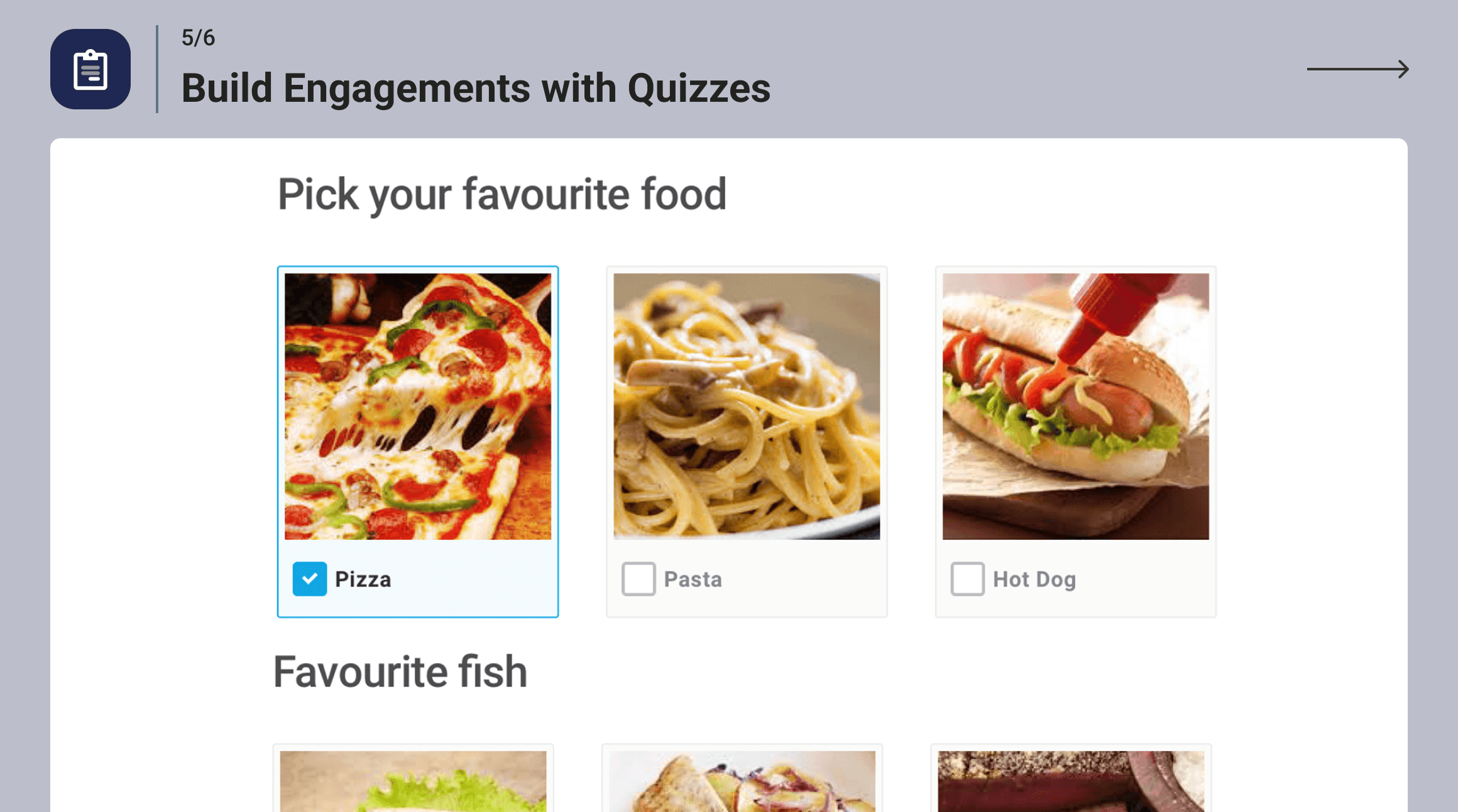
- 測驗 – 趣味性或具挑戰性的測驗,讓訪客填寫並分享至社群媒體。
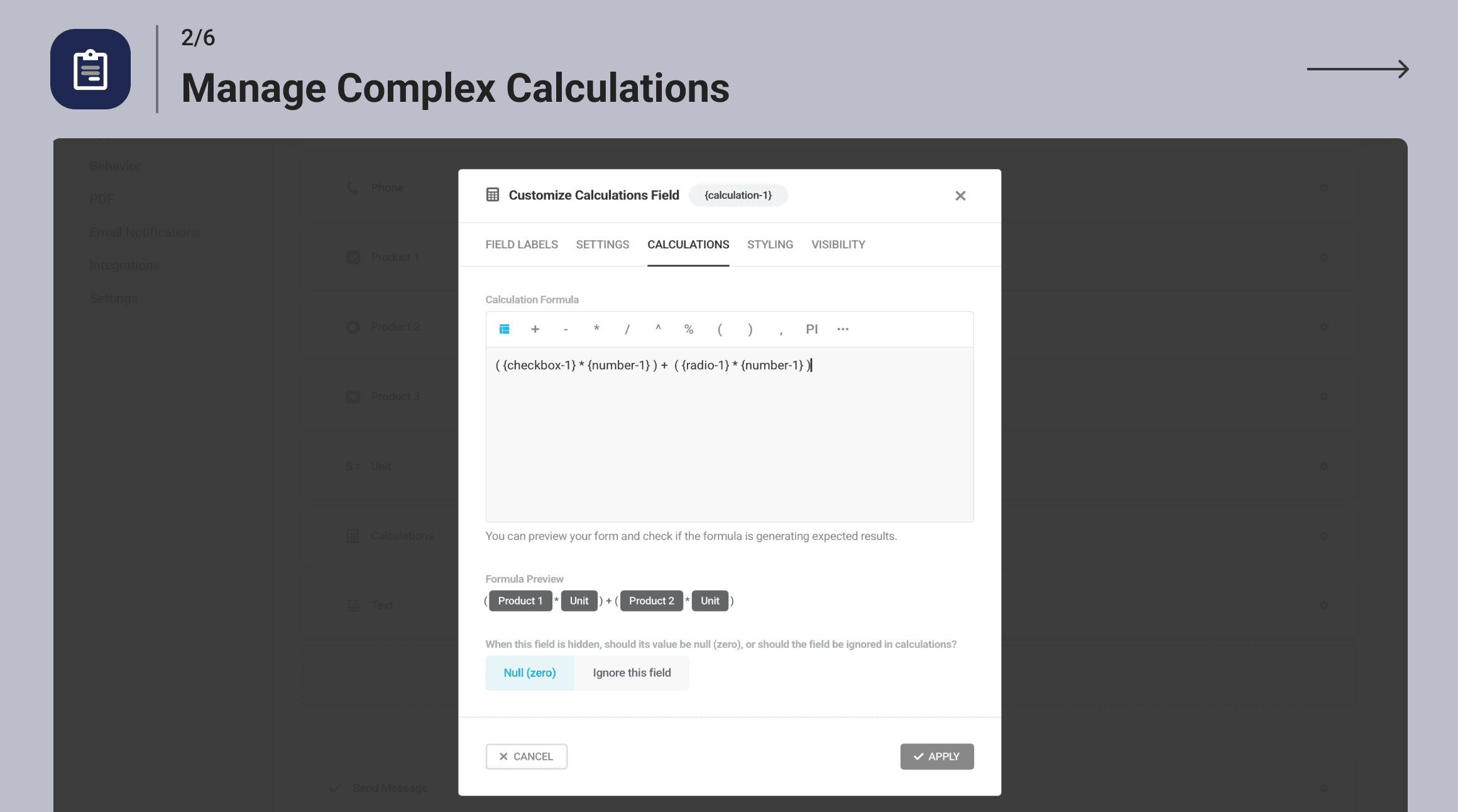
- 計算機 – 收集資訊、獲取潛在客戶名單、接收訂單並促進訪客互動。
- 金流付款 – 透過內建的 Stripe 與 PayPal 整合功能,輕鬆收取款項、贊助捐款、訂金與銷售周邊商品。
透過實用 Forminator 教學掌握各項操作技巧
- 如何使用 Forminator 建立完美的聯絡表單
- 如何使用 Forminator 免費建立簡捷的金流付款表單
- 如何發揮 Forminator 的最大效益
- 如何使用 Forminator 收集電子簽名
- 如何透過 Forminator 測驗收集電子郵件並獲取潛在客戶名單
透過 Stripe 與 PayPal 收取付款
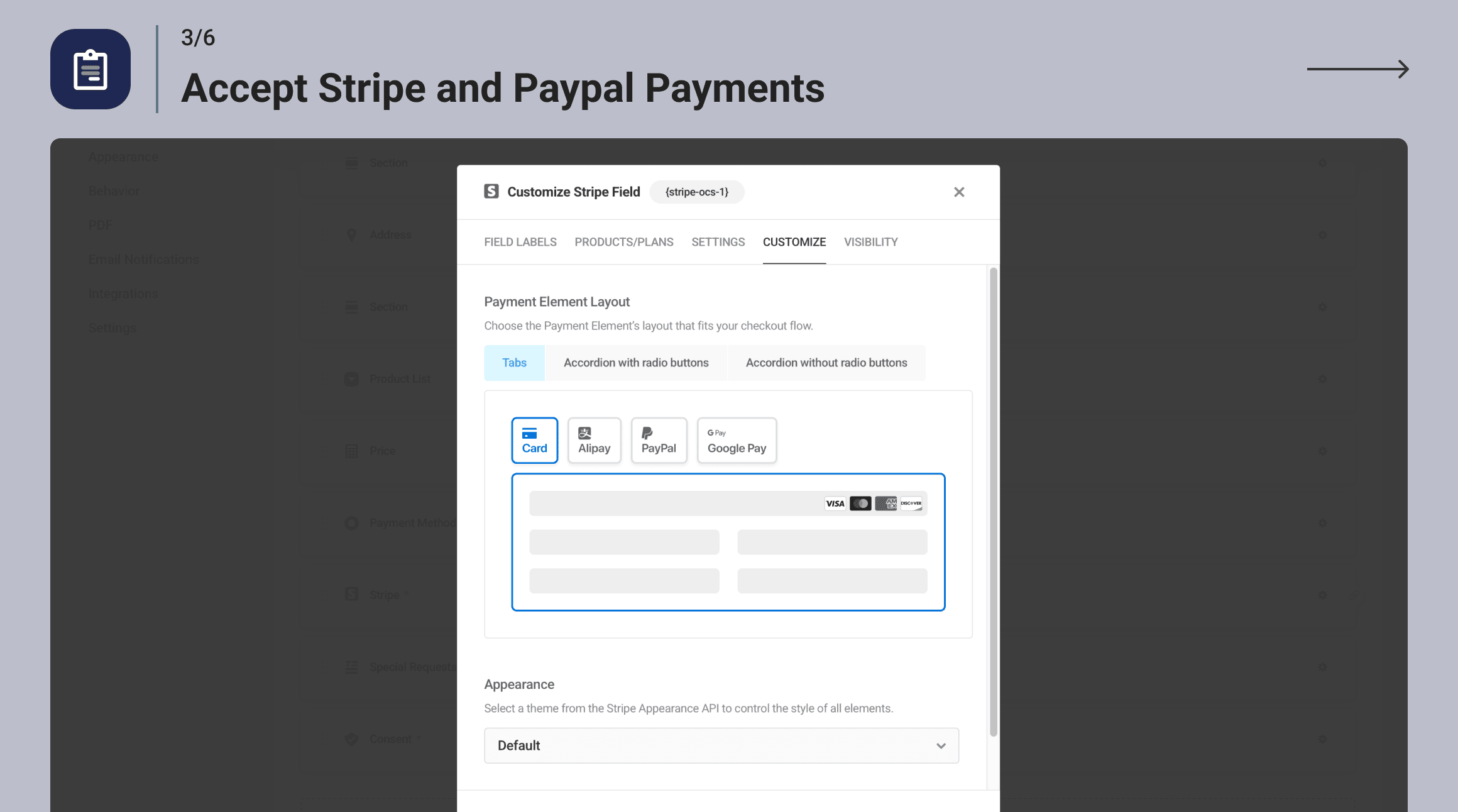
立即使用 Forminator 開始收取款項,無需升級至 Pro 版!外掛內建符合 SCA 規範的 Stripe 與 PayPal 整合。只需輸入你的公開金鑰,即可啟用 Forminator 金流付款模組,支援固定金額與變動金額付款。
Stripe 官方認證合作夥伴
Forminator 非常榮幸能夠成為 Stripe 官方認證合作夥伴。這項合作夥伴關係讓我們能藉由額外資源協助你充分發揮 Stripe 整合優勢,例如優先處理技術支援問題或申請客製化費率審核。
Stripe 動態付款
透過 Stripe 的動態支付元件(Dynamic Payment Element)提供超過 40 種付款方式,包括 Apple Pay、Google Pay、Klarna 等。輕鬆管理要向使用者開放哪些付款選項。
動態計算機:吸引潛在客戶的磁鐵
透過「計算機」功能,你可以創造數以千計的應用組合,大幅提升網站價值:
- 具備升級方案選項的會員註冊表單
- 販售 T 恤,支援尺寸、顏色、價格與稅率等多種規格變化
- 在你的健康與健身部落格中加入 BMI 或卡路里攝取計算機
- 在你的理財網站中嵌入貸款試算機
- 為助產士提供預產期推算計算機
- 即時線上報價或服務費用估算器
- 在接案公司或行銷代理商網站上加入投資報酬率(ROI)計算機
- 還有更多精彩應用,不勝枚舉……
拖放式表單區塊
Forminator 提供豐富的拖放區塊,讓表單組裝變得無比輕鬆——姓名、電子郵件、電話號碼、文字、檔案上傳、網站網址、日期、時間、數字、HTML、分頁、單選按鈕、符合 GDPR 規範的同意勾選、金流付款、計算機與隱藏欄位。
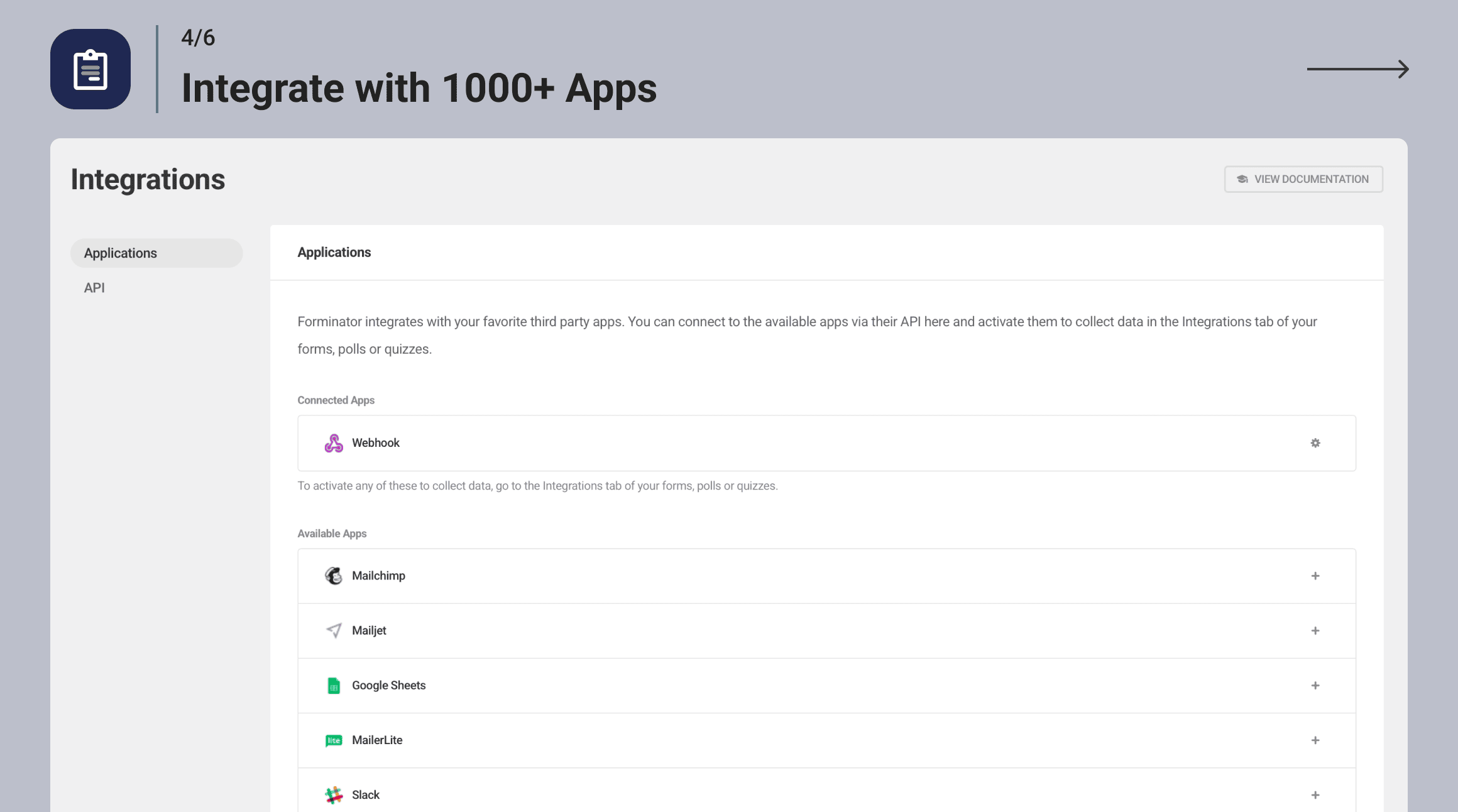
你喜愛的整合功能,已支援超過 1000 種應用程式
Forminator 內建眾多深受大家喜愛的第三方整合服務——電子郵件行銷服務、CRM、雲端儲存與專案管理工具。
- HubSpot
- Campaign Monitor
- ActiveCampaign
- Google Sheets
- Webhooks (n8n, Zapier, Make, Tray, etc)
- Trello
- MailChimp
- AWeber
- Slack
開發並銷售你自己的擴充套件
Forminator 完全免費並開放給數以百萬計的 WordPress 使用者!善用開發者 API 與外掛內建的 Action 勾點與 Filter 篩選器,打造專屬的整合功能或自訂應用程式,無論是要商業銷售或在 WordPress.org 免費分享都行。
向訪客發起投票調查
發起投票是提高訪客參與度的絕佳方式。Forminator 提供即時意見回饋,並以精美的圓餅圖與長條圖呈現即時統計資料。
打造專屬於你的 Facebook 風格測驗
誰沒在 Facebook 上做過「智商測驗」或「測測看你是哪位星際大戰角色」這類測驗?現在你可以將這些社群流量全部導進自己的網站。透過 Forminator,你可以輕鬆建立知識型測驗或趣味個性測驗(無標準答案測驗)。
透過互動測驗獲取潛在客戶名單
想讓測驗不只具備娛樂與社群互動效果嗎?Forminator 支援在測驗中整合潛在客戶收集表單,讓你輕鬆收集參加者的個人資料(例如姓名、電子郵件等)。
Gutenberg 區塊
無論你習慣使用傳統編輯器還是熱愛 Gutenberg 區塊編輯器,Forminator 都能完美滿足需求。告別繁瑣的簡碼,直接使用 Gutenberg 的 Forminator 專屬區塊快速將表單插入文章。
電子郵件轉寄路由與資料預填
大幅提升網站營運效率,從訪客填單到電子郵件回覆一氣呵成。透過查詢字串預先填入訪客資訊,並利用郵件路由、自動回覆與條件式判斷,將表單內容直接精準遞送給特定團隊處理。
前台訪客投稿文章
想要讓訪客分享文章投稿,又不想開放 WordPress 控制台權限嗎?透過 Forminator,訪客可以直接從網站前台提交文章構想,方便你策劃並發布他們的想法。支援指派預設作者、儲存為草稿、立即發布等功能。
Google reCAPTCHA
你絕對不希望收件匣被大量的垃圾表單灌爆。Forminator 免費內建 Google reCAPTCHA,能有效阻擋惡意機器人,同時免去訪客辨識難以閱讀文字的困擾。
防垃圾訊息功能
利用內建的防垃圾郵件工具(例如 reCAPTCHA、hCaptcha 與 Cloudflare Turnstile)全面保護你的表單。你還可以透過可自訂的電子郵件篩選器,允許或封鎖特定電子郵件地址、網域或頂級域名(TLD)。
雲端與預設範本
使用內建預設範本迅速展開表單製作,或透過 The Hub 同步雲端範本,在多個不同網站之間重複使用自訂表單,大幅節省時間。
資料收集、追蹤與符合 GDPR 規範
Forminator 能妥善儲存並整理各項提交內容,方便你排序、分析與管理回覆;更重要的是,能協助你輕鬆符合 GDPR 以及其他各項隱私法規的要求。
匯入既有的 Contact Form 7 資料
想將現有表單從 CF7 轉移過來嗎?Forminator 的匯入精靈讓你點擊幾下即可遷移所有或特定表單。你還可以轉移一系列 Contact Form 7 擴充套件的資料與設定。
自訂登入與會員註冊表單
為你的網站(或多站網路!)建立並嵌入自訂登入與註冊表單。讓會員表單全面升級:從豐富的表單欄位中自由挑選,並依需求自訂設定、外觀樣式與互動行為。
多檔案上傳欄位
除了支援單一檔案上傳外,Forminator 更進一步允許使用者一次上傳多個檔案。你還可以指定允許的檔案類型、限制可上傳的檔案數量以及個別檔案大小上限。上傳欄位直覺的拖放介面,更能讓使用者輕鬆完成檔案上傳。
分組並重複表單欄位
「欄位群組」功能讓你在單一表單中將任意數量的欄位組合在一起。你也可以讓使用者在填寫表單時,依需求自由新增多組相同的欄位群組。非常適合用於工作經歷、活動參加人員名單、各類清單等需要重複輸入資料的情境。
進階日期欄位限制
預約諮詢與飯店訂房的完美利器——Forminator 的「日期選擇器限制」功能,讓你自由限制日期欄位日曆上可選取的日期。例如只顯示未來日期、從今天起算特定天數內的日期、特定日期區間,或是指定的每週星期幾!
新增電子簽名表單欄位(僅限 Pro 版)*
網站上有需要簽名的線上申請表,或是需要客戶簽署的合約嗎?Forminator 的電子簽名功能讓訪客在提交表單時,可以直接使用滑鼠、觸控板或手指(在觸控裝置上)留下簽名。只需插入「電子簽名」欄位,立即搞定!
在 Stripe 上收取訂閱與定期定額款項(僅限 Pro 版)*
使用 Forminator Pro 的 Stripe 訂閱附加元件建立全自訂的訂閱表單。讓客戶自由選擇方案/價格、收費週期、自訂加購升級項目、免費試用選項,當然還能進行安全的信用卡線上付款。Forminator 能立即自動將所有訂閱表單資料同步至你的 Stripe 帳戶,為你節省寶貴時間。
*備註:這些功能僅隨 Forminator Pro 提供。立即加入 WPMU DEV 會員,即可暢享 Forminator Pro,以及我們所有的其他進階外掛、代管型 WP 主機、網站管理平台 The Hub 和 24/7 全天候專家支援服務。
大家對 Forminator 的評價如何?
★★★★★
太神奇的外掛了,唯有想像力才能限制它的用途!完全免費就提供收取付款、行事曆等豐富功能。真不敢相信我想要的所有功能都在這裡,它激發了無限創意,讓架構網站變得充滿樂趣。– araca
★★★★★
這款外掛擁有精心設計、體驗極佳的使用者介面,而且提供了我尋找的所有功能(我幾乎試過市面上所有主要的競爭對手產品)。– tvsmvp
★★★★★
這是目前為止最好用的免費表單編輯器!我研究過很多款,但這款實在太容易上手了……試試看吧,我相信你一定會愛上它!– johncarteroz
★★★★★
介面設計精美、操作超級簡單、功能強大。我平時很少寫評論,但我實在太喜歡這款外掛了,這次一定要大力推薦!– istavridi
私心推薦其他優質外掛
喜歡 Forminator 嗎?WPMU DEV 還有一系列超棒的免費外掛,非常推薦你下載試用。
- Smush – 圖片壓縮與最佳化
- Hummingbird – 網頁載入速度最佳化
- Hustle – 彈出式視窗、滑入式區塊與電子郵件訂閱引導
- SmartCrawl – SEO 最佳化工具
- Defender – 安全防護、監控與防駭客入侵
關於我們
WPMU DEV 是頂級 WordPress 外掛、雲端服務與專業技術支援的領導品牌。歡迎在此加入:
https://wpmudev.com/
別忘了隨時關注全網第一的 WordPress 專業資源,掌握最新動態:
WPMU DEV 部落格
對了,還有一件事……我們衷心希望你像我們熱愛開發它們一樣,享受我們精心打造的免費外掛!
聯絡方式與致謝
螢幕擷圖
常見問題集
為什麼選擇 Forminator 而不是 WPForms?
相較於 WPForms,Forminator 提供了更豐富的功能與特性,特別是在免費版本中。WPForms Lite 對核心重要工具設定了諸多限制,而 Forminator 則免費提供超過 20 種表單欄位、條件邏輯與全方位垃圾訊息防護機制。
此外,Forminator 同時提供 Stripe 與 PayPal 金流整合,而 WPForms Lite 僅支援 Stripe。Forminator 還支援更廣泛的第三方整合、測驗與投票工具、進階自訂與外觀樣式選項,以及強大的提交內容管理功能——這些功能在 WPForms 中往往必須購買 Pro 版才能享有。
Forminator 是否包含 Gutenberg 區塊?
當然有。Forminator 同時支援 Gutenberg 與 ClassicPress 編輯器。
Forminator 是否符合 GDPR 規範?
Forminator 讓你能夠輕鬆符合 GDPR 與其他在地隱私法規要求……外掛已內建所有必備工具,但最終仍需要你在網站上落實健全的隱私與資料保護機制。大家一起把關隱私安全。
我可以使用 Forminator 收取付款嗎?
沒錯!Forminator 免費內建 Stripe 與 PayPal 整合。Stripe 動態支付元件支援 40 多種選項——包含 Apple Pay、Google Pay、Amazon Pay 與 Klarna。
Forminator 金流選項是否符合 SCA 規範?
沒錯!Forminator 本身不直接經手交易金流處理。我們與 Stripe 和 PayPal 密切合作,確保內建整合功能完全遵循歐盟「強力客戶驗證」(SCA / PSD2)法規規範。
Forminator 可以協助防範垃圾表單提交嗎?
Forminator 內建多種防垃圾訊息工具,包括支援多家廠商的驗證碼(Captcha)整合、蜜罐欄位(Honeypot)、電子郵件篩選器,以及對 Akismet 等第三方服務的支援。
如何使用 Forminator 在 WordPress 中建立聯絡表單?
我們在部落格上彙整了 Forminator 聯絡表單的簡易指南。你可以在此閱讀完整教學文章
我想針對 Forminator 進行開發!可以在哪裡找到 API 文件?
歡迎查閱我們的 API 說明文件以瞭解所有詳細資訊:請點擊這裡
可以在哪裡取得 Forminator 說明文件?
如何回報安全漏洞或軟體錯誤?
我們極度重視外掛的安全性;如果你發現錯誤或安全性弱點需要回報,可以透過 Patchstack 弱點揭露計畫提出。流程快速又簡便,問題修復完成後你也會收到通知。回報安全漏洞。
使用者評論


參與者及開發者
以下人員參與了開源軟體〈Forminator Forms – 聯絡表單、金流付款表單與自訂表單編輯器〉的開發相關工作。
參與者
變更記錄
1.58.4 ( 2026-10-29 )
- Fix: Post Data featured images are now rejected when the file contents do not match an allowed image type
- Fix: Browser cookie for poll vote limits now lasts for the configured time when the site timezone is not UTC
- Fix: HubSpot tickets now receive the quiz name when the Quiz Name variable is used
- Fix: The {quiz_answer} tag now includes the quiz answers in notification emails for quizzes with a lead form
- Fix: Mapping a date field to a Trello due date no longer causes a fatal error on submission
- Fix: Subsite administrators no longer see a blank page when connecting the site from the Templates page
- Fix: Disconnecting PayPal no longer logs a console error when a form has a PayPal field
- Fix: Security hardening (props: Charles Vosburgh, Naoki Kawahigashi)
1.58.3 ( 2026-10-21 )
- Enhancement: Checkbox and Multi-select fields can now limit how many options a visitor may select
- Enhancement: Generated PDF files can now be password protected with a fixed password or a value from the submission
- Enhancement: Spam submissions can be reviewed with the Spam status filter
- Enhancement: Slack channel lists now include channels beyond the first page
- Enhancement: Added Ghana Cedi (GHS) to the currency list
- Enhancement: Currency symbols now appear in the currency field dropdown
- Enhancement: The dashboard summary and recent modules now load in the background
- Enhancement: Export and report background jobs are scheduled only when those features are in use
- Enhancement: Added
forminator_trigger_integrations_on_payment_in_processandforminator_trigger_integrations_again_on_payment_successfilters so integrations can run while a delayed Stripe payment is still processing - Fix: Apple Pay now opens its payment sheet when the form Submit button is tapped
- Fix: Forms with both Stripe and PayPal no longer show two Save as Draft buttons
- Fix: Resent notification emails now include repeater field values
- Fix: The Other option is no longer written twice in a Google Sheets cell
- Fix: A hidden field set to the submission ID now sends that ID to Google Sheets
- Fix: Stripe redirect payment methods, such as Amazon Pay, no longer replace the success message with Invalid CAPTCHA when Cloudflare Turnstile is enabled
- Fix: A required Slider field that is left empty now shows the required message instead of a minimum or maximum error
- Fix: Consent text is no longer pushed to the edge of the form
- Fix: ActiveCampaign no longer stops the submission when a checkbox field is mapped
- Fix: The dashboard no longer runs out of memory when the entry table is large
- Fix: The Geolocation reports widget no longer keeps the no-location message when the selected range has submissions
- Fix: The File Upload “No file chosen” text no longer gets cut off on small screens
- Fix: File Upload fields no longer raise a PHP warning when Akismet checks the submission
- Fix: Security hardening
1.58.2 ( 2026-10-12 )
- Fix: Quiz lead forms now submit correctly inside Elementor popups
- Fix: Site Name and Site Title mappings on User Registration now only allow compatible field types
- Fix: Multiple forms on the same page with PayPal fields and different currencies now each use their own currency
- Fix: Cloudflare Turnstile now scales when the form column is narrower than the widget minimum
- Fix: User Registration with Email Activation on Multisite site-only networks no longer sends an account-ready email before activation
- Fix: Security hardening
1.58.1 ( 2026-10-06 )
- Enhancement: Password and Confirm Password field descriptions now render Markdown bold
- Fix: Stripe subscription quantity no longer accepts 0 or negative values
- Fix: Large Number and Currency values that use a thousand separator now match on the Submissions page
- Fix: File upload fields now explain when a file exceeds the server upload limit
- Fix: Quiz answers are now saved when a Stripe payment redirects and the lead form is placed before the results
- Fix: A Stripe field hidden by visibility conditions no longer replaces the success message with a payment amount error
- Fix: Radio and Checkbox options with an empty value are no longer shown, so selecting them no longer fails validation
- Fix: HTML in Radio, Select, and Checkbox options is now sanitized consistently
- Fix: HTML in Radio, Checkbox, and Select option labels is now stripped on the Calculations tab
- Fix: Email allow and deny lists now match addresses regardless of letter case
- Fix: HTML field content now resets after a successful submission
- Fix: Polls using AJAX with multiple votes no longer get stuck on Back to Poll
- Fix: Poll View Results and Back to Poll now work when permalinks are set to Plain
- Fix: The Phone field no longer loads its scripts and styles twice on AJAX forms
- Fix: The Forms, Polls, and Quizzes lists no longer show an extra empty last page
- Fix: Selecting a date range on the Reports dashboard no longer logs a JavaScript error
- Fix: Bulk actions after a search on forms, polls, or quizzes no longer log a JavaScript error
- Fix: Calculation field settings no longer log a React unique key warning
- Fix: Security hardening
1.58.0 ( 2026-09-30 )
- New: Support for asynchronous and delayed Stripe payments, such as bank transfers, SEPA, and ACH Direct Debit
- Enhancement: Stripe webhook endpoints are created when an account is connected and removed on disconnect
- Enhancement: Pending and failed payment submissions are labeled on the Submissions page and can be filtered
- Enhancement: Stripe.js now loads before other plugins that enqueue it globally, so the payment field still initializes
- Enhancement: Clearer logging when a PayPal payment capture or order validation fails
- Enhancement: Upload webhook payloads now include the media post ID
- Enhancement: Added forminator_capability_definitions, forminator_permission_cap_map, and forminator_permission_cap filters for customizing permissions
- Enhancement: Removed deprecated hooks, functions, and methods
- Fix: PayPal forms now work when the same form is used more than once on a page, including in the block editor
- Fix: Required Signature fields are now validated on submit when inline validation is disabled
- Fix: Forms and Signature fields now work inside Divi Toggle modules
- Fix: Single-vote polls no longer accept a second vote, and multiple-vote polls can be voted on again after results are shown
- Fix: Poll browser cookies now expire correctly when multiple votes are allowed
- Fix: Mailchimp GDPR consent now renders on the form and blocks submission until it is accepted
- Fix: The {all_fields} macro inside an HTML field no longer breaks form submission
- Fix: Saved draft data is no longer cleared when a submission returns an error
- Fix: Rich Text fields inside repeated Field Group items now initialize as editors
- Fix: Phone field placeholder now updates after the country is changed
- Fix: Datepicker language is no longer dropped when another script shares the same handle
- Fix: Modern multi-select fields now reset to default value after submit
- Fix: Encoded characters in form names are now decoded in email subjects
- Fix: Trello can now be disconnected when the connected app or token is missing
- Fix: Captcha in the block editor preview now shows a placeholder instead of the live widget
- Fix: The shortcode generator now opens in ACF WYSIWYG editors
- Fix: The submit button no longer disappears on paginated forms that use a consent field with both Stripe and PayPal
- Fix: Stripe payment methods using the accordion with radio layout now show the radio options
- Fix: Previewing a form in the builder no longer raises PHP deprecated warnings
- Fix: Security hardening
1.57.3.1 ( 2026-09-30 )
- Fix: Security improvements
1.57.3 ( 2026-09-17 )
- Enhancement: Support Stripe Adaptive Pricing for dynamic payment amounts
- Enhancement: Support payment descriptions for PayPal
- Enhancement: Add a filter to customize the CSS class of the
forminator-rowsection - Fix: Prevent leading apostrophes from being added to string cells in Google Sheets
- Fix: Prevent the deactivation survey modal from stacking on the Plugins page
Full changelog can be found here – Forminator changelog.