
外掛說明
FluentAuth 是 WordPress 的登入安全性外掛程式。它會保護使用者登入網站的方式,並在網站上有任何變更時通知您。
您會取得雙因素身分驗證、通行密鑰、社群登入、魔法登入連結、登入嘗試次數限制、IP 存取規則、安全性檢查清單、檔案變更掃描與完整的稽核記錄。全部集中在一個外掛程式中,不臃腫,也不會拖慢速度。
重點功能
- 雙因素身分驗證(電子郵件、驗證器應用程式與通行密鑰)
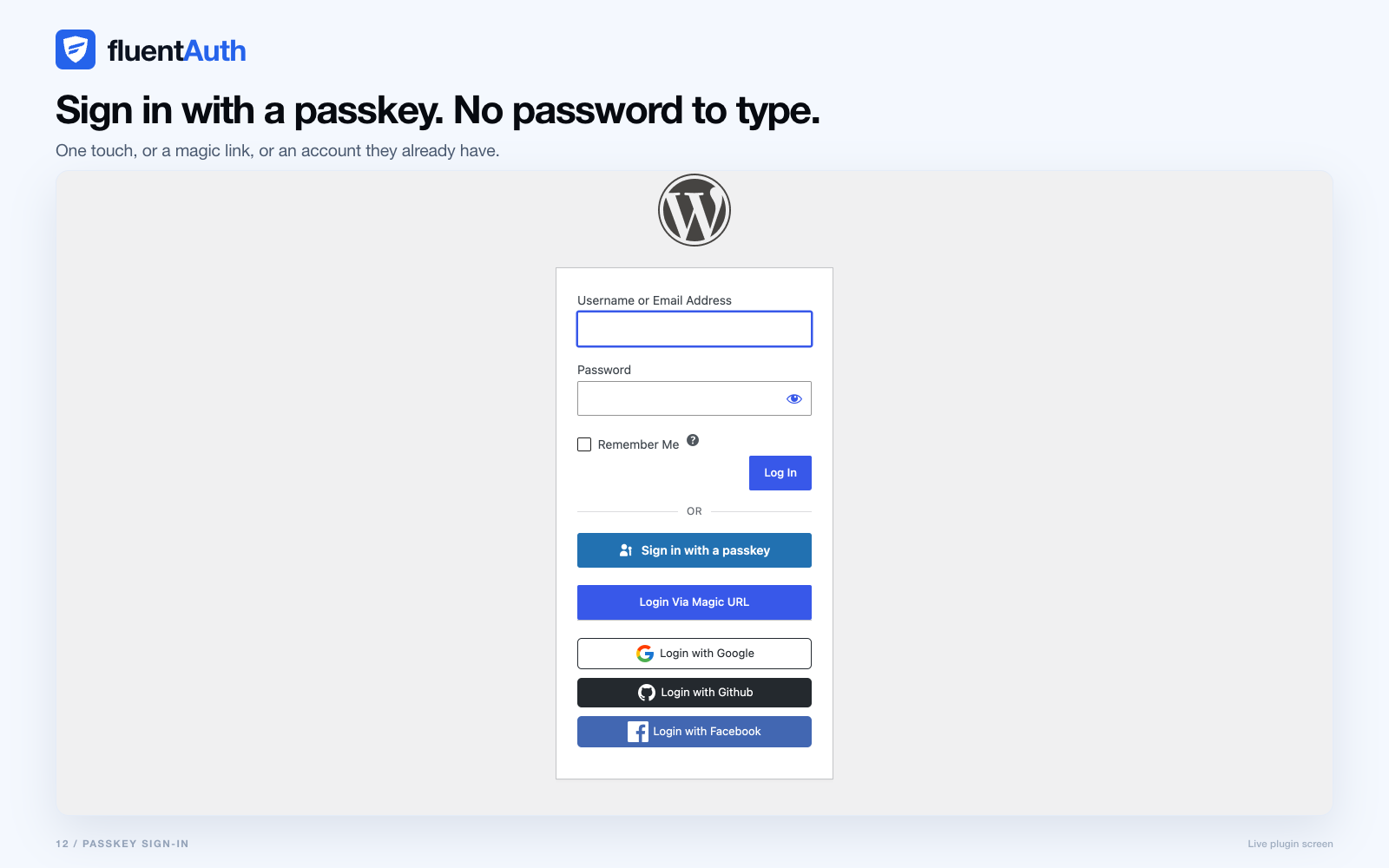
- 使用 Touch ID、Windows Hello、安全性金鑰或密碼管理程式進行通行密鑰登入
- 使用 Google、GitHub 與 Facebook 進行社群登入
- Google One Tap 登入
- 透過電子郵件傳送魔法登入連結,無需密碼
- 限制登入嘗試次數並封鎖暴力破解攻擊
- IP 允許清單與 IP 封鎖清單
- 為註冊、登入及 WooCommerce 帳號表單提供 Cloudflare Turnstile 機器人防護
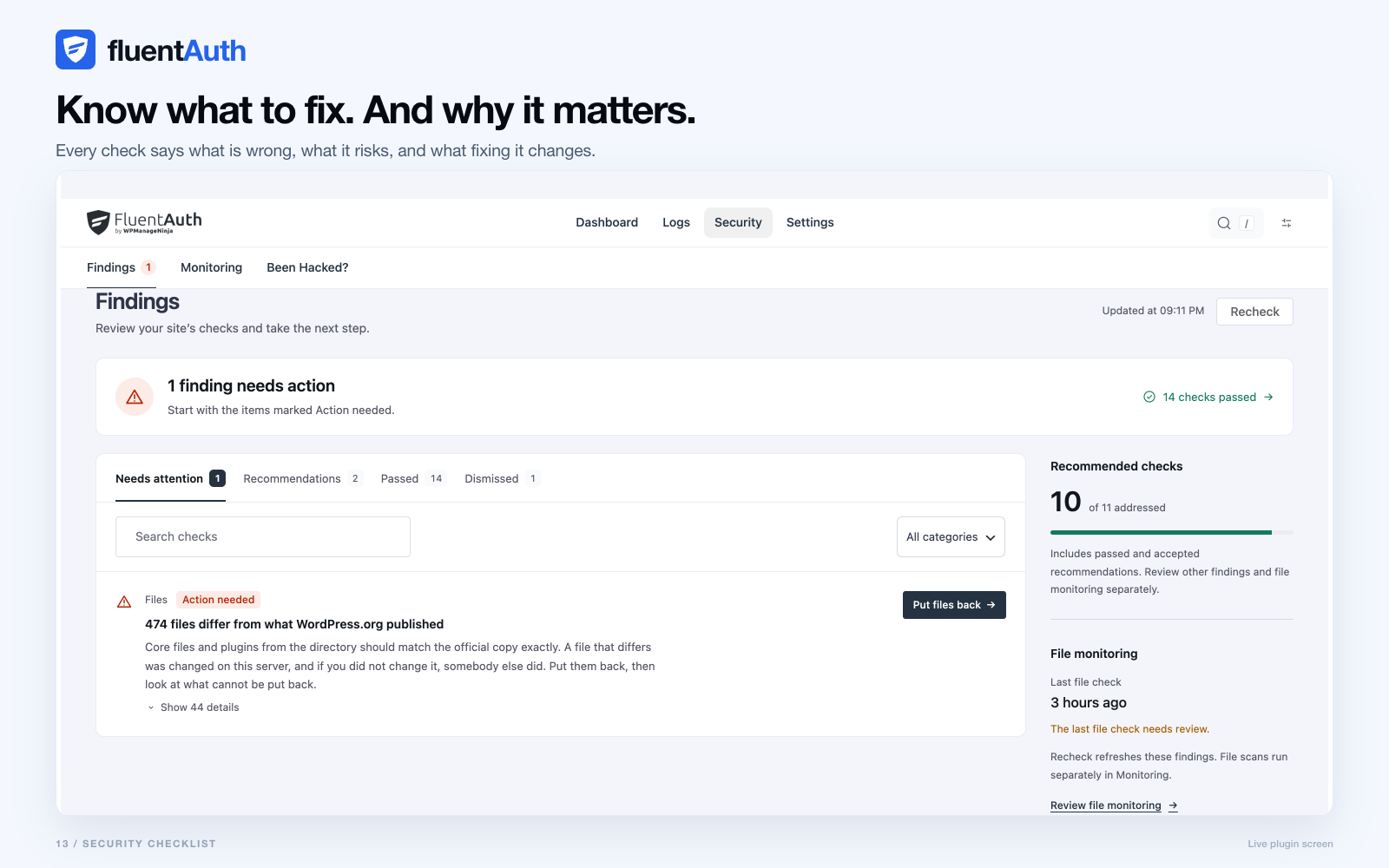
- 可找出並修正問題的安全性檢查清單
- WordPress 核心、外掛程式與佈景主題檔案變更掃描
- 每次登入、失敗嘗試與外掛變更的稽核記錄
- 登入與登出重新導向
- 登入與註冊頁面自訂工具
- 自訂 WordPress 系統電子郵件
- 依使用者角色限制 /wp-admin 存取權
- 遭到駭客入侵網站的復原工具
雙因素身分驗證 (2FA)
在密碼之後要求進行第二步驟。有三種方式可選,你可以選擇哪些角色能使用每種方式。
- 電子郵件驗證碼。 傳送至使用者信箱的一次性驗證碼。不需要安裝任何軟體。
- 驗證器應用程式。 Google Authenticator、Authy、1Password 或其他任何 TOTP 應用程式。FluentAuth 會在您自己的伺服器上產生 QR 碼,因此這個驗證器秘密值永遠不會離開您的網站。
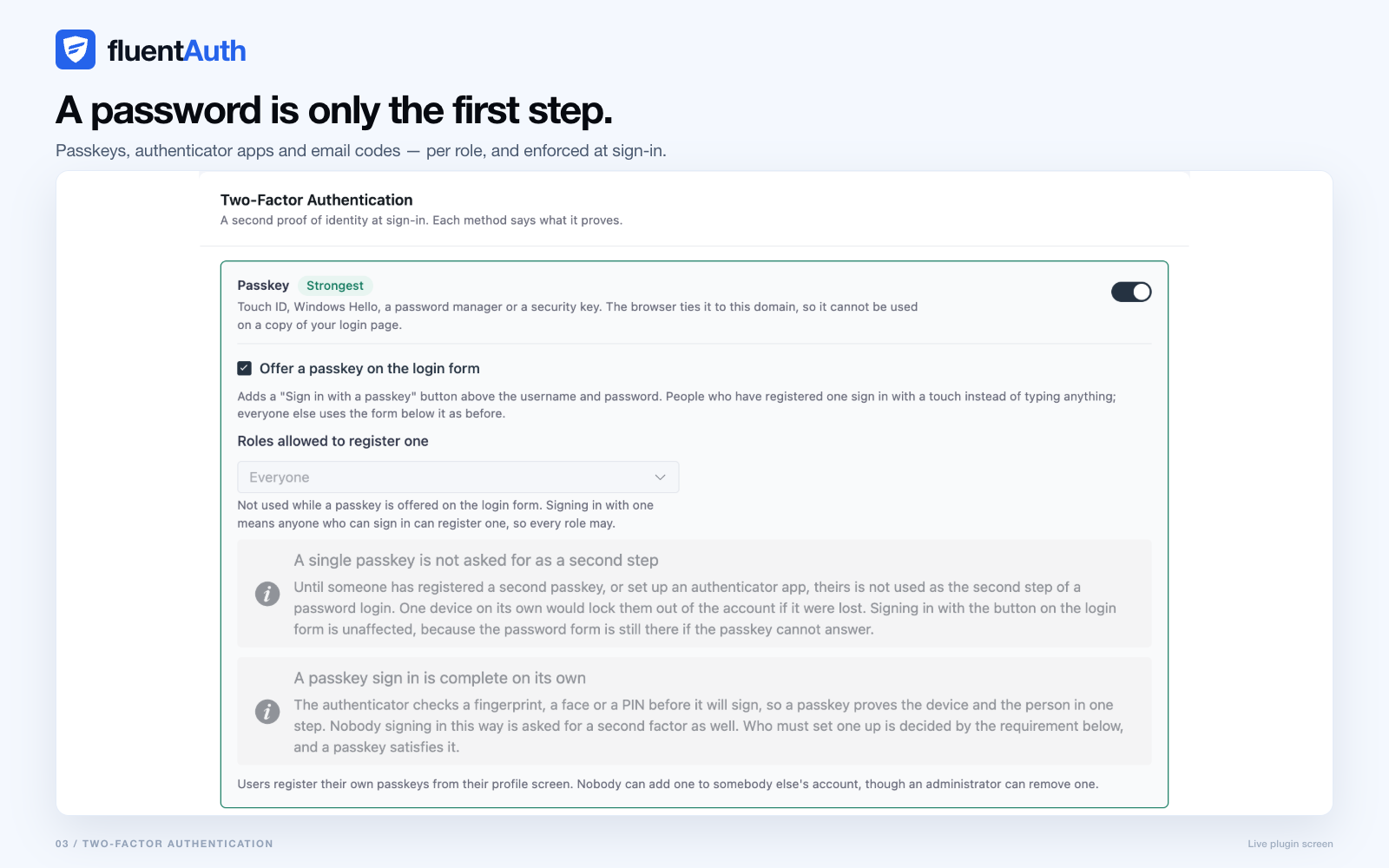
- 通行密鑰。 Touch ID、Face ID、Windows Hello、硬體安全性金鑰或密碼管理程式。瀏覽器會將通行密鑰繫結至你的網域,因此無法在仿冒的登入頁面上使用。
您可以讓某個角色設定第二因素驗證,或強制該角色使用第二因素驗證,並選擇強制使用的驗證方式:僅限裝置驗證因素(也就是通行密鑰或驗證器應用程式),或三種方式皆可。任何必須使用第二因素驗證的使用者,都要在登入時、建立工作階段之前完成設定,因此無法繞過這項要求。
驗證器應用程式也會提供十組一次性復原碼,通行密鑰使用者也可以在需要時改用這些復原碼。每個人都能從自己的 WordPress 個人資料畫面管理第二因素驗證;管理員畫面會列出已完成註冊的使用者、每個人註冊的驗證方式,並讓您重設任何遭鎖定使用者的第二因素驗證。
您可以使用存放在 wp-config.php 中的金鑰,將資料庫中的驗證器秘密值加密,如此一來,攻擊者即使讀取資料庫也一無所獲。
通行密鑰登入
通行密鑰是這裡最強的選項。認證資料儲存在裝置上,並由瀏覽器繫結至您的網域,因此網路釣魚無法對其奏效:複製的登入頁面使用不同網域,通行密鑰不會回應。
它們可以作為密碼之後的第二步驟,也可以單獨作為登入方式——啟用通行密鑰登入後,登入表單會提供按鈕,讓使用者完全不使用密碼即可登入。這不涉及第三方服務:所有功能都在你的網站上執行。
社群登入與註冊
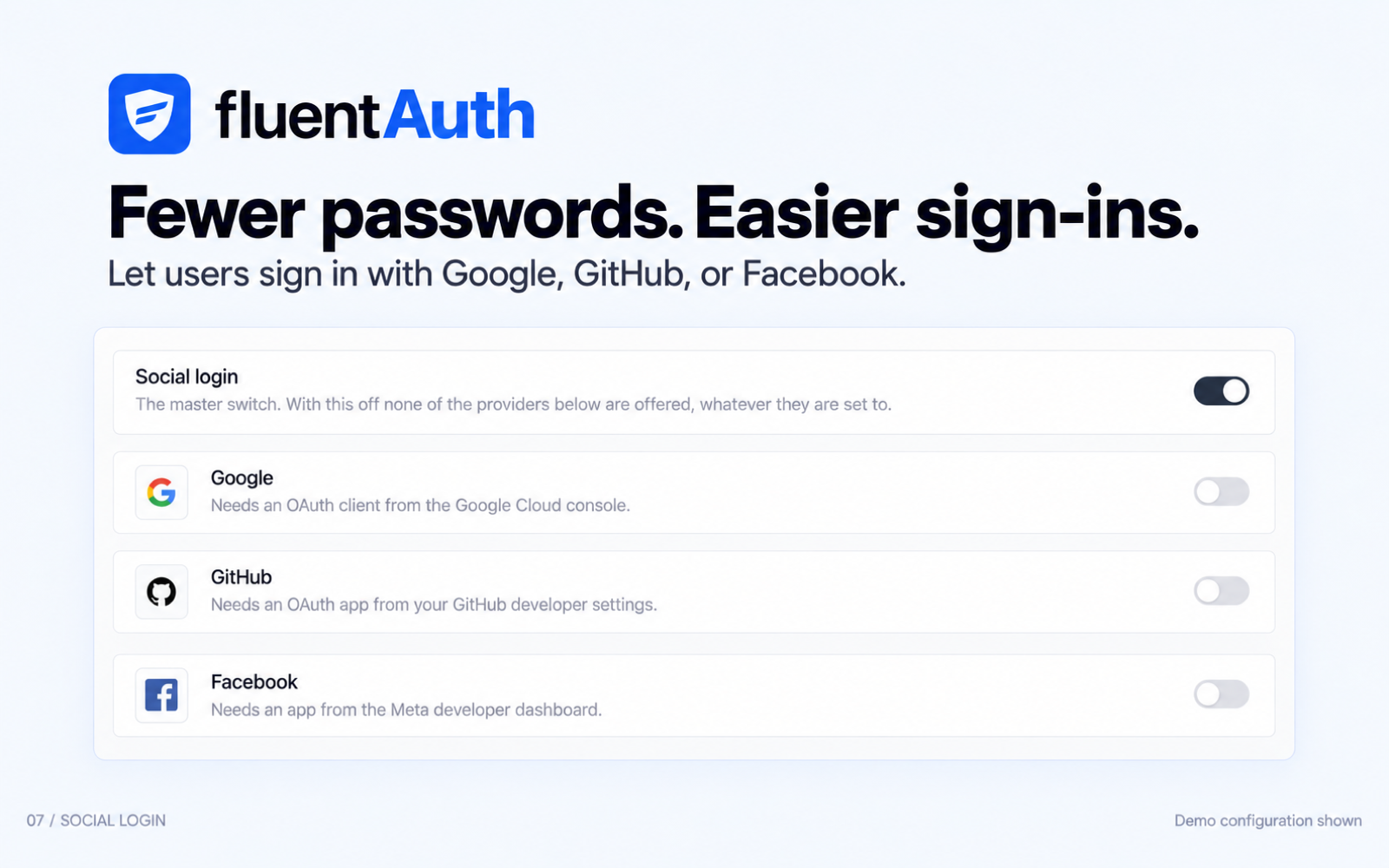
讓使用者使用現有帳號登入。
- 使用 Google 登入
- 使用 GitHub 登入
- 使用 Facebook 登入
- Google One Tap 登入
開啟您需要的提供者,貼上金鑰,按鈕就會出現在登入與註冊表單上。網站關閉註冊時,您也可以停止社群註冊。
透過電子郵件進行 Magic Login
使用者輸入電子郵件地址後,就會取得一次性登入連結。不必記住密碼,也不必經歷重設流程。您可以將它設為使用者登入的主要方式,也可以保留為額外選項。連結會經過雜湊處理、設定有效期限、受速率限制,而且只能使用一次;要求取得連結時,絕不會透露該地址是否在您的網站上擁有帳號。
限制登入次數
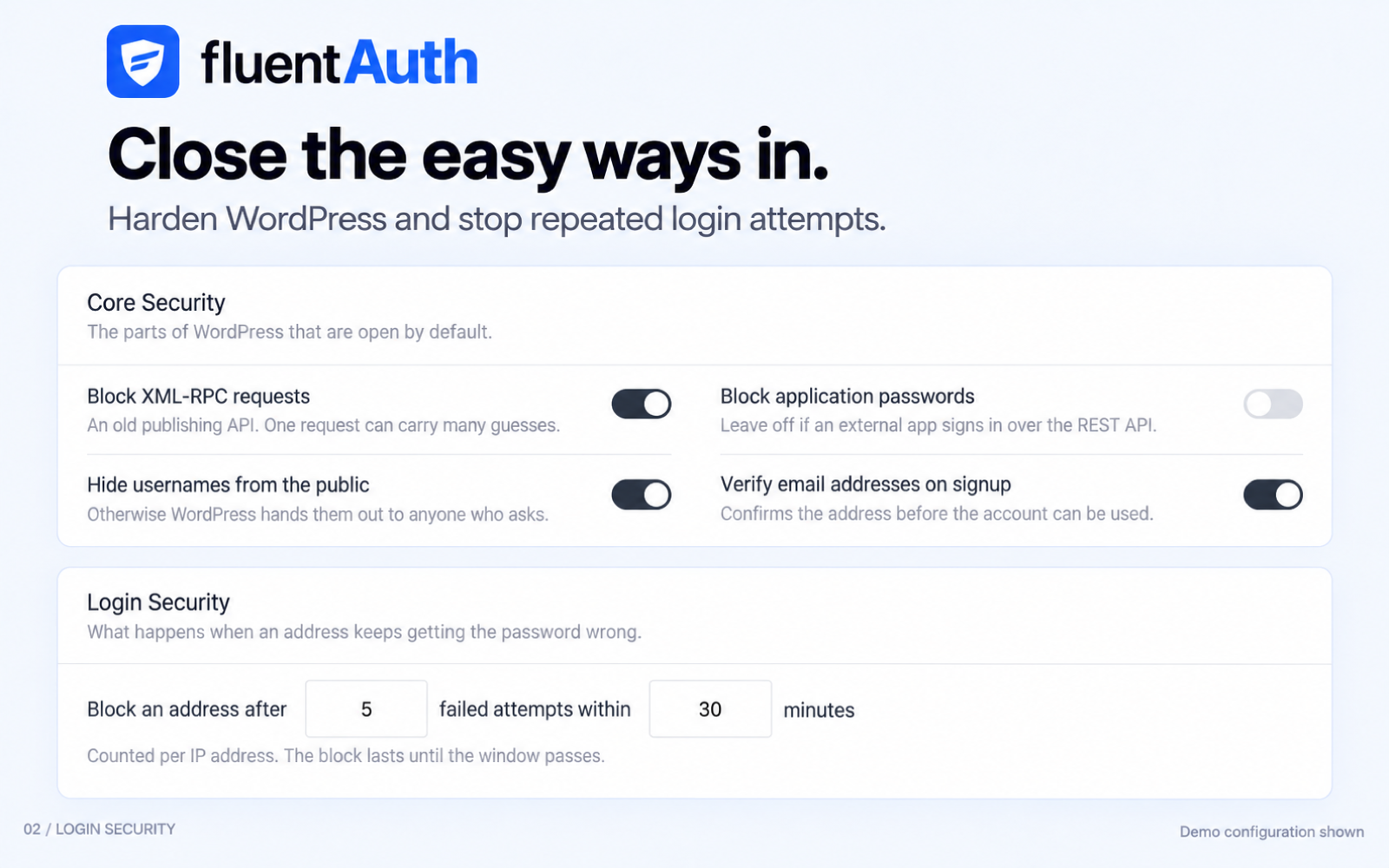
透過計算失敗的登入次數來封鎖暴力破解攻擊。設定允許的嘗試次數,以及要在幾分鐘內統計這些嘗試,FluentAuth 就會暫時封鎖該位址。每次遭到封鎖的嘗試都會記入稽核記錄,發生這種情況時,也可以透過電子郵件通知你。
IP 允許清單與封鎖清單
兩份簡單的清單,每行一個位址或範圍。封鎖清單會直接拒絕來自這些位址的登入。允許清單會略過你信任之位址(例如辦公室位址)的嘗試次數限制。
你也可以要求某個角色只能從允許清單中的位址登入。FluentAuth 會偵測反向 Proxy 與 Cloudflare,因此它據以判斷的位址是訪客的真實位址,而不是你的 Proxy。
使用 Cloudflare Turnstile 防護機器人
在網站寄出電子郵件前,先阻止垃圾註冊。為註冊表單、登入與重設密碼表單,或 WooCommerce 的「我的帳號」表單啟用 Cloudflare Turnstile。每個項目都有各自的開關。若 Fluent Forms 或 FluentCart 已有 Turnstile 金鑰,只要按一下即可沿用。結帳流程不會變更。若搬移網站後無法登入,可在 wp-config.php 加入 define('FLUENT_AUTH_DISABLE_TURNSTILE', true); 將其關閉。
安全性檢查清單
FluentAuth 會檢查你的網站,並列出一份簡短的待檢視項目清單。每個項目都會說明問題、為何重要,以及修正後的結果,而且大多數項目都有可代你修正的按鈕。不適用的項目可以先略過,之後也能取消略過。它會檢查以下項目:
- HTTPS,以及顯示給訪客的 PHP 錯誤訊息
- 從控制台編輯佈景主題與外掛檔案
- wp-config.php 中的安全性常數
- 放在公開資料夾中的舊備份檔案
- uploads 資料夾內的 PHP 執行功能
- 新出現或已變更的 Drop-in 或 mu-plugin 檔案
- 使用者名稱容易猜測或已閒置的管理員帳號
- 未顯示在使用者畫面上的使用者帳號
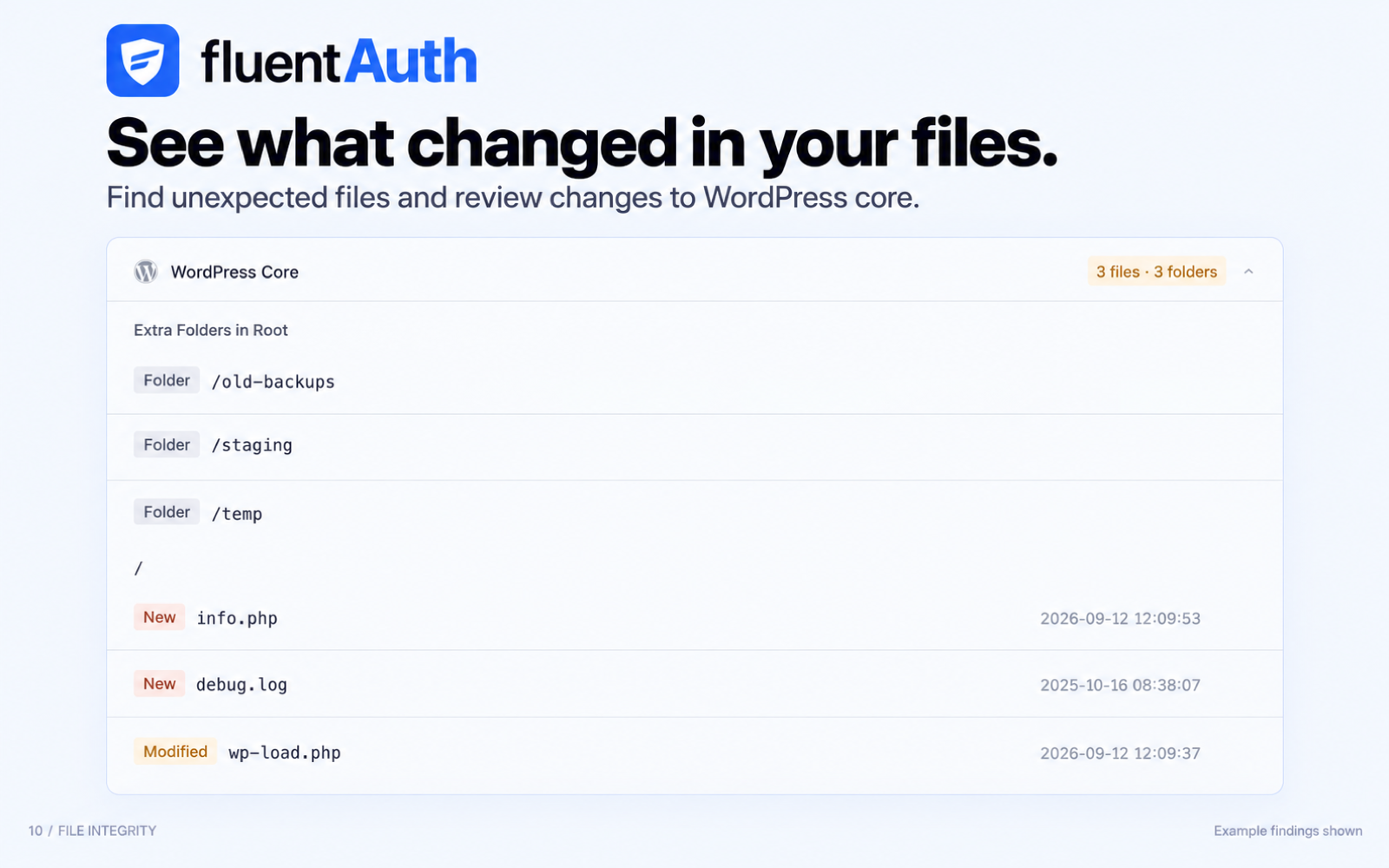
檔案變更掃描
FluentAuth 會將您的檔案與 WordPress.org 發布的官方副本進行比較。
- WordPress 核心檔案,與你所使用版本的官方檢查碼進行比對。
- WordPress.org 目錄中的外掛,與你已安裝版本的檢查碼進行比對。
- WordPress.org 目錄中的佈景主題會與官方佈景主題套件進行比對,因為佈景主題沒有公開的檢查碼。這需要 ZipArchive PHP 擴充功能,而大多數主機都已具備此擴充功能。
- 其他方式無法驗證的檔案,例如自訂佈景主題或付費外掛程式,會記錄在快照中,檔案變更時就會通知您。
檔案變更時,您可以查看與原始檔案並排顯示的差異內容、一鍵還原原始檔案,或刪除不應存在的檔案。您也可以標記使用從未發布版本的外掛程式或佈景主題,這通常表示檔案遭到替換。
活動與稽核記錄
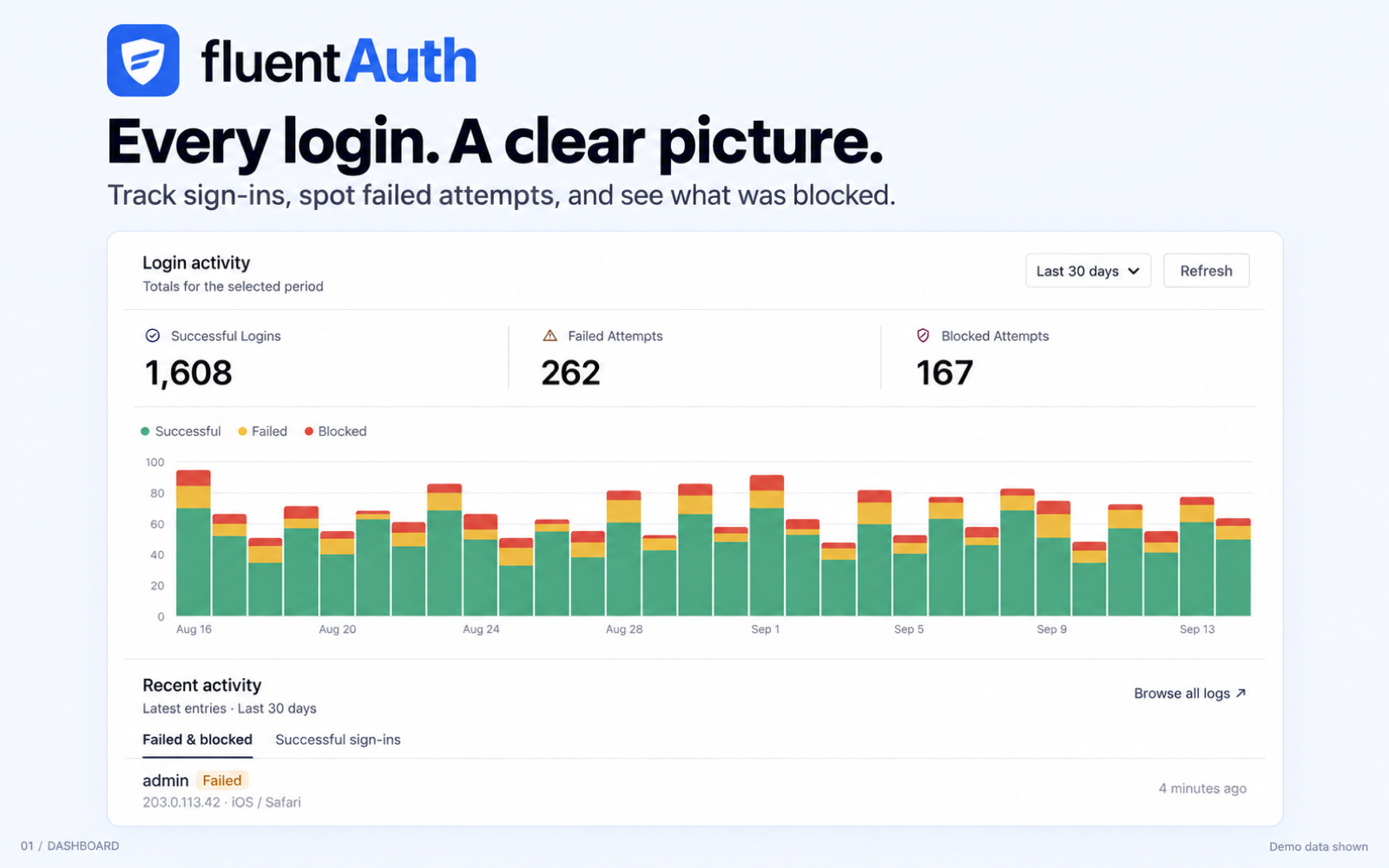
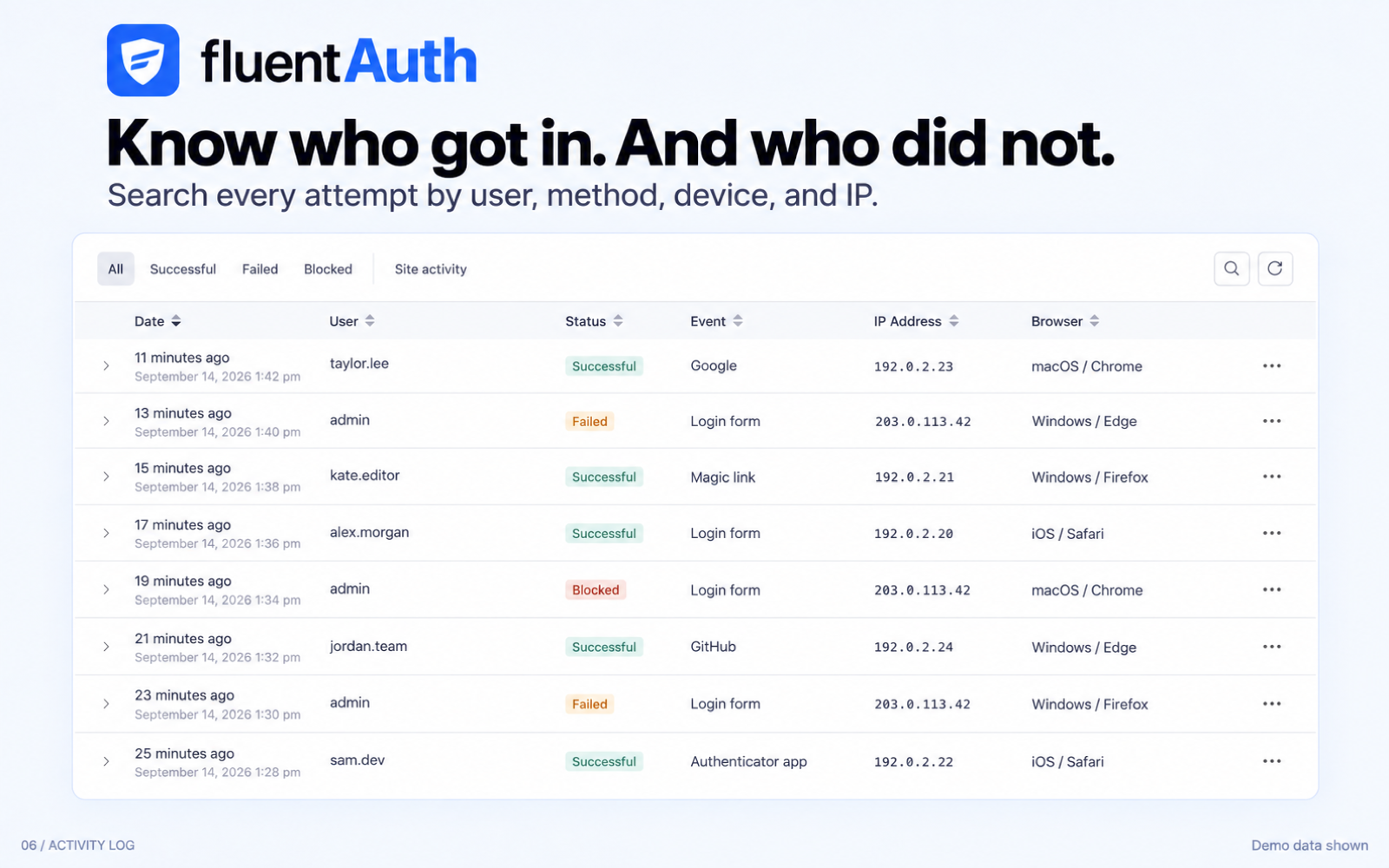
FluentAuth 會記錄每次登入、失敗的嘗試與遭封鎖的位址,也會記錄每個外掛或佈景主題的啟用、停用或更新,以及執行者。記錄會儲存在專用的資料庫資料表中,因此你的 WordPress 資料表能保持整潔,舊項目則會依你選擇的排程清除。
電子郵件通知與報告
管理員或編輯登入時,或有人因失敗嘗試次數過多而遭封鎖時,您會收到電子郵件。您也可以取得網站上發生事件的每日、每週或每月摘要。
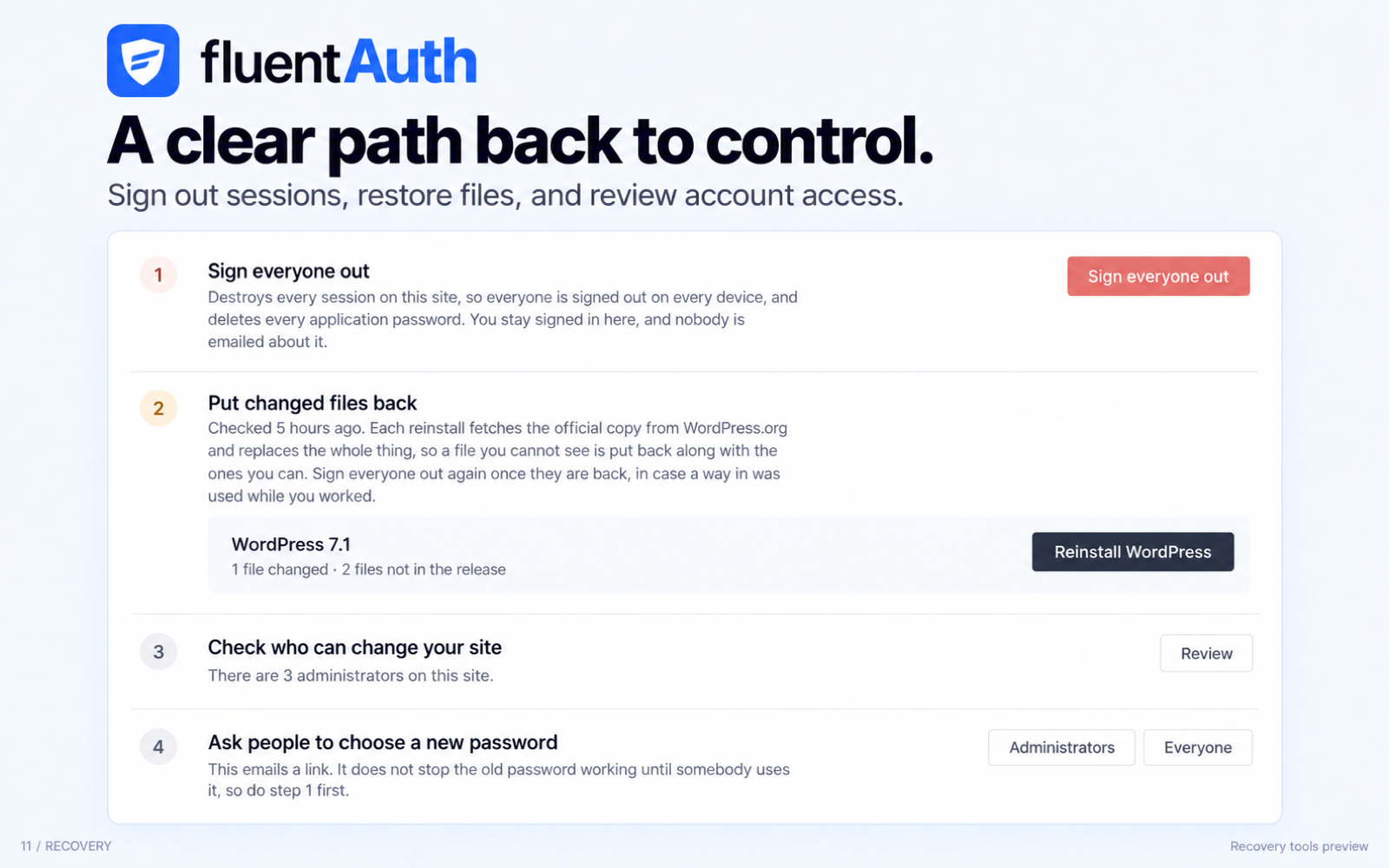
復原工具
如果您認為有人曾進入您的網站,單一畫面會告訴您接下來該做什麼。
- 將所有使用者登出並撤銷所有應用程式密碼
- 分批向使用者傳送密碼重設電子郵件,避免任何程序逾時
- 從官方副本重新安裝 WordPress 核心
- 從 WordPress.org 目錄重新安裝外掛或佈景主題
- 輪替 wp-config.php 中的安全性金鑰,並清楚警告還會導致哪些其他項目失效
這裡完成的所有操作都會寫入稽核記錄,並記錄執行操作的使用者姓名。
登入重新導向
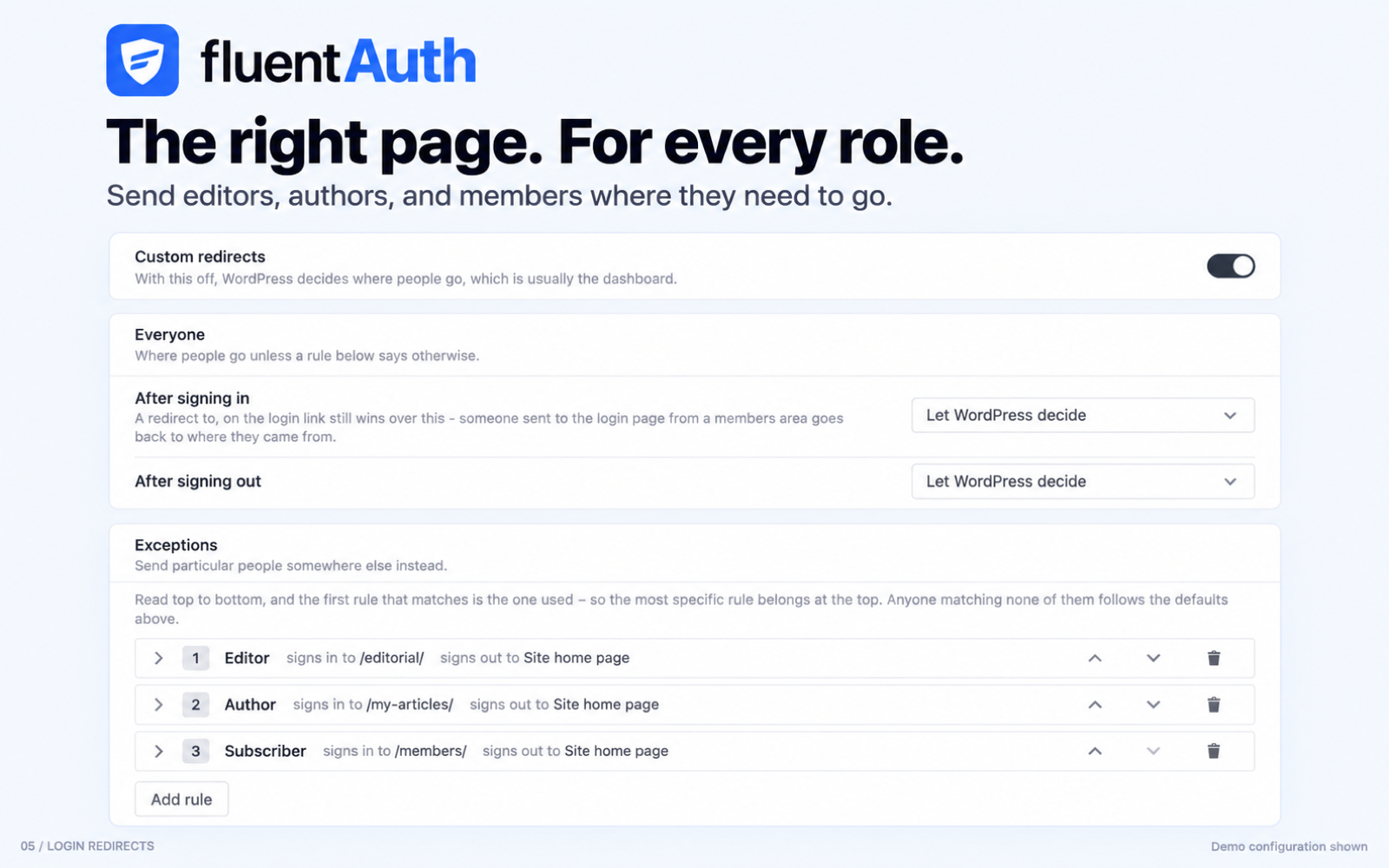
根據使用者角色,將使用者在登入或登出後導向不同頁面。設定一次後,這項設定會套用至所有登入方式,包括社群登入與魔法登入。
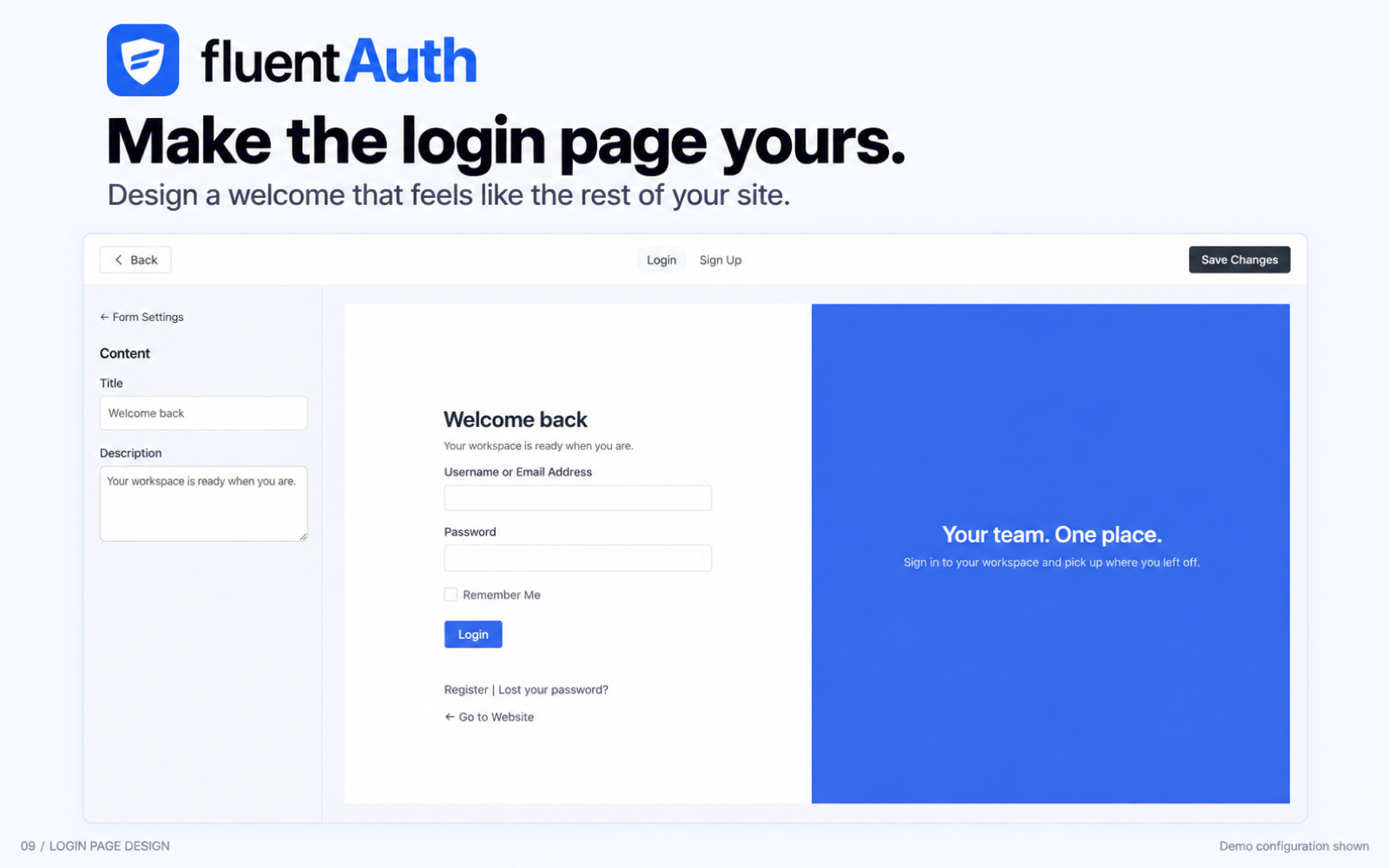
登入與註冊頁面自訂工具
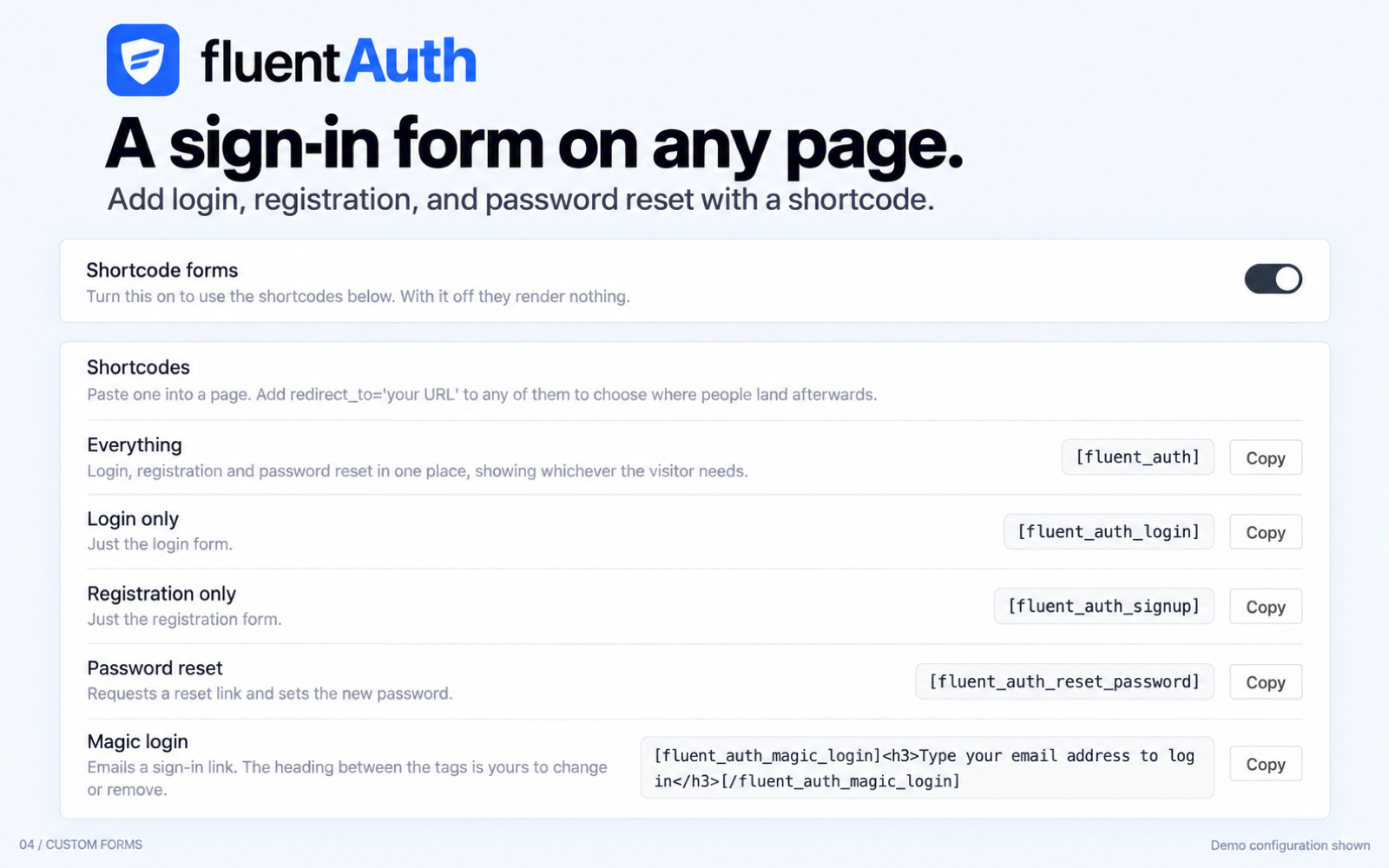
在 WordPress 登入頁面設定您自己的標誌、色彩、背景與表單樣式,編輯時即可查看結果。您也可以使用短代碼,在網站上的任何位置建立登入與註冊表單。
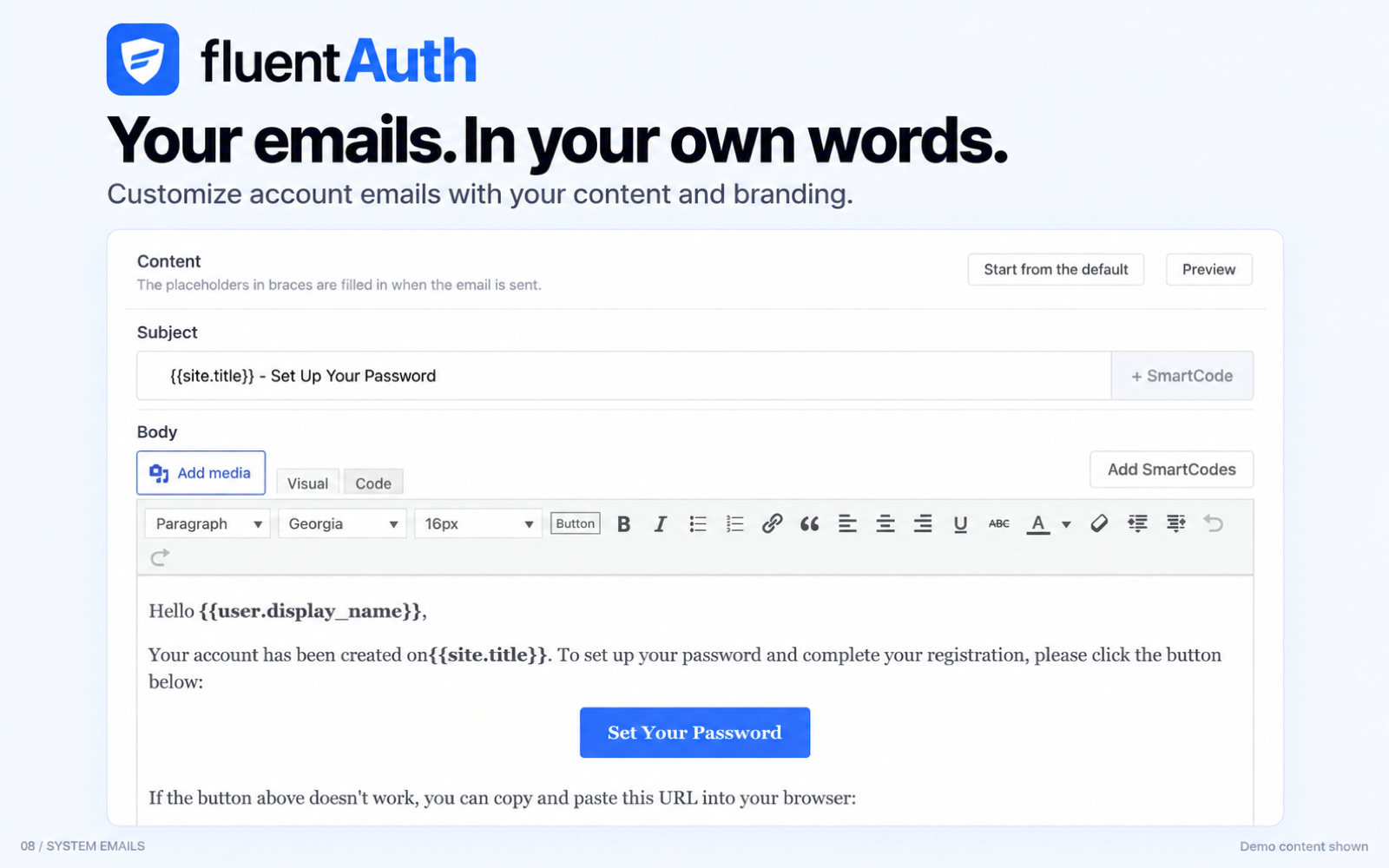
自訂 WordPress 系統電子郵件
WordPress 會傳送許多樣式簡單的預設電子郵件。FluentAuth 讓您使用自己的文字與品牌重新撰寫這些郵件,並提供一種供所有郵件共用的範本設計。您也可以關閉每當新使用者註冊時觸發的管理員通知。
核心安全性強化
停用網站未使用的 WordPress 功能。
- 停用 XML-RPC
- 停用應用程式密碼與遠端應用程式登入
- 停止透過 REST API 讀取使用者清單
- 限制低權限使用者角色存取 /wp-admin
- 為您選取的角色隱藏管理列
多網站遠端驗證
使用一個網站作為其他網站的登入提供者。使用者只要在主要網站登入一次,進入子網站時就已經完成登入。
引導式設定
第一次開啟 FluentAuth 時,會執行簡短的設定精靈。它會詢問幾個問題,告訴你每個回答會變更哪些設定,並啟用一組合理的選項。略過精靈就不會寫入任何內容,而每個回答都只是一般設定,之後可以再變更。
專為快速執行而打造
FluentAuth 是一個外掛,能執行多個外掛的工作,設計上不會妨礙網站運作。管理區域是透過 REST API 運作的單頁 Vue 3 應用程式,記錄會儲存在自訂資料庫資料表中,也不會有掃描代理程式攔截你網站的每一個請求。
開發人員專用
其他外掛可以將自己的登入畫面接入 FluentAuth 的流程。它會向 LoginBridge 服務註冊,之後其自訂表單就能取得登入嘗試次數限制、IP 規則與雙因素驗證挑戰,包括在自訂 AJAX 動作中內嵌的第二步驟。整個驗證流程中都提供篩選器,而網站擁有者的設定永遠優先於採用此服務的外掛所要求的設定。
外部服務
除非您啟用下列功能,否則不會有任何資料離開您的網站。
- 檔案掃描 會將您的檔案與官方版本比對,因此會從 WordPress.org(
api.wordpress.org、downloads.wordpress.org、plugins.svn.wordpress.org、themes.svn.wordpress.org)及 GitHub 上的 WordPress 官方鏡像站(raw.githubusercontent.com)取得檔案。系統只會傳送正在檢查項目的名稱、版本和檔案路徑。WordPress.org 隱私權政策 · GitHub 服務條款與隱私權政策。 - FluentAuth Alerts Service(
dash.fluentauth.com,由 WPManageNinja LLC 經營)會透過電子郵件傳送排程掃描警示。連線前此服務會保持關閉,畫面會在您決定前列出將傳送的資料:您的姓名與電子郵件地址、網站網址與標題、差異檔案的路徑、外掛與佈景主題版本,以及 PHP 與 WordPress 版本。絕不會傳送檔案內容、資料庫資料或任何訪客相關資訊。隱私權 · 條款。 - 社群登入只有在您設定好某個登入服務,且使用者按下按鈕時,才會與 Google、GitHub 或 Facebook 連線:透過標準 OAuth 授權流程進行互動,並傳送使用者的姓名和電子郵件地址,以便比對帳號。Google(服務條款、隱私權政策) · GitHub(服務條款、隱私權政策) · Facebook(服務條款、隱私權政策)。
- Cloudflare Turnstile(
challenges.cloudflare.com)會在您選擇的表單上檢查機器人:註冊、登入與重設密碼表單,或 WooCommerce 帳號表單。您新增金鑰並選擇表單前,此功能會保持關閉。在這些表單上,訪客的瀏覽器會載入 Cloudflare 指令碼,由該指令碼收集瀏覽器訊號,以辨別真人與機器人。送出表單時,您的網站會將檢查結果傳送至 Cloudflare 進行確認。Turnstile 隱私權附錄 · Cloudflare 條款。
為什麼選擇 FluentAuth?
大多數 WordPress 網站都是以相同方式遭到入侵:有人猜中密碼,或重複使用在其他地方外洩的密碼,然後從登入表單闖入。登入表單就是那扇門,而 FluentAuth 守護的正是這扇門。
使用多個安全性外掛來涵蓋這些功能,本身就會帶來問題。每個外掛都會掛接到每個請求並執行自己的一套規則,導致網站變慢。使用一個涵蓋登入安全性、雙因素身分驗證、社群登入、檔案掃描與稽核記錄的外掛,對伺服器和你自己來說都更省事。
這就是我們建立 FluentAuth 的原因,也正因如此,它是免費的。
使用 FluentAuth 取代多個外掛
如果你使用 FluentAuth,就不需要下列項目:
用於限制登入嘗試次數並封鎖暴力破解
- Limit Login Attempts Reloaded
- WPS Limit Login
用於雙因素身分驗證
- 雙因素身分驗證
- WP 2FA
登入與登出重新導向
- LoginWP(原名 Peter’s Login Redirect)
- Sky Login Redirect
- WP Login and Logout Redirect
用於隱藏管理列及限制存取
- 隱藏管理工具列
- 依使用者角色隱藏管理工具列
- 自動隱藏管理列
- 對非管理員隱藏管理工具列
使用者指南
同團隊製作的其他外掛
- FluentCart 電子商務的新時代 – 更快、更輕量、更簡單
- FluentCRM – WordPress 電子郵件行銷、電子報、電子郵件自動化與 CRM 外掛程式
- Fluent Forms – WordPress 最快速的表單編輯器外掛
- Ninja Tables – WordPress 專用的最佳 WP DataTables 外掛
- Ninja Charts – WordPress 的最佳 WP 圖表外掛程式
- WPPayForm – WordPress 的 Stripe 付款外掛程式
- Mautic Integration For Fluent Forms
- Fluent Forms PDF – Fluent Forms 的 PDF 表單項目
- FluentSMTP – WordPress 郵件 SMTP、SES、SendGrid、MailGun 外掛
貢獻
如果你想為這個專案貢獻心力,或只是回報錯誤,我們都非常歡迎。請在 Github 查看儲存庫。
螢幕擷圖
安裝方式
本節說明如何安裝外掛並讓它正常運作。
- 只要在 WordPress 外掛中搜尋 FluentAuth,然後按一下安裝並啟用即可。
或
- 將外掛檔案上傳至
/wp-content/plugins/fluent-auth目錄,或直接透過 WordPress 的外掛程式畫面安裝外掛。 - 在 WordPress 的「外掛程式」畫面中啟用外掛
- 前往
FluentAuth並依照簡短的設定精靈操作,或開啟FluentAuth->Settings自行設定。
常見問題集
-
FluentAuth 免費嗎?
-
是。這裡所述的每項功能都免費。沒有付費版本,也沒有鎖定的畫面。
-
這會讓我的網站變慢嗎?
-
不是。FluentAuth 不會像防火牆外掛程式一樣攔截每一個要求。記錄會儲存在獨立的資料庫資料表中,因此您的 WordPress 資料表能維持精簡;管理區則是只載入一次的單頁應用程式。
-
雙因素身分驗證可以搭配 Google Authenticator 使用嗎?
-
可以。驗證器應用程式選項可搭配 Google Authenticator、Authy、Microsoft Authenticator、1Password、Bitwarden,以及其他支援 TOTP 的應用程式使用。
-
什麼是通行密鑰?
-
通行密鑰可讓使用者透過 Touch ID、Face ID、Windows Hello、硬體安全性金鑰或密碼管理程式登入,不必輸入驗證碼。瀏覽器會將它繫結至你的網站網域,因此無法在仿冒的登入頁面副本上使用。FluentAuth 支援將通行密鑰作為第二項因素,也支援完全不使用密碼、單獨以通行密鑰登入。
-
我可以強制管理員使用雙因素身分驗證嗎?
-
是。你可以選擇哪些角色可以設定第二項因素,以及哪些角色必須使用第二項因素。必須使用第二項因素的使用者會在登入時被要求設定,並在為其建立工作階段之前完成,因此無法直接前往非登入表單的頁面來繞過這項要求。你也可以指定該因素必須具備的強度:僅限裝置因素,也就是通行密鑰或驗證器應用程式;或三種方式皆可,包括透過電子郵件傳送的驗證碼。
-
我必須連線至外部服務嗎?
-
不會。雙因素身分驗證、通行密鑰、稽核記錄、登入限制及其他功能全都在您自己的網站上執行。
有三項功能可能會連線至外部服務。掃描會向 WordPress.org 取得您檔案的官方版本,以判斷檔案是否變更;這項作業不會傳送任何網站資料。另有選用的 FluentAuth Alerts Service,可處理排程掃描與警示電子郵件。連線前,此服務會保持關閉;畫面會在您決定前列出將傳送的資料。若您啟用 Cloudflare Turnstile 防護機器人,您選擇的表單就會使用 Cloudflare 的檢查。詳情請參閱上方的「外部服務」章節。
-
是否符合 GDPR 規範?
-
是。除非您選擇連線選用的警示服務或啟用 Cloudflare Turnstile,否則您的所有資料都會留在 WordPress 資料庫中。這兩者各自會傳送哪些資料,已列於上方的「外部服務」章節。
-
它能與 WooCommerce 和會員制外掛程式搭配使用嗎?
-
可以。FluentAuth 會在標準 WordPress 登入流程上運作,因此涵蓋 WooCommerce、LearnDash、會員制外掛程式與自訂登入表單的登入。
-
我可以在多網站安裝中使用 FluentAuth 嗎?
-
是。FluentAuth 會在多網站安裝中以每個網站為單位執行,並會在判斷使用者是否能登入指定網站時,考量多網站環境。沒有全網路設定畫面,因此每個網站都要個別設定。
-
如果我不小心把自己鎖在網站外面,會發生什麼事?
-
使用您設定驗證器應用程式時取得的其中一組復原碼。如果連復原碼也遺失,其他管理員可以從 2FA 註冊畫面重設您的第二因素驗證。
如果您是唯一的管理員,且所有項目都已遺失,請將
define('FLUENT_AUTH_DISABLE_TWO_FA', true);加入 wp-config.php,這樣整個網站就會解除第二因素驗證。若要只針對單一帳號解除,請以使用者名稱取代true。重新登入後,請移除這行程式碼。保留這行期間,登入畫面會顯示相關提示、控制台會發出警告,而每次使用這項設定的登入都會寫入稽核記錄。 -
檔案掃描器會移除惡意軟體嗎?
-
這不是惡意軟體掃描器。它會告訴你哪些檔案已不再符合 WordPress.org 發布的官方副本、顯示變更內容,並讓你還原原始檔案。這能捕捉攻擊者留下的檔案變更,而且不需要維護持續更新的特徵碼清單。
使用者評論


參與者及開發者
以下人員參與了開源軟體〈FluentAuth – 登入安全性、雙因素身分驗證、通行密鑰 & 社群登入〉的開發相關工作。
參與者


變更記錄
3.1.1 – Date: Nov 3, 2026
- Fix: Magic link and signup email limits now work for visitors on IPv6.
- Fix: The security scan now checks PHP files inside the node_modules folders of plugins and themes.
- Fix: The passkey button on a login page left open after signing in now says the page has expired.
- Fix: Some text boxes and buttons were hard to read in dark mode, and warning and info boxes in light mode.
- Improvement: The PHP security warning now says your server “may” be affected when your host could have patched PHP without changing its version. Once your host confirms the patch, you can dismiss the warning.
- Developer: New fluent_auth/email_verified action, fired when a magic link or an emailed code signs someone in.
- Security: Hardening for sign-in links and codes, login attempts, trusted proxies, multisite permissions and deleted users.
3.1.0-日期:2026 年 10 月 23 日
- 新增:為註冊、登入、重設密碼表單及 WooCommerce 帳號表單提供 Cloudflare Turnstile 機器人防護。
- 新增:若伺服器的 PHP 存在嚴重的 php2shell 安全漏洞(CVE-2026-109618、CVE-2026-109619),wp-admin 和控制台會顯示警告,並列出可向主機代管商要求的 PHP 版本。
- 修正:Outlook、Hotmail 和 Live 使用者現在可以使用 Magic Login 連結登入。Microsoft 的連結掃描器會先開啟連結並將其用掉。
- 改善:設定精靈現在會提供通行密鑰和摘要報告選項,並提供連結讓您設定必須使用雙因素身分驗證。
- 改善:在設定精靈中選擇的摘要報告頻率,現在會從選擇當天開始計算。
- 改善:全面讓管理介面的文字更清楚,並附上翻譯人員備註。
- 修正:深色模式下,已開啟的切換開關會正確顯示為開啟。
- 變更:傳送至 FluentAuth Alerts Service 的掃描報告現在也會包含 PHP 與 WordPress 版本。
3.0.5-日期:2026 年 10 月 7 日
- 修正:含連字號或撇號的姓名(例如 Mary-Jane 或 O’Brien)現在可以註冊。
- 修正:在會重新導向 index.php 網址的伺服器及 Proxy(例如 Cloudflare)上,Magic Login 連結現在仍可讓您登入。
- 修正:啟用 Wordfence Login Security 的 CAPTCHA 時,Magic Login 現在仍可正常運作。
- 修正:Magic Login 連結現在會將您帶到原本要前往的頁面。
- 修正:社群註冊按鈕現在會遵循表單的重新導向設定及您的登入重新導向設定,包括 Fluent Support 入口網站。
- 修正:「摘要報告」設定現在會顯示「不要傳送摘要」,不再是空白方框。
- 修正:Magic Login 成功圖示現在會在所有佈景主題中置中顯示。
- 改善:註冊表單現在會顯示其他外掛新增的下拉式欄位,例如 Fluent Support 的國家欄位。
- 開發人員:新增 LoginBridge::release(),讓外掛在顯示 FluentAuth 登入表單後,結束使用該表單。
3.0.4-日期:2026 年 10 月 2 日
- 安全性:登入重新導向現在一律會留在您的網站上。
- 強化安全性:即使 WordPress 的新使用者預設角色設為管理員,透過 FluentAuth 註冊也永遠不會建立管理員帳號。
- 變更:登入與登出重新導向設定只接受您網站上的網址。若先前儲存的網址指向站外,登入重新導向畫面會指出該網址。
- 改善:WordPress 根目錄中的新文字檔(llms.txt、驗證檔案、備註)現在不會再被安全性掃描回報。
- 修正:透過社群登入建立的帳號現在不會再使用電子郵件地址作為使用者名稱。
- 修正:安全性掃描報告現在會與最終掃描結果一致,包括 WordPress 根目錄中的非預期資料夾。
- 修正:雙因素設定畫面現在會保留應返回的網址。
3.0.3 – Date: Sep 20, 2026
- Added compatibility with MainWP and other plugins that sign users in programmatically. These sign ins are now recorded in the audit log as a programmatic login, collapsed into one entry per hour, and do not send a login notification email.
- Fix: Signing in with Google One Tap or a passkey on a site that asks for a second factor now takes you to that step, instead of showing an error with no way forward.
- Fix: Answering a second factor after signing in with a social account now returns you to the page you started from.
- Improved user facing strings and error messages throughout.
- The recovery help on the two-factor login screen now appears after 50 seconds.
3.0.2 – Date: Sep 18, 2026
- Fix: Requiring two-factor no longer locks anybody out of wp-admin, or breaks front-end forms and add-to-cart for logged-in members.
- Fix: Sites in other languages no longer report a WordPress core file as changed on every scan.
- Fix: Recovery codes are shown only to the person they belong to, and setting up an authenticator app no longer replaces codes you have already saved.
- Fix: Passkey setup on sites that use passkeys without authenticator apps, including retrying a prompt the server refused.
- New: Tells you when another plugin is also enforcing two-factor login, since two of them cannot both finish a sign-in.
- Improvement: Says when a scan could not reach WordPress.org, instead of going quiet.
3.0.1 – Date: Sep 17, 2026
- Fix: Setup wizard switches could not be turned off.
- Fix: Two-factor requirements now follow the method switches – a method that is off is off for everybody. Sites updating from 3.0.0 that required a factor with every method off keep working: the authenticator app is switched on for them automatically.
- Fix: The dashboard reported two-factor as off on sites using passkeys without authenticator apps.
- Fix: The login page designer can now edit the sign-in form’s own colours, and from name and reply-to apply to every email FluentAuth sends.
- Improvement: Plain-language rewrite of the admin screens, plus fixes to activity log search, the encryption panel and sign-ins through third-party login forms.
3.0.0 – Date: Sep 16, 2026
- New: Two-factor authentication with passkeys, authenticator apps and email codes. Pick which roles may set one up and which must have one, and how strong a required factor has to be. A required factor is now enrolled during sign-in, before a session is created, and everyone manages their own from their WordPress profile screen. Ten recovery codes come with every authenticator setup, stored secrets can be encrypted with a key in wp-config.php, and an emergency bypass constant is there for the day somebody locks themselves out.
- New: Passkey sign-in with no password at all, offered on the login form beside magic links and social login.
- New: Security checklist that tells you what to fix and fixes most of it for you, covering HTTPS, debug output, the file editor, wp-config constants, backup files, uploads folder execution, drop-ins, mu-plugins, admin usernames, dormant admins and hidden users.
- New: File change scanning for WordPress core, and for plugins and themes from the WordPress.org directory, with a side by side diff, a one click restore, and baseline snapshots for the files nothing else can verify.
- New: Recovery tools for a site that has been broken into – sign everyone out, revoke application passwords, batched password resets, core and extension reinstall, and optional salt rotation, each one written to the audit log.
- New: IP allow and block lists with a role restriction, real visitor IP detection behind a reverse proxy or Cloudflare, activity logging for plugin and theme changes, a guided setup wizard, and a LoginBridge service so another plugin can run its own login screen on FluentAuth’s flows.
- Improved: Settings rebuilt around a sidebar and the admin UI refreshed throughout, with hardening across login attempts, magic login, social login, email smart codes and the alerts service – plus fixes for two-factor enrollment counts, dark mode, small screen layout and the password reset email link.
2.1.2 – Date: Apr 28, 2026
- Hardened Security Scan and Settings endpoints with stricter input validation and sanitization
- Sanitized social auth redirect cookie to prevent storing untrusted values
- Added client token verification in Google One-Tap login for stronger identity checks
- Fixed: Magic Login rate limiter incorrectly using days instead of minutes
- Fixed: Login issue with GitHub social authentication
- Fixed: Timezone mismatch in dashboard quick stats and audit log time differences
- Fixed: canLogin filter ignoring falsy return values (now respects developer overrides)
- Fixed: Sprintf positional argument syntax in digest email and removed a duplicate filter
- Improved: Translation readiness: wrapped previously hard-coded admin UI strings with the translation helper and fixed typos / awkward phrasing across the dashboard, settings, security scan, server mode, and email customization screens
- Improved: Internal test coverage and codebase reliability
2.1.1 – Date: Dec 03, 2025
- Introducing One-Tap Login via Google Social Auth Connection
- Improved Translation & Localization
- Security: Improved Data Security and Sanitization and compitable with latest WordPress security standards
- Bug Fixes and Performance Improvements
2.0.3 – Date: Jun 11, 2025
- Typo and Smartcode fixed on Custom Emails
- WP_Error Notice fixed
2.0.2 – Date: Jun 11, 2025
- Fixed: Login Redirect Issue
- Fixed Typo on Admin Menu
- Fixed Styling Issues
2.0.0 – Date: Jun 09, 2025
- Introduing Login/Signup Page Customizer
- Added Login with Facebook
- Added Syststem Emails Custimizations
- Introducing WordPress Core Files Integrity Check
- Configurable: One-Click Login via Email as primary login method
- UI & UX Improvements
- Disable Signup on social media connection when global signup is disabled
1.1.0 – Date: Dec 16, 2014
- Added hooks for 3rd party developers
- Improvement on Authentication flow
1.0.8 – Date: Dec 02, 2024
- Added Additional Hooks for Regsitration and Signup
- Improved UI & UX
- Fixed translation issues
1.0.7 – Date: Jul 26, 2024
- Added Email verification on User Regstration Flow
- PHP 8.x compatability issue fixed
- JS errors fixed on Magic Links Shortcodes
1.0.6 – Date: Jan 28, 2024
- Fix Compatibility issue with PHP 8.x
- Upgrade Internal Libraries
- Improved Login with Google
- Improved UI & UX
1.0.5 – Date: May 04, 2023
- Added Login or Signup with Google Social Auth Connection
- Magic Login URL token is now hashed to improve the security
1.0.4 – Date: Feb 04, 2023
- Added Daily/Weekly/Monthly Email reporting Feature
- Made Login Form as Custom (no login url expose)
- Two-Factor Authentication Improvement
1.0.2 – Date: Dec 17, 2022
- Fix UI issue on dashboard
- Login with GitHub improvement
- Do Two-Factor Authentication even for social login for selected user roles
- Added more hooks for developers
1.0.2 – Date: Dec 16, 2022
- Improved UI & UX
- Added feature to block /wp-admin access and hide admin bar for low-level user roles
- Fix conflict issue with LearnDash and other wp-users REST-API
- Improved IP Address for login verification.
1.0.0 – Date: Dec 12, 2022
- Initial Release