
外掛說明
DominikShaim Order Documents for WooCommerce adds one or more PDF documents to selected WooCommerce order emails. It is suitable for terms and conditions, a complaints policy, instructions, warranty information, or other documents that belong with an order email.
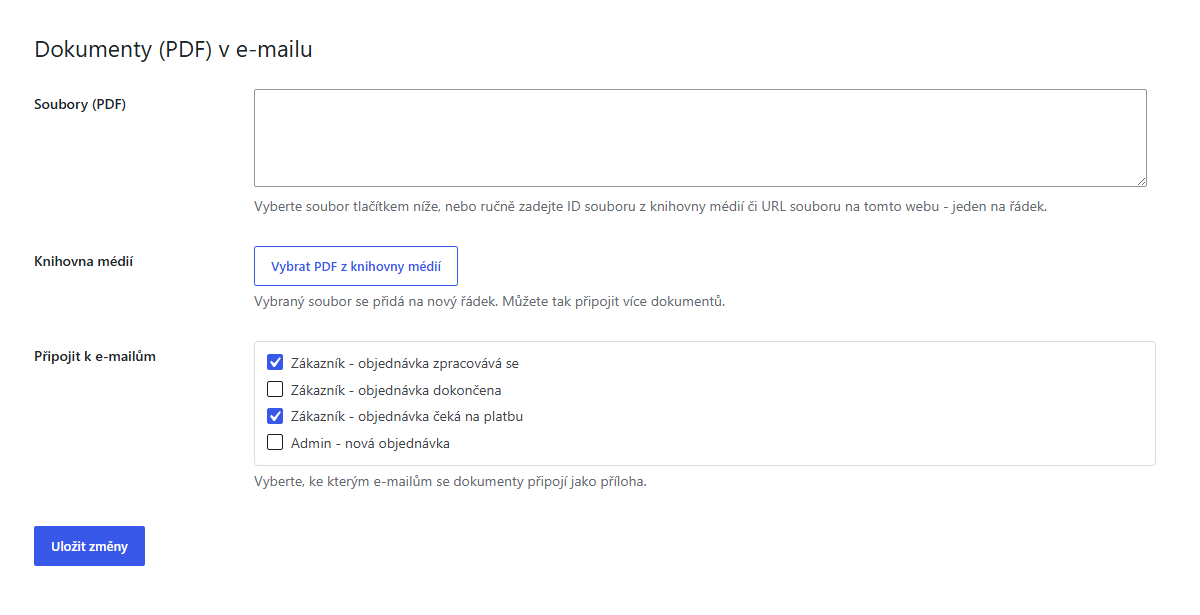
Choose PDFs from the WordPress Media Library, or enter a Media Library attachment ID or a local upload URL manually. Each document is entered on a separate line. The plugin accepts only readable files from the current site’s uploads directory. It does not download remote files or accept arbitrary server paths.
You can attach the configured documents to these WooCommerce email types:
- Processing order email sent to the customer.
- Completed order email sent to the customer.
- On-hold order email sent to the customer.
- New order notification sent to the administrator.
Processing and on-hold customer emails are selected by default. The same configured set of documents is used for every selected email type. The plugin does not select different files by language.
The plugin declares HPOS compatibility. It does not send files or order data to an external service. This public version contains no license checks, vendor telemetry, or self-hosted updater. WordPress.org provides its updates.
螢幕擷圖
安裝方式
- Install and activate the plugin in WordPress.
- Open the Settings link next to DominikShaim Order Documents for WooCommerce.
- Select one or more PDF documents from the Media Library.
- Choose the WooCommerce order emails that should include the documents and save the settings.
WooCommerce must be active.
常見問題集
-
Which files can I attach?
-
You can attach readable files from the current site’s WordPress uploads directory. The Media Library picker is limited to PDFs.
-
Can I attach more than one document?
-
Yes. Add each Media Library attachment ID or local upload URL on a separate line.
-
Which WooCommerce emails are supported?
-
Processing, completed, and on-hold customer order emails, plus the administrator’s new order notification.
-
Can I use a different document for each language?
-
Not automatically. The same configured document set is attached to every selected email type, regardless of the site language.
-
Does the plugin send files or order data to a third party?
-
No. It resolves local WordPress uploads and adds them to WooCommerce emails. It does not call an external service.
-
Does the plugin support HPOS?
-
Yes. It declares compatibility with WooCommerce High-Performance Order Storage.
使用者評論
這個外掛目前沒有任何使用者評論。
參與者及開發者

變更記錄
1.0.0
- Initial public release as a standalone free plugin.