

Default Content
外掛說明
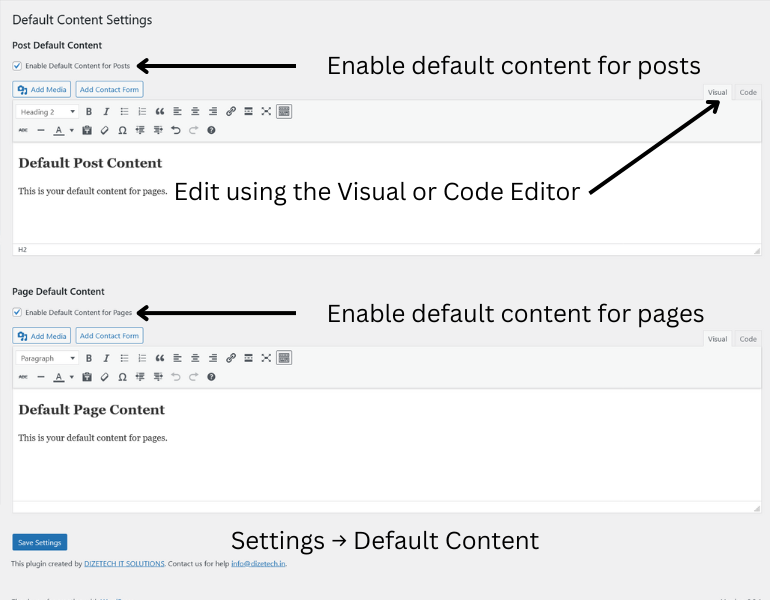
Default Content is a simple yet powerful WordPress plugin that automatically inserts predefined HTML content into the editor when you create a new post or page. You can enable or disable default content insertion separately for posts and pages, and customize the content using the built-in WordPress editor.
Features:
- Automatically insert default content for new posts or pages.
- Enable or disable default content separately for posts and pages.
- Customize content using the WordPress TinyMCE (WYSIWYG) editor.
- Saves time when publishing similar content repeatedly.
- Clean and lightweight code.
Credits
Developed by DIZE TECH IT SOLUTIONS
License
This plugin is licensed under the GPLv2 or later.
螢幕擷圖

安裝方式
- Upload the plugin folder to the
/wp-content/plugins/directory or install it via the WordPress admin dashboard. - Activate the plugin through the ‘Plugins’ menu in WordPress.
- Go to
Settings > Default Contentto configure the plugin options.
常見問題集
-
Will this plugin affect existing content?
-
No, the plugin only affects new posts or pages that are created. It does not modify existing content.
-
Can I disable default content for posts or pages?
-
Yes, you can selectively enable or disable the feature for posts and pages via the plugin settings page.
-
You can use any HTML tags supported by the WordPress visual editor.
使用者評論
這個外掛目前沒有任何使用者評論。
參與者及開發者

變更記錄
1.1
- Added nonce verification and input validation for improved security.
- Updated code for WordPress.org plugin guidelines compatibility.
1.0
- Initial release.