外掛說明
Dashboard Shortcuts lets you create a personalized menu of links to any page in your dashboard: including posts, pages, settings, builders, theme dashboards, and more.
You can also add links to external resources, even outside your dashboard.
Use it as your bookmarks or favorites list to quickly access your most-used tools, documentation, or external resources, all from the admin bar.
Perfect for developers, site administrators, and content managers who want faster navigation to their frequently used pages.
The plugin is fully compatible with popular page builders (WPBakery, Elementor, Beaver Builder, Oxygen, Brizy, Visual Composer, etc.) and will not render or load the shortcuts bar in builder/editor iframes, preventing conflicts and ensuring a clean editing experience.
Features
- Custom Shortcut Links: Add unlimited custom links with titles and URLs
- Admin Bar Integration: Your shortcuts appear under the admin bar for instant access
- Bookmark Any Page: Add links to any dashboard page (posts, pages, settings, builders, themes) or any external website
- Page Builder Compatibility: The shortcuts bar automatically detects builder/editor iframes and will not render or load in those environments (WPBakery, Elementor, Beaver Builder, Oxygen, Brizy, Visual Composer, etc.)
- New Tab Option: Choose whether links open in the same tab or a new tab
- Easy Management: Simple settings interface to add, edit, remove and order your shortcuts
- Add current page: Quickly add the current admin page as a shortcut with one click
- Toggle Visibility: Enable or disable the shortcuts menu as needed
Contribute
This plugin is open-source! You can contribute, report issues, or suggest improvements on GitHub:
GitHub Repository
螢幕擷圖

Shortcuts menu in the admin bar 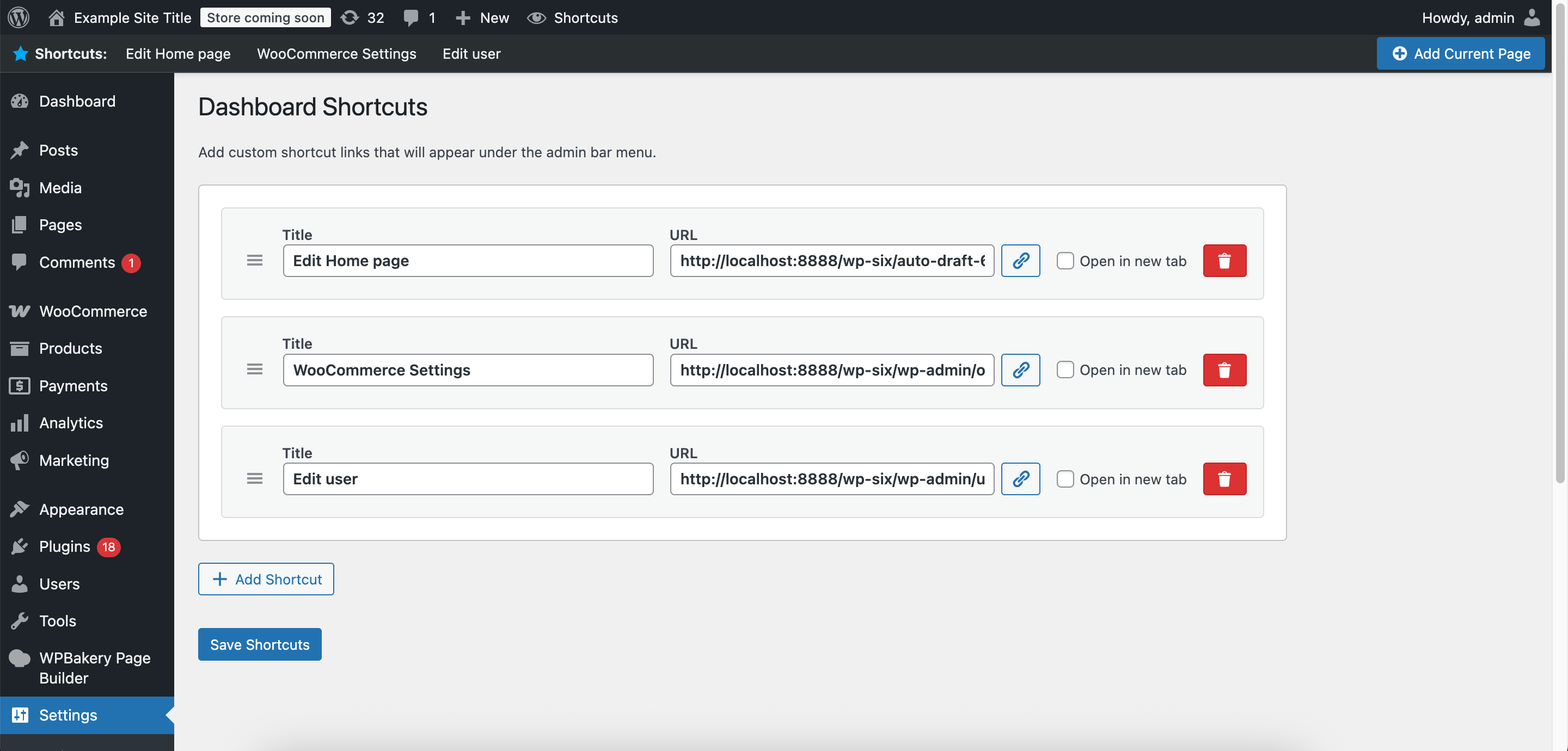
Settings page for managing shortcuts 
Add new shortcut interface
安裝方式
- Upload the
dashboard-shortcutsfolder to/wp-content/plugins/ - Activate the plugin through the ‘Plugins’ menu in WordPress
- Navigate to Settings > Dashboard Shortcuts to configure your shortcuts
常見問題集
-
Who can see the shortcuts?
-
Currently, only users with the
manage_optionscapability (administrators) can see and use the shortcuts. -
Can I add shortcuts to external websites?
-
Yes! You can add any valid URL, including external websites, documentation, tools, or internal WordPress pages.
-
How many shortcuts can I add?
-
There’s no hard limit, but we recommend keeping it reasonable (10-15 shortcuts) for the best user experience.
使用者評論
這個外掛目前沒有任何使用者評論。
參與者及開發者

變更記錄
1.1.1
- Fix: Optimized CSS, updated styles for 7.0 release
1.1.0
- Fixed: Link selector modal now opens on first click for every shortcut row, even for newly added rows
- Shortcuts bar and assets will not render or load in builder/editor iframes (WPBakery, Elementor, Beaver Builder, Oxygen, Brizy, Visual Composer, etc.), preventing conflicts and ensuring a clean editing experience
1.0.0
- Initial release