

外掛說明
CraftyWebbies Pillar & Cluster Manager brings a clean, structured way to manage your blog content directly inside the WordPress admin. Instead of a flat list of posts, you can organise every article into a topic hierarchy:
- Pillar post — the comprehensive, authoritative guide on a broad topic.
- Cluster posts — focused articles that go deep on a specific sub-topic and link back to the pillar.
This structure is recommended by SEO experts because it signals topical authority to search engines and creates a better reading experience for your audience.
Features
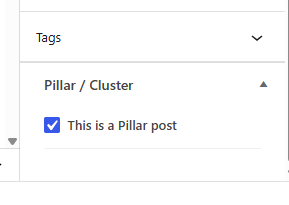
- Meta box on every post — tick a checkbox to mark a post as a Pillar, or select its parent Pillar from a dropdown to make it a Cluster.
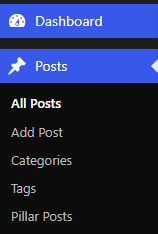
- “Pillar Posts” submenu under Posts — a dedicated view that shows only your pillar content.
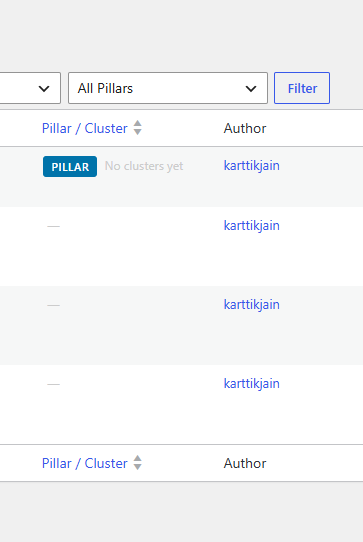
- Custom admin column on the Posts list — shows a PILLAR or CLUSTER badge, cluster count with a one-click filter, or the parent pillar name.
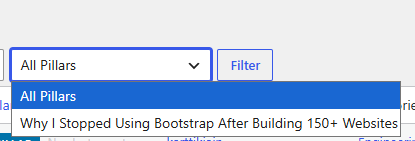
- Filter dropdown — quickly filter the Posts list to see all clusters for any pillar.
- REST API support — all meta fields are exposed via the REST API. A virtual
_cwpcm_pillar_urlfield lets you link a cluster by passing the pillar’s URL instead of its ID. - Template helper functions —
cwpcm_get_cluster_posts(),cwpcm_get_pillar_post(),cwpcm_is_pillar(),cwpcm_is_cluster(), andcwpcm_get_all_pillars()for use in your theme templates. - Translation-ready — fully internationalised with a
craftywebbies-pillar-cluster-managertext domain.
Template Helpers
Use these functions in your theme templates:
cwpcm_is_pillar( get_the_ID() ) — returns true if the current post is a Pillar.
cwpcm_is_cluster( get_the_ID() ) — returns true if the current post is a Cluster.
cwpcm_get_pillar_post( get_the_ID() ) — returns the parent WP_Post pillar object for a cluster.
cwpcm_get_cluster_posts( get_the_ID() ) — returns an array of published cluster WP_Post objects for a pillar.
cwpcm_get_all_pillars() — returns all published pillar posts.
Credits
Developed by Kartik Jain.
螢幕擷圖
安裝方式
- Upload the
craftywebbies-pillar-cluster-managerfolder to/wp-content/plugins/. - Activate the plugin via Plugins Installed Plugins.
- Open any post and look for the Pillar / Cluster meta box in the sidebar.
- Mark a post as a Pillar, then link other posts as Clusters of that Pillar.
常見問題集
-
Does this work with custom post types?
-
Currently the plugin works with the built-in
postpost type. Support for custom post types is planned for a future release. -
Will activating this plugin affect my existing posts?
-
No. The plugin only adds new meta fields. Existing posts are unaffected until you explicitly set them as Pillars or Clusters.
-
Can a post be both a Pillar and a Cluster?
-
No. If you mark a post as a Pillar, any existing cluster assignment is removed, and vice versa.
-
Is this compatible with the Block Editor (Gutenberg)?
-
Yes. The meta box appears in the sidebar of both the Classic Editor and the Block Editor.
使用者評論
這個外掛目前沒有任何使用者評論。
參與者及開發者

變更記錄
1.0.0
- Initial release.