

外掛說明
Camera Field for Elementor Forms extends Elementor Pro Forms by adding a new field type that allows users to capture photos or videos directly from their camera, or upload media files from their device.
Perfect for verification forms, KYC, ID uploads, field reports, service requests, or any form that requires visual proof — all handled seamlessly within Elementor Forms.
Demo: https://demo.add-ons.org/demo-camera-field-for-elementor-forms/
Documentation: https://add-ons.org/document-camera-field-for-elementor-forms/
Perfect for
- Capture photos or videos directly inside forms.
- Customer verification or KYC uploads.
- Field reporting or on-site inspection.
- Bug or issue reporting with visual evidence.
- Service or warranty requests.
Features
- 📸 Photo Capture: Take photos directly from the device’s camera.
- 🎥 Video Capture: Record videos directly inside the form (configurable max duration).
- 🪄 Popup Camera Preview: Real-time preview before capturing.
- 🕒 Countdown Timer: Optional 3-second countdown before capturing or recording.
- ⏱️ Video Limit: Restrict maximum recording time (default: 1 min 30 sec).
- 🔁 Retake / Record Again: Users can redo captures before submitting.
- ✅ Validation: Supports required and file type validation.
- 📁 Upload Integration: Automatically attaches captured files to Elementor email and entry.
- ⚡ Optimized Performance: JS/CSS only load when the camera field exists.
- 🧱 Full Elementor Integration: Works inside popups, AJAX, and responsive layouts.
Usage
- Edit your form with Elementor Pro.
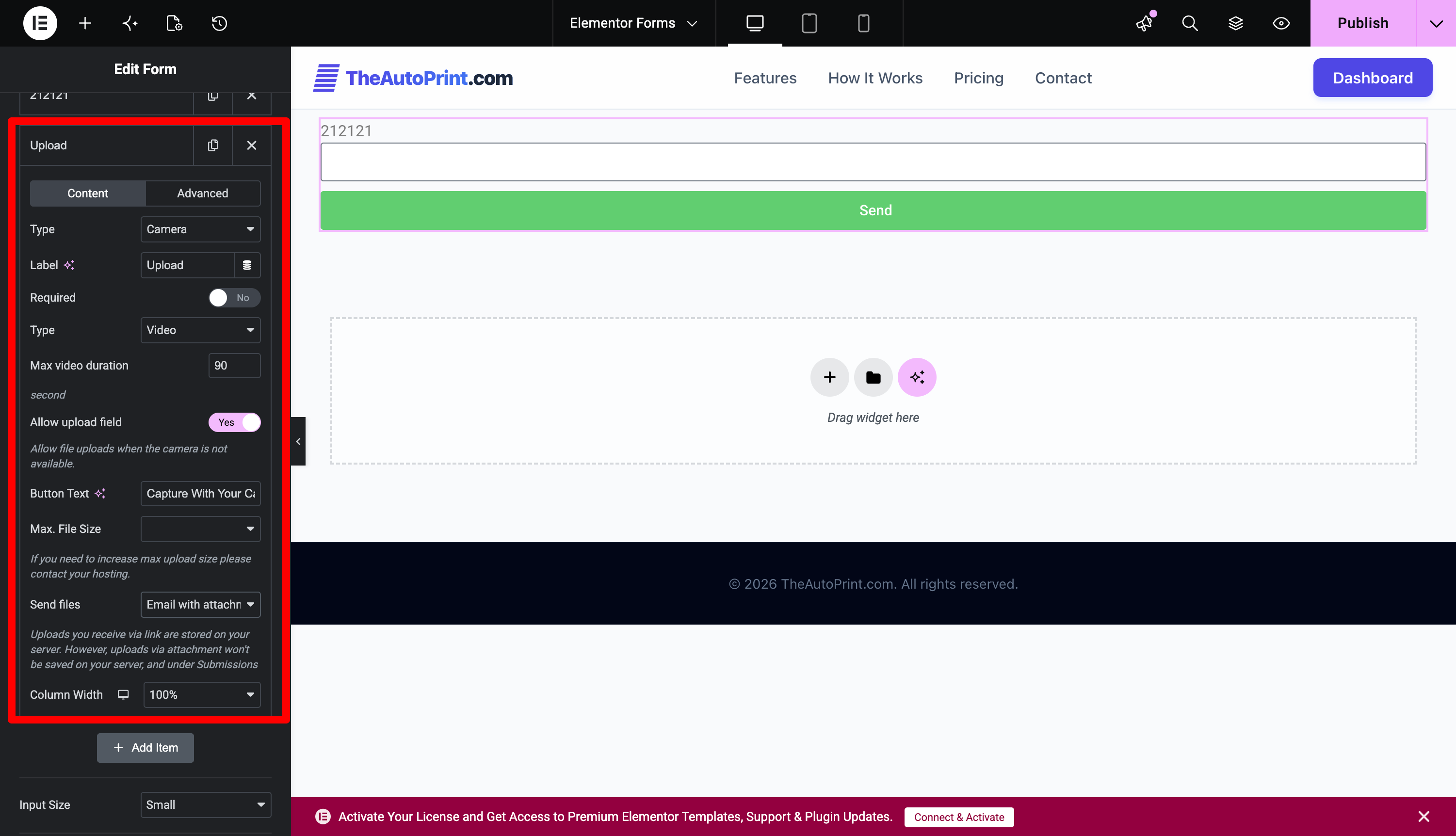
- Add a new field and set Type Camera.
- Choose capture mode (Photo or Video) and configure:
- Max video duration
- Save and preview your form.
- Users can now open their camera, capture media, and submit directly.
螢幕擷圖
安裝方式
- Upload the plugin files to the
/wp-content/plugins/camera-field-for-elementor-forms/directory, or install directly from the WordPress plugins screen. - Activate the plugin through the Plugins menu in WordPress.
- Edit an Elementor form and add a new Camera field.
- Customize its behavior and appearance in the field settings.
- Save your form — done!
常見問題集
-
Does this work on desktop?
-
Yes. On desktop browsers that support
getUserMedia(), users can access their webcam. On unsupported devices, it falls back to the default file upload. -
Does it work inside Elementor popups?
-
Yes. It fully supports Elementor AJAX popups and multi-step forms.
-
Where are the files saved?
-
Captured files are stored in
wp-content/uploads/elementor/forms/camera/and automatically attached to email notifications or form entries. -
Can I limit the recording duration?
-
Yes. You can set a custom time limit (default: 1 minute 30 seconds).
-
Is the plugin compatible with all browsers?
-
All modern browsers that support the MediaRecorder API: Chrome, Edge, Firefox, Safari (latest versions).
使用者評論
這個外掛目前沒有任何使用者評論。
參與者及開發者

變更記錄
1.0.0
- Initial release — added Camera Field for Elementor Forms with photo and video capture support.