

外掛說明
終於有一款你真正會用的 WordPress 分析工具
Google Analytics 實在過於繁複。多數其他 WordPress 統計外掛也是雜亂令人困惑。你只是想追蹤訪客並了解網站發生的動態,並不需要擁有資料科學學位。
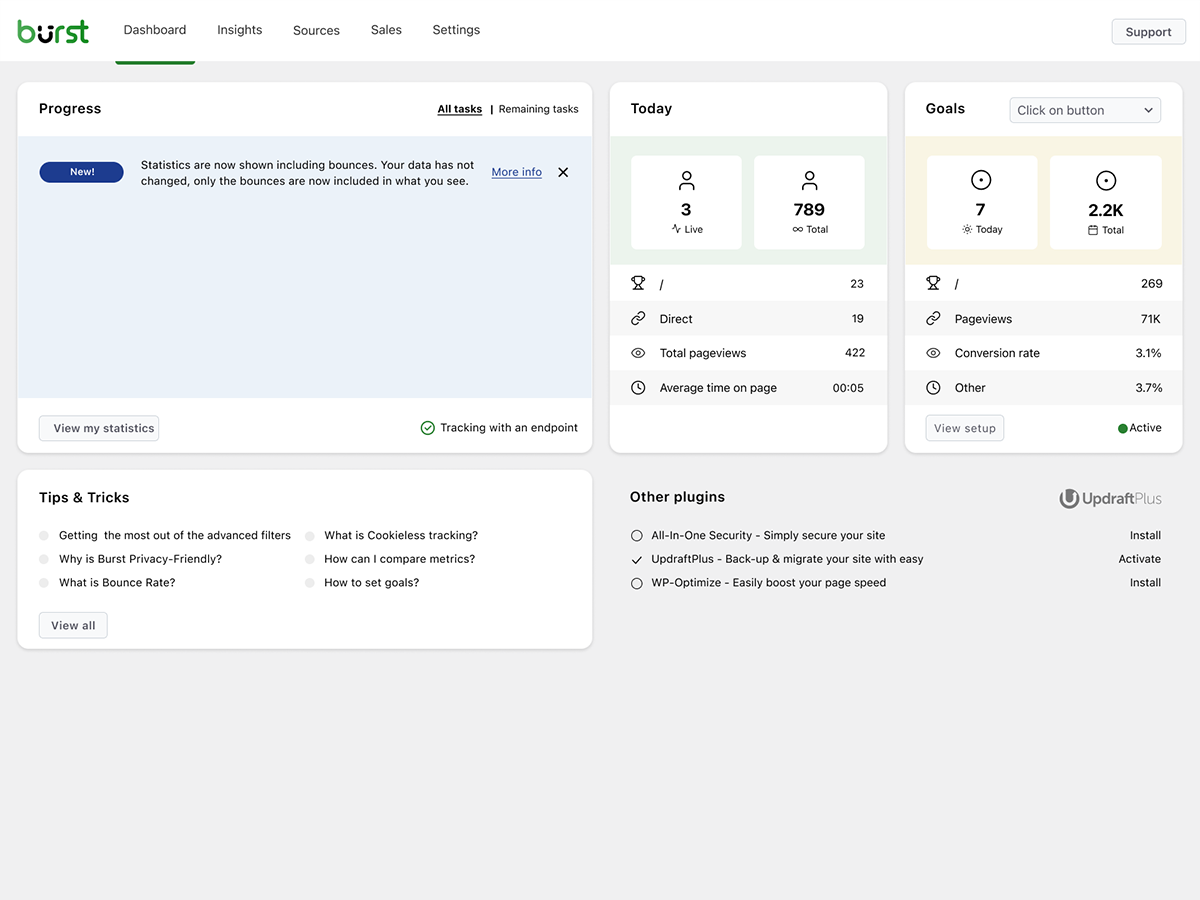
Burst Statistics 為你提供簡潔、直覺的分析儀表板,專注於真正重要的指標。無需外部分析帳號。無需複雜設定。安裝、啟用,幾秒內即可掌握網站流量。
深受 200,000+ 個 WordPress 網站 信賴。由以 UpdraftPlus、WP-Optimize 和 All-In-One Security (AIOS) 聞名的 Team Updraft 團隊打造。
使用者怎麼說
「終於有一款我能真正向客戶說明的分析外掛了。」
— @anguskeystone on wordpress.org「我嘗試過 WP Statistics 和 Independent Analytics,但它們功能過多且令人眼花撩亂。Burst 的介面直覺易用,而且專注於我真正在乎的重點。」
— @vallered on wordpress.org
為什麼選擇 Burst Statistics?
專為採取行動而設計的分析工具
其他分析外掛把所有資訊一股腦塞給你。Burst 在你真正會使用的儀表板中,只呈現真正重要的指標:訪客、頁面瀏覽量、推薦來源、熱門頁面。沒有資料過載,沒有令人困惑的選單。了解為什麼 Burst 是部落客的完美首選。
以隱私為核心的分析設計
所有網站統計資料都保留在你的伺服器上,讓 Burst 成為真正的本機分析解決方案。無外部追蹤。你的資料完全屬於你,未經你的明確許可,我們絕不會檢視。開箱即可符合 GDPR 規範的分析設計。閱讀 為什麼 Burst Statistics 具備隱私友善特性。
零設定負擔
安裝、啟用,立即搞定。無需 Google Analytics 帳號、無需 GA4 設定、無需追蹤代碼,也沒有繁瑣設定的困擾。立即開始查看即時訪客。剛接觸網站分析?請從我們的 WordPress 分析指南開始。
WordPress 原生分析
絕非從其他平台移植而來。專為 WordPress 打造,具備原生效能與無縫整合。適用於 WooCommerce、部落格、商業網站與會員網站。
輕量分析,預設極速
最佳化的資料庫查詢。小於 4 KB 的微型追蹤指令碼。沒有任何外部相依項目會拖慢頁面。即使在採用強效伺服器端快取的環境下,也能精準追蹤。在 Burst 會拖慢我的網站嗎 中查看實證。
功能特色
了解你的網站流量
- 表現最佳的頁面與文章一目了然
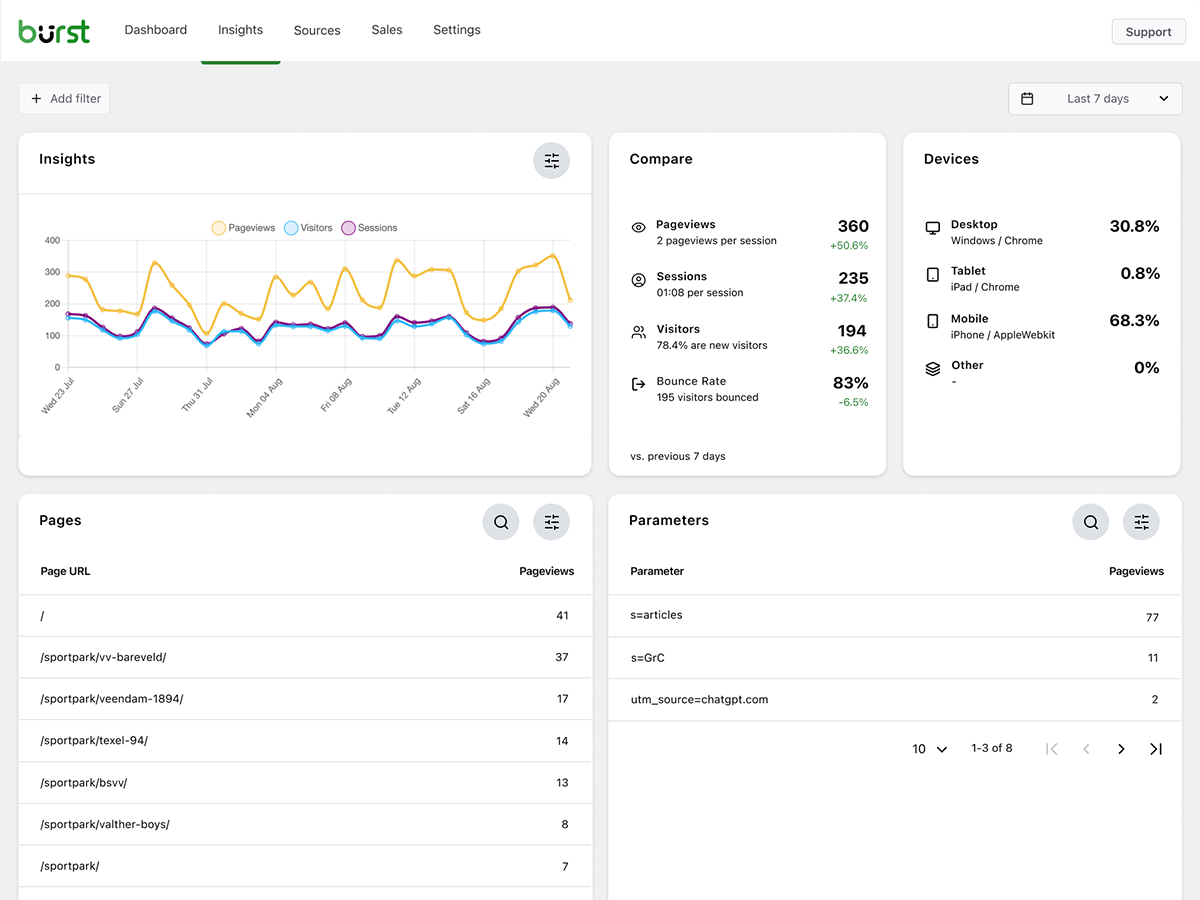
- 追蹤關鍵指標:訪客、工作階段、頁面瀏覽量、跳出率
- 依裝置分析訪客 (桌機、平板、手機)
- 依自訂日期範圍篩選資料
- 比較不同期間的流量
- Search Console 整合,直接在儀表板上檢視 Google 搜尋資料
即時分析
- 即時掌握線上訪客的來源
- 查看使用者目前正在造訪的特定頁面
- 即時統計網站上的活躍使用者人數
掌握成效出色的內容
- 依瀏覽量排名的熱門頁面與文章
- 比較任意日期範圍
- 追蹤個別頁面的成效
自訂轉換與目標追蹤
- 追蹤瀏覽次數、點擊次數與 WordPress Hook
- 追蹤 WooCommerce 分析 & 銷售額 (Burst Pro Business)
- 追蹤自訂事件與轉換
- 在我們的目標指南中查看逐步設定說明
絕不妥協的隱私友善分析
- 100% 自行託管,所有統計資料皆儲存在你的 WordPress 資料庫中
- 免 Cookie 追蹤選項,一種無需 Cookie 的分析設定,在許多國家/地區都不需要同意橫幅
- 專為符合 GDPR、CCPA、DSGVO、AVG、RGPD 與 PECR 規範而設計的分析工具
- 不與 Google、Facebook 或任何第三方共用資料
隨時掌握最新動態
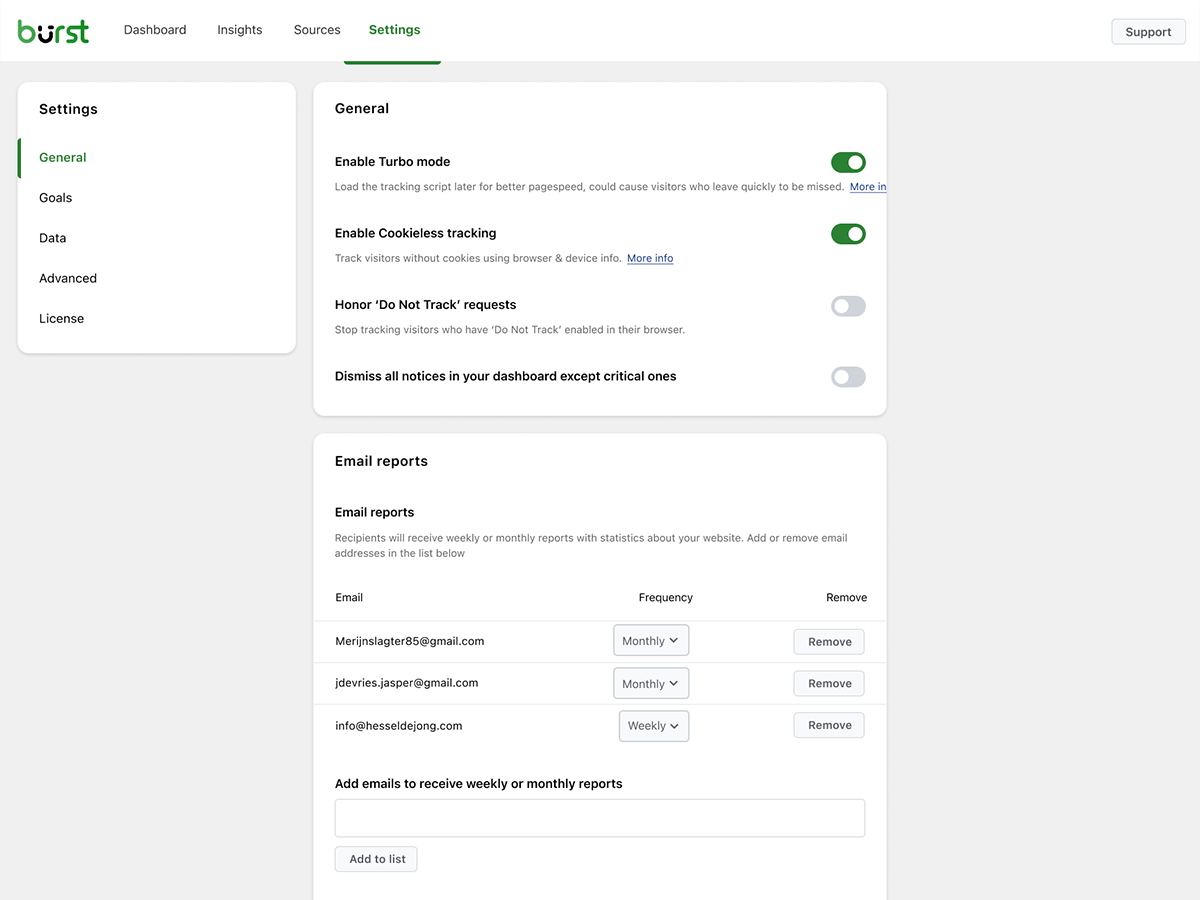
- 每週或每月電子郵件報告直接寄送至你的收件匣
- 比較不同期間以掌握趨勢
- 在追蹤功能失效時收到通知
WordPress 原生的 Google Analytics 替代方案
如果你已經不再需要龐雜的 Google Analytics,或者從一開始就不想使用 GA4,Burst 就是為你量身打造的解決方案。作為 Google Analytics 的替代方案,Burst 摒棄了 GA4 的繁瑣複雜,換取清晰易讀的體驗。你可以在單一儀表板上掌握關鍵指標,無需資料抽樣、沒有資料門檻限制,更不會將訪客傳送至 Google 的廣告聯播網。
GA4 是為了讓 Google 的廣告業務更繁榮而打造。Burst 則是為了讓你的網站表現更出色而設計。
想了解完整面貌?閱讀 為什麼 WordPress 網站擁有者紛紛告別 Google Analytics,或是深入比較 Burst Statistics 與 Google Analytics。
來自 UpdraftPlus、WP-Optimize 與 All-In-One Security 的開發團隊
Burst Statistics 隸屬於 Team Updraft,該團隊打造了市面上多款安裝量最高的 WordPress 外掛:
誰適合使用 Burst Statistics?
Burst 適用於任何 WordPress 網站,但我們特別針對能從中獲得最大效益的四大目標客群打造了專屬解決方案:
- 部落客與內容創作者,查看哪些文章能引起受眾共鳴
- 創業者與小型企業主,輕鬆理解流量與行銷活動成效,毫不複雜
- WooCommerce 商店,追蹤訪客行為、營收與商品成效
- 代理商與自由工作者,為多個客戶網站管理分析與報表
- 重視隱私的網站擁有者,無須同意橫幅即可符合 GDPR 規範的分析工具
- 厭倦了 Google Analytics 的使用者,獲得清晰明瞭的資訊,不再困惑
免費版 vs Pro 版
Burst Statistics (免費版) 包含協助你了解網站流量所需的一切功能。訪客、頁面瀏覽量、推薦來源、熱門內容、裝置統計資料、目標追蹤、電子郵件報告及更多功能。
Burst Pro 為企業與專業人士增添進階功能。在價格頁面比較所有方案。
創作者方案
商務方案
- Creator 方案的所有功能,外加
- 完整 WooCommerce 銷售儀表板,查看哪些內容帶來最高營收
- 營收歸因,將 WooCommerce 銷售額與流量來源連結
代理商方案
- Business 方案的所有功能,外加
- 報表功能,為客戶產生可分享的成效報表
所有 Burst Pro 方案均包含優先支援。你可以直接聯絡我們的開發團隊,由真人為你服務,而非聊天機器人。
Burst 與其他 WordPress 分析外掛的比較
我們經常被問到 Burst 與其他工具相比表現如何。以下是誠懇簡短的說明:
- Google Analytics / GA4,GA4 功能強大,但它是專為廣告商而非網站擁有者打造的。它架構複雜,會對統計數字套用取樣和門檻限制,且在大多數國家/地區都需要 Cookie 橫幅。Burst 是一款更簡單、注重隱私的 GA4 替代方案,無需繁雜設定即可呈現真實數字。閱讀完整比較。
- MonsterInsights,MonsterInsights 是一個將資料傳送至 Google Analytics 的連接工具。如果你想要一個真正的 MonsterInsights 替代方案,將資料保留在自己的網站上而非傳送給 Google,Burst 會是更好的選擇。
- Independent Analytics,值得尊敬的競爭對手,採用類似的隱私優先、WordPress 原生設計方式。Burst 則更著重於具實用價值的儀表板、更深入的 UTM 與目標追蹤、WooCommerce 營收分析以及代理商等級的報表功能。不妨兩者都試試看,選擇最適合你的那一款。
- Koko Analytics,簡潔輕量的選擇,專注於基礎功能。Burst 則走得更遠,提供目標追蹤、即時分析、UTM 活動、WooCommerce 分析與電子郵件報表。
- WP Statistics,歷史悠久的 WordPress 統計外掛,擁有豐富選項。許多使用者覺得它的介面較為雜亂。Burst 則專注於單一清晰的儀表板,設計理念重在直覺清晰,而非單純堆砌功能。
- Matomo,可自行託管且功能豐富,但執行起來更為笨重且複雜。Burst 是更簡單、更快速且完全原生於 WordPress 的選擇。
實用指南與資源
深入了解各項指標、解決常見問題,並發揮分析工具的最大價值。完全免費,盡在 burst-statistics.com。
新手入門
隱私與 GDPR
指標與資料解讀
行銷活動與轉換
WooCommerce
瀏覽完整的 學習中心以取得更多資訊。
安裝
- 前往你的 WordPress 控制台中的 外掛 → 安裝外掛
- 搜尋 Burst
- 點擊 立即安裝,然後點擊 啟用
- 前往 統計資料 → 儀表板 即可查看你的分析資料
就這麼簡單。不需要外部帳號。不需要貼上追蹤代碼。Burst 會立即開始收集網站統計資料。
偏好手動安裝或透過 Composer 安裝?請參閱 使用 Composer 安裝 Burst Statistics。
外部服務
Burst 完全在你的專屬伺服器上運作,不會將你的資料傳送到任何地方。以下兩項選用功能是唯二會與外部服務連線的項目,但使用 Burst 時均非必要功能。隱私權政策請參閱我們的 隱私權聲明;以下各項功能亦分別連結至其更具體的政策說明。
Google Search Console 整合 (選用)
當你在「整合」設定頁面中連結 Google 帳號時,Burst 會從 Google Search Console API (googleapis.com) 擷取你的搜尋成效資料 (查詢、點擊次數、曝光次數與排名),並顯示在你的儀表板中。這是單向資料流:由你的網站從 Google 擷取資料,絕不會將任何訪客或統計資料傳送給 Google 或我們。只有 OAuth 信號交換與權杖重新整理會透過我們位於 search-console.burst-statistics.com 的中繼伺服器執行;擷取的搜尋資料則直接從 Google 傳送到你自己的網站。在連結帳號前不會執行任何動作,且你可以隨時中斷連結,這會撤銷在 Google 端的權杖。請閱讀我們的 Search Console 整合隱私權政策,並參閱 Google 隱私權政策與 Google API 服務使用者資料政策。
匿名資料分享 (選用)
這是 Burst 唯一會向我們傳送資料的情況,且嚴格採主動選擇加入 (opt-in) 機制。當你選擇啟用此功能時,Burst 會定期向 api.burst-statistics.com 傳送匿名且彙總的使用情況與效能統計資料 (不含任何訪客資料或個人資料)。作為回饋,你可以在儀表板中查看社群效能基準,將你的網站與匿名的社群平均水準進行比較,同時這也能協助我們改善此外掛。閱讀 我們如何處理匿名使用資料。
致謝
國家/地區層級的地理位置資料由 MaxMind GeoLite2 資料庫提供。本產品包含由 MaxMind 建立的 GeoLite2 資料,可於 https://www.maxmind.com/ 取得。
原始碼
此外掛隨附的已編譯分析儀表板位於 includes/Admin/App/build/。可供閱讀的 React/TypeScript 原始碼(includes/Admin/App/src/)及建置工具已發布在 GitHub。歡迎在那裡提交 Issue 或 Pull Request。
螢幕擷圖
適用於區塊編輯器
這個外掛提供 1 個可供區塊編輯器使用的區塊。
- Pageviews Counter
常見問題集
Burst Statistics 真的是免費的嗎?
是的。Burst Statistics 100% 免費且沒有追蹤上限。Burst Pro 則是提供給需要進階功能使用者的付費選購項目,進階功能包括 UTM 追蹤、收益歸因、地理位置資料或客戶報表。這就是我們能讓絕大多數使用者免費使用 Burst Statistics 的原因。
資料儲存在哪裡?
所有統計資料均儲存在你自己的 WordPress 資料庫中。與 Google Analytics 或雲端工具不同,我們完全無法存取你的資料。除非你手動選擇加入與我們分享匿名使用情況洞察,否則你的資料絕對不會離開你的伺服器。深入了解 Burst 如何處理你的資料。
Burst 是 Google Analytics 的理想替代方案嗎?
是的。如果你覺得 GA4 過於繁瑣複雜,或者擔心將訪客資料傳送給 Google,Burst 就是個清爽俐落的替代方案。你可以在毫無負擔的情況下,取得真正需要的網站流量統計資料:訪客、推薦來源、熱門頁面與轉換。請閱讀我們的 Google Analytics 替代方案指南查看完整比較。
Burst 是適合替代 GA4 的好選擇嗎?
是的。Burst 專為追求清晰簡潔、摒棄複雜設定的網站擁有者打造,是具備隱私友善特性的 GA4 替代方案。無需 Google 帳號、無需代碼管理工具,在大多數情況下甚至不需要 Cookie 橫幅。了解 WordPress 網站擁有者紛紛告別 Google Analytics 的原因。
Burst 可以作為 MonsterInsights 的替代方案嗎?
是的。MonsterInsights 會將你的 WordPress 網站連結至 Google Analytics,因此你的資料仍會流向 Google。Burst 則將所有資料保留在自己的伺服器上,並在 WordPress 內建專屬儀表板。如果你想要不依賴 Google 的分析工具,Burst 是更簡單的 MonsterInsights 替代方案。
Burst 與 WP Statistics、Independent Analytics 或 Koko Analytics 有何不同?
Burst 注重清晰度而非數量。雖然其他某些 WordPress 分析外掛可能讓人感到雜亂臃腫,但 Burst 的儀表板設計旨在為你排除干擾,只呈現關鍵資訊。Independent Analytics 在理念上與我們最為接近,同樣秉持隱私優先與 WordPress 原生的理念。Burst 的不同之處在於提供更深入的 UTM 追蹤、WooCommerce 分析以及代理商層級的報表功能。WP Statistics 雖然提供更廣泛的功能集,但許多使用者覺得過於繁複。Koko Analytics 則刻意維持極簡設計,因此非常適合極為基礎的需求。
Burst 與 Matomo 有何不同?
Matomo 試圖成為全面的 Google Analytics 替代品。Burst 則致力於成為最清晰、最具行動導向的 WordPress 分析工具。如果你追求簡約、快速設定以及原生 WordPress 體驗,Burst 是更理想的選擇。如果你需要細緻的設定選項與完整的 GA 風格功能集,Matomo 可能更適合你。
我需要帳號嗎?
不需要,你不需要任何帳號,也不會有任何資料被傳送到其他網站。如果你連結了 Google Search Console,Burst 僅會從 Google 擷取你的搜尋資料;絕不會傳送任何與訪客相關的資訊。唯一的例外是匿名資料分享,這是一項主動選擇加入的選項,可與我們分享匿名統計資料,並讓你獲得社群效能基準作為回饋。
可以追蹤的訪客數量有限制嗎?
不會,唯一的限制因素是你自己的資料庫與伺服器。
如果你願意,也可以選擇使用 免 Cookie 追蹤。在預設情況下,Burst 會使用 Cookie,因為這種方式更準確且更輕量。即使使用 Cookie,Burst 依然具備隱私友善特性,因為所有資料均為匿名處理並儲存在你的伺服器上。進一步了解 為什麼 Cookie 常被誤解。
Burst Statistics 可以在不設定 Cookie 或不將資料儲存在瀏覽器中的情況下使用。這可能會對準確性造成輕微影響,因此也可以採用在獲得同意後才使用 Cookie 的混合模式。請參閱 Burst 如何在沒有 Cookie 的情況下追蹤訪客。
Burst 符合 GDPR 規範嗎?
Burst 的設計旨在支援符合 GDPR、CCPA、DSGVO、AVG、RGPD 與 PECR 規範。資料均保留在你的伺服器上,追蹤採取匿名方式,且你可以完全停用 Cookie。在大多數設定環境下,分析功能無需顯示同意橫幅。請參閱 如何在沒有 Cookie 橫幅的情況下設定網站。
我可以同時使用 Burst 與 Google Analytics 嗎?
可以。許多使用者會在過渡期間同時執行兩者,或者保留 GA4 查看歷史資料,同時使用 Burst 取得每日深入分析。兩者完全不會衝突。
Burst Statistics 會拖慢我的網站速度嗎?
不會。Burst 專為極致效能而打造,具備最佳化的資料庫查詢、極小化的追蹤指令碼,且若速度重於完美精準度,還提供 Turbo 模式。完整剖析請參閱 Burst Statistics 會拖慢我的網站嗎。
Burst 可以與 WooCommerce 搭配使用嗎?
是的。免費版即支援基本頁面瀏覽量追蹤。若需要完整的 WooCommerce 分析、收益追蹤、商品成效與銷售歸因,則需要 Burst Pro Business。
如何從其他分析外掛遷移?
安裝並啟用 Burst 後,它就會立即開始追蹤。雖然無法匯入來自其他外掛的歷史資料,但你可以在過渡期間同時執行兩者。
可以使用 Composer 安裝 Burst Statistics 嗎?
是的。免費版與付費進階版外掛皆可透過 Composer 進行管理。請閱讀 Composer 安裝指南以取得更多資訊。
我可以針對外掛提供意見回饋嗎?
我們非常重視你的意見回饋。你可以在 WordPress 論壇提交支援請求,我們會盡快回覆。
使用者評論


參與者及開發者
以下人員參與了開源軟體〈Burst Statistics – 簡約的 WordPress 網站分析工具 (Google Analytics 替代方案)〉的開發相關工作。
參與者


變更記錄
3.7.2
- September 29th 2026
- New: an AI summary block for email reports, which sums up the report period in a few sentences. The block is available when the AI assistant is enabled.
- New: the 404 pages block shows which pages link to a missing page, split into internal and external referrers, with a link to edit the internal page that holds the broken link.
- Improvement: informative dashboard tasks are shown one at a time, and after you dismiss one the next appears three days later. Warnings and errors are always shown.
- Improvement: the interactive tour fills the dashboard with sample data while it runs, instead of installing demo data in the database.
- Improvement: the page picker for goals loads faster on sites with a lot of statistics, and lists pages of every post type.
- Improvement: every dashboard task declares whether it applies inside the MainWP dashboard; tasks that assume the site’s own wp-admin are no longer served to MainWP.
- Improvement: the GoogleOther and Google-InspectionTool crawlers are recognized as bots and no longer tracked, props @draven666
- Fix: the MainWP dashboard offered every date range preset except “All time”; the presets are now localized from one list for the WP admin and the MainWP dashboard.
- Fix: the interactive tour is no longer offered inside the MainWP dashboard (task and settings button), where it cannot run.
- Fix: long messages in the report log batch details wrapped outside their row.
- Fix: since 3.7.1 the beacon hit was sent with fetch() instead of navigator.sendBeacon, so crawlers that render JavaScript, such as Google’s renderer, were counted as visitors. The hit is sent with sendBeacon again; fetch is only used when the beacon cannot be queued, or in debug mode, props @draven666
- Hardening: a user with share link access could extend access to the statistics after the share link expired by changing the password, props Chloe Chamberland / Wordfence.
3.7.1
- September 17th 2026
- New: CartFlows integration, checkout steps count as checkout visits in the Live traffic block.
- New: interactive tour: a guided walkthrough of the dashboard, insights, data tables, traffic sources, AI assistant, reading engagement, reports, goals and settings, using sample data so every block is populated; the tour can be paused and resumed where you left off.
- Improvement: the cookieless fingerprint no longer renders a WebGL test image, which removed most of the tracking script’s CPU time on first interaction (up to ~190ms on desktop, more on mobile) with no meaningful loss of uniqueness; cookieless visitors are counted as new visitors once after the update.
- Improvement: visitor icons in the Live traffic block use twelve distinct colors and a better hash, so different visitors are easier to tell apart.
- Improvement: activating or deactivating a plugin during an optimized Burst REST request can no longer persist the reduced plugin list the REST API optimizer uses for that request, props Will Lassalle / JLSTech.
- Fix: the Compare block counted sessions, visitors and bounces for visits that only requested non-existing pages (404 hits, typically bot scans), while the Today block and the other blocks left those out; all blocks now apply the same rule, and existing sessions are updated by a background migration.
- Fix: pages of post types registered by plugins, such as WooCommerce products, showed an empty url in the Pages table; existing data is completed by a background migration.
- Fix: the “Today” count in the Goals block started the day at UTC midnight instead of midnight in the WordPress timezone.
- Fix: visitor counts for historic date ranges showed near zero while the 3.7.0 visitor-index migration was still running; rows the migration has not converted yet are now counted by their legacy visitor id until the migration completes.
- Fix: the database upgrade progress notice started in the nineties and barely moved, because it counted every upgrade ever shipped instead of the tasks in the running batch.
- Fix: the Source column of the Campaigns table had no header label, and campaign queries on that column were not recognized as campaign queries by the goal filter.
- Fix: a missing-table notice was shown for a search-terms table that is no longer in use.
- Fix: the tracking script did not start when the consent-change event of a cookie banner did not include the statistics category; it now also checks the WP Consent API directly, and the beacon request uses fetch with keepalive where available.
- Fix: the REST API optimizer read and decoded the request body once per active plugin instead of once per request, and now inspects at most 64 KB of it, props Will Lassalle / JLSTech.
For the full changelog, see burst-statistics.com/docs/changelog.