

外掛說明
With BugHerd it’s so easy for clients to provide website feedback. They simply point, click and comment – BugHerd grabs a screenshot, saves technical details and creates a task for your team to track.
Install the BugHerd plugin once, send your clients or stakeholders a link, and they can start pinning feedback right away, directly onto any element of your live or WordPress staging site – no code changes, no browser extension, no client login or account setup required.
Used by web agencies, in-house dev teams, QA testers, freelancers, and marketing teams worldwide, the BugHerd visual website feedback and bug tracking tool is trusted by over 350,000 people across 10,000+ companies in 172 countries.
Every piece of feedback automatically captures a screenshot plus full technical metadata: browser, OS, screen resolution, URL, CSS selector, and more.
Feedback flows straight into BugHerd’s built-in Kanban board, or syncs with your favorite developer or PM tools.
How it works
Get Started with BugHerd in Minutes
Step 1: Install the plugin from your WordPress dashboard
Step 2: Create your first project
Step 3: Invite your team and clients to leave feedback
BugHerd Key Features
Feedback pinned to the exact element on a web page
Clients and teammates click any element on your live WordPress site or WP Admin to leave a comment. Feedback is anchored to that specific element so your developer knows exactly what needs fixing – no more vague emails. Learn more
Automatic screenshot & full technical data captured
A screenshot along with browser type, OS, screen resolution, and the exact URL are all captured automatically with every piece of feedback. Your team gets everything they need to reproduce and fix an issue without a single follow-up question. Learn more
No client account or login required
Clients don’t need to create an account or install anything. Send them a link to your BugHerd project and they can start leaving feedback immediately, directly on the page, in their browser. Learn more
Task Tracking
Every comment becomes a trackable task on a Kanban board, so your team can prioritize and resolve feedback easier than ever. Already using a PM tool? Send tasks there with one click. Learn more
Deep two-way integrations
BugHerd has true two-way integrations with all major project management tools, such as Jira, ClickUp, monday.com, Asana, and more; as well as supporting integrations with collaboration tools like Slack & MS Teams, and developer tools like GitHub. BugHerd also has a fully featured API and Webhook support enabling custom integrations with any application. Learn more
Video feedback for complex issues
For feedback that’s hard to describe in text, clients and teammates can record a short video walkthrough directly on a web page. The recording attaches to the task alongside a screenshot and user metadata. Learn more
Public feedback widget for ongoing feedback on live sites
Visitors can QA your website and leave comments even after your website project has finished. The always-on public widget runs a continuous feedback loop on your live WordPress site. Learn more
Who uses BugHerd
- Web development agencies collecting client feedback on builds, redesigns, and ongoing maintenance
- In-house dev and QA teams managing bug reports during UAT and pre-launch testing
- Marketing teams getting sign-off on landing pages, campaign pages, and content updates
- Freelancers who want to look professional and cut down on client email threads
- Product teams running continuous feedback cycles on live web applications
Get started with BugHerd
All BugHerd plans include a free 7-day trial. No credit card required.
Start your free trial or book a 1:1 demo with a BugHerd product specialist.
How to install the BugHerd WordPress plugin
- Log in to your WordPress Admin.
- Go to Plugins Add New.
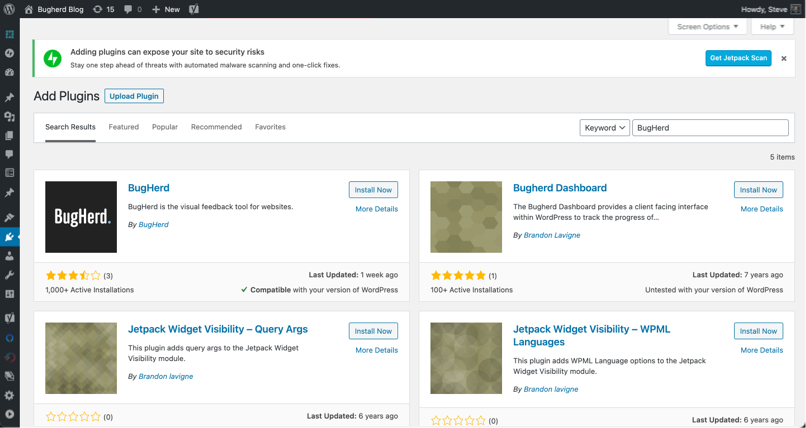
- Search for “BugHerd” and click Install Now, then Activate.
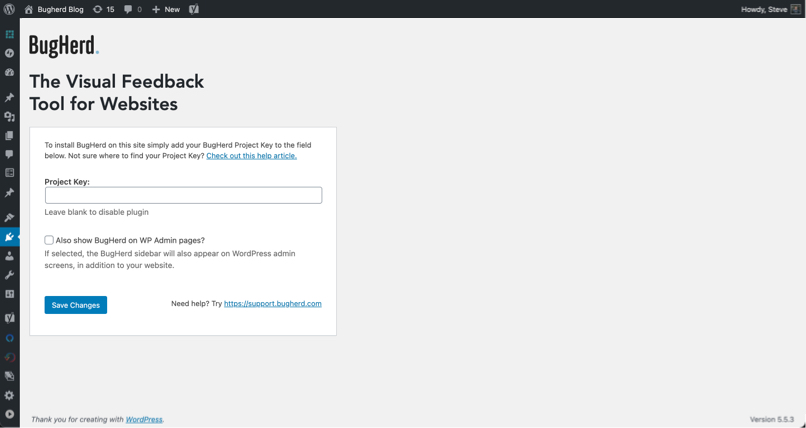
- Go to Settings BugHerd and enter your Project Key (find it in your BugHerd project under “Settings” > “General Settings”).
- Optionally enable “Show BugHerd on WP Admin pages” to collect feedback on Admin pages too.
- Open your site — the BugHerd sidebar appears on the right, ready for feedback.
Need help installing BugHerd? Follow the BugHerd WordPress Installation Guide for help or email support@bugherd.com
螢幕擷圖
BugHerd on your WordPress site
BugHerd on your WordPress editor
Enter your Project Key from BugHerd to enable the Plugin

Search for “BugHerd” in the plugins directory of your Wordpress Admin

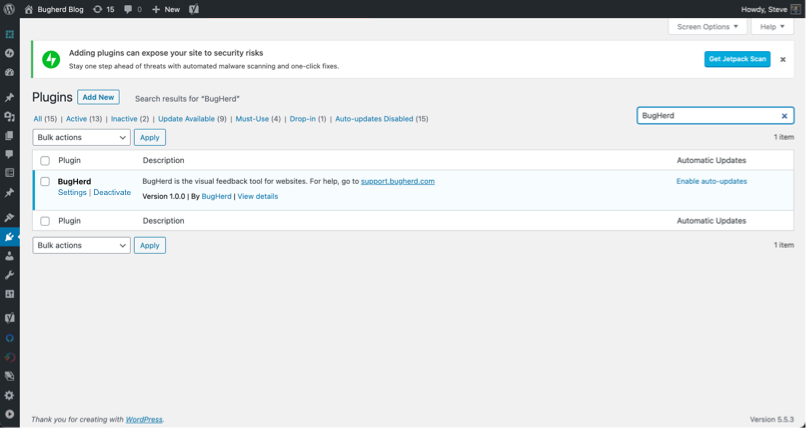
Configure the plugin from the Settings menu of clicking the settings link on the plugin page.
常見問題集
What does the BugHerd WordPress plugin do?
The BugHerd WordPress plugin lets your team and clients leave visual feedback directly on your WordPress website. They click any element on the web page, add a comment, and BugHerd automatically captures a screenshot plus user technical details like browser, OS, and device details. Every comment becomes a task on a Kanban board, or syncs two-way to your project management tool – Jira, Asana, ClickUp, Linear, Trello, and more.
Do I need a BugHerd account to use this plugin?
Yes. The plugin connects your WordPress site to a BugHerd project using a Project Key from your account. All plans include a free 7-day trial, no credit card required. See current BugHerd pricing
Do my clients need to install anything or create an account?
No. Clients receive a link to your BugHerd project and can leave feedback directly on the site in their browser – no account, no extension, no technical knowledge required. This is one of BugHerd’s most valued features for agencies working with non-technical clients.
Does the BugHerd plugin work on staging and local environments?
Yes. BugHerd works on staging URLs, local development environments, and live production sites. It also works on WordPress Admin pages if you enable that option, which is useful for flagging issues with post metadata, required tags, or page configuration before going live.
Does BugHerd have two-way Jira integration?
Yes. BugHerd has a native two-way sync with Jira. Feedback submitted on your WordPress site creates issues in Jira automatically. When your team updates status, adds comments, or resolves issues in Jira, those changes sync back to BugHerd. The same two-way sync is available for Asana, ClickUp, Linear, Monday.com, Trello, and GitHub. See all BugHerd integrations.
Will BugHerd conflict with Elementor, Bricks Builder, or other page builders?
BugHerd is compatible with most WordPress themes and page builders. If you experience a conflict on a specific page, add
?disable_bugherdto the URL to prevent BugHerd loading there. You can also define custom query parameters in the plugin settings.Can I use BugHerd on multiple WordPress sites?
Yes. All BugHerd plans include unlimited projects. Install the plugin on as many WordPress sites as you need, each connected to a different BugHerd Project Key, with no extra charge per site.
Can I keep collecting feedback after a site goes live?
Yes. BugHerd’s Public Feedback widget lets you collect ongoing feedback from real visitors on your live site without inviting them to a project. Designed as an always-on feedback channel for post-launch sites and ongoing maintenance retainers.
How do I find my Project Key in BugHerd?
Log in to your BugHerd account, open the relevant project, and go to Settings. Your Project Key is listed there. Click here for full instructions.
使用者評論


參與者及開發者

變更記錄
1.0.23
- Load the sidebar in the WordPress 7.1 editor
1.0.22
- Fix release publishing on the GitHub Actions runner
- Automate version bumps and WordPress.org releases
1.0.21
- Fix sidebar not appearing in the Gutenberg / site editor after updating to WordPress 7.1
1.0.20
- Updated plugin page imagery
- Bump stable tag
1.0.19
- Fix broken links in plugin directory description
- Bump stable tag
1.0.18
- Update plugin directory description in readme
- Bump stable tag
1.0.17
- Update readme tags
- Bump stable tag
1.0.16
- Bump tested support to v6.9.4
- Bump stable tag
= 1.0.14
* Users can add ?disable_bugherd (or any defined query params) to prevent BugHerd from loading. Useful where BugHerd might conflict with theme builders like BricksBuilder.
= 1.0.13
* Bump stable tag
* Updated readme
1.0.12
- Bump stable tag
- Updated readme
1.0.11
- Bump stable tag
- Updated readme
1.0.10
- Bump stable tag
- Bump tested support to v6.6
1.0.9
- Bump stable tag
- Updated readme
1.0.8
- Bump stable tag
- Updated readme
1.0.7
- Bump stable tag
- Updated readme
1.0.6
- Bump stable tag
- Bump tested support to v6.4
1.0.5
- Bump stable tag
- Bump tested support to v5.6.0
1.0.4
- Fix broken link on wordpress.org plugin page
1.0.3
- Bump stable tag
- Bump plugin version
1.0.2
- Bump tested up to version
- Bump stable tag version
1.0.1
- Add options page link to plugin actions.
- Updated plugin page content & screenshots.
1.0.0
- Initial release