外掛說明
BLAQ Alerts is a thin connector that links your WooCommerce store to
BLAQ (blaqreports). After you opt in and connect, BLAQ can surface chargeback
alerts and order insight for your store.
The plugin itself stores no card data and ships no bundled third-party
libraries. Access tokens are stored server-side in your site’s options and are
never exposed to the browser.
Key points:
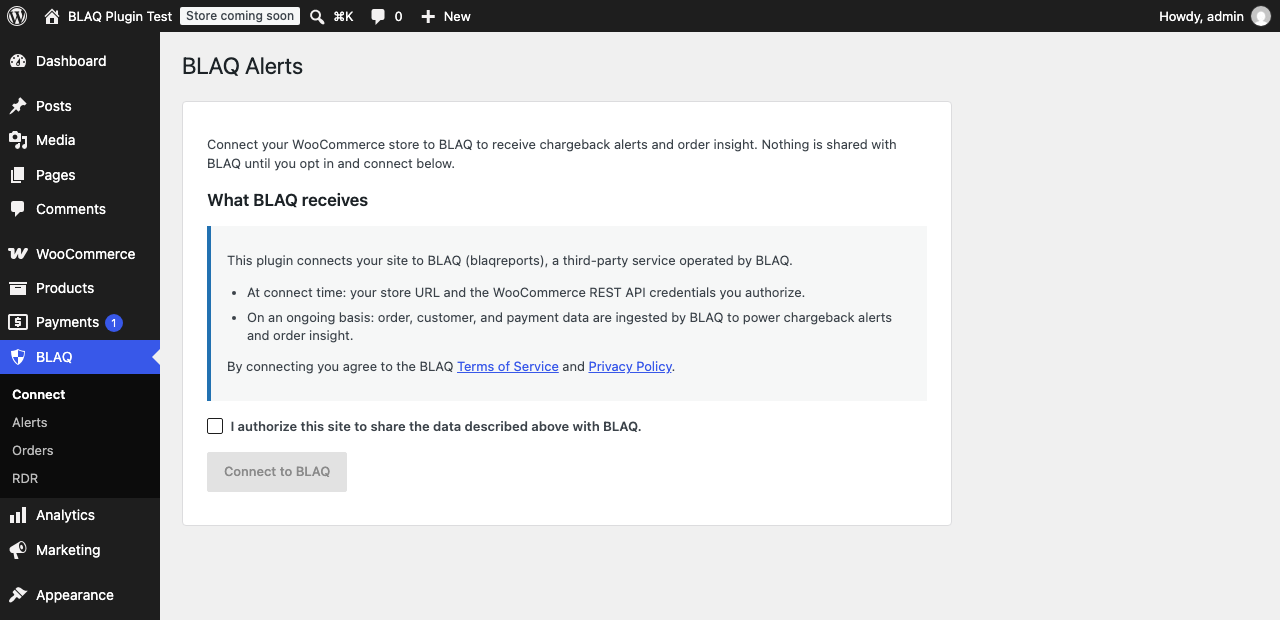
- Opt-in: nothing is shared with BLAQ until you check the consent box and connect.
- Secure handoff: connection uses a PKCE (S256) authorization flow; the plugin
never places secrets in a URL. - All admin actions are protected by WordPress nonces and capability checks.
External Services
This plugin connects to BLAQ (blaqreports), a third-party SaaS operated by
BLAQ, to provide chargeback alerts and order insight for your WooCommerce store.
What data is sent and when:
- At connect time — your store URL and the WooCommerce REST API credentials
you explicitly authorize during the connection handoff. This happens only
after you check the opt-in consent box and start the connection. - On an ongoing basis, after you connect — order, customer, and payment
information from your store is ingested by BLAQ so it can generate chargeback
alerts and order insight. This continues until you disconnect.
No data is transmitted to BLAQ before you connect. Disconnecting from the plugin
revokes the access token and deactivates the integration.
Service: BLAQ (blaqreports)
Base URL: https://app.blaqreports.com
Terms of Service: https://www.blaqreports.com/terms
Privacy Policy: https://www.blaqreports.com/privacy
螢幕擷圖
安裝方式
- Upload the plugin to
/wp-content/plugins/blaq-alertsor install it through the WordPress plugins screen. - Activate the plugin.
- Go to the BLAQ menu, read the data-sharing disclosure, check the consent box, and click Connect to BLAQ.
常見問題集
-
Does any data leave my site before I connect?
-
No. The connection (and any data transfer to BLAQ) only begins after you check
the opt-in consent box and click Connect. -
Where are my access tokens stored?
-
Server-side, in your site’s options table. Tokens are never sent to the browser
or exposed to JavaScript.
使用者評論
這個外掛目前沒有任何使用者評論。
參與者及開發者

變更記錄
1.1.0
- Security: disconnecting now deletes the WooCommerce API key BLAQ was issued. Previously the key stayed valid after disconnecting, leaving the store readable and writable.
- Refund and Cancel are now offered independently. An order awaiting payment can be cancelled but not refunded, and a paid order refunded but not cancelled; previously neither control appeared at all.
- Refund amounts are pre-filled with the balance still refundable on the order, and any amount already refunded is shown alongside.
- Refund and Cancel now report what actually happened, including the payment gateway’s own reason when it declines. Previously every attempt reported success.
- The Orders and Alerts filters now work. The order status filter is a list of the statuses BLAQ recognises rather than free text.
- Connecting with an email that already has a BLAQ account now explains that a confirmation email has been sent, instead of appearing to hang.
1.0.0
- Initial release: BLAQ connection/handoff (PKCE S256), status card, disconnect.