
外掛說明
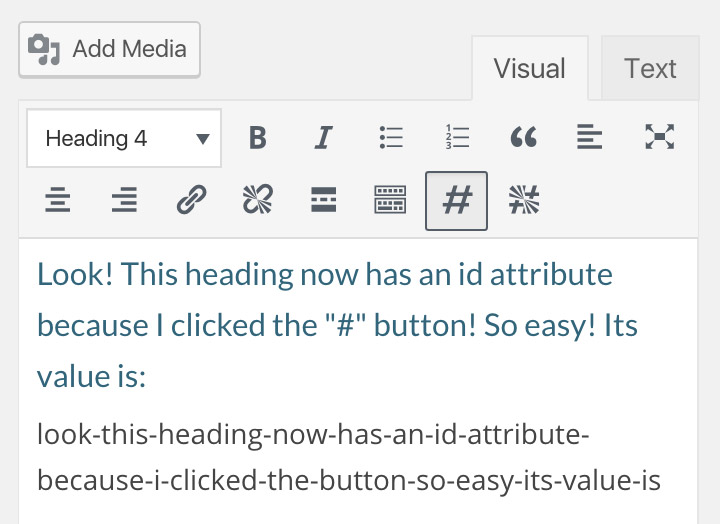
Adds two convenient buttons to easily add/remove an id attribute to any element when editor a Post, Page or custom post type that uses a standard TinyMCE editor. Uses the text contained within the element, cleaned up, to formulate a URL-friendly id.
螢幕擷圖
安裝方式
- Upload the entire
/addfunc-idsfolder to the/wp-content/plugins/directory or download it from the WordPress repository. - Activate the plugin through the Plugins menu in WordPress.
- Use the Add ID and Remove ID buttons as needed.
常見問題集
- What does the Add ID button do?
-
It adds an id attribute to the selected element (or the element with the cursor in it) using the text within. Note: not recommended for use on paragraphs.
- What does the Remove ID button do?
-
It removes any id attributes from the selected element (or the element with the cursor in it). Note: recommended for removing ridiculously long id attributes.
- Where can I see the ID/id attribute?
-
You can see it in Text view. Example:
This is rad
- Will AddFunc work in Text view?
-
Nope. It’s a TinyMCE thang.
- Does AddFunc IDs work on custom content types, the same as they do on Posts and Pages?
-
It works in any custom content type that has a standard TinyMCE editor.
- Does it really require WordPress 3.0.1 or later?
-
I have not tested it on earlier versions. I suspect it depends on the version of TinyMCE included with your WordPress install. Feel free to try it out and let us know if it works! 🙂
- Does AddFunc have a website?
-
Yes. addfunc.com
使用者評論

參與者及開發者


變更記錄
0.1
27 Jun 2017
- Released plugin on WordPress Repository
0.4
23 Jun 2017
- Improves cleanup of string used for id attribute
- Removes HTML tags
- Removes instances of multiple consecutive hyphens
_ Removes hyphens at beginning and end of string
- Adds button highlighting (button is highlighted if the selected element has an id attribute)
- Submitted plugin to WordPress repository as version 1.0
0.3
18 Jul 2016
- Improves TinyMCE button icons, using font instead of SVGs
0.2
?? ??? 201?
- Adds “Add ID” button to Tiny MCE
- Adds “Remove ID” button to Tiny MCE
0.1
29 Sep 2015
- Adds a button to TinyMCE