
外掛說明
這個外掛會追蹤使用於頁面的自動載入選項,並在頁面轉譯結束時儲存相關資料。它會產生一個顯示使用中的選項的陣列,然後在網站管理頁面會比較儲存於選項陣列中的自動載入選項,並顯示使用者瀏覽網站時沒有使用的自動載入選項;如果已瀏覽過網站上的全部頁面,或對應外掛已使用一週左右,就代表這類選項不需要自動載入。
外掛使用方式
安裝這個外掛後,請瀏覽整個網站,最佳方式是正常使用數日,或自行造訪網站前端或管理後台的全部頁面。之後前往外掛設定頁面,查看屬於「未使用」的選項。網站管理員可以判斷是否要移除未使用的選項 (可能是網站不再使用的外掛的執行個體),或將這類選項設定為不要自動載入。後者對網站影響較小,選項仍然存在,只是不會自動載入。
螢幕擷圖
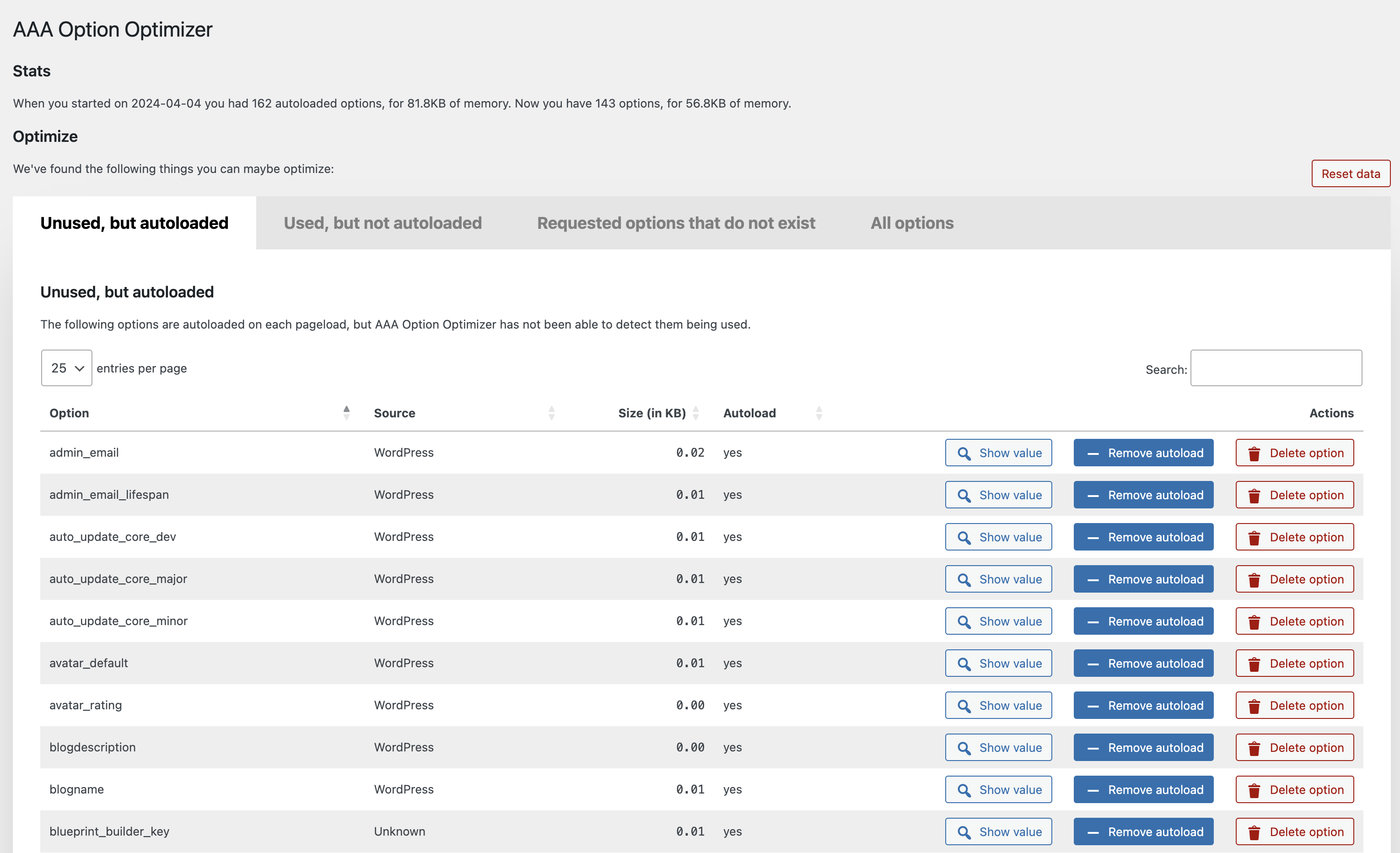
![外掛的 [全部選項] 分頁,這個分頁可供顯示並瀏覽全部選項](https://ps.w.org/aaa-option-optimizer/assets/screenshot-2.png?rev=3078030)
安裝方式
- 在 [安裝外掛] 頁面搜尋「AAA Option Optimizer」。
- 安裝外掛。
- 請耐心等待大約一週。如果急於知道結果,請自行點擊網站上的每個頁面,並確定點擊了網站前端及網站管理後台的每個頁面。
- 前往這個外掛的管理頁面,並對選項的使用方式進行最佳化。
常見問題集
-
為什麼這個外掛的名稱會以 AAA 為前置詞?
-
因為這個外掛需要監測已載入的選項,所以先於其他外掛載入會有所幫助。由於 WordPress 會依據字母順序載入外掛,以 AAA 命名外掛相當合情合理。
-
是否必須採取預防措施?
-
是!在進行任何操作前,請先備份網站資料庫。
-
在何處可以回報程式碼錯誤?
-
請在這個外掛的 GitHub 存放庫回報程式碼錯誤或程式碼建議,也歡迎在技術支援論壇提出問題。
關於安全性問題,請參照下一個問題。
-
如何回報安全性問題?
-
使用者可以透過 Patchstack 漏洞揭露計畫回報安全性問題。Patchstack 團隊會協助驗證、分類及處理任何安全性漏洞。點擊這裡回報安全性漏洞。
-
如何在這個外掛中為現有的外掛新增可供辨識的資訊?
-
請透過 GitHub 為這個外掛的指定檔案進行增補,並提出提取要求。
使用者評論


參與者及開發者
以下人員參與了開源軟體〈AAA Option Optimizer〉的開發相關工作。
參與者


變更記錄
1.6.1
- Fix infinite recursion in option access monitoring that could cause a fatal error in certain hosting environments.
= 1.6.0
- Replace using ‘all’ filter for monitoring option usage with ‘pre_option’ filter for better performance.
- Migrate tracked options data from a single wp_option to a custom database table for improved performance and reliability.
1.5.1
- Add “select all” checkbox.
- Fix table filtering by Source column.
1.5.0
- Prefix the Datatables script slug to avoid conflict with other plugins.
- Add MainWP to known-plugins list
- Add SliceWP to known-plugins list
- Add more known prefixes for WooCommerce options
- Fixed a bug in bulk-actions
1.4.0
- Performance improvements.
- Added bulk-actions to allow optimizing & deleting options in bulk.
- Added more known plugins.
1.3.2
- Performance fix: Do not autoload the plugin option.
1.3.1
- Fix JS error when deleting an option.
1.3
- Make plugin work with the latest autoload changes.
1.2.1
- Fix error in
known-plugins.json. - Prevent fatal error when there’s an error in
known-plugins.json.
1.2
Enhancements:
- Overhaul of the UX, implementing proper tabs, better buttons and more.
- Added a new “All options” tab, which, when you hit the button, loads all the options from the database and allows you to manage them.
- Added a “Reset data” button which resets the tracking data.
- Added a link to the Optimize Options page from the Plugins page.
- Much improved recognition of core WordPress options, themes and plugins under “Source”, thanks in part to pull requests from Rogier Lankhorst and system4pc.
- You can now also filter all tables by Source so you can more easily find the options you’re looking for.
- Many code and speed improvements under the hood, including adding a class autoloader and some i18n fixes.
1.1.1
Implement the missing functionality to create an option with value false when it’s being loaded but doesn’t exist.
1.1
The plugin now recognizes plugins from which the options came (thanks to a great pull by Rogier Lankhorst). If you’re a plugin developer and want your plugin’s options
properly recognized, please do a pull request on this file.
Small enhancements:
- Column width is now automatically determined which leads to better spacing.
- Action buttons are now centered in their columns.
Bugs fixed:
- If you removed autoload from or deleted an option, it’d be removed from the table but would be back when you paginated, that’s fixed – thanks to Jono Alderson for reporting.
- Fixed sorting by filesize by moving the
KBto the table heading, so that you can now properly sort numbers. - Fixed issue where an empty option would result in weird size output.
1.0.2
- Fixed a bug where the buttons wouldn’t work in a paginated state.
- Show the value of an option in a
popover, as suggested with a great pull request by @rogierlankhorst.
1.0.1
Fixed an error with values that are objects, not strings, which also caused sorting not to work for some people.
1.0
Initial release on GitHub and WordPress.org.