
外掛說明
Object Cache for APCu enables persistent object caching in WordPress using the APCu extension. It helps reduce database queries by caching objects in memory, speeding up page loads and backend performance.
Requires: APCu extension
How to Enable APCu Caching (cPanel)
⚠️ Make sure APCu is enabled on your server before activating this plugin.
Features:
* Uses APCu for WordPress object caching.
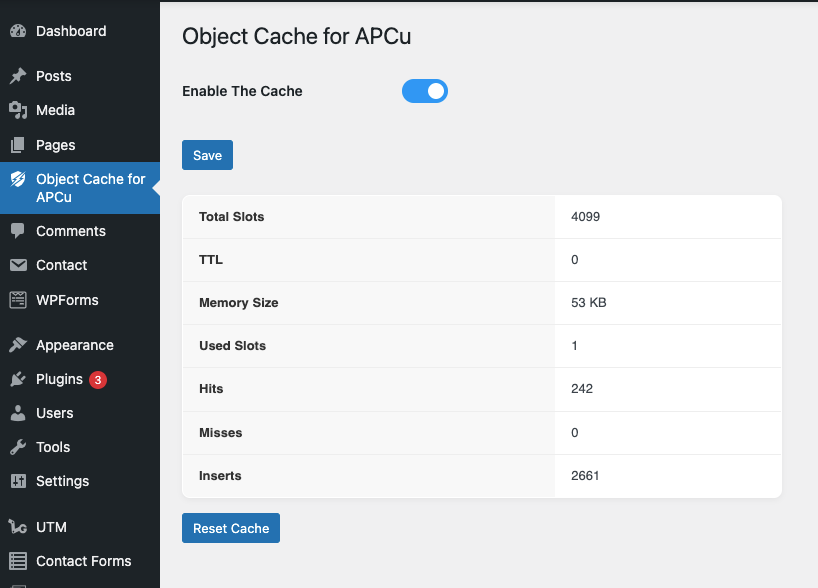
* Dashboard with real-time APCu stats (hits, misses, memory, inserts, etc.).
* Clear/reset cache with one click (protected by nonce).
* Automatically installs object-cache.php in wp-content.
* Clean, professional admin interface.
螢幕擷圖
安裝方式
- Make sure the APCu PHP extension is installed and enabled.
- Upload the plugin to the
/wp-content/plugins/directory. - Activate the plugin from the ‘Plugins’ menu in WordPress.
- Visit Settings > APCU Cache to view stats or clear the cache.
常見問題集
-
What if APCu is not installed?
-
You’ll see a warning asking to enable the APCu extension via terminal or cPanel. You can install it using PECL:
pecl install apcu.
How to Enable APCu Caching (cPanel) -
Only if your host supports APCu.
-
Is this suitable for production?
-
APCu is ideal for single-server setups like small VPS or staging/dev sites. It’s not recommended for multi-server/clustered environments.
使用者評論
這個外掛目前沒有任何使用者評論。
參與者及開發者

變更記錄
1.0.0
- Initial release
- Object cache via APCu
- Admin dashboard with stats and reset