

外掛說明
Make your WooCommerce variable products behave just like affiliate/external products! Super simple to set up:
- Enable the ‘Affiliate Product’ option in the ‘Inventory’ tab of your Variable Product.
- Put in the product URL and optionally customize the cart text.
- Optionally add affiliate/external URLs for each variation in the ‘Variations’ tab.
螢幕擷圖
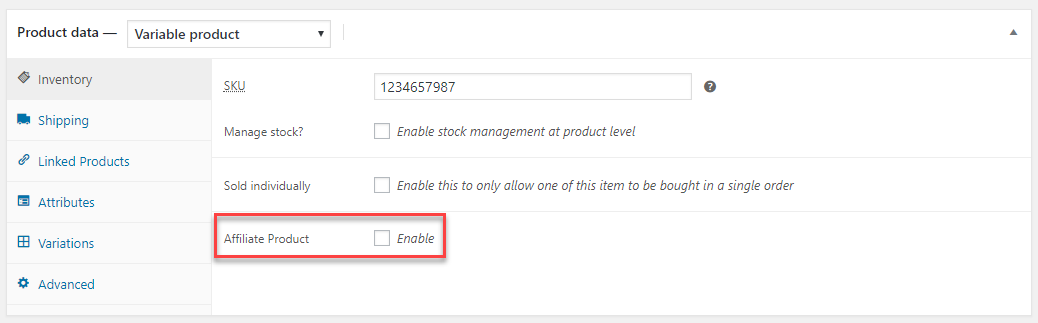
The “Affiliate Product” option. 
After enabled. 
Variation URLs.
安裝方式
There are 2 ways to install AMB Variable Affiliate Products for WooCommerce:
From the repo
Navigate to Plugins -> Add New, search for “AMB Variable Affiliate Products for WooCommerce”, install and activate.
Manually install
Download the ZIP file from the plugin repo, then navigate to Plugins -> Add New -> Upload Plugin in your WordPress admin dashboard. Upload the plugin and activate.
This guide is helpful: https://www.wpbeginner.com/beginners-guide/step-by-step-guide-to-install-a-wordpress-plugin-for-beginners/.
1. Enable the ‘Affiliate Product’ option in the ‘Inventory’ tab of your Variable Product.
2. Put in the product URL and optionally customize the cart text.
3. Optionally add affiliate/external URLs for each variation in the ‘Variations’ tab.
Set up after install
After the plugin is installed, you’ll find a new option “Affiliate Product” in the “Inventory” tab for your variable products. Just enable that option, put in your affiliate product URL, and optionally customize the cart text. You can also optionally add individual affiliate URLs for each variation in the “Variations” tab.
常見問題集
-
How can I import Variable Affiliate Products?
-
Go to WooCommerce > Settings and enable the “Enable importing mode” option. Then, when importing the products, you’ll need to import these custom fields:
- “_amb_vap_prod” – import “yes” or “no.
- “_amb_vap_prod_url” – import the parent product affiliate URL.
- “_amb_vap_prod_cart_text” – import the text for the buy button.
- “_amb_wpvap_variation_url” – import the variation affiliate URL.
-
Can I leave the parent product URL empty?
-
No, the parent product URL is required if “Affiliate Product” is enabled. This URL is used as a fallback URL in the case that a variation that’s added to the cart does not have an individual affiliate URL.
-
Do my products still go into the shopping cart?
-
No, if “Affiliate Product” is enabled, the item will automatically be removed from the cart, the cart notice message will be dismissed, and the user will be redirected to the affiliate URL.
使用者評論


參與者及開發者

變更記錄
1.0.0
- Initial release.
1.0.1
- Fix readme
- Remove assets folder from plugin
1.0.2
- Fixed importing option for product types that aren’t “variable” or “variation”.