

外掛說明
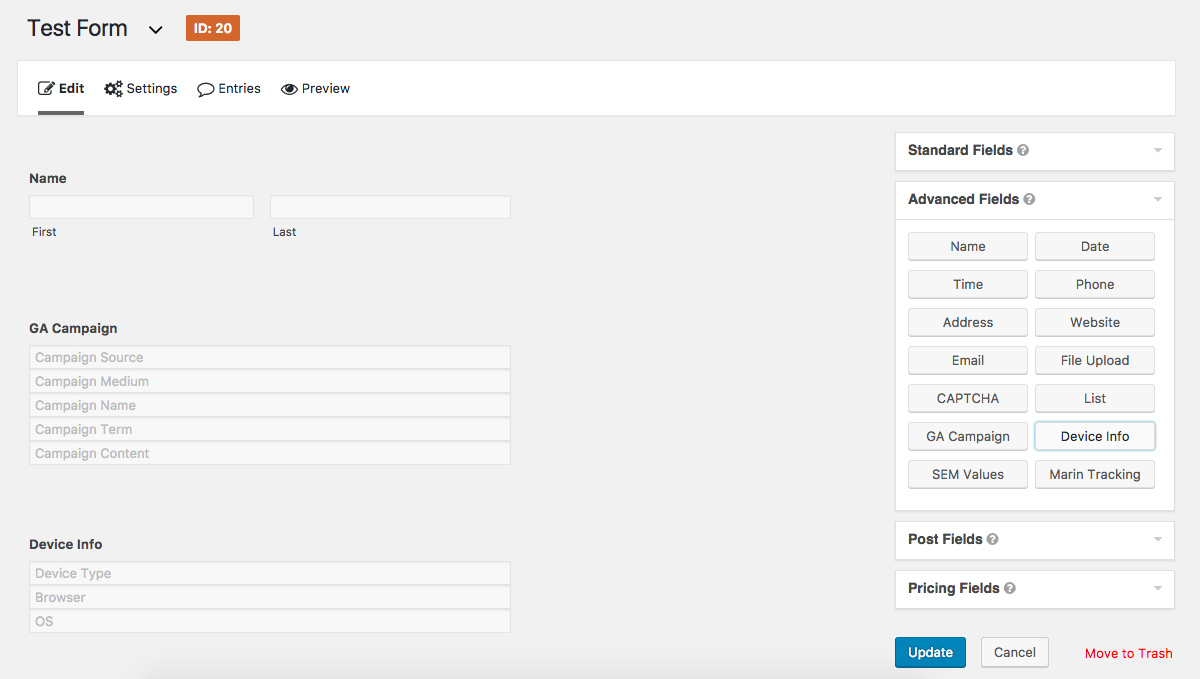
This plugin adds advanced fields to Gravity Forms that collect campaign and device data and attaches the data to form entries.
The plugin can be configured to track first touch or last touch attribution and the campaign query string parameters are customizable.
The plugin currently supports:
- Google Analytics UTM Parameters
- Google AdWords (GCLID and MatchType)
- Device Information (browser, OS, device type)
- Marin (KWID and Creative ID)
- Google Analytics Client ID
螢幕擷圖

安裝方式
- Upload the plugin files to the
/wp-content/plugins/gf-campaign-fieldsdirectory, or install the plugin through the WordPress plugins screen directly. - Activate the plugin through the ‘Plugins’ screen in WordPress
- Use the Forms->Settings->Campaign Info screen to configure the plugin
常見問題集
- Installation Instructions
-
- Upload the plugin files to the
/wp-content/plugins/gf-campaign-fieldsdirectory, or install the plugin through the WordPress plugins screen directly. - Activate the plugin through the ‘Plugins’ screen in WordPress
- Use the Forms->Settings->Campaign Info screen to configure the plugin
- Upload the plugin files to the
- Does this plugin include Gravity Forms?
-
No, you must purchase your own license of Gravity Forms
使用者評論

2018 年 9 月 10 日
it crushed the website right after installing the plugin. by the way i am already using Gravity Form plugin and wanted to install this Add-on. which i did and it crushed the whole website and giving me 500 Error page. which is sucks since its our production website and live on the web. so i had to quickly login to FTP and to delete the plugin manually, since it was not opening WP admin pages or any other page.

2018 年 7 月 16 日
Just install, add to the form, and it works!
參與者及開發者

變更記錄
2.4
- Bug related to fields not being hidden
2.3
- Updated JS variable names
- Bug fixes
2.2.1
- closing tag fix
2.2
- Set UTM_SOURCE as required parameter to set data
2.1
- Refactored code to used GF_Field_HiddenGroup class
- Moved dependancies to “lib” folder
- Added Google Analytics Client ID field
2.0
- Added JS-Cookie library
- Refactored Campaign data storage
- Added config for Cookie Lifetime
- Improved first / last touch attribution capabilities
- Fixed WhichBrowser 500 error
- Added Google Tag Manger capabilities
1.1.6
- Configuration Error fix
1.1.5
- Fixed JS errors
1.1
- Fixed readme.txt format issues
- Fixed version inconsistencies
1.0.5
- The initial release.