
外掛說明
BrainsMatch WordPress plugin is creating a list of Soulmates and Oponnents
for the current user based on posts and comments rating.
Blog reader is pressing one of the “Agree” or “Disagree” buttons located
under each post or comment and can see other users who have similar or polar
views listed in the widget box.
The users are calculated across all the blogs where the plugin is installed.
The plugin is based on BrainsMatch innovative real-time collaborative filter
(patent pending). More information about BrainsMatch Engine and API can be
found in the API section
of BrainsMatch Technology Blog.
Features
Adds “Agree (0), Disagree (0)” after each post and comment.
Counts the votes, analyses them and calculates proximity between Users across all the blogs where plugin is installed.
Publish results in a Widget box.
Languages
Please visit the BrainsMatch site for additional language packs.
螢幕擷圖


安裝方式
- Just unzip and upload the “bmcs” folder to your ‘/wp-content/plugins/’ directory
- Activate the plugin through the ‘Plugins’ menu in WordPress
- Optionally publish the widget
After the installation you will see Agree (0) Disagree (0) appears under each comment or post on your Blog.
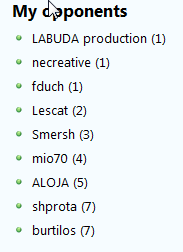
In the Widget section of your admin interface you will notice two BrainsMatch widgets:
Soulmates and Opponents. You can chose to publish either of them or both.
If the Blog has small amount of users it is better to publish only soulmates as a list of opponents will most likely mirror a list of soulmates upside down.
Requests for CSS customizations are considered support requests.
常見問題集
- What will guest see in the widget box?
The Soulmates and Opponents of the blog admin
- Why I see nothing in the widget box?
Non of your registered users has voted for anything on any of brainsmatch enabled blogs.
- Why I see the same people in Soulmates and in Opponents boxes?
If there is small amount of users you will see the same people as your Soulmates and as Opponents but in reverse order, naturally.
- I see people in the widget box which did not vote for anything on this blog yet, why?
Brainsmatch will calculate proximity across all blogs at which those users were active, hence we can calculate their proximity already!
- Is support free?
-
Visit http://wp.brainsmatch.com and post the support questions as well as features requests as comments
使用者評論
這個外掛目前沒有任何使用者評論。
參與者及開發者

變更記錄
- 1.0 – Released 01 July 2009 by shprota
- Initial version
- 1.0.1 – Released 05 July 2009 by shprota
- Fixed the plugin path for voting to work correctly
- 1.0.2 – Released 13 July 2009 by shprota
- Fixed the incorrect voting data when adding new post or comment