
外掛說明
Ordered Thumbnails is a WordPress plugin that allows you to display thumbnails based on images that have been attached to a post. This plugin also allows you to specify which thumbnail appears next to a post with multiple images by ordering the thumbnails in the Gallery tab of the WordPress “Add Images” lightbox and placing the thumbnail desired in the first position.
To style how the thumbnail appears on your page, you may pass optional CSS class names to the plugin, which will then be applied to the <img> tag returned. Alternately, by setting the display parameter to “false”, Ordered Thumbnails will return the thumbnail URL, height, and width as a PHP array to be used however you see fit. If no images have been attached to a post, the plugin fails gracefully and returns “false”. This plugin will work anywhere the WordPress posts loop is used and works particularly nice in combination with the_excerpt for archive pages.
螢幕擷圖
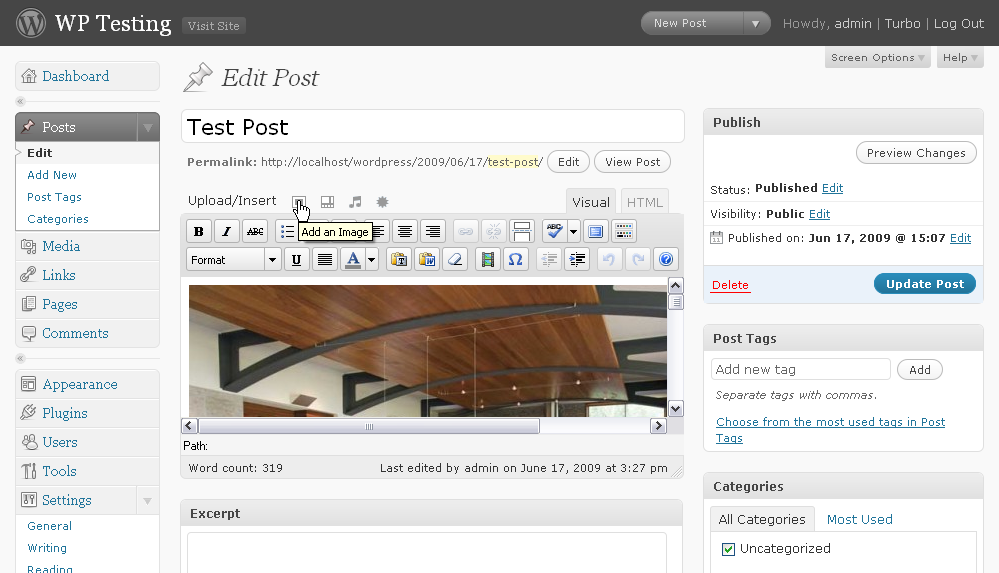
To change which thumbnail is used for a post with multiple images, click the “Add an Image” icon in the post edit screen. 
Click the “Gallery” tab and then drag the image thumbnail you want to appear for the post to the top of the order. You may also change the order number to “1”. Then click “Save all changes”.
安裝方式
- Upload
ordered-thumbnails.phpto the/wp-content/plugins/directory. - Activate Ordered Thumbnails through the “Plugins” menu in WordPress.
- Place
<?php ordered_thumbnails(); ?>in your templates within the WordPress post loop.
The plugin takes two optional parameters:
By default, <?php ordered_thumbnails(); ?> behaves exactly like <?php ordered_thumbnails( 'true', '' ); ?>. Change the 1st parameter to “false” if you want the plugin to return the thumbnail data as an array, rather than display an <img> for the thumbnail. The 2nd parameter accepts CSS class names you would like to assign to the thumbnail <img> (only used if param. 1 is “true”). All options will return “false” if no image is attached to the post.
For posts with more than one image attached, you can pick which thumbnail you want to use by ordering the image in the post’s gallery. While editing a post, click the “Add an image” button and then click the “Gallery” tab in the lightbox. Re-order your images by dragging the image thumbnail you want to appear for the post to the top of the order. You may also change the order number to “1”. Click “Save all changes”. See the Screenshots for a visual guide on how to do this. Note that this will NOT reorder images in the actual post.
Using the plugin with the_excerpt in your archive.php template works nicely to show thumbnails next to your archived posts.
常見問題集
- Why can’t I change which thumbnail is used?
-
While the plugin will show thumbnails and will not break in WordPress 2.5, the ability to order the Gallery images was not added until 2.6.
- Will this plugin work for images not uploaded through WordPress?
-
Short answer: no. This plugin relies on the way images are attached to a particular post when they are uploaded through WordPress. Images hotlinked from other sites (or even linked to a place on your own server not controlled by WordPress) are not tied to the post as attachments in the WordPress database.
- Some of my images are just image links, some are uploaded through WordPress. Will this plugin break on my site?
-
No, but the plugin will only show thumbnails for images uploaded through WordPress. For posts with no WordPress uploaded images, no thumbnail will appear.
- How does Ordered Thumbnails work?
-
This plugin works by first looking for any attachments in the
wp_postsdatabase table that have apost_parentID that matches the current post and as a second step for posts with multiple image attachments, returning the attachment with itsmenu_orderfield set to “1”. If no image attachments match the current post ID, the plugin returns “false”.
使用者評論
這個外掛目前沒有任何使用者評論。
參與者及開發者

變更記錄
1.0
- Initial release version.