

外掛說明
Courier ratio and COD fraud check for Bangladeshi WooCommerce stores, right inside your orders. No API token or sign-up is needed. Made by WPSaleHub, the team behind WooEasyLife.
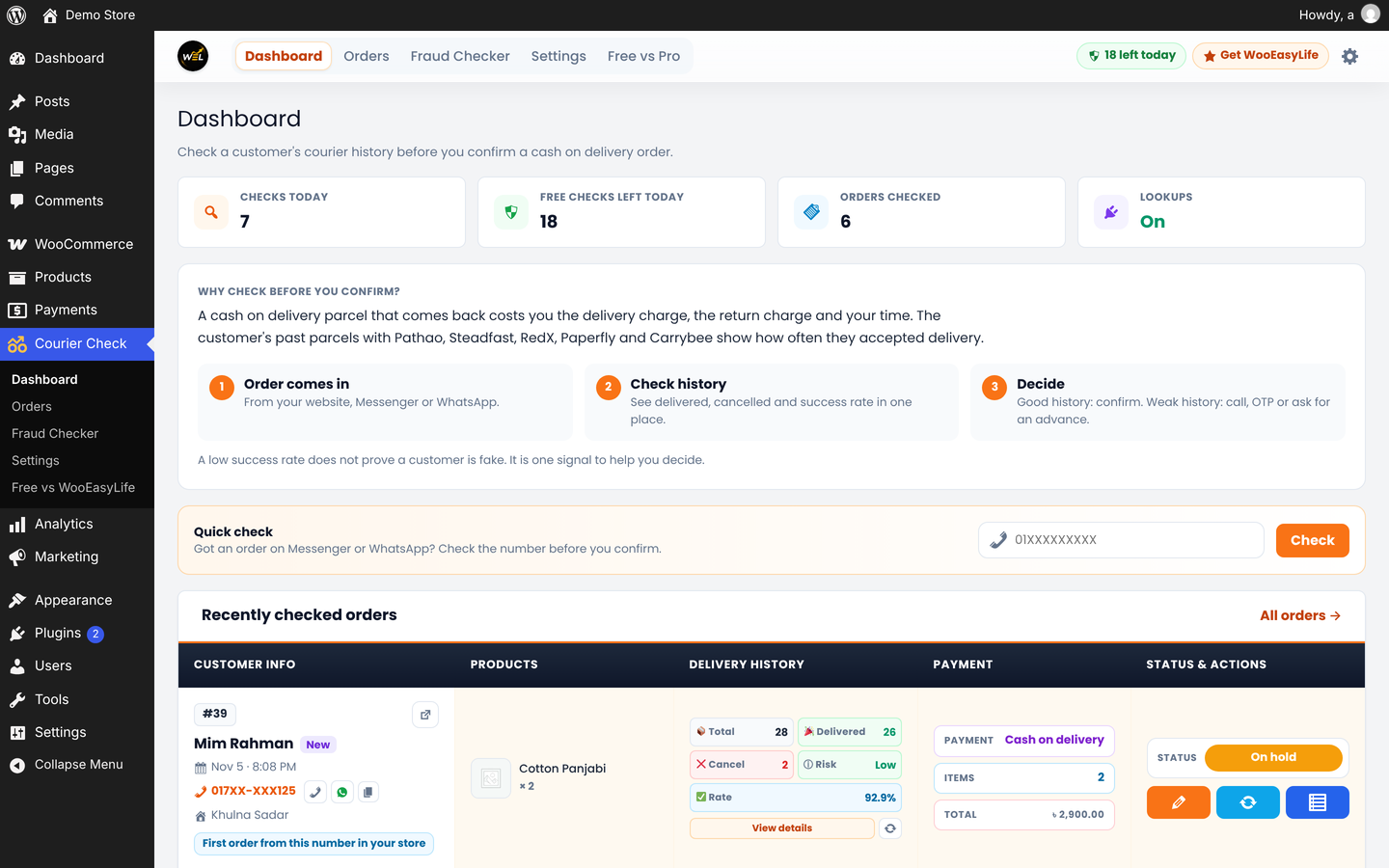
When a cash on delivery (COD) order comes in, the first question is: will this customer actually receive the parcel? EasyLife Courier Check shows the customer’s previous courier history next to the WooCommerce order, so you can decide before you ship:
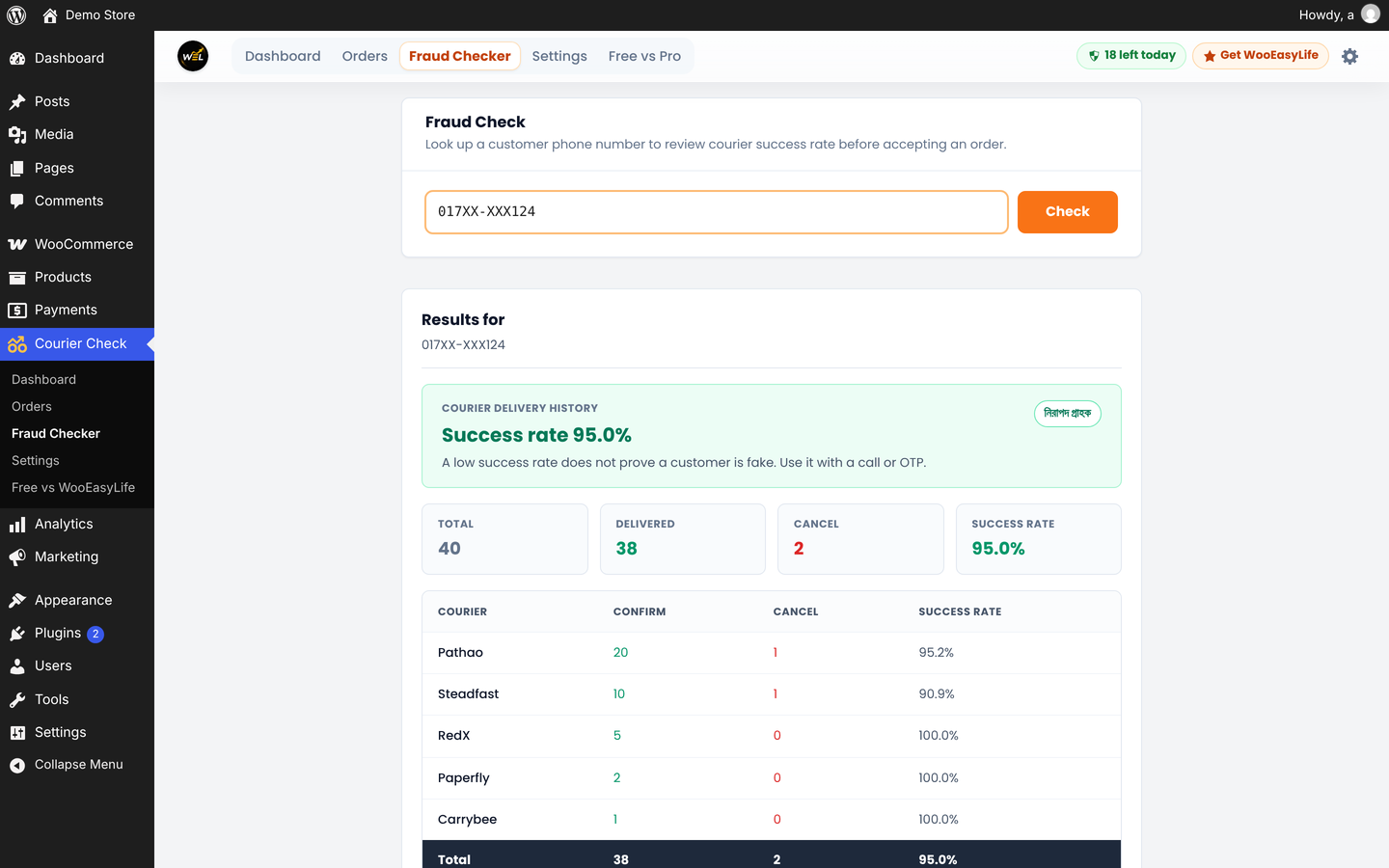
- Total parcels, delivered and returned: per courier and combined
- Delivery success ratio (%) with a simple risk label (low / medium / high)
- Couriers covered: Pathao, Steadfast, RedX, Paperfly and Carrybee
It works like the courier ratio / fraud checker websites Bangladeshi sellers already use, but you don’t have to copy and paste phone numbers. The result appears on the order itself.
Important: a low success ratio does not prove that a customer is fake, and a high one does not guarantee delivery. Use it as one signal, together with a phone call, OTP or advance payment, before you decide.
Features
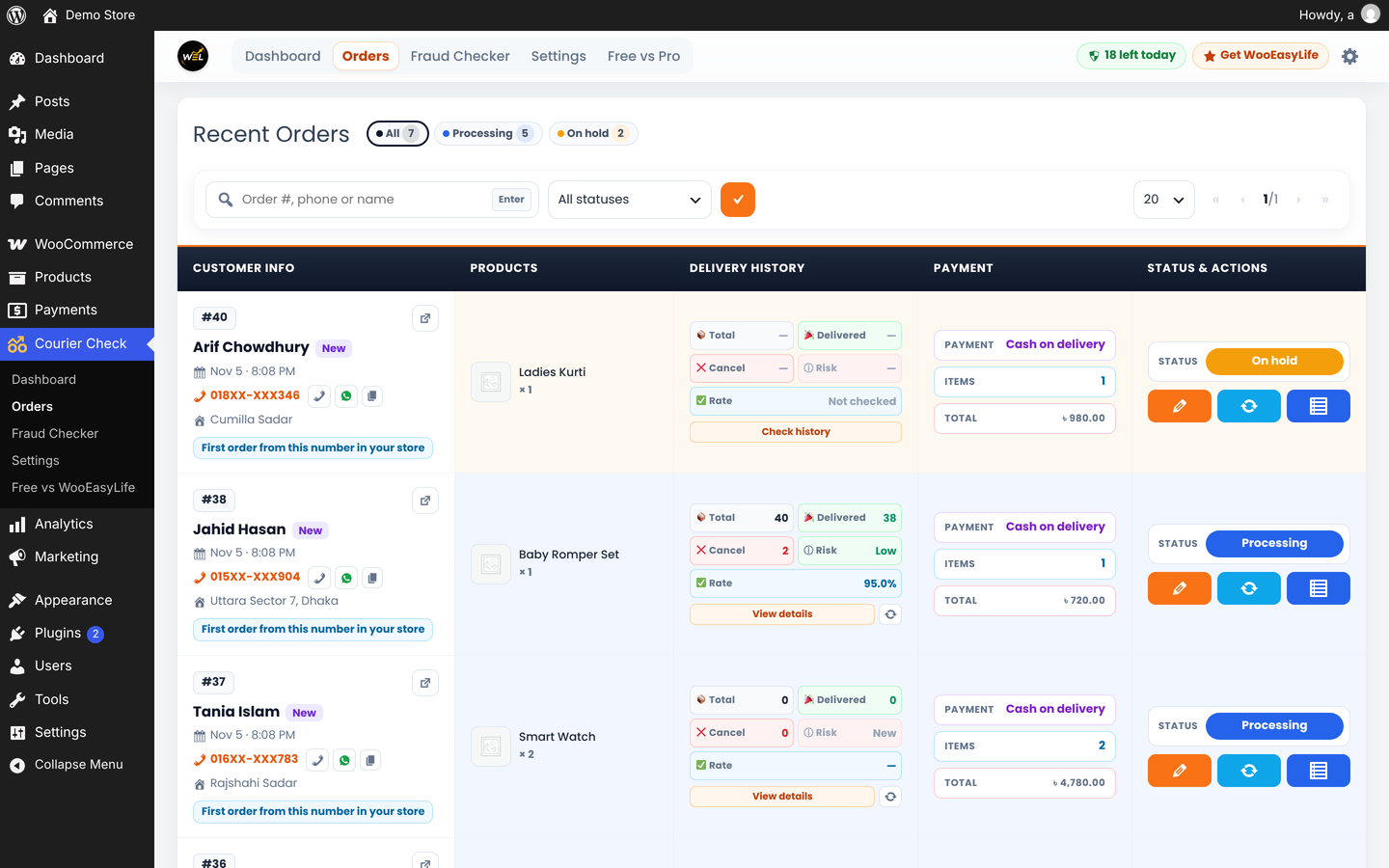
- Delivery history on every order: a “Delivery history” column on the WooCommerce orders list and a box on the single order screen.
- One-click check: click “Check history” and the result is saved on the order. The same order is not looked up twice unless you refresh it.
- Fraud history details: see delivered and returned parcels per courier in a clean popup.
- Phone number checker: look up any Bangladeshi mobile number before you accept a Facebook, phone or WhatsApp order.
- Orders screen: a focused orders list with status filters, search by order number or phone, and delivery history side by side.
- Your own store’s history too: see how many earlier orders the same phone number placed in your store, how many were completed or cancelled, and a “possible duplicate” warning when the same number ordered within 24 hours. This runs on your own data, without any external call.
- Order details at a glance: product images and quantities, delivery charge, order source (website, manual, Facebook or other UTM source), and a customer-note marker.
- Faster confirmation calls: see the mobile operator from the number, then call, open WhatsApp or copy the number in one click. Numbers that are not valid Bangladeshi mobiles are flagged.
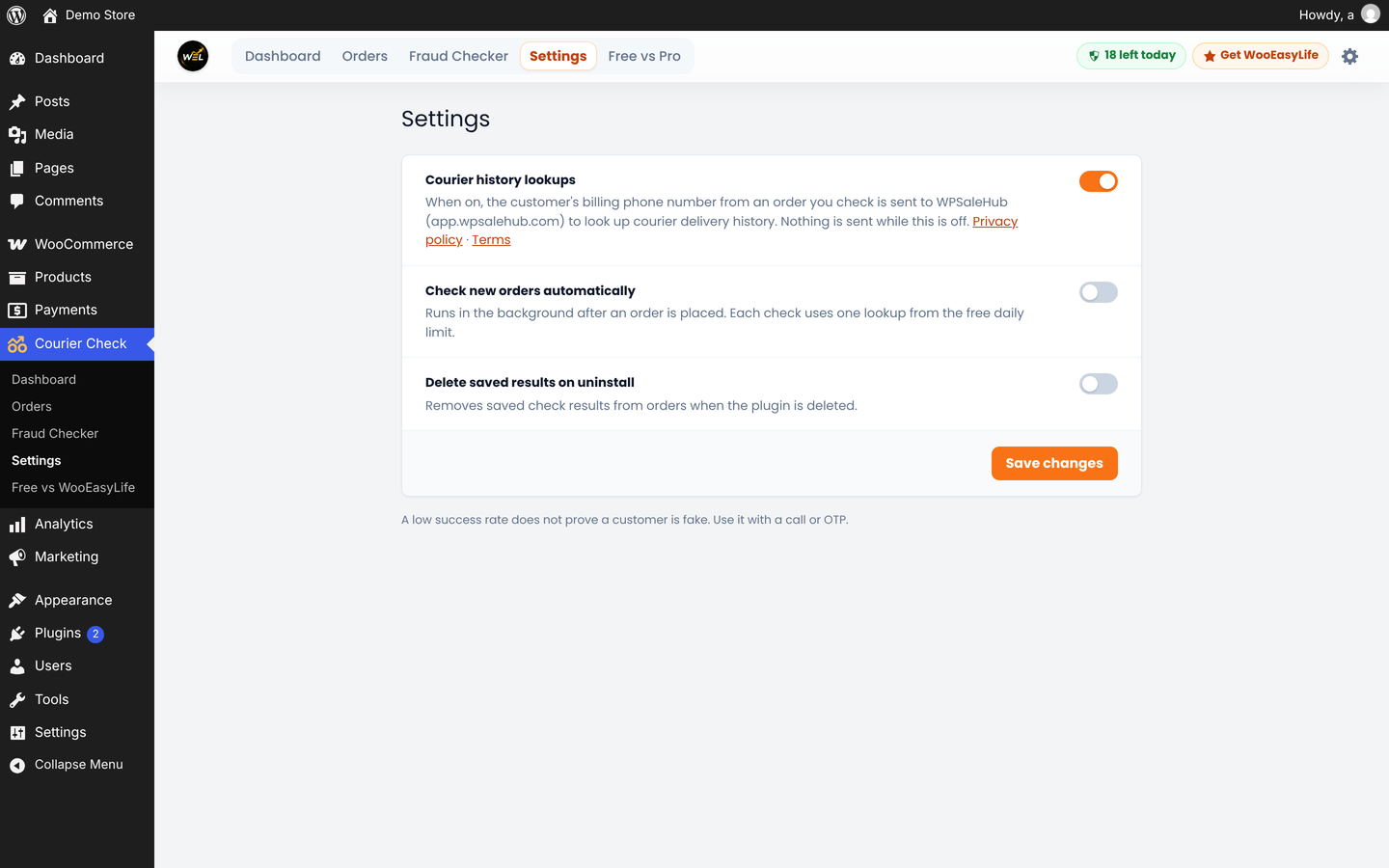
- Optional automatic check: check new orders in the background (Action Scheduler), never during checkout.
- No API token, no account: turn on lookups in Settings and start checking.
- HPOS compatible: works with WooCommerce High-Performance Order Storage and with legacy post storage.
- Privacy first: nothing is sent until you turn lookups on. Suggested privacy-policy text is included.
- Lightweight: no front-end scripts and no external fonts. Assets load only on its own and WooCommerce order screens.
Who is it for?
- Bangladeshi WooCommerce stores that sell with cash on delivery
- Facebook and F-commerce sellers who also run a WooCommerce site
- Agencies and developers who build WooCommerce stores for Bangladeshi clients
How it works
- Install and activate the plugin. WooCommerce must be active, and a “Courier Check” menu appears in the admin sidebar.
- Go to Courier Check Settings and turn on lookups. Nothing is sent to any server until you do this.
- Open Courier Check Orders (or any WooCommerce order) and click Check history. Click View details to see delivered and returned parcels per courier.
- Use Courier Check Fraud Checker to look up any phone number before you accept an order.
- Optional: turn on automatic checks for new orders.
The free service has a daily lookup limit. When the limit is reached, checks resume the next day. Nothing in the plugin is locked or disabled.
Want more?
This plugin works on its own. If you need more, the full WooEasyLife service by WPSaleHub adds courier auto entry (Pathao, Steadfast, RedX, Paperfly), checkout OTP, blacklist, bulk history checks and order management. See WooEasyLife pricing.
External services
This plugin connects to the WPSaleHub courier history service to look up a customer’s delivery history.
- What is sent: the customer’s billing phone number from the order you check (or the number you type in the Fraud Checker), and your site’s address so the daily limit can be applied. Data is sent only after you turn on lookups and a check runs.
- Where: https://app.wpsalehub.com (operated by WPSaleHub, Bangladesh).
- Why: to return delivered and returned counts and the success ratio across supported couriers.
- Terms of use: https://app.wpsalehub.com/wooeasylife/courier-check/terms-of-service
- Privacy policy: https://app.wpsalehub.com/wooeasylife/courier-check/privacy-policy
The plugin also adds suggested text to your site’s Privacy Policy guide (Settings Privacy) so you can tell your customers about this check.
螢幕擷圖


安裝方式
- In your WordPress admin go to Plugins Add New, search for “courier ratio” or “EasyLife Courier Check”, then install and activate it. You can also upload the zip through Plugins Add New Upload Plugin.
- Make sure WooCommerce is installed and active.
- Go to Courier Check Settings, read the notice, and turn on lookups.
- Open Courier Check Orders and click Check history on any order.
常見問題集
-
Is it free?
-
Yes. The plugin is free and the lookup service includes a free daily limit. No feature in the plugin is locked.
-
Do I need an API token or an account?
-
No. You don’t need to register anywhere or paste an API token. Turn on lookups in Settings and start checking.
-
Which couriers are covered?
-
Pathao, Steadfast, RedX, Paperfly and Carrybee. Some numbers or couriers may have no data.
-
What is a courier success ratio?
-
It is the share of a customer’s previous parcels that were delivered, out of all their parcels across the supported couriers. For example, 8 delivered out of 10 is an 80% success ratio.
-
Does a low success ratio mean the customer is fake?
-
No. It means previous parcels were often returned. Call the customer, use OTP or ask for an advance before deciding.
-
Can I check a phone number without an order?
-
Yes. Go to Courier Check Fraud Checker and enter any Bangladeshi mobile number.
-
Will it slow down my checkout?
-
No. Nothing runs on your storefront or checkout. Checks run only in the admin, either when you click or, if you turn it on, as a background job after the order is created.
-
Does it work with High-Performance Order Storage (HPOS)?
-
Yes. It supports both HPOS and the legacy post storage.
-
What happens when the daily limit is reached?
-
The check shows a message, and lookups resume the next day. Results you already checked stay on your orders.
-
Is my customers’ data stored?
-
The result is saved as order meta in your own database. See the External services section above for what is sent and the WPSaleHub privacy policy.
使用者評論
這個外掛目前沒有任何使用者評論。
參與者及開發者

變更記錄
1.0.0
- First release: courier history column and order box, Orders screen with product images, store history, duplicate warning, call and WhatsApp buttons, Fraud Checker, Dashboard, Free vs WooEasyLife page, optional automatic checks, HPOS support.