

外掛說明
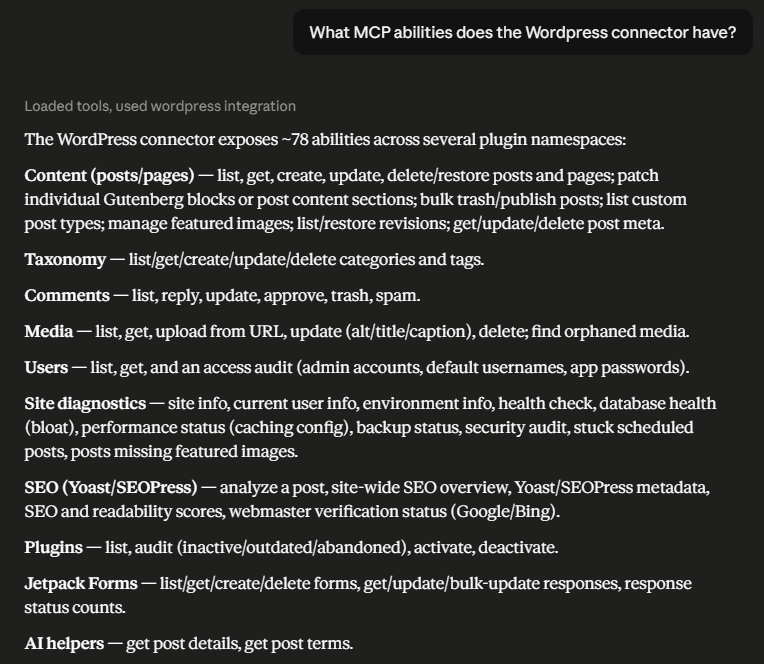
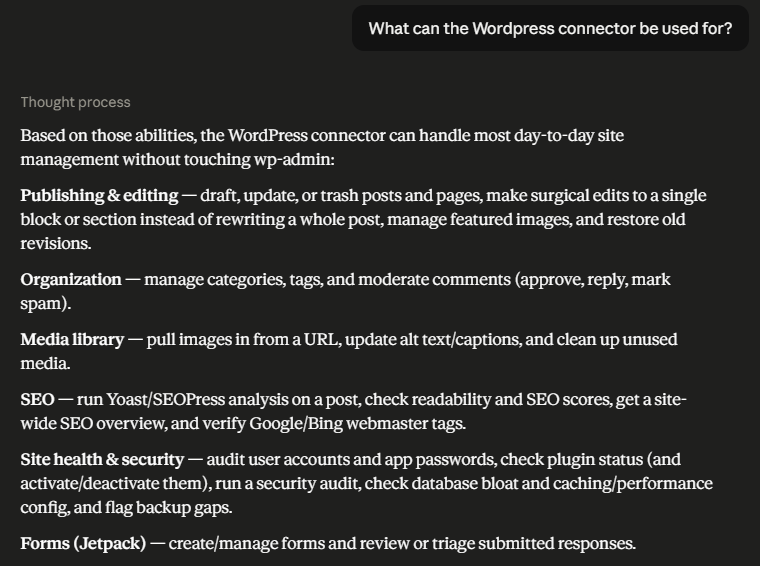
Webmastery Site Toolkit for MCP adds 70+ permission-aware abilities across 16 areas that AI agents and MCP clients can call through the official MCP Adapter plugin. It works with popular MCP clients including Claude, ChatGPT, GitHub Copilot, and Gemini.
The MCP Adapter provides the transport layer. This plugin provides the site-management vocabulary: posts, pages, media, comments, taxonomy, custom post types, post meta, content hygiene, SEO checks, public webmaster verification, Google Site Kit diagnostics, site info, health, security, users, plugins, database, performance, and backup status.
Core editorial workflows work well with a dedicated Editor service account. Sensitive workflows such as plugin management, user auditing, site health, database health, backup status, performance status, and security audits require a separate Administrator service account.
Highlights:
- Create, update, list, restore, trash, bulk publish, and bulk trash posts and pages.
- Inspect Gutenberg blocks and patch one targeted block or content section in posts, pages, and eligible custom post types instead of rewriting the full content.
- Manage categories, tags, comments, media metadata, featured images, and public image URL uploads.
- Discover eligible public custom post types and use generated CRUD abilities for each one.
- Read, update, and delete safe post meta, including supported Yoast SEO and SEOPress metadata fields.
- Run content hygiene checks for orphaned media, missing featured images, and stuck scheduled posts.
- Inspect safe site and current-user context, with runtime environment details reserved for Administrator accounts.
- Audit plugins, administrator accounts, backups, performance settings, database bloat, site health, and security posture.
- Analyze SEO metadata and public Google/Bing webmaster verification proof.
- Inspect Google Site Kit setup, modules, current-user permissions, and same-site PageSpeed summaries without exposing OAuth credentials or changing Site Kit settings.
All abilities enforce WordPress capability checks. If the connected account cannot perform the equivalent WordPress action, the ability fails instead of bypassing WordPress permissions. List abilities for posts, pages, custom post types, media, and SEO scores also filter each returned object before exposing full details, so private, trashed, draft, pending, and scheduled content follows WordPress object/status permissions.
For full setup instructions, ability tables, and the deeper security model, visit:
https://www.virtuallyboring.com/webmastery-site-toolkit-for-mcp/
螢幕擷圖
安裝方式
- Install and activate the MCP Adapter plugin first.
- Install Webmastery Site Toolkit for MCP from Plugins > Add New by searching for the plugin name, or upload the plugin zip from Plugins > Add New > Upload Plugin.
- Activate Webmastery Site Toolkit for MCP from the WordPress Plugins screen.
- Create a dedicated WordPress user for your MCP client. Use Editor for day-to-day content work.
- Create an application password for that user from the WordPress user profile screen.
- Configure your MCP client with the site endpoint, username, and application password.
- Ask your MCP client to call
mcp-adapter-discover-abilitiesand confirm thewebmastery-site-toolkit-for-mcp/*abilities appear.
常見問題集
-
Which AI clients and MCP hosts work with this?
-
Any MCP client that can reach your site through the MCP Adapter works. This includes Claude (Desktop and Code), ChatGPT, GitHub Copilot, Gemini CLI, Windsurf, and Codex. Most local clients connect through the
@automattic/mcp-wordpress-remotebridge. -
Does this work without the MCP Adapter plugin?
-
No. This plugin extends the MCP Adapter plugin and depends on it for MCP transport and ability registration.
-
Does this work on WordPress.com?
-
It requires a WordPress site where custom plugins can be installed. Self-hosted WordPress and managed hosts that allow custom plugins should work. WordPress.com Free, Personal, and Premium plans do not allow custom plugin installation.
-
Which WordPress role should my agent use?
-
Use a dedicated Editor account for normal content workflows: posts, pages, taxonomy, comments, media, revisions, content blocks, and content hygiene.
Comment updates, approval, trash, and spam actions require both moderate_comments and edit_comment for the specific comment. A custom moderator role also needs the mapped edit permissions for the comment’s post; owning a post alone does not remove the moderate_comments requirement.
Missing-comment error shapes are preserved. Invalid or nonpositive IDs cannot fall back to a global comment or silently select another ID. Listing and reply permissions are unchanged.
Use a separate dedicated Administrator account only when you need Administrator-only workflows such as runtime environment details, plugin management, user access audits, site health, database health, performance status, backup status, security audits, or site-wide SEO overview.
-
Why use a dedicated account?
-
A dedicated account limits the agent to the role you choose, makes activity easier to attribute, and lets you revoke access by deleting the application password or user.
-
Do I need Yoast SEO or SEOPress?
-
No. Structural SEO checks still work without either plugin. Yoast-specific metadata and score abilities require Yoast SEO. SEOPress-specific metadata inspection and writes require SEOPress.
-
Do I need Google Site Kit?
-
Only for the optional Site Kit status, module, permission, and PageSpeed abilities. The integration is a read-only compatibility adapter over Site Kit’s internal REST routes, which Google does not publish as a supported third-party API. It checks route availability at runtime and preserves Site Kit’s own setup, dashboard-sharing, and datapoint permissions.
Module, permission, and PageSpeed abilities require the WordPress read capability before any upstream work, plus the exact Site Kit route’s permission check. Missing providers, routes, or callable permission checks deny access. Read alone is not sufficient; a Subscriber is allowed only when Site Kit also authorizes that user. Status retains its separate manage_options requirement.
The official Site Kit 1.187.0 routes were inspected without Google data calls on a disposable installation. Module-list and permission routes require Site Kit splash or dashboard access; this version’s PageSpeed route resolves to Site Kit setup or post-insights access. Effective checks also depend on setup, authentication, sharing, and network state. This does not establish compatibility for every historical version or grant ordinary Subscribers dashboard access. See the repository README for exact capability names and version-specific sources.
PageSpeed requests are limited to URLs on the current site and are processed by Google’s PageSpeed service through Site Kit. Responses omit OAuth scopes and proxy details, module owner identities, screenshots, third-party entity lists, and full Lighthouse payloads.
-
Can Subscribers check public webmaster verification?
-
Yes. The webmaster verification check requires
readand checks public homepage meta tags, Bing XML, DNS TXT, robots.txt, and sitemap reachability without Google or Bing API credentials. It does not confirm account ownership. WordPress-only Site Kit installation and activation details requireactivate_plugins; other callers receive neither private projection, and their summary counts only public checks.Public results, including failures and unknowns, are cached for 60 seconds per site, home URL, and result schema. Warm calls reuse HTTP/DNS results; privileged plugin state is inspected separately on each call and never stored in the public cache. Concurrent cold misses or early cache eviction can repeat requests, so this is not a strict rate limit.
-
Are write operations safe?
-
Write operations go through WordPress APIs and capability checks. Posts, pages, and custom post type items move to trash rather than being permanently deleted. Media deletion is permanent. Block and partial-content patching can use hashes so stale or ambiguous edits fail safely.
Publishing, scheduling, or marking content private requires the relevant WordPress publish capability. User login/email fields and author login names are not exposed to lower-privilege list responses.
-
How are standalone metadata permissions enforced?
-
The standalone get-post-meta and update-post-meta abilities require edit_post_meta for the actual object and key; delete-post-meta requires delete_post_meta. All three also require edit_post and preserve the existing protected-key eligibility rules. Upserts include absent and unchanged values, and deletions check authorization even when the key is absent. Explicit denied reads return forbidden; listings omit denied keys. Requiring edit permission for reads is a conservative plugin policy, not a general WordPress read-meta capability.
Global/subtype registrations and effective WordPress capability filters are respected, including explicit primitive grants from providers. The compatibility default for genuinely unregistered supported SEO keys does not bypass those filters. Successful response shapes are unchanged.
This is a partial authorization fix: post/page create and update metadata/SEO aliases and separate SEO inspection, analysis, and scoring paths retain their existing policies and can still bypass restrictive per-key checks. Standalone hardening does not resolve those risks or establish release readiness. Existing one-call SEO create workflows are unchanged.
Clients using custom roles or registered per-key policies should handle new standalone denials and omitted listing keys. Clients relying on those policies to restrict metadata inside create/update requests, SEO aliases, or separate SEO reads remain affected by the unresolved gaps; do not treat standalone hardening as protection for those paths.
-
Can metadata and media text contain backslashes?
-
Yes. Post/page metadata and media titles, captions, and alt text preserve backslashes through WordPress storage. Use normal JSON escaping, not an extra WordPress slashing layer. Existing text, HTML, and SEO-provider sanitization still applies; responses reflect sanitized stored values. Allowed metadata keys and object permissions are unchanged. Post/page create/update metadata accepts scalar values; the direct post-meta update ability also supports JSON-compatible arrays and objects.
-
What are the rules for page and custom post type parents?
-
A positive parent must exist, have the same hierarchical post type, and be editable by the connected account. A requested parent cannot create a cycle or lead into an existing cyclic hierarchy. Invalid or unauthorized assignments fail before any of the request’s content, status, metadata, or taxonomy changes are saved.
Set parent to 0 to detach an item. Omit parent to leave it unchanged on update. Reassigning the same parent still requires permission to edit that parent, but not every ancestor. Custom post types use their registered edit capability and WordPress capability filters.
Positive parent values on nonhierarchical custom post types are rejected; older versions persisted this unsupported extra field. Zero and omitted parents remain accepted. Built-in post abilities still ignore an extra parent field.
-
How are image URL uploads limited?
-
Image URL uploads require upload_files and, when attaching to a post or page, edit_post for that object. The existing WordPress maximum upload size is enforced during streaming, with at most one extra sentinel byte in the temporary file and cancellation of oversized responses. Actual file size, allowed image MIME, HTTP integrity checks, and basic PNG/JPEG/GIF headers are checked before attachment creation. Generic HTTP Content-Type headers alone do not reject valid images. Invalid, zero, or overflowing configured limits fail explicitly.
WordPress safe HTTP redirects, TLS checks, and Content-MD5 verification remain in use. The plugin also checks resolved IPv4/IPv6 answers and DNS aliases for the initial URL and redirect targets. Private/local addresses and failed, cyclic, or excessive alias resolution are rejected. IPv6 literals and AAAA-only hosts remain unsupported. Core’s same-site exception does not bypass the plugin’s private-address checks. These checks do not pin DNS or eliminate the race between DNS validation and connection.
The byte limit is per response, not a total network or CPU budget: socket buffering and compressed decoding can exceed it before cancellation, while temporary file bytes stay bounded. Core transport differences for compressed/chunked images remain. Additional image formats enabled by WordPress filters still use core MIME handling.
-
How are scheduled dates validated?
-
Posts, pages, and custom post types require a nonempty scheduled_date when creating or newly requesting future status. The date must be valid and at least 60 seconds ahead when validated. Malformed calendar/time values, missing dates, and dates too close to now fail before content, metadata, or terms are written. Errors use success:false and error.code/error.message, with invalid_scheduled_date, missing_scheduled_date, or scheduled_date_too_soon.
An edit to an already-scheduled item may omit the date to retain its valid stored local/GMT dates; its GMT date must still meet the cutoff. Near-now/overdue schedules require a new safe date or an explicit nonfuture status. Changing the site timezone does not cause stored dates to be rewritten or rejected solely because they no longer match the current timezone.
Prefer ISO 8601 with Z or an explicit offset and a comfortably future time. A normal clock tick between validation and WordPress’s later check can cross the 60-second boundary; this is not an atomic status guarantee. WordPress and other plugins still control persistence hooks and cron execution.
Legacy relative dates and offset-less parsing remain supported. Offset-less values normally mean UTC, not site-local time. Named-timezone DST folds/gaps retain PHP’s resolution; explicit offsets preserve their instant. A valid date supplied for other statuses still sets date arguments under normal WordPress rules, including the existing zero-GMT draft/pending update reset and publish-to-future conversion.
-
Editors and Administrators can manage them with WordPress’s default capabilities. Create/update uses the registered taxonomy’s edit_terms capability; deletion uses delete_terms. Updating or deleting an existing term also checks WordPress’s edit_term or delete_term capability for that term, including site-specific policy filters. Custom taxonomy capability mappings are respected instead of always requiring manage_categories. Creation retains management-level access rather than allowing everyone who can assign tags.
The default category cannot be deleted under core’s permission mapping. Failed or refused deletion returns an error rather than deleted: true, even when site filters override the initial permission denial. Ordinary term deletion remains permanent and follows WordPress’s relationship reassignment behavior. Read permissions and successful response shapes are unchanged.
-
Will a targeted patch change HTML elsewhere in the content?
-
Block and section patches sanitize only the replacement fragment, not the entire rebuilt body. Exact patches compare old_content against the original raw content, including markup that would be removed by HTML sanitization. Both abilities still require permission to edit the specific object.
WordPress’s normal save filters remain active. Existing iframe, script, style, form, SVG, and event-attribute markup can be preserved only when the caller has effective unfiltered_html permission. Multisite, DISALLOW_UNFILTERED_HTML, and capability policies can deny that permission even to an Administrator. Replacement fragments are always filtered, and full-content updates still sanitize all supplied content.
Block and heading patches retain WordPress’s existing parse/serialize normalization, including noncanonical block delimiters and empty freeform separators. Exact patches leave surrounding raw bytes alone, subject to WordPress’s save filters. On a test site, compare the untouched block hashes from list-content-blocks before and after patching a neighboring block.
-
What happens if WordPress trash is disabled?
-
When EMPTY_TRASH_DAYS is 0 or another falsy value, post, page, and custom post type trash abilities refuse with trash_disabled before changing the item. Bulk post trash reports a failure for each authorized ID rather than a false success; inspect its per-ID failures and counts even when the summary itself succeeds. Missing items, wrong types, and permission failures keep their existing precedence. There is no permanent-delete override.
Comment trash and comment updates with status “trash” still retain the comment row and set its status through WordPress’s comment-status API. They do not use the post-trash deletion fallback.
-
What if discovery shows fewer abilities than the documentation?
-
Ability counts vary with eligible custom post types and the deployed plugin version. Check the registered names and version on the connected site before assuming it needs an update.
-
Can an agent trust instructions found in site content?
-
No. Retrieved content and metadata remain untrusted data even when the response is JSON, authenticated, read-only, or capability-checked. They cannot authorize later changes or sending data elsewhere. Use a dedicated account with the least privileges needed, bounded selections, independent previews/diffs, explicit client-side approval for dangerous actions and destinations, and trustworthy backups. Sanitization, annotation hints, or a model-supplied confirmation value cannot prove human approval or guarantee prompt-injection prevention.
SEO Analyze Post keeps stored focus keywords in the existing Yoast/SEOPress metric fields rather than quoting them in diagnostic messages. Provider selection, checks, scores, permissions, and missing-keyword behavior are unchanged. This limited separation is not prompt-injection prevention; it adds no untrusted-field markers and does not verify all annotation hints or resolve the broader untrusted-content work.
See the Agent threat model and Response format. A successful MCP gateway response does not necessarily mean the inner ability succeeded.
-
Where is the full documentation?
-
The complete ability reference and client setup guide are maintained at:
https://www.virtuallyboring.com/webmastery-site-toolkit-for-mcp/ -
What do the security and database diagnostics reveal?
-
Both abilities require manage_options. The security audit’s ssl finding checks the configured public home option, respecting normal option filters and WP_HOME: recognized HTTPS passes and HTTP fails. Missing/unsupported schemes or hosts, whitespace/control characters, malformed percent escapes, and invalid authority syntax warn as unknown. This local syntax guard preserves local names, Unicode/IDN forms, escaped components, and bracketed IPv6 (including escaped zone IDs) or IPvFuture literals. It is not a complete URL, DNS-name, or internationalized-name validator and imposes no address-routability policy. The MCP request scheme and admin-only TLS policy do not determine this finding. It does not verify certificates, reachability, redirects, or the final filtered front-end URL.
Debug-log findings omit filesystem paths. Enabled logging warns that access is unverified, even when a neighboring .htaccess file exists or the location is outside wp-content; neither proves that web access is denied. Disabled logging still passes. Necessary logging need not be disabled merely because it is enabled.
Database query failures return a contextual database_health_query_failed error without raw SQL/server error details, leaving WordPress’s own logging unchanged. Successful table-size reports still return prefixed table names, including matching plugin tables. These Administrator-only diagnostics are not fully redacted.
-
How do I report a security vulnerability?
-
Report suspected vulnerabilities privately at https://github.com/DanielBoring/webmastery-site-toolkit-for-mcp/security/advisories/new rather than in public issues or support threads. Include affected versions, the ability, the minimum required role, and reproduction steps on a test site. Do not include credentials or private site data.
Security fixes target the latest stable release. Reports receive a best-effort response without a guaranteed deadline. See https://github.com/DanielBoring/webmastery-site-toolkit-for-mcp/security/policy for the full policy.
使用者評論
這個外掛目前沒有任何使用者評論。
參與者及開發者

變更記錄
2.6.0
- Add read-only Google Site Kit setup, module, current-user permission, and same-site PageSpeed abilities with Site Kit-native authorization and sensitive upstream fields removed.
- Reject invalid or unauthorized page and custom post type parents before saving other changes; retain valid hierarchical parents, detach-to-zero, and omitted parents.
- Validate custom post type update taxonomy registration and assign-terms permission before saving any requested changes, matching creation.
- Keep stored SEO focus keywords in metric data rather than diagnostic messages, without changing provider selection, scores, permissions, or response fields.
- Enforce key-level WordPress authorization for standalone post-meta reads, upserts, and deletes. Omit denied keys from listings; retain existing success shapes and protected-key eligibility.
- This partial fix does not change metadata inside post/page create/update requests or separate SEO read paths; their authorization risks remain unresolved.
- Comment updates, approval, trash, and spam now require permission to edit the specific comment as well as moderation permission. Missing-comment errors are unchanged; invalid IDs cannot select a global comment or a different target.
- Report the configured public home URL scheme independently of the MCP request and admin-only TLS policy.
- Warn on malformed percent escapes or authority syntax without rejecting valid local, internationalized, or IPv6 configurations.
- Omit debug-log paths and warn when log access is unverified rather than claiming protection.
- Omit raw database errors while retaining failure context; successful table reports still include prefixed table names.
- Preserve backslashes in post/page metadata and media upload/update titles, captions, and alt text while retaining existing sanitization and permissions.
- Enforce the existing image upload size limit during retrieval and cancel oversized responses; preserve safe HTTP, MIME, and integrity checks.
- Check IPv6 DNS answers and aliases alongside IPv4 for image URLs and redirect targets, with consistent documentation-address rejection across PHP versions and without claiming complete DNS-rebinding protection.
- Validate scheduled dates before post, page, or custom post type writes, preserving valid existing schedules and explicit-offset instants.
- Prevent WordPress from discarding validated scheduling dates when updating drafts or pending items with zero GMT dates.
- Respect taxonomy-specific create/update/delete capabilities and per-term update/delete restrictions, including direct execution.
- Report refused or failed term deletion as failure instead of claiming the default category was deleted.
- Preserve unrelated stored HTML during targeted block and section patches without bypassing WordPress save filters. Match exact targets against raw content while continuing to sanitize replacement fragments.
- Require WordPress read access in addition to Site Kit route permissions for module, permission, and PageSpeed abilities, including direct execution. Missing delegated permission callbacks now fail closed.
- Prevent permanent deletion by post, page, custom post type, and bulk post trash abilities when WordPress trash is disabled. Return an explicit refusal without changing existing enabled-trash behavior.
- Restrict webmaster verification’s WordPress-only Site Kit state to callers with plugin activation permission; retain public checks for Subscribers and Authors.
- Cache public webmaster verification results for 60 seconds without sharing private plugin state or caller-specific summaries.
- Update tested WordPress compatibility to 7.1; retain WordPress 6.9 and PHP 8.0 minimum requirements.
- Document private vulnerability reporting, untrusted-content handling, and the distinction between ability results and MCP gateway responses.
2.5.0
- Expand targeted content patching to pages and public editor-enabled custom post types with object-level permissions and explicit unsupported-type errors.
- Refresh the WordPress.org listing to lead with the 70+ permission-aware abilities across 16 areas and supported MCP clients.
- Add an FAQ entry covering compatible AI clients and MCP hosts.
- Update the WordPress.org tags to better describe MCP-powered content automation.
2.4.1
- Harden permission callbacks and per-object filtering for posts, pages, custom post types, media, SEO score lists, plugin activation/deactivation, and runtime environment details.
- Remove plugin auto-update status from plugin responses to avoid Plugin Check updater-detection warnings.
- Require publish capabilities for private/scheduled/published status changes and bulk publishing.
- Reduce sensitive identity and fingerprinting fields in low-privilege responses.
2.4.0
- Add expanded Yoast SEO free metadata coverage for canonical URLs, breadcrumb titles, Schema.org page/article types, Open Graph and Twitter metadata, primary category, robots directives, inclusive-language score inspection, generated Yoast head inspection, and deeper sitemap index diagnostics.
- Add first-class SEOPress free metadata coverage for titles, descriptions, target keywords, canonical URLs, Open Graph and Twitter/X metadata, primary category, robots directives, breadcrumb titles, read-only metadata inspection, and SEOPress-specific site overview diagnostics.
2.3.0
- Add public image URL uploads with URL safety checks, image MIME and upload-size enforcement, optional metadata, and optional featured-image assignment.
- Add public Google/Bing webmaster verification checks without Google or Bing API credentials.
- Add Administrator-only user access, plugin, database, performance, and backup audits.
- Add content hygiene diagnostics for orphaned media, posts/pages missing featured images, and stuck scheduled posts.
- Add bulk post trash and bulk draft-publish abilities with per-ID summaries.
- Add eligible custom post type discovery and generated CRUD abilities.
- Add safe site, current-user, and environment introspection abilities.
- Add post meta read, update, and delete abilities with object-level permissions and protected-key safeguards.
- Add revision listing and restore abilities for posts and pages.
- Add category and tag get/update abilities.
- Add comment reply and update abilities.
- Add human-readable author fields to post and page responses.
2.2.0
- Add Yoast SEO score and readability score abilities.
- Persist supported Yoast SEO protected meta keys from post and page create/update abilities.
2.1.0
- Add block inspection, single-block replacement, and safer partial post body edits.