

外掛說明
With this add-on, you will have the opportunity to enhance the security of your website.
It will allow you to decide which pages can receive a special level of security, authenticating access to your content with JWT and limiting access to the posts you want.
You can also select a different token signature for each of the pages you want to have high security, giving your website an extra layer of protection.
螢幕擷圖



安裝方式
- Upload the plugin folder to the
/wp-content/plugins/directory. - Activate it from the WordPress ‘Plugins’ menu.
- Configure the options from the Plugin’s ‘Settings’ page.
常見問題集
-
Do I need to configure anything to use JWT?
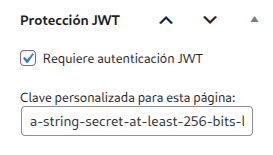
Yes, you must access (you can do this through the JWT Selector Authenticator administration panel) the pages you want to secure and activate the ‘Require JWT authentication’ checkbox and set the signature you want for that page. -
Is it compatible with all themes?
Yes, as long as you use the standard WordPress functions to render content.
使用者評論
這個外掛目前沒有任何使用者評論。
參與者及開發者

變更記錄
1.4
- Second version of the plugin. Remember configure correctly the JWT’ signatures. Must be the shame used to sign the token.