

外掛說明
Tagged Gallery enables you to easily generate a gallery in any post or page based on tagged media.
Useage
- Tag a image in your media library. For this example we use ‘Spring2013’
- Make a page or a blogpost where you want to display your images and tag that post/page with ‘tg:Spring2013’ and Tagged Gallery will create an image gallery of alle the images tagged with ‘Spring2013’
- Remeber to set thumb size in admin interface 🙂
Dependency
- [Tag Pages] (https://wordpress.org/extend/plugins/tag-pages/ “Tag Pages”) by Bjorn Wijers
- [WordPress Media Tags] (http://www.typomedia.org/wordpress/plugins/wordpress-media-tags/ “WordPress Media Tags”) by Typomedia Foundation
Tagged Gallery does NOT connect to any external servers. Just getting tags and images from your WordPress database
Demo
Click here for a [demo] (http://www.bergh.me/bilder/ “demo”)
0.7
- PHPImagic is completely replaced with jQuery
- New view image feature created in jQuery. That now fit to screen.
- Support for mobile screen rotation. Image resizes to fit window resize
Initial upload
Todo
- Next/previous function
- user defined CSS
- Lose pendency to Tag Pages and WordPress Media Tags
Version Log
0.7
- PHPImagic is completely replaced with jQuery
- New view image feature created in jQuery. That now fit to screen.
- Support for mobile screen rotation. Image resizes to fit window resize
0.6.1
Bugfix – in 0.6 i added the jQuery and forgot to add the values from Tagged Gallery settings.
0.6
Thumbs are now generated by jQuery and not phpimagick
0.5
螢幕擷圖

This is the thumbs in a gallery 
In the admin interface you can define the size of your thumbs 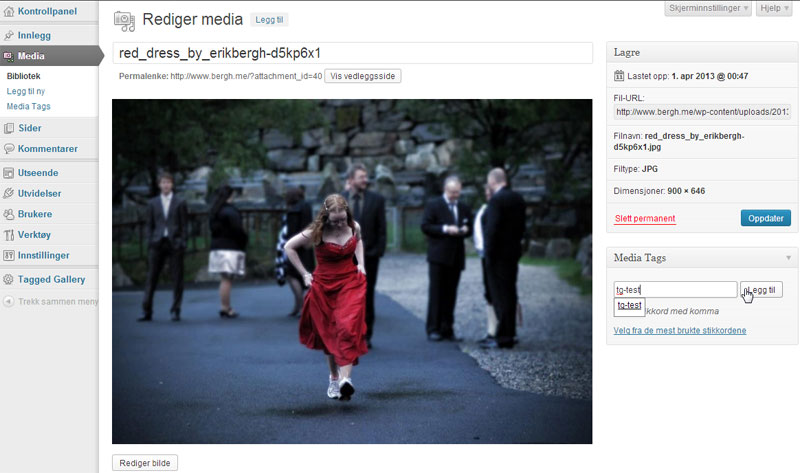
Tagging an image ‘tg-test’ 
Tagging a page ‘tg:tg-test’ to generate a gallery of pictures tagged ‘tg-test’ 
If you click on an image it will open like this
安裝方式
Easiest installation
- In wordpress admin go to Plugins -> Add plugin
- Search for “tagged gallery” and add
- Set thumb size in Tagged Gallery settings
Alternative installation
- Upload the
tagged-galleryfolder to the/wp-content/plugins/directory - Activate the plugin through the ‘Plugins’ menu in WordPress
- Set thumb size in Tagged Gallery settings
常見問題集
- Does Tagged Gallery use WordPress thumbs or does it make its own?
-
Tagged Gallery make its own thumbs.
- Does Tagged Gallery support Lightbox or jQuery-plugins like that?
-
Tagged Gallery har its own lightbox feature called tgbox.
使用者評論
這個外掛目前沒有任何使用者評論。
