
外掛說明
This plugin allows you to integrate your existing Janrain Engage sign-in
application with any form in Gravity Forms and use users’ social profile data to
prefill fields.
After activating the plugin and entering your Engage app settings on the Forms >
Janrain Settings page, a “Social Login” field will be added to the list of
available fields in Gravity Forms. All other fields will have a new setting for
“Prefill from:”, where you can elect to let that field be prefilled from the
social profile data, and choose which data to use as a prefill.
Works with the free Basic app available from Janrain – sign up at
http://rpxnow.com – although some extended profile data fields are only
available with the Plus level ($10/mo – see
Janrain Engage Pricing
for more information.)
螢幕擷圖
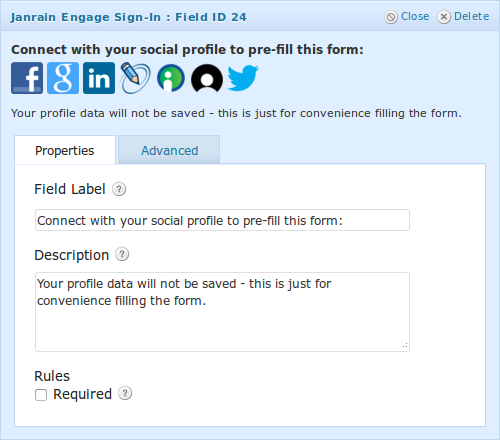
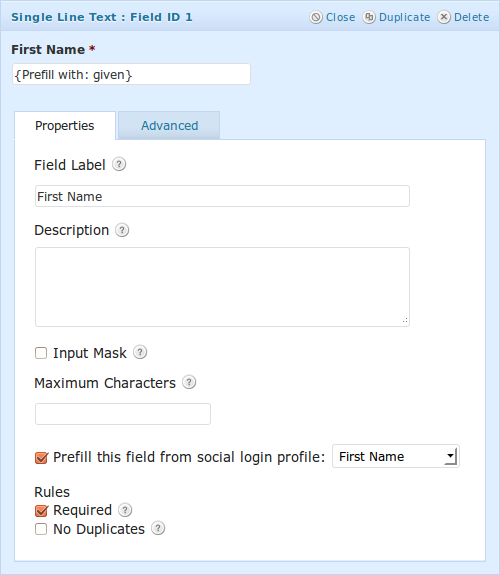
安裝方式
- Extract the zip file and just drop the contents in the
wp-content/plugins/directory of your WordPress installation and then activate the Plugin from Plugins page. - Enter your Engage app info (which can be found on your dashboard at dashboard.janrain.com) on the settings page (Forms > Janrain Settings). Choose the providers you would like to enable social signin from there.
- Add “Social Login” fields to any forms you would like to enable social prefill for, and set the “Prefill with” value for each of the fields which you would like to pull info from the social profile.
常見問題集
I can’t find (Facebook/Twitter/other provider) in the list of available
providers.
Some providers require configuration in order to be available. To use Facebook
login through Janrain Engage, for example, you will have to create an app on
Facebook, and give those credentials to your Engage app.
Luckily, there are current step-by-step directions on the Engage dashboard. Go
to the “Setup Widget” page on your Janrain dashboard (find it under
Deployment > Sign-in for Web; open the Providers section of the
sidebar). Each of the providers which requires configuration will have a gray
gear icon next to it; click that icon and follow the wizard steps.
I want to be able to access a field that a provider offers, but it’s not
populating in my forms.
Some profile fields require requesting extended profile data. You can configure
the permissions your app requests of the user on an “a la carte” basis from your
rpxnow dashboard under Deployment > Provider Configuration. (Keep in mind
that asking users for too many permissions is more likely to scare them away –
don’t be a creeper!
NOTE: some extended profile fields are only available to Plus or higher
service levels.
- How can I add more prefill fields beyond the default ones?
-
This plugin has been designed to be easy to extend. If you want to add more
fields, you will need to hook a function to the filterjanrain_gforms_profile_data
that defines the name of the field you want to add, and the function to get its
data. This filter recieves the array of core fields as its argument, so if you
need to redefine one of the core fields, this is the place to do that as well.For example, the following code will make a new field available called
“religion”; which pulls any data the user has entered as their “religion” on
Facebook (or any other provider that includes that field):add_filter( 'janrain_gforms_profile_data', 'add_religion_field' ); function add_religion_field( $fields ) { $fields['religion'] = array( 'name' => 'Religion', 'function' => 'religion_field' ); return $fields; } function religion_field( $profile ) { return $profile->merged_poco->religion; }
使用者評論
這個外掛目前沒有任何使用者評論。
參與者及開發者

變更記錄
0.3
- Bugfixes: Fixed Javascript error that was making it impossible to update field settings
using Chrome browser in recent versions of WordPress - Enhancements: Added more providers that have been added to the Janrain
product since this plugin was last updated, including Google+, Instagram,
XING, and MYDIGIPASS.COM. - Updated some help text and links in admin settings pages.
0.2
- Bugfixes: typos in configuration settings prevented plugin from working with
any apps other than Janrain internal ones. (a pretty big problem) - Enhancements: Minor display enhancements to plugin settings screen and help text.
0.1a
- Initial commit