

外掛說明
Tired of fake signups and spam accounts in your WooCommerce store?
Email and Domain Blocker for WooCommerce lets you block unwanted emails or domains from registering — keeping your store clean and your customers real.
Key Features:
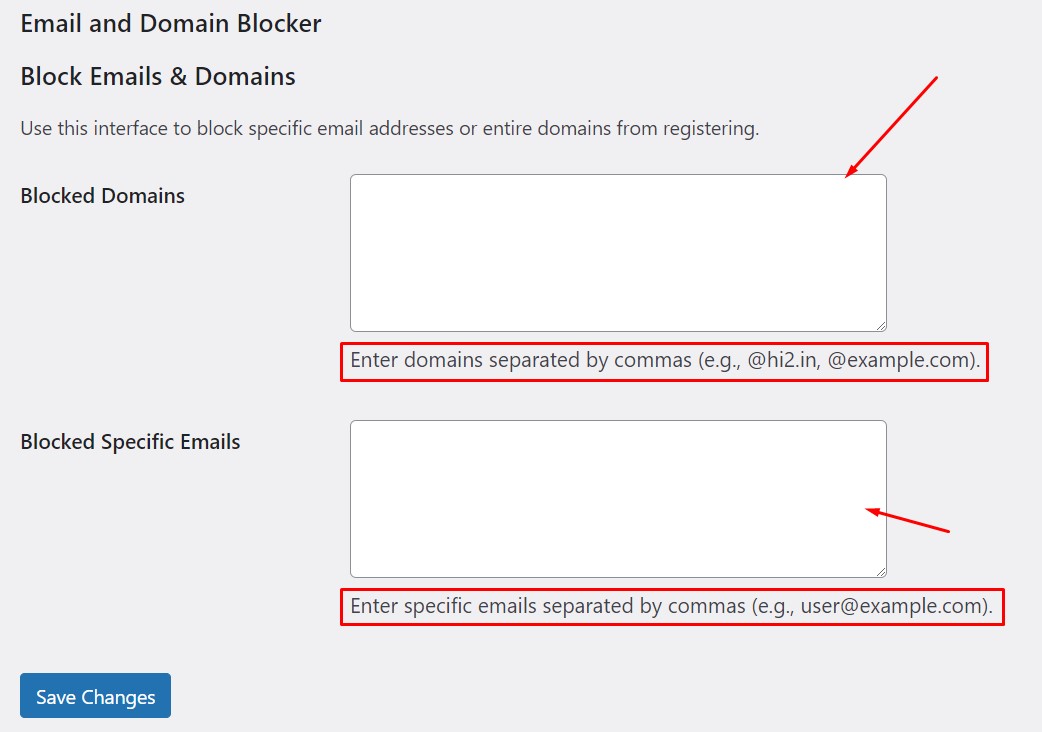
- Block specific email addresses (e.g.
baduser@gmail.com) - Block entire domains (e.g.
@spam.com) - Wildcard support (e.g.
*@gmail.com,*@*.ru,test*@domain.com) - Disposable email auto-blocking — block 200+ known throwaway providers (Mailinator, TempMail, YOPmail, etc.) with one checkbox
- Custom error message — set your own message shown to blocked users
- WordPress native registration blocking — optionally apply rules to
/wp-login.php?action=registeras well - Bulk Import — upload a
.txtor.csvfile to import a list of blocked domains/emails in one click - Dashboard Widget — at-a-glance stats (today / this week / all time) right on your WordPress dashboard
- Test Email Checker — instantly check if an email would be blocked
- Optional logging of blocked attempts
- Logs tab — view, paginate, clear, and download blocked attempts as CSV
- Newline and comma-separated list support — one item per line or comma-separated
- Simple, accessible admin UI with usage examples and tab navigation
Use cases:
- Stop spam signups with disposable or free mail services
- Block competitors or fraud-prone domains
- Restrict registrations to company emails only
- Bulk-block entire country TLDs (e.g.
*@*.ru)
螢幕擷圖
Test Email Checker — instantly check if an email is allowed or blocked.
安裝方式
- Upload the plugin folder to the
/wp-content/plugins/directory or install via WordPress Plugins screen. - Activate the plugin through the “Plugins” menu in WordPress.
- Go to Settings > Email & Domain Blocker to configure.
- Enter blocked emails/domains (one per line or comma-separated).
- Optionally enable logging, disposable email blocking, and WordPress registration blocking.
- Test with the built-in Test Email Checker.
常見問題集
-
Does this block users from logging in?
-
No. It only blocks new registrations. Existing accounts remain completely unaffected.
-
Can I use wildcards?
-
Yes! Examples:
**@gmail.com— blocks all Gmail addresses
**@*.ru— blocks all .ru domains
*test*@domain.com— blocks any address starting with “test” -
How do I block an entire domain?
-
Enter
@spam.com(with the @) in the Blocked Domains field. The plugin will correctly match only emails from that exact domain. -
What is disposable email blocking?
-
Enable the “Block Disposable Emails” checkbox to automatically block 200+ known throwaway email providers (Mailinator, TempMail, YOPmail, Guerrilla Mail, etc.) without entering them manually.
-
Can I block registrations on the standard WordPress login page too?
-
Yes! Enable the “Block WordPress Registration” option in Settings to also apply your rules to
/wp-login.php?action=register. -
How do I import a large list of blocked domains?
-
Go to the Import tab and upload a
.txtor.csvfile with one domain per line (or comma-separated). You can choose to append to or replace your existing list. -
Where can I see blocked attempts?
-
Enable logging in Settings. Blocked attempts will appear in the Logs tab, where you can view, clear, or download them as CSV.
-
Is this compatible with Paid Memberships Pro or other WooCommerce membership plugins?
-
Yes. It hooks into WooCommerce’s registration filter, so it works with any plugin that uses WooCommerce accounts.
-
What happens to my data if I delete the plugin?
-
All plugin data (blocked lists, log table, settings) is completely removed when you delete the plugin.
使用者評論


參與者及開發者

變更記錄
1.2
- Fixed: Domain matching now correctly compares the @domain portion only — previously
@gmail.comwould also match@notgmail.com. - Fixed: Restored full i18n/translation support (all strings wrapped in
__()/esc_html__()). - Fixed: Tab parameter is now properly allowlisted, not just sanitized.
- Fixed: Replaced
wp_add_inline_style()with a proper enqueued stylesheet. - Added:
uninstall.php— dropswp_edb_logstable and all options on plugin deletion. - Added: WooCommerce dependency notice when WooCommerce is not active.
- Added: Disposable email auto-blocking — 200+ known throwaway providers with one checkbox.
- Added: Custom error message — override default block messages with your own text.
- Added: WordPress native registration blocking — optional, applies rules to
/wp-login.php?action=register. - Added: Bulk Import tab — upload
.txt/.csvfiles to import blocked lists (append or replace mode). - Added: Dashboard Widget — at-a-glance blocked attempt stats (today / this week / all time).
- Added: Newline-separated list support (in addition to comma-separated).
- Added: “Page X of Y” indicator in Logs pagination.
- Added: “Blocked this week / total” stats bar on the Logs tab.
- Added: Enter key support in the Test Email Checker input.
- Improved: All JavaScript strings are now localized (passed from PHP via
wp_localize_script()). - Improved:
edb_parse_list()helper normalizes all list inputs consistently. - Improved: Tested up to WordPress 6.7.
1.1
- Added wildcard support for blocking emails/domains.
- Added Test Email Checker (AJAX).
- Added optional logging system.
- Added Logs tab with view, clear, and CSV export.
- Improved admin UI with help text and examples.
1.0
- Initial release — block specific emails and domains from WooCommerce registration.