

外掛說明
Welcome to the RevoStock Media Gallery WordPress plugin! This plugin allows RevoStock members to insert a gallery of RevoStock media items (video, audio, AfterEffects templates, Apple Motion templates) into WordPress posts or pages, using the shortcode or the added RevoStock star button on the post editor.
A thumbnail image and description are displayed for each media file, and display of the gallery is controlled by the shortcode attributes – or default values specified on the plugin settings page. For your convenience, you can either manually add the shortcode with your desired attributes, or just click the RevoStock Media Gallery editor button to have it inserted for you.
Choose from one of the four bundled color schemes (black-and-white, grey, red, blue), or add your own custom CSS by specifying a prefix.
Requires WordPress 3.1 and PHP 5.2
How-to video:
Current gallery display options
- Display a particular RevoStock file
- Display files from a particular RevoStock mediabox
- Display files from a specific RevoStock producer
- Display files of a particular type: Audio, Video, AfterEffects, Motion
- Display files containing search terms
- Display files from a specific RevoStock group: Newest, Most Downloaded, or Editor’s Choice
- Limit the number of files displayed – from 1 to 40
- Choose from one of the four bundled color schemes (black-and-white, grey, red, blue)
- Add a custom CSS prefix to provide your own custom CSS
螢幕擷圖
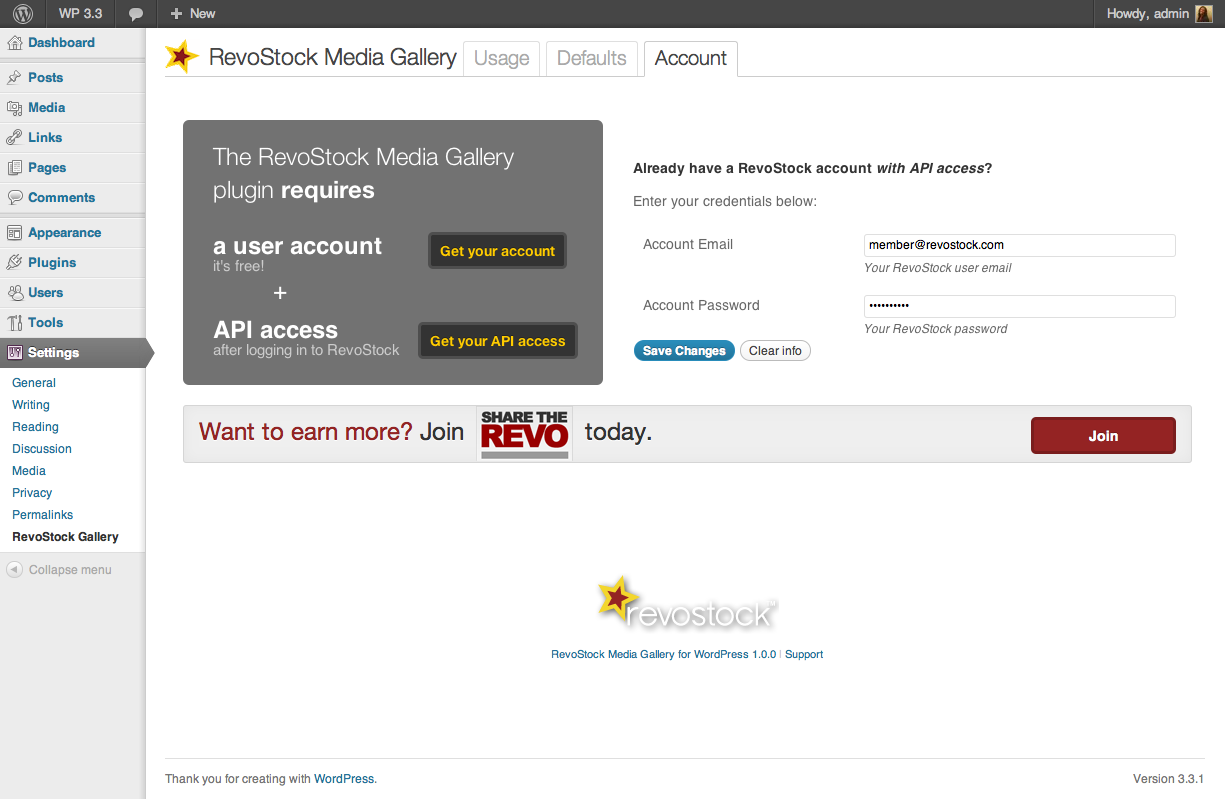
First, make sure you have your RevoStock user name and password, AND active API access 
Welcome page & explanation of shortcode attributes 
Set shortcode default attributes 
Use the editor button to insert the shortcode into your posts and pages 
Gallery display on page
安裝方式
This section describes how to install the RevoStock Media Gallery plugin.
- Upload
revostock-galleryto the/wp-content/plugins/directory - Activate the plugin through the ‘Plugins’ menu in WordPress
- Add your RevoStock credentials to the Settings->Revostock->Account page.
- Manually add a shortcode to your post or page (e.g. [revostock-gallery mediabox=29323] )
or simply use the button on the editor which inserts the shortcode and arguments for you
常見問題集
- How do I get started?
-
The RevoStock Media Gallery plugin requires
-
A RevoStock user account (it’s free!) – http://www.revostock.com/RegMember.html
-
API access – after logging in to RevoStock, visit: http://www.revostock.com/api.html
Currently, API authorization is only available to RevoStock Producers (users who sell content through RevoStock) but will be open to all members soon.
Also, you can earn more by joining “Share the Revo”
http://www.revostock.com/Affiliate.htmlVideo:
-
- I’ve installed the plugin, placed the [revostock-gallery] shortcode into a post but I’m receiving a “There is a problem with your account. Please check settings” message displayed in the post
-
Be sure that you’ve provided credentials on the Account page of the plugin’s settings. You’ll need both an email address
and password registered at RevoStock.com as well as API authorization. - Where do I go for support?
-
- Ask questions or report bugs at http://www.revostock.com/Helpdesk.html,
- Who developed this plugin?
-
- Valara Satsura – 1.1 Development
- Craig Lillard – 1.1 Development
- Naomi C. Bush – 1.0 Development
- Sean Leonard – Pre-release Development
- Carol Shepherd – Technical project management, wireframes
- Marna Friedman – QA and Project management
- Mike Schinkel – Client engagement and high-level architecture
- Valara Satsura – 1.1 Development
使用者評論
這個外掛目前沒有任何使用者評論。
參與者及開發者


變更記錄
1.1.1
- Fixed problems with popups not displaying large enough in some cases.
- Shortened names of CSS files.
1.1.0
- Updated styling
- Fixed problems with popup window overflow
- Added rel=nofollow to links (http://support.google.com/webmasters/bin/answer.py?hl=en&answer=96569)
- Made the iframe bigger to accomodate varying sizes of videos playing.
- Checked compatibility with WordPress 3.4.1
1.0.0
- Rewritten core
- Redesigned admin interface
- Changed to user-friendly shortcode attribute names and removed unnecessary attributes
- Added post editor button
0.9.14
- Updated styling
- Minor changes to admin page labels
- Fixed problem with some audio not playing
0.9.13
Updated styling
0.9.10
Updated styling
0.5
Initial beta release