
跳至主要內容
WordPress.org

Taiwan 正體中文

  • 佈景主題目錄
  • 外掛目錄
  • 最新消息
  • 技術支援
  • 關於我們
  • 團隊
  • 取得 WordPress
取得 WordPress
WordPress.org

Plugin Directory

ShareMe Simple Social Share Plugin

  • 提交外掛
  • 我的最愛
  • 登入
  • 提交外掛
  • 我的最愛
  • 登入

這個外掛並未在最新的 3 個 WordPress 主要版本上進行測試。開發者可能不再對這個外掛進行維護或提供技術支援,並可能會與更新版本的 WordPress 產生使用上的相容性問題。

ShareMe Simple Social Share Plugin

由 Shipon Karmakar 開發
下載
  • 詳細資料
  • 使用者評論
  • 安裝方式
  • 開發資訊
技術支援

外掛說明

ShareMe Simple Social Share Plugin is a fast and lightweight plugin that allows your visitors to share your content across multiple social media platforms. Boost your website engagement and visibility with easy-to-use sharing buttons.

Features:
– Simple & lightweight
– Supports Facebook, Twitter, LinkedIn, WhatsApp, and Pinterest
– Uses Dashicons for a clean, native WordPress look
– No external scripts for better performance
– Easy to use, no configuration required

Support

For support and feature requests, visit Shipon Karmakar’s Website or WordPress.org Plugin Page.

螢幕擷圖
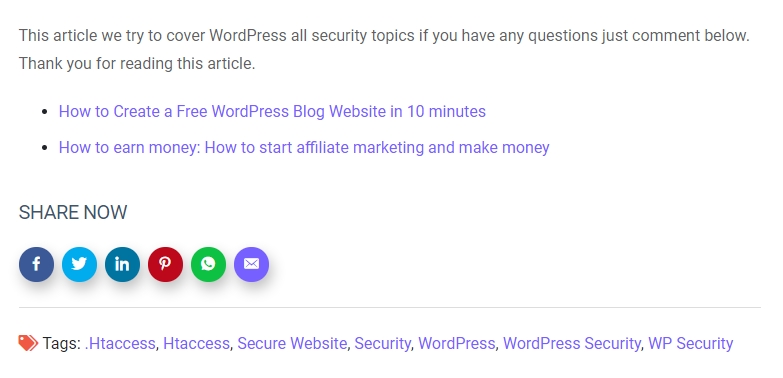
  • Social sharing buttons in action on a blog post.

安裝方式

  1. Upload the shareme folder to the /wp-content/plugins/ directory.
  2. Activate the plugin through the ‘Plugins’ menu in WordPress.
  3. The share buttons will automatically appear on single post pages.

常見問題集

Can I change the position of the sharing buttons?

Currently, the buttons are added automatically at the end of the content. Future versions may include customization options.

Does this plugin slow down my site?

No. ShareMe is lightweight and does not use external JavaScript files, ensuring fast performance.

使用者評論

Excellent Social Sharing Plugins

Muhibul Haque 2023 年 8 月 25 日
Share Me is an exceptional WordPress plugin for social sharing. Its intuitive design and seamless integration make it a must-have for website owners looking to boost their online presence. With a wide array of customizable social sharing buttons, Share Me allows you to effortlessly encourage your visitors to share your content with their networks.

A Best Share Plugin easy to use

farhadsoft 2022 年 6 月 11 日
The Best Share Plugin easy to use, i just install this plugin and automatic show all social icon on blog post

It’s so easy to use.

williamwp 2020 年 10 月 18 日
It’s so easy to use. I just install and automatic add social icon on my all posts
閱讀全部 3 則使用者評論

參與者及開發者

以下人員參與了開源軟體〈ShareMe Simple Social Share Plugin〉的開發相關工作。

參與者
  • Shipon Karmakar

〈ShareMe Simple Social Share Plugin〉外掛目前已有 1 個本地化語言版本。 感謝全部譯者為這個外掛做出的貢獻。

將〈ShareMe Simple Social Share Plugin〉外掛本地化為台灣繁體中文版

對開發相關資訊感興趣?

任何人均可瀏覽程式碼、查看 SVN 存放庫,或透過 RSS 訂閱開發記錄。

變更記錄

1.3.0

  • Improved compatibility with WordPress 6.4
  • Enhanced security with better input validation
  • Fixed minor CSS issues

1.2.0

  • Added WhatsApp sharing support
  • Optimized performance by removing unnecessary scripts

1.1.0

  • Added LinkedIn and Pinterest sharing options
  • Improved mobile responsiveness

1.0.0

  • Initial release with Facebook and Twitter support

中繼資料

  • 版本 2.0.0
  • 最後更新 1 年前
  • 啟用安裝數 30+
  • WordPress 版本需求 5.0 或更新版本
  • 已測試相容的 WordPress 版本 6.7.5
  • PHP 版本需求 7.2 或更新版本
  • 語言

    Bengali (Bangladesh) 及 English (US).

    將這個外掛本地化為你的母語版本

  • 標籤:
    facebookLinkedInsocial mediasocial sharetwitter
  • 進階檢視

評分

5 星,滿分為 5 星
  • 3 個 5 星使用者評論 5 星 3
  • 0 個 4 星使用者評論 4 星 0
  • 0 個 3 星使用者評論 3 星 0
  • 0 個 2 星使用者評論 2 星 0
  • 0 個 1 星使用者評論 1 星 0

Your review

查看全部使用者評論

參與者

  • Shipon Karmakar

技術支援

使用者可在技術支援論壇提出意見反應或使用問題。

檢視技術支援論壇

  • 關於我們
  • 最新消息
  • 主機代管
  • 隱私權
  • 展示網站
  • 佈景主題目錄
  • 外掛目錄
  • 區塊版面配置目錄
  • Learn
  • 技術支援
  • 開發者資源
  • WordPress.tv ↗
  • 共同參與
  • 活動
  • 贊助基金會 ↗
  • Five for the Future
  • WordPress.com ↗
  • Matt ↗
  • bbPress ↗
  • BuddyPress ↗
WordPress.org
WordPress.org

Taiwan 正體中文

  • 查看我們的 X (之前的 Twitter) 帳號
  • 造訪我們的 Bluesky 帳號
  • 造訪我們的 Mastodon 帳號
  • 造訪我們的 Threads 帳號
  • 造訪我們的 Facebook 粉絲專頁
  • Visit our Instagram account
  • Visit our LinkedIn account
  • 造訪我們的 TikTok 帳號
  • Visit our YouTube channel
  • 造訪我們的 Tumblr 帳號
程式碼,如詩
The WordPress® trademark is the intellectual property of the WordPress Foundation.