Title: WPApps Table Collapser
Author: Hefin Dsouza
Published: 2024 年 7 月 4 日
Last modified: 2024 年 10 月 5 日
---
搜尋外掛

這個外掛**並未在最新的 3 個 WordPress 主要版本上進行測試**。開發者可能不再對這個
外掛進行維護或提供技術支援,並可能會與更新版本的 WordPress 產生使用上的相容性問題。
# WPApps Table Collapser
由 [Hefin Dsouza](https://profiles.wordpress.org/hefind/) 開發
[下載](https://downloads.wordpress.org/plugin/wpapps-table-collapser.1.1.0.zip)
* [詳細資料](https://tw.wordpress.org/plugins/wpapps-table-collapser/#description)
* [使用者評論](https://tw.wordpress.org/plugins/wpapps-table-collapser/#reviews)
* [安裝方式](https://tw.wordpress.org/plugins/wpapps-table-collapser/#installation)
* [開發資訊](https://tw.wordpress.org/plugins/wpapps-table-collapser/#developers)
[技術支援](https://wordpress.org/support/plugin/wpapps-table-collapser/)
## 外掛說明
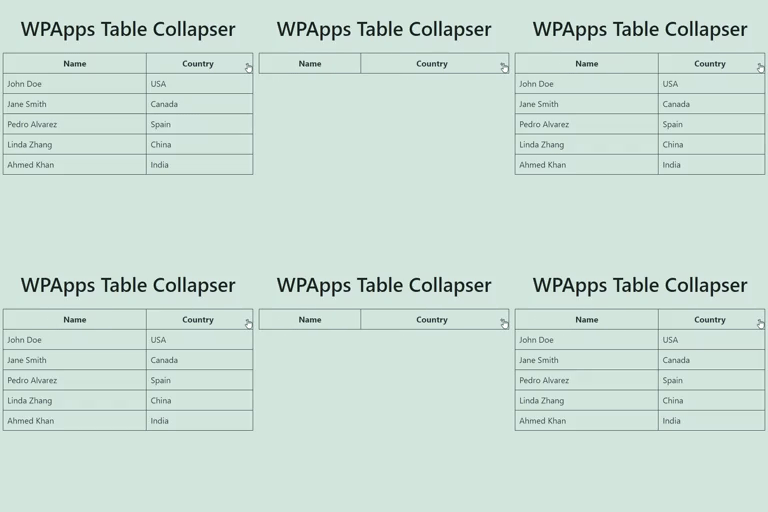
WPApps Table Collapser is a lightweight plugin that makes your tables collapsible.
By adding a `collapsible-table` class to your tables, you enable users to toggle
the visibility of the table body by simply clicking on the table header.
### Features
* **Collapsible Tables:** Make any table collapsible by adding a simple class.
* **Toggle Indicator:** Automatically adds a `+/-` indicator to the last column
of the table header.
* **Customizable:** Style the toggle indicator and table appearance with your own
CSS.
* **Block Editor Support:** Includes a Gutenberg block for easy table creation
and collapsing functionality.
* **Mobile Friendly:** Works seamlessly on mobile devices with responsive design.
**Usage:**
1. Ensure that your table has a `` tag for the table header, though it’s not
mandatory if you enable the “Allow Table Without ``” option in settings.
2. Add the class `collapsible-table` to your table.
3. Optionally, add a `data-title` attribute to your table to set a custom title for
the mobile compact view.
4. The last column in the table header will have a toggle indicator (`+/-`) added
to it. Clicking anywhere in the header will show or hide the table body.
## 螢幕擷圖
* [[
* **Example of a Collapsible Table:**
* [[
* **Settings Page:**
* [[
* **Detailed Guidelines on CSS Customization:**
* [[
* **Responsive Table View:**
* [[
* **Block Support:**
## 適用於區塊編輯器
這個外掛提供 1 個可供 Gutenberg/區塊編輯器使用的區塊。
* Table Collapser A block that makes tables collapsible.
## 安裝方式
1. Upload the `wpapps-table-collapser` folder to the `/wp-content/plugins/` directory.
2. Activate the plugin through the ‘Plugins’ menu in WordPress.
3. Add the `collapsible-table` class to any table you want to make collapsible.
## 常見問題集
### Does the table require any specific structure?
For optimal functionality, the table should have a `` tag defining the header.
The collapsing functionality is primarily activated by clicking on this header.
However, if you enable the “Allow Table Without ``” option in the settings,
the plugin will also work without a ``.
### Can I style the toggle indicator?
Yes, you can style the toggle indicator by targeting the `.toggle-indicator` class
in your CSS.
### How do I set a custom title for the mobile view?
You can add a `data-title` attribute to your table element to set a custom title
that will be displayed in the mobile compact view.
### Is the plugin compatible with the Gutenberg block editor?
Yes, the plugin includes a Gutenberg block for easy creation and management of collapsible
tables.
## 使用者評論
這個外掛目前沒有任何使用者評論。
## 參與者及開發者
以下人員參與了開源軟體〈WPApps Table Collapser〉的開發相關工作。
參與者
* [ Hefin Dsouza ](https://profiles.wordpress.org/hefind/)
[將〈WPApps Table Collapser〉外掛本地化為台灣繁體中文版](https://translate.wordpress.org/projects/wp-plugins/wpapps-table-collapser)
### 對開發相關資訊感興趣?
任何人均可[瀏覽程式碼](https://plugins.trac.wordpress.org/browser/wpapps-table-collapser/)、
查看 [SVN 存放庫](https://plugins.svn.wordpress.org/wpapps-table-collapser/),或
透過 [RSS](https://plugins.trac.wordpress.org/log/wpapps-table-collapser/?limit=100&mode=stop_on_copy&format=rss)
訂閱[開發記錄](https://plugins.trac.wordpress.org/log/wpapps-table-collapser/)。
## 變更記錄
#### 1.1.0
* Fixed a bug where the block editor css gets loaded in the front-end.
#### 1.0.0
* Initial release.
## 中繼資料
* 版本 **1.1.0**
* 最後更新 **2 年前**
* 啟用安裝數 **10+**
* WordPress 版本需求 ** 4.0 或更新版本 **
* 已測試相容的 WordPress 版本 **6.6.5**
* PHP 版本需求 ** 5.6 或更新版本 **
* 語言
* [English (US)](https://wordpress.org/plugins/wpapps-table-collapser/)
* 標籤:
* [block](https://tw.wordpress.org/plugins/tags/block/)[responsive table](https://tw.wordpress.org/plugins/tags/responsive-table/)
[table](https://tw.wordpress.org/plugins/tags/table/)[toggle](https://tw.wordpress.org/plugins/tags/toggle/)
* [進階檢視](https://tw.wordpress.org/plugins/wpapps-table-collapser/advanced/)
## 評分
這個項目尚無任何評論記錄。
[Your review](https://wordpress.org/support/plugin/wpapps-table-collapser/reviews/#new-post)
[查看全部使用者評論](https://wordpress.org/support/plugin/wpapps-table-collapser/reviews/)
## 參與者
* [ Hefin Dsouza ](https://profiles.wordpress.org/hefind/)
## 技術支援
使用者可在技術支援論壇提出意見反應或使用問題。
[檢視技術支援論壇](https://wordpress.org/support/plugin/wpapps-table-collapser/)