
外掛說明
This plugin adds an extra column to the users overview with the date of the last login for each user.
Additionally, users can be sorted by the date of their last login.
Translations
I will be more than happy to update the plugin with new locales, as soon as I receive them!
Currently available in:
- Arabic
- Chinese
- French
- English
- German
- Italian
- Japanese
- Nederlands
- Norwegian (bokmål)
- Polish
- Portuguese
- Rumanian
- Russian
- Spanish
Plugin Filter Hooks
wpll_current_user_can (boolean)
Whether the column is supposed to be shown.
Default: true
wpll_date_format (string)
The date format string for the date output.
螢幕擷圖
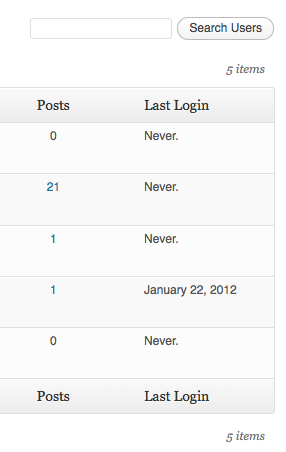
Last login column in the user table.
安裝方式
- Download WP Last Login.
- Unzip the folder into the
/wp-content/plugins/directory. - Activate the plugin through the ‘Plugins’ menu in WordPress.
常見問題集
None asked yet.
使用者評論

2024 年 4 月 3 日
Switched to this plugin as another similar plugin by YooHoo was incompatible with TwoFactor.
This works with both TwoFactor and Limit Login Attempts plugins.
[Anyone who says it does not work likely has a code conflict with another plugin]

2023 年 12 月 27 日
Well maintained plugin. This is the only 'last login' plugin I have found that supports two factor.

2023 年 1 月 30 日
Totally useless: every user is listed as never having logged in, even the one I'm currently logged in as to view this. Two stars instead of one because at least it didn't seem to break anything.

2019 年 11 月 18 日
4 則留言
It shows users as Login "Never" even the users have been logged in. I decided on this information to delete users! Good luck, I had an early backup of the database!
Do not trust in this Plugin!

2018 年 8 月 1 日
1 則留言
I'm giving two stars because the plugin didn't break anything and appeared to be working just fine. I left this on for over a year to help me identify which users out of 20,000+ actually log into my site. After a year, I deleted the users that had "never" logged in, only to find I deleted users who had recently signed up for classes on my site. To sign up for a class on my site, you have to log in first. Thank goodness for backups. Unfortunately, this plugin doesn't serve its purpose reliably and the information it shows can't be trusted. I cannot recommend it.

2018 年 7 月 13 日
Great plugin--very easy to use. To Konstantin Obenland: The other CMS, Drupal, has this functionality built in to the core of their cms. Request that the makers of WordPress to add your cool plugin to the core of WordPress, perhaps in the upcoming version of WordPress 5.0.
參與者及開發者

變更記錄
7
- Added compatibility with Two Factor plugin. Props @bkno.
- Improved date display to display login time on hover.
6
- Revamped file structure to remove unnecessary files.
- Fixed a bug where login dates were overwritten on plugin reactivation. Props @richardbuff.
5
- Improved uninstall routine (no longer queries all users).
- Updated utility class.
- Tested with WordPress 6.1.
4
- Improved date display to account for the timezone of the site. Props @knutsp.
3
- Fixed a bug where users who haven’t logged in disappear from user lists when ordering by last login. See https://wordpress.org/support/topic/new-users-dont-get-the-meta-field/
2
- Maintenance release.
- Updated code to adhere to WordPress Coding Standards.
- Tested with WordPress 5.0.
1.4.0
- Fixed a long standing bug, where sorting users by last login didn’t work.
- Tested with WordPress 4.3.
1.3.0
- Maintenance release.
- Tested with WordPress 4.0.
1.2.1
- Reverts changes to wp_login() as the second argument seems not to be set at all times.
1.2.0
- Users are now sortable by last login!
- Updated utility class.
- Added Danish translation. Props thomasclausen.
1.1.2
- Fixed a bug where content of other custom columns were not displayed.
1.1.1
- Updated utility class.
1.1.0
- Made the display of the column filterable.
- Widened the column a bit to accommodate for large date strings.
1.0
- Initial Release.