Title: WP Code Pre
Author: zeshanb
Published: 2017 年 9 月 19 日
Last modified: 2021 年 8 月 8 日
---
搜尋外掛
這個外掛**並未在最新的 3 個 WordPress 主要版本上進行測試**。開發者可能不再對這個
外掛進行維護或提供技術支援,並可能會與更新版本的 WordPress 產生使用上的相容性問題。
# WP Code Pre
由 [zeshanb](https://profiles.wordpress.org/zeshanb/) 開發
[下載](https://downloads.wordpress.org/plugin/wp-code-pre.1.0.1.zip)
* [詳細資料](https://tw.wordpress.org/plugins/wp-code-pre/#description)
* [使用者評論](https://tw.wordpress.org/plugins/wp-code-pre/#reviews)
* [安裝方式](https://tw.wordpress.org/plugins/wp-code-pre/#installation)
* [開發資訊](https://tw.wordpress.org/plugins/wp-code-pre/#developers)
[技術支援](https://wordpress.org/support/plugin/wp-code-pre/)
## 外掛說明
This simple plugin was created because of security concerns related to using PHP
preg_replace directly. With transition to PHP7, it’s advised to use preg_replace_callback
instead.
This plugin uses built-in supported feature of PHP-“highlight_string”. This plugin
filters post content inside custom html block for
and helps display html and other source code.
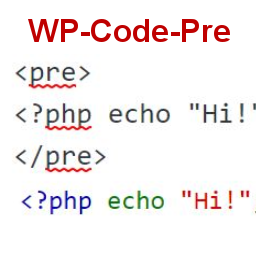
To display source code in your posts, surround source code with pre tags. Plugin
will filter for pre tags and add inline styles that may be modified using your wordpress
theme’s css stylesheet.
For WordPress versions 5.0 and above, HTML pre tags can be used within html block
or, classic block. Use the three dot menu to convert to html when there is a invalid
content error while post editing.
## 螢幕擷圖
* [[
* Code preview on blog post or page
* [[
* Typing code in text tab of WordPress Admin area when writing Post.
* [[
* Convert block to html while editing to make modifications to existing source
code display
## 安裝方式
1. Download the plugin
2. Upload the wp-code-pre.zip folder to your site’s wp-content/plugins directory
3. Activate the plugin in the WordPress Admin Panel
4. Surround source code with `
` tags, when writing in blog posts using
Gutenberg with classic block and “Edit as HTML” or, html block
## 常見問題集
Why there aren’t any options to modify in admin?
This plugin simply filters for
pre tags.
## 使用者評論
這個外掛目前沒有任何使用者評論。
## 參與者及開發者
以下人員參與了開源軟體〈WP Code Pre〉的開發相關工作。
參與者
* [ zeshanb ](https://profiles.wordpress.org/zeshanb/)
[將〈WP Code Pre〉外掛本地化為台灣繁體中文版](https://translate.wordpress.org/projects/wp-plugins/wp-code-pre)
### 對開發相關資訊感興趣?
任何人均可[瀏覽程式碼](https://plugins.trac.wordpress.org/browser/wp-code-pre/)、
查看 [SVN 存放庫](https://plugins.svn.wordpress.org/wp-code-pre/),或透過 [RSS](https://plugins.trac.wordpress.org/log/wp-code-pre/?limit=100&mode=stop_on_copy&format=rss)
訂閱[開發記錄](https://plugins.trac.wordpress.org/log/wp-code-pre/)。
## 變更記錄
#### 1.0
* First version of the plugin.
#### 1.0.1
* Updated readme to reflect updates to version 5.0
## 中繼資料
* 版本 **1.0**
* 最後更新 **5 年前**
* 啟用安裝數 **10+**
* WordPress 版本需求 ** 4.0 或更新版本 **
* 已測試相容的 WordPress 版本 **5.8.13**
* PHP 版本需求 ** 7.0 或更新版本 **
* 語言
* [English (US)](https://wordpress.org/plugins/wp-code-pre/)
* 標籤:
* [Code Highlight](https://tw.wordpress.org/plugins/tags/code-highlight/)[filter content](https://tw.wordpress.org/plugins/tags/filter-content/)
* [進階檢視](https://tw.wordpress.org/plugins/wp-code-pre/advanced/)
## 評分
這個項目尚無任何評論記錄。
[Your review](https://wordpress.org/support/plugin/wp-code-pre/reviews/#new-post)
[查看全部使用者評論](https://wordpress.org/support/plugin/wp-code-pre/reviews/)
## 參與者
* [ zeshanb ](https://profiles.wordpress.org/zeshanb/)
## 技術支援
使用者可在技術支援論壇提出意見反應或使用問題。
[檢視技術支援論壇](https://wordpress.org/support/plugin/wp-code-pre/)