
外掛說明
Variation Images Gallery for WooCommerce plugin allows to add UNLIMITED additional images for each variation of product.
This additional variation images gallery plugin gives your customers an extra feature to showcase your products that gives visitors to multiple view of your products. This will help to increase your sales.
Plugin Demo | Documentation | Get Pro
By default, WooCommerce has only single image to insert as variation there is not gallery or multiple image add option.
This additional variation image gallery for WooCommerce plugin give you the opportunity to showcase additional images as gallery for each product variation. This plugin allows you to upload unlimited additional images for each variation. By using this plugin, you can showcase different set of images when your visitors switch product variation like color, image, style at the same time.
This plugin is easy to use and included detail settings there is no limit to use this free version. This plugin will give your WooCoomerce store a new look to your visitors to showcase your variation images.
Features
- UNLIMITED additional images for each product variation
- Drag & Drop custom sorting option.
- Delete option for Variation images.
- Zoom option for variation images.
- Zoom button position control option.
- Light box for variation images.
- Compatible with Flatsome Theme Builder Product Gallery Element.
- Compatible with Elementor Page Builder Product Gallery Addon.
- Compatible with Variation Swatches for WooCommerce plugin.
Pro Features
- Thumbnail Slider.
- Thumbnail position (Left/ Right/ Bottom)
- Support Video at gallery
Pro Plugin Demo | Pro Documentation | Get Pro
For any bug or suggestion please create ticket (https://www.radiustheme.com/ticket-support/)
螢幕擷圖
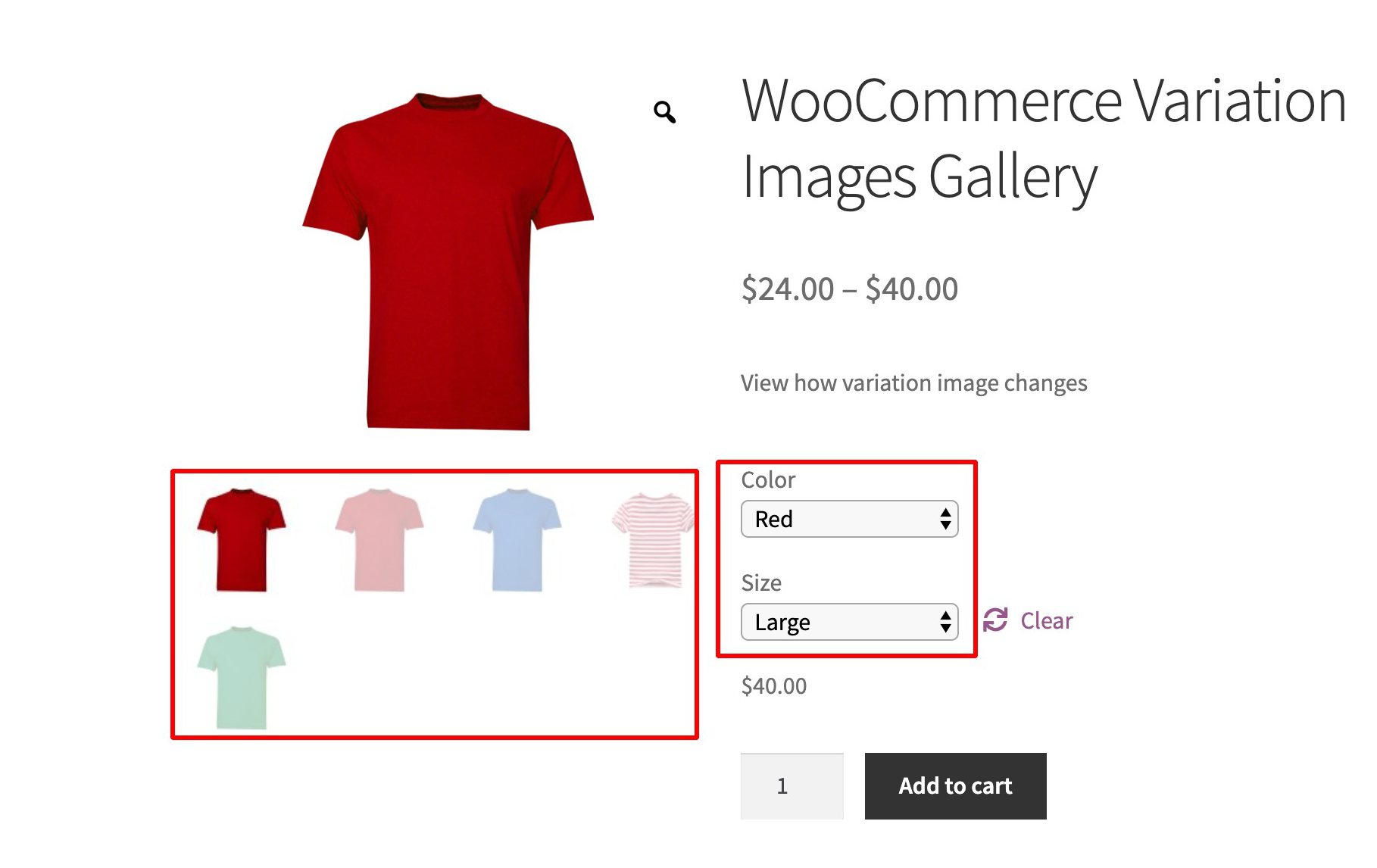
Variation Gallery 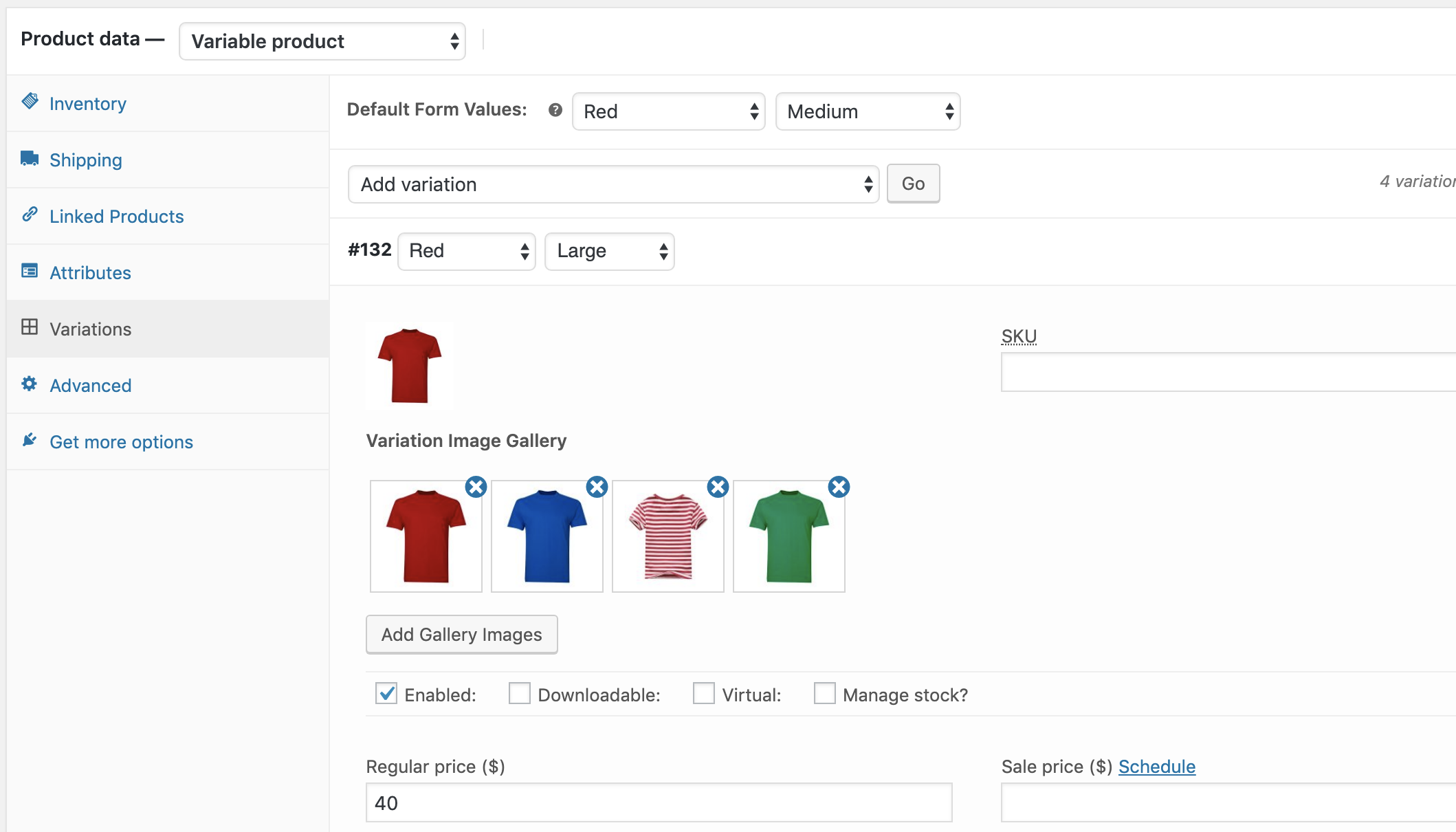
Variation Gallery at product variation 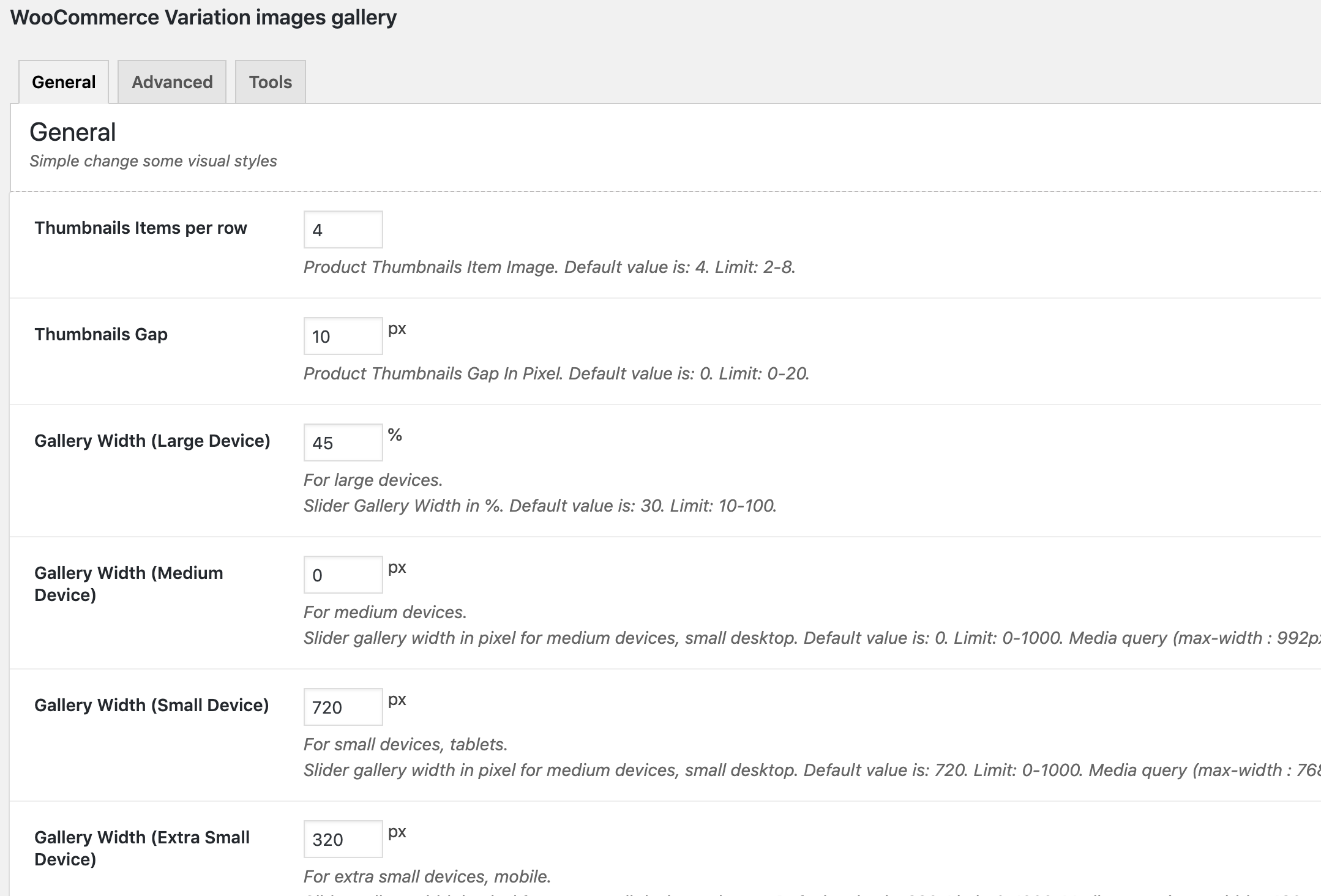
General Settings 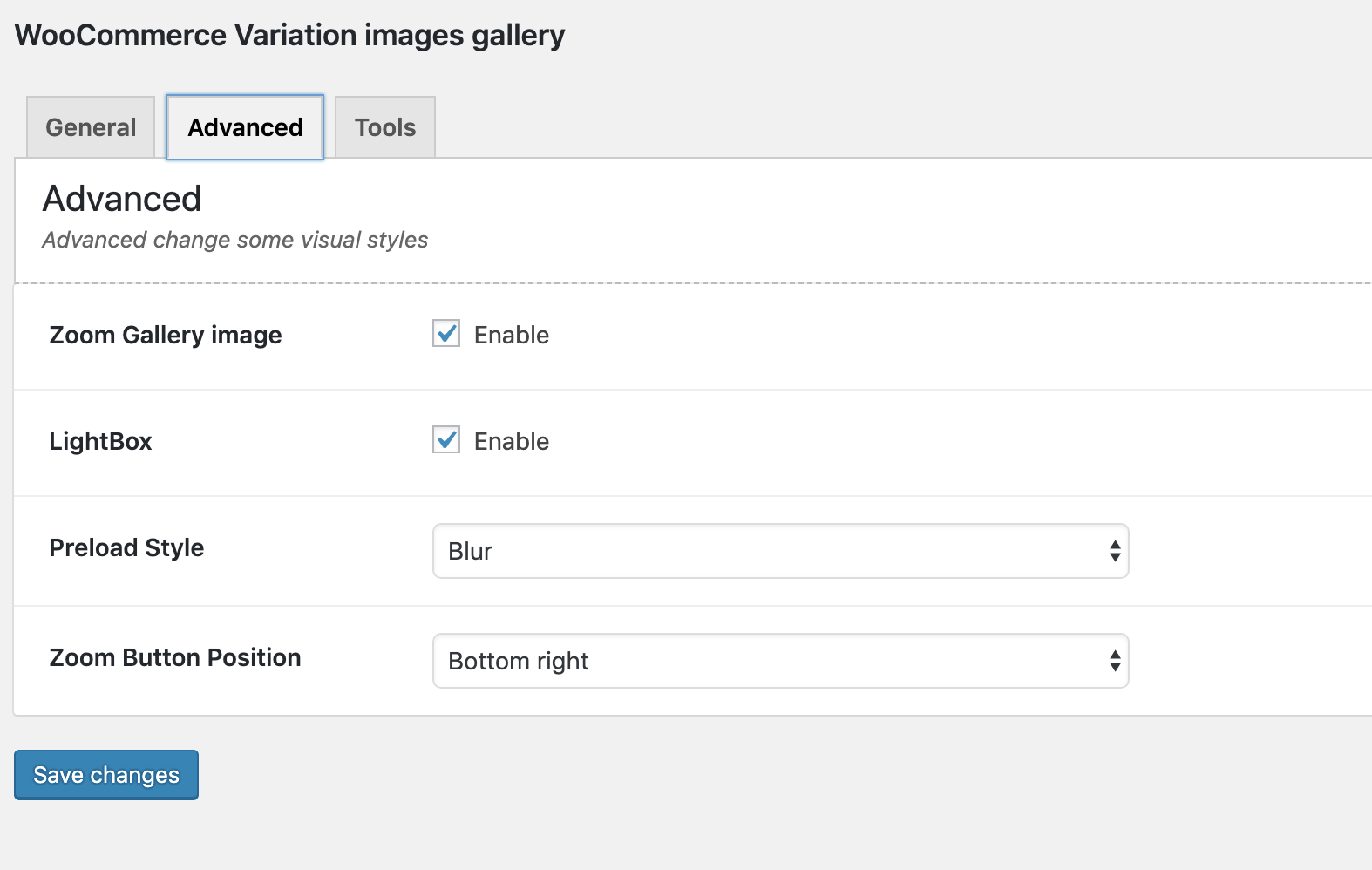
Advanced Settings
安裝方式
Using The WordPress Dashboard
- Navigate to the ‘Add New’ in the plugins dashboard
- Search for ‘Variation Images Gallery by RadiusTheme’
- Click ‘Install Now’
- Activate the plugin on the Plugin dashboard
Uploading in WordPress Dashboard
- Navigate to the ‘Add New’ in the plugins dashboard
- Navigate to the ‘Upload’ area
- Select
woo-product-variation-gallery.zipfrom your computer - Click ‘Install Now’
- Activate the plugin in the Plugin dashboard
Using FTP
- Download
woo-product-variation-gallery.zip - Extract the
woo-product-variation-gallerydirectory to your computer - Upload the
woo-product-variation-gallerydirectory to the/wp-content/plugins/directory - Activate the plugin in the Plugin dashboard
Requirements
- WordPress version: >= 5.5
- PHP version: >= 7.4
常見問題集
-
Need Any Help?
-
How to Use Variation Images Gallery for WooCommerce
-
- Go to
WooCommerce > settings > Variation Swatches
- Go to
-
Is it compatible with any kinds of WooCommerce Theme?
-
Yes, it is compatible with Most popular WooCommerce themes.
-
Does it show in product QuickView?
-
Yes, it supports any kinds of product quick view.
-
Does it work on MultiSite?
-
Yes, it is.
使用者評論


參與者及開發者

變更記錄
2.3.12 ( March 15, 2024 )
- Fixed: Save Settings
2.3.11 ( February 06, 2024 )
- Fixed: Plugin Support
- Fixed: Zoom Image Bg
- Fixed: Text Domain Issue For Loco Translator
2.3.10 ( January 31, 2024 )
- Fixed: Swiper Image Height Issue
- Fixed: Video Height Issue
- Support: Avanam Theme.
2.3.9 ( January 12, 2024 )
- Added: Swiper Slider Added.
2.3.8 ( November 20, 2023 )
- Fixed: RTL issue
2.3.7 ( November 07, 2023 )
- Added: Gallery Image size option
- Support: Export Import Support
2.3.6 ( August 23, 2023 )
- Fixed: HPOS Declare compatibility
2.3.5 ( August 10, 2023 )
- Fixed: PHP 8.2 issue
- Fixed: Image Zoom with slick slider
2.3.4 ( July 04, 2023 )
- Fixed: Vulnerability XSS in Variation
- Fixed: Video Height
- Fixed: Zoom Image
- Added: Backward Support
2.3.3 ( June 19, 2023 )
- Fixed: Fixed Responsive issue.
2.3.2 ( June 07, 2023 )
- Fixed: Mobile Devices Issue fixed.
2.3.1 ( May 30, 2023 )
- Fixed: Added Theme Support ( Woostify ).
2.3.0 ( May 12, 2023 )
- Fixed: Double Gallery fix.
- Fixed: Make Compatible with WC latest version .
- Added: Responsive Gallery Settings
2.2.8 ( April 17, 2023 )
- Fixed: Divi double gallery issue fixed
- Fixed: Css Issue Fixed
2.2.7 ( February 20, 2023 )
- Fixed: Notice and Image width issue fix.
2.2.6 ( January 30, 2023 )
- Fixed: Shopkeeper/woostify theme support.
2.2.5 ( December 15, 2022 )
- Fixed: Security Issue Fixed.
2.2.4 ( November 22, 2022 )
- Fixed: Css issue fixed.
2.2.3 ( August 15, 2022 )
- Fixed: Sanitization.
- Fixed: Asset Loding issue.
2.2.2 (June 15, 2022)
- Fixed: Video issue for plugin main gallery.
2.2.1.7 (Apr 12, 2022)
- Fixed: Duplicate gallery image.
2.2.1.6 (Feb 16, 2022)
- Add WP 5.9 support
2.2.1.5 (Nov 23, 2021)
- Fixed: Some functional issue
Version 2.2.1.4 (Nov 10, 2021)
- Added: Featured image disable settings for swatches gallery
- Fixed: Slider arrow visibility in mobile device
Version 2.1.1.3 (Sep 27, 2021)
- Added: Preloader off/on option
- Added: Preloader image chaning option
Version 2.0.1.3 (Sep 09, 2021)
- Added: Support Flatsome Theme Builder Product Gallery Element
- Added: Support Elementor Page Builder Product Gallery Addon
2.0.1.2
- Improve: Slider adaptiveHeight setting move to free version
2.0.1.1
- Fixed: Minir CSS Issue
2.0.1
- Fixed: Licensing tab error
2.0.0
- Add modular system
- Update coding structure
1.1.23.2
- Add WordPress 5.7 Support
1.1.23.1
- Add WordPress 5.6 Support
1.1.23
- Compatible with WordPress 5.5