
外掛說明
A broken plugin update can take a whole site down — and WordPress’ built-in recovery mode only pauses the plugin for the administrator who clicks the recovery link, while every visitor keeps seeing the error.
This plugin works like an electrical circuit breaker: it counts PHP fatal errors per plugin within a configurable time window. When the same plugin keeps crashing (default: 5 fatals within 10 minutes), the breaker trips and the plugin is deactivated automatically. Your site keeps running without the broken plugin instead of staying down.
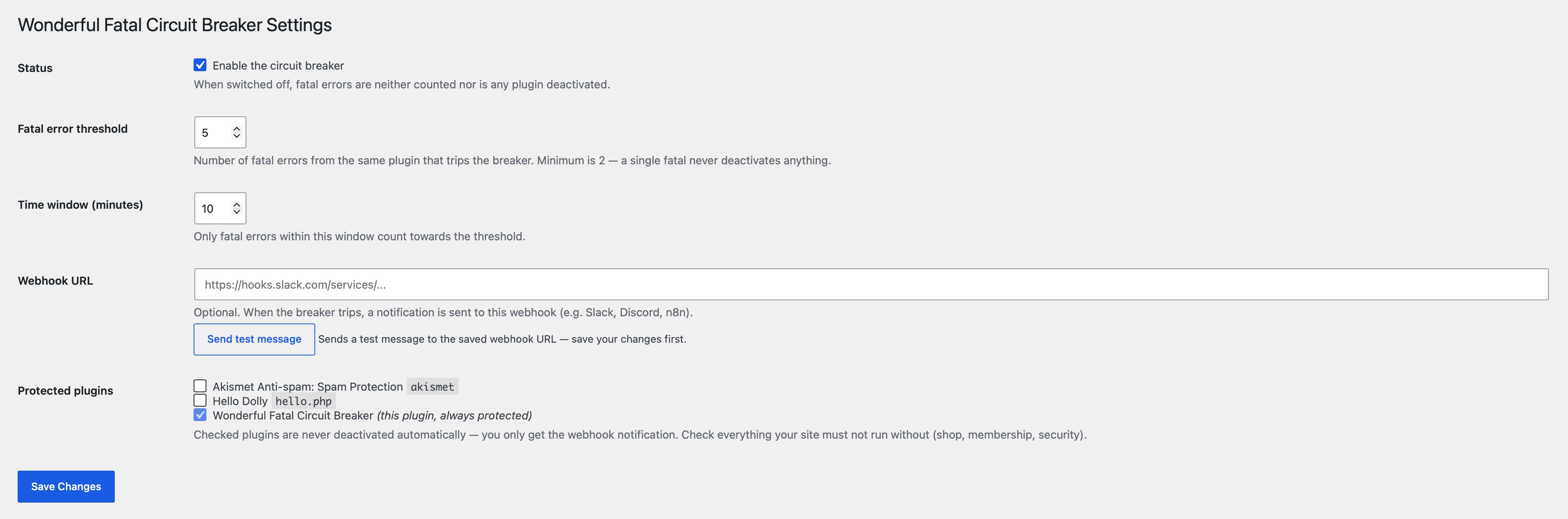
Plugins your site must not run without (shop, membership, security) can be ticked off as protected — they are never deactivated automatically. For protected plugins you only get a notification, so a human can decide.
Optionally, a webhook URL (Slack, Discord, n8n, …) can be configured. Whenever the breaker trips — or a protected plugin keeps crashing — a notification is sent there.
What the breaker does when it trips:
- Removes the broken plugin from the active plugins — without running any of its deactivation hooks (the plugin is broken; running its code would be exactly the wrong move).
- Shows a persistent admin notice with the error details until you reactivate the plugin.
- Sends a webhook notification if a webhook URL is configured.
External services
The plugin has no service of its own. It sends data only to the webhook URL you enter on its settings page — Slack, Discord, n8n or whatever you choose — and contacts nothing else. The terms and privacy policy of the service you point it at apply.
Nothing is sent until you save a URL. After that:
- The “Send test message” button sends a fixed message plus your site address.
- When the breaker trips, it sends: site address, the slug of the affected plugin, how many fatal errors occurred within which time window, the first line of the error message, and the file and line the fatal came from.
- When a protected plugin reaches the threshold, the same data is sent without the file and line, together with the note that nothing was deactivated.
No visitor data is included — no IP addresses, cookies, form contents or accounts.
螢幕擷圖
安裝方式
- Upload the
wonderful-fatal-circuit-breakerfolder to the/wp-content/plugins/directory. - Activate the plugin through the ‘Plugins’ menu in WordPress.
- Go to Settings > Fatal Circuit Breaker in your admin dashboard.
- Tick off the plugins that must never be deactivated automatically.
- Optionally enter a webhook URL and verify it with the Send test message button. That’s it!
常見問題集
-
Which error types are counted?
-
E_ERROR,
E_PARSE,E_CORE_ERROR, andE_COMPILE_ERROR— the errors that actually take a site down. Warnings, notices, and deprecations are ignored. -
Can a single fatal error deactivate one of my plugins?
-
No. The threshold has a hard minimum of 2, and the default is 5 fatals within 10 minutes. A one-off hiccup never trips the breaker.
-
What happens to plugins I marked as protected?
-
Nothing — they are never deactivated automatically. If a protected plugin keeps crashing, you receive a webhook notification (if configured) so you can act manually. This plugin itself is always protected.
-
Can the breaker lock me out of my site?
-
No. It never deactivates itself, it never touches must-use plugins, and it only ever removes a plugin from the active plugins list — nothing is deleted, no files are written, and no drop-in is installed. Every deactivation can be undone with one click on the Plugins screen, and the admin notice tells you which plugin it was and why.
-
What data leaves my site, and where does it go?
-
Only to the webhook URL you enter yourself — the plugin has no service of its own and contacts nothing else. Sent are the site address, the affected plugin slug, the error message, file and line, and the threshold that was reached. No visitor IP addresses, cookies, form contents or account data. Without a webhook URL nothing leaves your site at all. See “External services” above.
-
Are all fatal errors caught?
-
Runtime fatals — the vast majority, e.g. a plugin crashing while rendering a page — are caught. Fatals that happen while WordPress is still loading the plugin files themselves (e.g. a syntax error in a plugin’s main file) occur before this plugin can register its handler and cannot be counted.
-
Does this work on multisite?
-
The breaker only manages the per-site active plugins. Network-activated plugins are never touched.
-
Does this plugin affect my site’s performance?
-
No. The plugin only runs a very lightweight check at the very end of a PHP process, and only if a fatal error has occurred. It has no impact on the performance during normal site operation.
使用者評論
這個外掛目前沒有任何使用者評論。
參與者及開發者

變更記錄
1.0.3
- Added an explainer video to the plugin description.
- Tested up to WordPress 7.1.
1.0.2
- Removed load_plugin_textdomain() call (translations are loaded automatically by WordPress.org since WP 4.6).
- Prefixed the test-notice transient and WP_Error codes with the full plugin prefix.
1.0.1
- Coding standards: prefixed global variables in uninstall.php.
1.0.0
- Initial release.