
外掛說明
WordPress Social Media Feather is a lightweight free social media WordPress plugin that allows you to quickly and painlessly add social sharing and following features to all your posts, pages and custom post types.
The plugin supports adding of social buttons for sharing or following (that is, social buttons that link to your social network profiles pages). The social media buttons can easily and automatically be added to all your posts, pages or any other custom post types.
One of the few social sharing and bookmarking plugin with full support for the Retina and high resolution displays as used in the iPad, iPhones and other devices!
What sets WordPress Social Media Feather aside from the plethora of other social sharing and following WordPress plugins is its focus on simplicity, performance and social sharing impact. Social share buttons and links to your social pages are fast to setup with automatic display or social widgets.
Given the widespread focus on WordPress social media integration, your site will still provide social bookmarks and share buttons to improve visibility of your posts and content and improve your overall global reach on social platforms.
The WordPress social media sharing offered by the plugin includes all major social sharing buttons providers like Facebook, Twitter, reddit, Pinterest, tumblr, Linkedin and even e-mail.
It will show social buttons that your users can click to share to facebook or tweet your posts and pages on your site or submit it to reddit or publish it on tumblr and all other social sharing networks.
The WordPress social media following offered by the plugin includes all major social network providers and tools like Facebook, Twitter, Pinterest, Linkedin, YouTube, tumblr, instagram, flickr, foursquare, vimeo or RSS.
Our social media plugin also offers widgets for sharing and following buttons that you can place in any widgetized area in your site and the widgets also expose some settings and parameters to tweak the appearance of the social buttons. The plugin also provides shortcodes that can be used for the same purpose, creating both share and follow buttons and allowing selection of visibility of different social media networks or reordering how the various social networks appear (see example shortcodes at the bottom).
You can disable automatic rendering of social icons for specific posts by using Custom Fields. Simply set a custom field of synved_social_exclude_share to “yes” (without quotes) to disable rendering of sharing buttons on the post/page or synved_social_exclude_follow to “yes” (without quotes) to remove following buttons from the post or alternatively synved_social_exclude to disable both. The Custom Fields editor needs to be enabled on your post/page edit screen by clicking at the top right where it says “Screen Options”.
Features
- Integrated WordPress social sharing for all your posts
- Full support for Retina and high resolution displays
- WordPress social sharing and following widgets
- Supports all major providers of social features
- Sharing with Facebook, Twitter, Reddit, Pinterest, Tumblr, Linkedin and E-mail
- Following on Facebook, Twitter, Pinterest, Linkedin, YouTube, Tumblr, Instagram, Flickr, Foursquare, Vimeo or RSS Feed
- Each social provider can be enabled or disabled
- Ability to select what services each provider will be exposed for
- Full customization for titles and URLs for each provider
- Fast unobtrusive social bookmarks for your site
- Comes with a default modern icon set
- For further customization more social icons skins are available. Free from the version 1.8.2!
- Available skins can be customized with cool effects like fading and greying out social icons
- If you like them, you can get social sharing counters that load dynamically, only when necessary, thus not weighing in on visitors who don’t use them
Example Shortcodes
This shortcode will create a list of social sharing buttons to share content on your site:
[feather_share]
This shortcode will create a list of social media sharing buttons to share content on your site, only showing Twitter and Facebook, in that specific order:
[feather_share show=”twitter, facebook” hide=”reddit, pinterest, linkedin, tumblr, mail”]
You can change the order of displayed buttons by changing the order of keywords:
[feather_share show=”twitter, facebook” hide=”reddit, pinterest, linkedin, tumblr, mail”]
This shortcode will create a list of social sharing buttons to share content on your site using the “Wheel” icons skin:
[feather_share skin=”wheel”]
This shortcode will create a list of social media sharing buttons to share content on your site using the default icon skin with a size of 64 pixels:
[feather_share size=”64″]
You can add a custom CSS class to your share buttons using the “class” attribute:
[feather_share class=”myclass”]
You can combine all the parameters above to customize the look, for instance using the “Wheel” icon skin at a size of 64 pixels and only showing Twitter and Facebook, in that specific order:
[feather_share skin=”wheel” size=”64″ show=”twitter, facebook” hide=”reddit, pinterest, linkedin, tumblr, mail”]
The next shortcode will create a list of social following buttons that allow visitors to follow you:
[feather_follow]
The next shortcode will create a list of social following buttons that allow visitors to follow you, using the “Balloon” icons skin:
[feather_follow skin=”balloon”]
You can add a custom CSS class to your social profiles buttons using the “class” attribute:
[feather_follow class=”myclass”]
The next shortcode will create a list of social media following buttons that allow visitors to follow you, using the “Balloon” icons skin with a size of 64 pixels:
[feather_follow skin=”balloon” size=”64″]
You can specify a manual URL to be used for the sharing buttons:
[feather_share url=”http://www.example.org”]
Template Tags
If you don’t want to use shortcodes but instead prefer to use PHP directly, there are 2 PHP functions/template tags you can use.
For sharing buttons you can use:
if (function_exists(‘synved_social_share_markup’)) echo synved_social_share_markup();
For following buttons you can use:
if (function_exists(‘synved_social_follow_markup’)) echo synved_social_follow_markup();
Related Links:
- WordPress Social Media Plugin Official Page
- Extra Social Icons Skins
- Grey Fade addon that can grey out and fade out any social icons set
- Light Prompt that adds counts for social shares
By downloading and installing this plugin you are agreeing to the Privacy Policy and Terms of Service.
螢幕擷圖
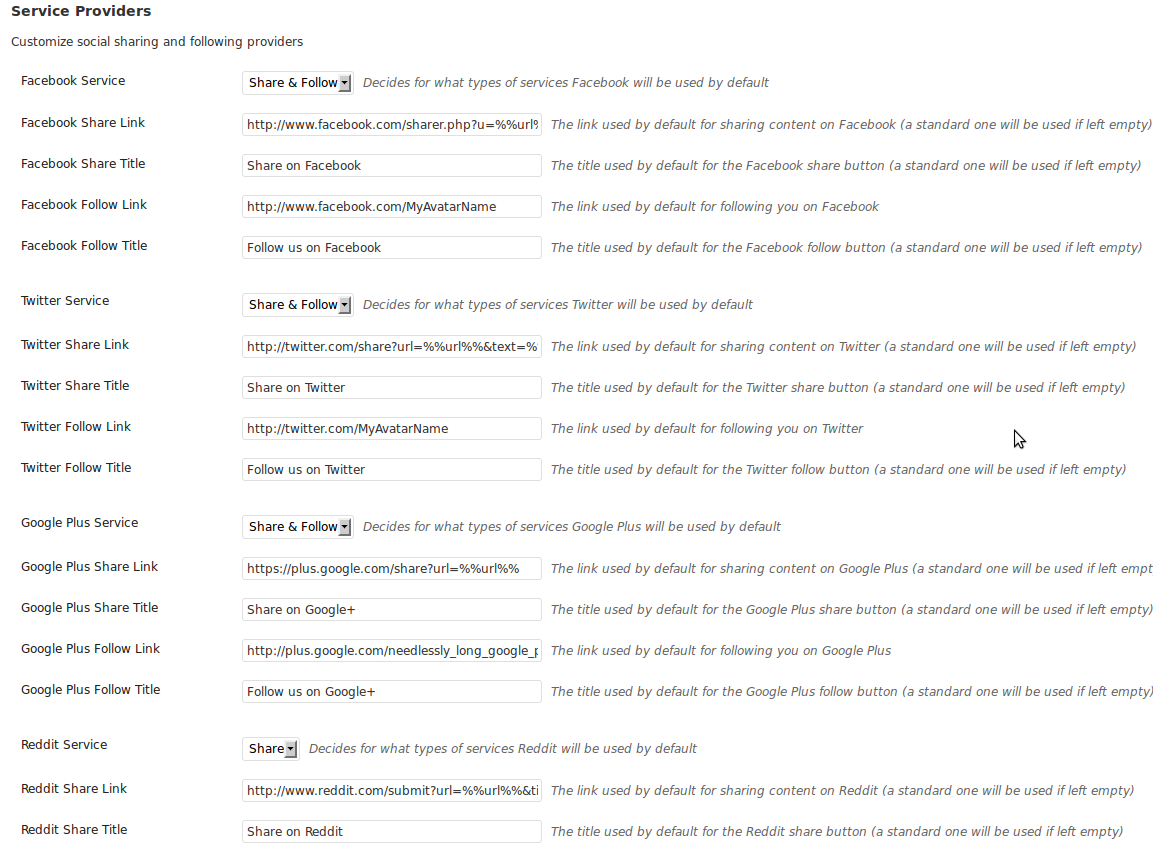
A demo of how social media providers can be customized in the back-end. 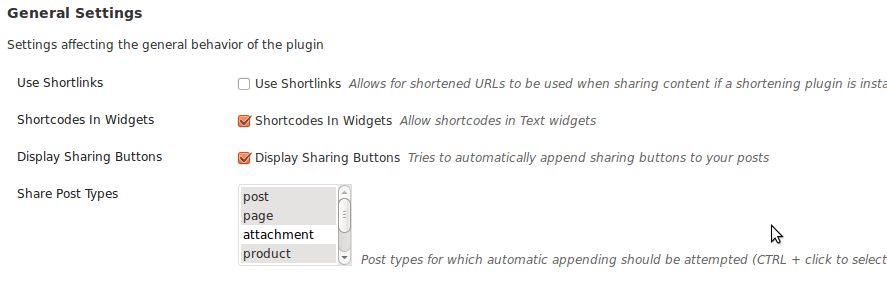
A view of some of the settings that can be customized in Social Media the back-end. 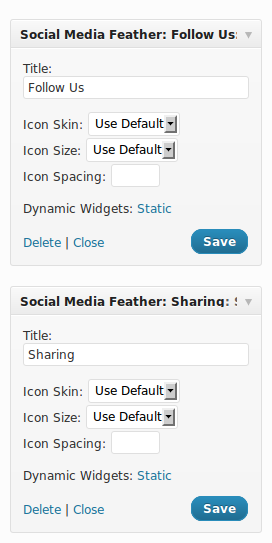
This shows the available social sharing and following widgets and their settings. 
An illustration of sharing functionality. 
An illustration of following functionality.
安裝方式
- Download the Social Media Feather plugin
- Simply go under the Plugins page, then click on Add new and select the plugin’s .zip file
- Alternatively you can extract the contents of the zip file directly to your wp-content/plugins/ folder
- Finally, just go under Plugins and activate the plugin
常見問題集
-
Have a look at our site or where you can see the social sharing and following features in action
-
You can achieve this by using Custom Fields. Simply set a custom field of
synved_social_exclude_shareto “yes” (without quotes) to disable share buttons on the post or page. Alternatively setsynved_social_excludeto “yes” (without quotes) to disable both sharing and following. -
You can achieve this by using Custom Fields. Simply set a custom field of
synved_social_exclude_followto “yes” (without quotes) to remove following buttons from the post or page. Alternatively setsynved_social_excludeto “yes” (without quotes) to disable both sharing and following. -
You can achieve this by editing the Twitter Share Link under Settings -> Social Media from this:
http://twitter.com/share?url=%%url%%&text=%%message%%
to this:
http://twitter.com/share?url=%%url%%&text=%%title%% -
Go to Settings -> Social Media and under “Automatic Display” uncheck “Display Sharing Buttons” as well as “Display Follow Buttons”. Then go under Appearance -> Widgets and add the “Social Media Feather: Sharing” widget to your sidebar.
-
Go to Settings -> Social Media and under “Automatic Display” uncheck “Display Sharing Buttons” as well as “Display Follow Buttons”. Then go under Appearance -> Widgets and add the “Social Media Feather: Follow Us” widget to your sidebar.
-
You can simply edit the page in question and add a shortcode like the following
[feather_share url="http://www.example.org"], then replacehttp://www.example.orgwith the URL to your site. See the next FAQ as well for adding an image. -
Just edit your shortcode so it looks like this
[feather_share url="http://www.example.org" image="http://www.example.org/image.jpg"], remember to substitutehttp://www.example.orgwith the URL to your site and the same goes for the JPEG URL. -
Just edit the page contents and insert another shortcode like this
[feather_follow]. -
Facebook is not showing the correct title/description/thumbnail, what to I do?
-
Social Media Feather always try to communicate to Facebook the correct parameters corresponding to the post being shared, including title and thumbnail but Facebook sometimes decides to ignore this information and instead picks up its own details from the page. This could be because some other plugin on your site is incorrectly specifying some OpenGraph tags in your page, or simply down to a Facebook choice. In both cases the solution is to remove any plugins creating incorrect OpenGraph tags and instead installing a plugin that provides proper OpenGraph tags, like Yoast SEO.
-
This could be due to Facebook caching your page information. Go to Facebook Debug Tools and type in the URL to the post/page, then click “Debug”. On the next screen that loads, now click on “Fetch new scraping information”; this should clear Facebook’s cache of your page.
-
If you have automatic display enabled or you’re displaying the social media icons using other means, like shortcodes or widgets, but some or all the buttons are not showing up in your browser, but they do show up on a fresh install of a different browser, it is possible that some of your browser add-ons are blocking the icons. This is generally caused by ad-blocking software such as Adblock or Adblock Plus. Please add your site in the exception list for these add-ons and your social icons should show up again.
-
This is not caused by our plugin but by a lightbox library you are using. This could either be loaded by your theme or one of your other plugins. If you’re using Easy Fancybox, please install their development version.
-
You can achieve this by adding some CSS under Settings -> Social Media, “Extra Style” option. Add something like this inside that text area:
.synved-social-button {
margin-left: 10px !important;
}If you want to just add it to the buttons as a whole instead of each individual button, then set “Buttons in Container” to “Both” and “Buttons Container Type” to “Block” and add this:
.synved-social-container {
margin-left: 10px;
}
使用者評論


參與者及開發者
以下人員參與了開源軟體〈Social Media Feather | social media sharing〉的開發相關工作。
參與者


變更記錄
2.1.5
- Tested 6.4.3
- Update twitter icons to X.
2.1.4
- Tested 6.4.2
- Fixed vulnerability issues with ajax calls.
2.1.3
- Test with WordPress 6.1.1 and PHP 8.
2.1.2
- Test with WordPress 6.0.2
- Fix warning.
2.1.1
- Fix bug with follow
2.1.0
- New settings interface.
- Sanitize everything!
2.0.7
- Add more sanitization.
2.0.6
- Update screenshots.
2.0.5
- Strengthen sanitization for inputs and outputs.
- Fix warnings, remove unnecessary files.
- Remove Google+ entirely.
2.0.4
- Test with WordPress 5.9.
- Update media assets.
2.0.3
- Test with WordPress 5.8.
2.0.2
- New WP version test.
2.0.1
- Replace http links with https.
2.0.0
- Fixed missing index error.
- Added review us dismissable popup.
- Tested WP 5.4.1 compatability.
1.9.4
- Removed deprecated function “create_function”.
- Utilizing WP Settings API.
- WP 5+ compatability tests.
1.8.4
- Added option to decline terms of service after having accepted
1.8.3
- Minor design improvements
1.8.2
- NEW: 6 icon styles which were previously available as a $15 add on are now included for FREE!
- Removed NEWS dashboard widget
1.8.1
- Fixes for old versions of PHP
1.8
- Added support for “Facebook Insights”
- Improved admin interface
- Updated terms of service and privacy policy
1.7.12
- Performance improvements for Dashboard loading
- Added “message” parameter to share shortcode
1.7.11
- Adjusted some text and README descriptions
1.7.10
- Use HTTPs by default for Facebook/Twitter follows
- Ensure facebook alt uses capitalized Facebook to pass facebook ads requirements
1.7.9
- Changed text domain to reflect plugin slug
1.7.8
- Disable credit link by default
1.7.7
- Fixed addon installer’s path calculation for rare cases
1.7.6
- Minor adjustments
1.7.5
- Updated social network links descriptions to be more clear
1.7.4
- Cache provider list to improve performance when social buttons are shown many times
1.7.3
- Strip HTML from titles in sharing links
- Fix for certain Fancybox plugins loading lightboxes on sharing images
1.7.2
- Added
imageattribute for shortcodes - Minor adjustments
1.7.1
- Fix for Easy Digital Downloads adding HTML tags to titles that were then posted to social sharing
- Fix for certain quote characters not being properly converted on share
1.7
- Performance improvements
1.6.15
- Fix for PHP notice in rare cases
- Prevent certain fancybox plugins from trying to open fancybox on share/follow icons
1.6.14
- Adjusted description
- Added documentation
1.6.13
- Added author_wp variable for built-in WordPress author name
1.6.12
- Re-compressed all large icon sets to slightly reduce file size
1.6.11
- Minor tweaks
1.6.10
- Minor adjustments
1.6.9
- Added url_trimmed variable that trims extra slashes off of the URL
1.6.8
- Added short_url variable that always contains the shortened URL
1.6.7
- Fix automatic displaying of share/follow buttons on single posts only
1.6.6
- Updated all images to “optimized” versions to silence certain analytical tools
1.6.5
- Fixed issue for correct detection of home page
1.6.4
- Added two filters for shortcode parameters: synved_social_shortcode_variable_list and synved_social_shortcode_parameter_list
- Minor adjustments
1.6.3
- Additional fix for “ghost” prefixes appearing in odd cases for non-single pages
1.6.2
- Fix for “ghost” prefixes appearing in certain cases for non-single pages
1.6.1
- Adjusted some descriptions
1.6
- Added alignment options for both sharing and following buttons
- Minor adjustments
1.5.10
- Added date variable
- Minor adjustments
1.5.9
- Fix for RSS feeds displaying double resolution images
- Minor adjustments
1.5.8
- Attempt suggesting meta values to Facebook (it seems to ignore them at this time though)
- Fix for esc_url strictness
- Minor adjustments
1.5.7
- Fixed escaping of quote and double quote characters
- Added mail as follow provider for “contact us” buttons
- Minor adjustments
1.5.6
- Added %%author%% template variable for URL substitution
- Minor tweaks
1.5.5
- For automatic display, allow positioning of buttons both before and after post content
- Minor adjustments
1.5.4
- Pick first image in the post when featured image is not set
- Minor adjustments
1.5.3
- Added buttons container options
- Misc adjustments
1.5.2
- Small fix to default URL
- Appearance fix in admin settings page
- Fixed typo
1.5.1
- Updated Facebook icons according to newest branding changes
1.5
- Added social providers instagram, flickr and foursquare
1.4.4
- Fixed titles not displaying certain special characters properly
- Misc adjustments
1.4.3
- Fixed share URL being incorrect in some instances like subdir installs
- Misc adjustments
1.4.2
- Fixed some issues on certain windows hosting
- Fixed installation of addons in certain peculiar environments
- Added option for RTL layouts sites
1.4.1
- Minor fixes and adjustments
1.4.0
- Added social providers tumblr and vimeo
- Assorted minor fixes and tweaks
1.3.4
- Fix for potential conflicts with some other plugins
1.3.3
- Fixed validation error for e-mail link
- Fixed invalid index notices
1.3.2
- Added ability to specify position for both share and follow buttons
- Added options for prefix and postfix markup for individual buttons sets
- Fixed warning when in debug mode
1.3.1
- Tweak the new Retina display code to work more accurately
- Fix for share URL being incorrect in certain cases
- Fix for addons being deleted by WordPress on automatic upgrade (this will work from the next version, sorry about that!)
1.3.0
- Added support for Retina and other high resolution displays
- Fix exclusion checks for custom post types
- Added option to share full URL instead of single post/page URL
1.2.3
- Fix check for single posts to include all singular pages
- Set image dimensions attributes to match icon size
- Fix for images stacking vertically in some themes
- Fix for automatic follow not shown when automatic share was disabled
1.2.2
- Added option to limit automatic appending to single post/pages
1.2.1
- Added Pinterest as sharing and following network
- Added ability to automatically append following buttons as well
- Added ability to disable automatic appending for posts with custom fields
- Added class, show and hide parameters to shortcodes
1.0
- First public release.