Title: Screen Reader Text Format
Author: Reaktiv
Published: 2021 年 10 月 15 日
Last modified: 2024 年 11 月 15 日
---
搜尋外掛
這個外掛**並未在最新的 3 個 WordPress 主要版本上進行測試**。開發者可能不再對這個
外掛進行維護或提供技術支援,並可能會與更新版本的 WordPress 產生使用上的相容性問題。

# Screen Reader Text Format
由 [Reaktiv](https://profiles.wordpress.org/reaktivstudios/) 開發
[下載](https://downloads.wordpress.org/plugin/screen-reader-text-format.1.1.zip)
* [詳細資料](https://tw.wordpress.org/plugins/screen-reader-text-format/#description)
* [使用者評論](https://tw.wordpress.org/plugins/screen-reader-text-format/#reviews)
* [安裝方式](https://tw.wordpress.org/plugins/screen-reader-text-format/#installation)
* [開發資訊](https://tw.wordpress.org/plugins/screen-reader-text-format/#developers)
[技術支援](https://wordpress.org/support/plugin/screen-reader-text-format/)
## 外掛說明
Screen Reader Text Format adds a screen reader only text format control to the block
editor. This allows content creators to correctly markup certain types of text content.
For example, when using the _strikethrough_ text format, it is almost always correct
to include screan reader text that indicates the content has been struck out and
if the content is replaced with an insert, the correct solution is to include screen
reader text that indicates the insertion.
Without this ability, content creators will have to do complicated HTML edits to
create the correct text informing screen readers of strike, insert, and even “important”
notes that are indicated with bold text since screen readers are completely agnostic
towards those HTML tags.
## 安裝方式
1. Upload the `screen-reader-text-format` folder and all its contents to the `/wp-
content/plugins/` directory
2. Activate the plugin through the ‘Plugins’ menu in WordPress
## 常見問題集
### Why do I need to use screen reader text?
The most common use case is when the text had been formated using things like strike.
This is great for visual users, but users who are accessing content via a screen
reader will not know what has happened.
For example, let’s say you are writting about a product and that product is normally
$100 but the price is marked down to $80. This might be represented as ~$100~ $80.
That is to say `$100 $80`. A screen reader will read “$100 $80” with
no mention of the strike through.
In the best case scenerio this would be written out “Was $100 now $80” but often
the design will not allow the space, hence the shorthand. To fix this for screen
readers, the screen reader text format can be used to include “was” and “now” so
this will make more sense for screen readers.
### How do I use this?
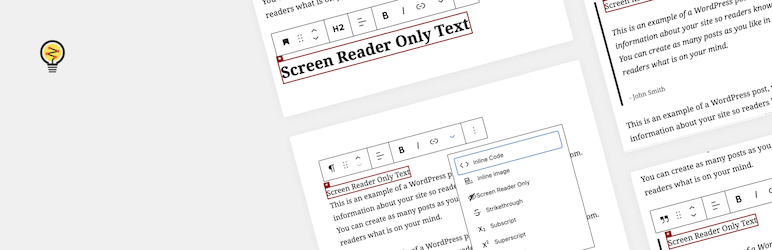
In the block editor, most text content like paragraphs, headings, and lists have
a text format toolbar. To use the tool add your text, then highlight it. This should
bring up the text format toolbar. Click the down arrow and select the screen reader
text format.
### How do I find hidden text?
Once you add and hide text it may be difficult to find. Fortunately we added some
highlighting to make this easier. When you are editing a block, any text that is
hidden within the block or it’s children will be displayed with highlighted.
## 使用者評論

### [A no-brainer for accessibility](https://wordpress.org/support/topic/a-no-brainer-for-accessibility/)
[Eric Amundson](https://profiles.wordpress.org/sewmyheadon/) 2023 年 6 月 21 日
This simple utility makes adding helpful screen reader text to blocks easy. This
is especially helpful to give more meaning to generic calls-to-action like Learn
more or View bio buttons.

### [Absolutely brilliant!](https://wordpress.org/support/topic/absolutely-brilliant-93/)
[Vanderbeam](https://profiles.wordpress.org/vanderbeam/) 2022 年 2 月 2 日
I always add my own screen reader text into sites for a variety of reasons (adding
non-visual context to sections, adding extensions to buttons like “Read more [about
article title]”, and so on). But it’s a manual process and can sometimes be a bit
tricky. This plugin makes adding screen reader text much more efficient and event
allows some of my clients to add it on their own. I didn’t discover this plugin
too long ago, but so far I haven’t experienced any issues. I only use Gutenberg
and block library plugins (nothing like Divi or Elementor), and so far it’s been
compatible with everything. Such an awesome contribution to the repo! An asset for
any site!
[ 閱讀全部 2 則使用者評論 ](https://wordpress.org/support/plugin/screen-reader-text-format/reviews/)
## 參與者及開發者
以下人員參與了開源軟體〈Screen Reader Text Format〉的開發相關工作。
參與者
* [ Reaktiv ](https://profiles.wordpress.org/reaktivstudios/)
* [ Josh Eaton ](https://profiles.wordpress.org/jjeaton/)
* [ Nick the Geek ](https://profiles.wordpress.org/nick_thegeek/)
〈Screen Reader Text Format〉外掛目前已有 1 個本地化語言版本。 感謝[全部譯者](https://translate.wordpress.org/projects/wp-plugins/screen-reader-text-format/contributors)
為這個外掛做出的貢獻。
[將〈Screen Reader Text Format〉外掛本地化為台灣繁體中文版](https://translate.wordpress.org/projects/wp-plugins/screen-reader-text-format)
### 對開發相關資訊感興趣?
任何人均可[瀏覽程式碼](https://plugins.trac.wordpress.org/browser/screen-reader-text-format/)、
查看 [SVN 存放庫](https://plugins.svn.wordpress.org/screen-reader-text-format/),
或透過 [RSS](https://plugins.trac.wordpress.org/log/screen-reader-text-format/?limit=100&mode=stop_on_copy&format=rss)
訂閱[開發記錄](https://plugins.trac.wordpress.org/log/screen-reader-text-format/)。
## 變更記錄
#### 1.1.0
* [fix] Issue with block based widget editor
* [chore] Update build method
* [chore] Code standard updates
* [chore] Optimize images
#### 1.0.0
* Initial release
## 中繼資料
* 版本 **1.1**
* 最後更新 **2 年前**
* 啟用安裝數 **200+**
* WordPress 版本需求 ** 5.4 或更新版本 **
* 已測試相容的 WordPress 版本 **6.7.6**
* 語言
* [English (US)](https://wordpress.org/plugins/screen-reader-text-format/) 及 [French (France)](https://fr.wordpress.org/plugins/screen-reader-text-format/).
* [將這個外掛本地化為你的母語版本](https://translate.wordpress.org/projects/wp-plugins/screen-reader-text-format)
* [進階檢視](https://tw.wordpress.org/plugins/screen-reader-text-format/advanced/)
## 評分
5 星,滿分為 5 星
* [ 2 個 5 星使用者評論 ](https://wordpress.org/support/plugin/screen-reader-text-format/reviews/?filter=5)
* [ 0 個 4 星使用者評論 ](https://wordpress.org/support/plugin/screen-reader-text-format/reviews/?filter=4)
* [ 0 個 3 星使用者評論 ](https://wordpress.org/support/plugin/screen-reader-text-format/reviews/?filter=3)
* [ 0 個 2 星使用者評論 ](https://wordpress.org/support/plugin/screen-reader-text-format/reviews/?filter=2)
* [ 0 個 1 星使用者評論 ](https://wordpress.org/support/plugin/screen-reader-text-format/reviews/?filter=1)
[Your review](https://wordpress.org/support/plugin/screen-reader-text-format/reviews/#new-post)
[查看全部使用者評論](https://wordpress.org/support/plugin/screen-reader-text-format/reviews/)
## 參與者
* [ Reaktiv ](https://profiles.wordpress.org/reaktivstudios/)
* [ Josh Eaton ](https://profiles.wordpress.org/jjeaton/)
* [ Nick the Geek ](https://profiles.wordpress.org/nick_thegeek/)
## 技術支援
使用者可在技術支援論壇提出意見反應或使用問題。
[檢視技術支援論壇](https://wordpress.org/support/plugin/screen-reader-text-format/)