外掛說明
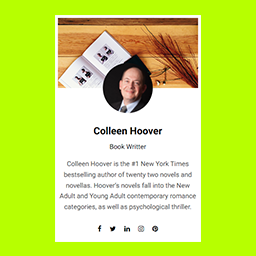
Introducing the RS Author Info Box – About Me Widget WordPress Plugin. Create a captivating author profile on your website with ease. Display your name, profession, social links, profile image, and banner image effortlessly. Connect with your audience and establish your personal brand using this user-friendly plugin. Customize the appearance to match your website’s aesthetics and ensure a consistent user experience. Take your online presence to the next level and showcase your expertise and credentials with style. Download now and unleash your true potential!
Plugin Features:
- Author Name and Profession: Display your name and profession prominently.
- Social Links: Easily include links to your social profiles for
seamless connection with your audience. - Profile Image: Add a professional headshot or creative avatar to
represent yourself. - Banner Image: Showcase your unique style or branding elements with an
eye-catching banner image. - Customization Options: Customize the appearance to match your
website’s aesthetics and maintain a consistent user experience.
To learn how to add the RS WP THEMES Author Info Box – About Me Widget WordPress Plugin to your website, please watch our informative video guide.
安裝方式
From your WordPress dashboard
- Visit ‘Plugins > Add New’
- Search for ‘rs-author-info-box’
- Activate RS AUTHOR INFO BOX from Plugins page
- Go to the Appearance -> Widgets -> and select Rs Author Info Box
- And Add Author Information to the sidebar area.
使用者評論
這個外掛目前沒有任何使用者評論。
參與者及開發者
以下人員參與了開源軟體〈RS WP THEMES AUTHOR INFO BOX – About Me Sidebar Widget WordPress Plugin〉的開發相關工作。
參與者