Title: Kombat Links
Author: d_alinus2004
Published: 2026 年 5 月 3 日
Last modified: 2026 年 5 月 3 日
---
搜尋外掛
# Kombat Links
由 [d_alinus2004](https://profiles.wordpress.org/d_alinus2004/) 開發
[下載](https://downloads.wordpress.org/plugin/kombat-links.zip)
* [詳細資料](https://tw.wordpress.org/plugins/kombat-links/#description)
* [使用者評論](https://tw.wordpress.org/plugins/kombat-links/#reviews)
* [安裝方式](https://tw.wordpress.org/plugins/kombat-links/#installation)
* [開發資訊](https://tw.wordpress.org/plugins/kombat-links/#developers)
[技術支援](https://wordpress.org/support/plugin/kombat-links/)
## 外掛說明
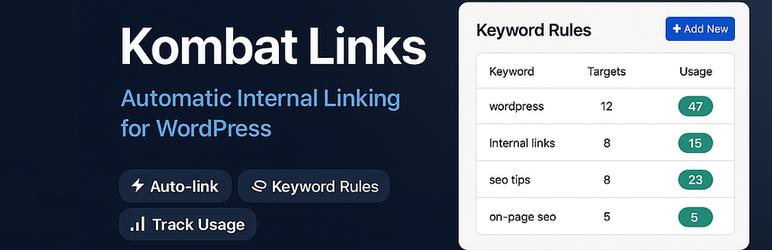
**Kombat Links** automates internal linking across your entire WordPress site. Instead
of manually editing every post to add links, you define keyword-to-URL rules once—
and the plugin handles everything else automatically.
Every time you publish or update a post, Kombat Links scans the content and inserts
the correct internal links based on your active rules. Existing content can be updated
in bulk with a single click.
#### Key Features
* **Automatic link insertion** — links are added on every post save, automatically
* **Bulk Re-link** — apply all rules to existing posts and pages with a real-time
progress bar
* **Usage tracking** — see exactly how many posts contain each rule’s link; click
to see the full list
* **Post type targeting** — apply rules to Posts, Pages, or both
* **WooCommerce support** — link to WooCommerce products directly from the rule
editor (when WooCommerce is active)
* **Smart Suggestions** — the plugin suggests potential link targets based on your
existing page titles
* **Non-destructive** — links are never inserted inside headings (H1–H6) or inside
existing `` tags
* **Remove all links** — strip all Kombat Links links from your entire site in
one click
* **Settings control** — configure max links per post, first-occurrence-only mode,
case sensitivity, and new-tab behaviour
#### How It Works
1. Go to **Smart Links** in your WordPress admin menu
2. Add a rule: type a keyword and select the destination post or page
3. Click **Re-link All Posts** to apply rules to existing content
4. From that point on, every new or updated post is linked automatically
#### SEO Benefits
Internal linking is one of the most effective and most neglected SEO techniques.
Kombat Links helps you build a consistent internal link structure without spending
hours manually editing posts.
#### Links are stored as standard HTML
Kombat Links inserts links directly into post content as plain `` tags — no shortcodes,
no overlays, no dynamic injections. Links persist even if the plugin is deactivated.
### Upgrade to PRO
Looking for more advanced features? **Smart Linker PRO** adds:
* Per-rule settings: nofollow, sponsored, UGC rel attributes
* Bold link text per rule
* Custom icon per link ( 🔗 or custom)
* Extra CSS class per rule
* External URL support (not just internal pages)
* Custom Post Types support
* Exclude specific posts from auto-linking
* Import / Export rules (JSON)
* Drag-to-reorder rules
[Get Smart Linker PRO ](https://webdesign-profesional.com/kombat-links/)
## 螢幕擷圖
* [[
* The Kombat Links admin panel showing active rules with usage counters.
## 安裝方式
1. Upload the `kombat-links` folder to the `/wp-content/plugins/` directory, or install
directly from the WordPress plugin directory.
2. Activate the plugin through the **Plugins** menu in WordPress.
3. Navigate to **Smart Links** in the admin menu.
4. Add your first keyword rule and click **Re-link All Posts**.
## 常見問題集
### Will this slow down my site?
No. Kombat Links only runs when a post is saved in the admin, or during the bulk
re-link batch process. It has no impact on front-end page load time.
### What happens to my links if I deactivate the plugin?
Links inserted by Kombat Links are stored as plain HTML in your post content. They
will continue to work as normal links even after the plugin is deactivated or deleted.
### Can I link to WooCommerce products?
Yes. When WooCommerce is active, products appear as link targets in the rule editor
under the “Products” group.
### What does “first occurrence only” mean?
When this setting is enabled (recommended), only the first occurrence of a keyword
in each post will be linked. This avoids excessive linking and follows SEO best
practices.
### Why does my rule show 0 uses after I add it?
Rules are applied when a post is saved. To apply rules to existing posts, click **
Re-link All Posts** in the Bulk Actions section.
### How many links per post should I set?
We recommend 3–5 links per post. Google’s guidelines suggest that internal links
should feel natural and relevant. Too many links on a single page can dilute their
value.
### Does Kombat Links create links inside headings?
No. The plugin never inserts links inside H1–H6 tags or inside existing `` tags—
your content structure is always preserved.
## 使用者評論
這個外掛目前沒有任何使用者評論。
## 參與者及開發者
以下人員參與了開源軟體〈Kombat Links〉的開發相關工作。
參與者
* [ d_alinus2004 ](https://profiles.wordpress.org/d_alinus2004/)
[將〈Kombat Links〉外掛本地化為台灣繁體中文版](https://translate.wordpress.org/projects/wp-plugins/kombat-links)
### 對開發相關資訊感興趣?
任何人均可[瀏覽程式碼](https://plugins.trac.wordpress.org/browser/kombat-links/)、
查看 [SVN 存放庫](https://plugins.svn.wordpress.org/kombat-links/),或透過 [RSS](https://plugins.trac.wordpress.org/log/kombat-links/?limit=100&mode=stop_on_copy&format=rss)
訂閱[開發記錄](https://plugins.trac.wordpress.org/log/kombat-links/)。
## 變更記錄
#### 1.0.0
* Initial release.
* Keyword-to-URL rule management.
* Automatic link insertion on post save.
* Bulk re-link with real-time progress bar.
* Usage tracking per rule with post list modal.
* Post type targeting (Posts, Pages, or both).
* WooCommerce product support.
* Smart Suggestions based on existing page titles.
* Remove All Smart Links bulk action.
* Settings: max links per post, first-occurrence-only, case sensitivity, new tab.
## 中繼資料
* 版本 **1.0.0**
* 最後更新 **7 天前**
* 啟用安裝數 **少於 10 次**
* WordPress 版本需求 ** 5.0 或更新版本 **
* 已測試相容的 WordPress 版本 **6.9.4**
* PHP 版本需求 ** 7.4 或更新版本 **
* 語言
* [English (US)](https://wordpress.org/plugins/kombat-links/)
* 標籤:
* [automatic linking](https://tw.wordpress.org/plugins/tags/automatic-linking/)
[content](https://tw.wordpress.org/plugins/tags/content/)[internal linking](https://tw.wordpress.org/plugins/tags/internal-linking/)
[internal links](https://tw.wordpress.org/plugins/tags/internal-links/)[seo](https://tw.wordpress.org/plugins/tags/seo/)
* [進階檢視](https://tw.wordpress.org/plugins/kombat-links/advanced/)
## 評分
這個項目尚無任何評論記錄。
[Your review](https://wordpress.org/support/plugin/kombat-links/reviews/#new-post)
[查看全部使用者評論](https://wordpress.org/support/plugin/kombat-links/reviews/)
## 參與者
* [ d_alinus2004 ](https://profiles.wordpress.org/d_alinus2004/)
## 技術支援
使用者可在技術支援論壇提出意見反應或使用問題。
[檢視技術支援論壇](https://wordpress.org/support/plugin/kombat-links/)