外掛說明
GutenTOC plugin is SEO-friendly customizable Gutenberg block editor which scans headings through the Page or Post content and creates the table of contents(TOC) automatically.
SUPPORTING FUTURE DEVELOPMENT
If you like this plugin, please rate and review it here in the WordPress Plugin Directory or support it with good review. Thank you!
How to add a block
Goto Gutenberg page Editor, add a block by search for “toc” or “table of contents”.
Featured
- Automatically generate a table of contents by insert Advance Table of Content block.
- Automatically generates anchor, but you will be able to customize if you want.
- SEO friendly table of Contents and anchor so it will display nicely in search result page (SERP).
- You can change toggle.
- Counter bullet formats are none, decimal, numeric, iconic.
- Smooth scrolling when click anchor.
螢幕擷圖

TOC Initially Hide 
TOC in Editor 
TOC Position Right 
TOC Left Right 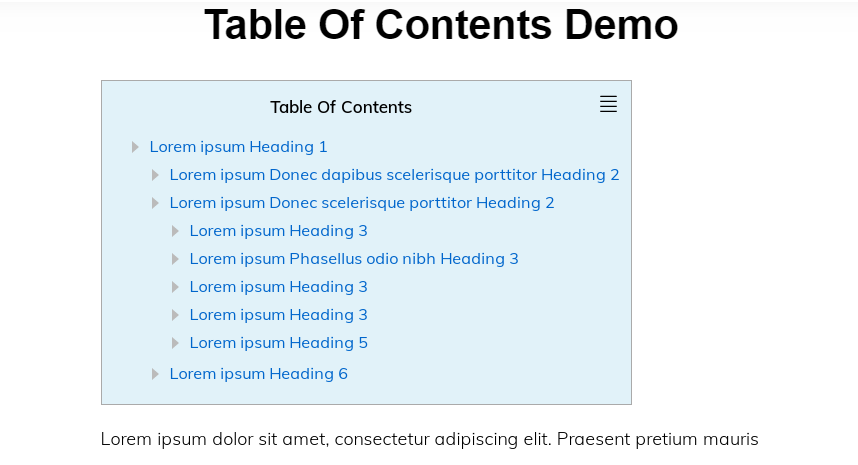
TOC Background Color 
TOC Border Color 
TOC Text Color 
Toc Border Radius
適用於區塊編輯器
這個外掛提供 1 個可供 Gutenberg/區塊編輯器使用的區塊。
- GutenTOC - Advance Table of Content for Gutenberg
安裝方式
To install the plugin automatically:
- You’ll need WordPress version 5.0 or higher for this to work.
- Require Gutenberg Editor**
- Through WordPress admin, use the menu: Plugin > Add new
- Click on install then click activate link
- In page or post Search for a block : toc or find it under Common Blocks category
常見問題集
-
Can I get support for the editor use?
-
We reply to every question about the editor on the forum here, just ask 🙂
-
Does Plugin slowing down my website?
-
The plugin has almost NO impact on page load for your visitors, it’s only loaded during the edition process.
-
Is plugins free?
-
Yes, totally free of charge.
使用者評論

2022 年 11 月 10 日
Great plugin, works fine and comes with numerous well thought-out options – thanks for this!!
Some suggestions / things I'd love to see in a coming version:
Make the source JS readable (currently completely minified) and as such editable / understandable – I cannot contribute if it is obfuscated like this...
Would love to see the numbering of the second (third, ...) levels reflect the parent numbers – by that I mean level 1 with levels 1.1 and 1.2 instead of having level 1 repeat level 1, level 2, etc.
Make the plugin translatable via WP's coding standards so I can change the labels accordingly without editing plugin code directly
Regards

2022 年 6 月 29 日
This plugin does a good job, but it has multiple accessibility issues (invalid list code, TOC title isn't a true heading, open/show TOC not keyboard focusable...).

2022 年 3 月 10 日
This plugin is working perfectly as per requirement. Only one thing is that "rankmath seo plugin" doesn't detect this plugin, therefore getting low SEO score. Please follow the Rankmath guide to add this functionality. Thanks.

2022 年 1 月 9 日
Automatically sets table up with tags. Smooth scrolling is nice. Simple yet elegant. Please add support for Rankmath.

2021 年 8 月 24 日
Not gonna lie this is the best TOC plugin on wordpress.

2020 年 11 月 27 日
had to switch from another table of contents plugin a different one, cause it broke my content ... so try this now and it works fine and easy... thank you ... I hope you keep updating it ... the most of these table of contents plugins are not getting updated anymore ..
參與者及開發者

變更記錄
0.0.1
- Initial Release.
0.0.2
- Add- Toc Alignment
1.0.1
- wp 5.5 compatible
2.0.1
- Find Extra Editor Core CSS
2.0.2
- Find Scrooling Issue
2.0.2
- Find Extra Editor Core CSS again
2.0.5
- Add options, Font Size, Line Height, Font weight, Font Family,Letter Spacing,Text Color,Text Hover Color,
Hover Undeline