Title: Dashboard quick links widget
Author: Hem Thapa
Published: 2016 年 9 月 20 日
Last modified: 2026 年 1 月 23 日
---
搜尋外掛

# Dashboard quick links widget
由 [Hem Thapa](https://profiles.wordpress.org/hemthapa/) 開發
[下載](https://downloads.wordpress.org/plugin/dashboard-quick-link-widget.1.6.0.zip)
* [詳細資料](https://tw.wordpress.org/plugins/dashboard-quick-link-widget/#description)
* [使用者評論](https://tw.wordpress.org/plugins/dashboard-quick-link-widget/#reviews)
* [安裝方式](https://tw.wordpress.org/plugins/dashboard-quick-link-widget/#installation)
* [開發資訊](https://tw.wordpress.org/plugins/dashboard-quick-link-widget/#developers)
[技術支援](https://wordpress.org/support/plugin/dashboard-quick-link-widget/)
## 外掛說明
A lightweight plugin to allows admins to create an admin dashboard widget with frequently
accessed links for quick access.
I originally developed this plugin after spending hours creating client/user documentation
for every WordPress project. Instead of writing step-by-step navigation documentation,
I used this plugin to organise all necessary links on the single widget for non-
technical users. As a developer, I also use this script myself to organise frequently
accessed links for quick access.
#### Links format
Each link should be entered in a separate line in the following format
(the fourth
parameter, i.e. font awesome icon class is optional)
**`Link text|Button link|Button text|font-awesome icon class`**
#### Examples
```
Post blog|/wp-admin/post-new.php|Post blog
Post blog|/wp-admin/post-new.php|Post blog|fa fa-cog
Post blog|/wp-admin/post-new.php newtab|Post blog|fa fa-cog`
```
If you have any feedback or queries please contact me at [hemthapa.com](http://hemthapa.com?ref=wp_dqlw"hemthapa.com")
## 螢幕擷圖
* [[
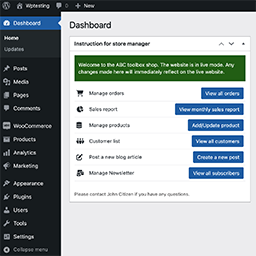
* Dashboard widget preview
* [[
* plugin settings dialog
## 安裝方式
1. Install the plugin from within the Dashboard or upload the directory `dashboard-
quick-link-widget` and all of its contents to the `/wp-content/plugins/` directory
of your website
2. Activate the plugin through the ‘Plugins’ menu in WordPress
3. Configure the widget options and links on Settings->Dashboard links widget.
4. Preview and confirm the dashboard widget.
5. That’s all, Now users can simply click on the button in the dashboard widget to
access the page.
## 常見問題集
### How to format the list of the links?
You need to list each link in a separate line in the following format
**`Link text
|Button link|Button text|font-awesome icon class`**
(fourth parameter, i.e. Font Awesome icon class is optional)
Example:
```
Post new blog|/wp-admin/post-new.php|Create new post|fa fa-cog
```
### How to open links in new tab?
By default, all links open in the same tab, if you want to open all the links on
the widget in a new tab tick the ‘Open all links in a new tab’ box.
However, if you want to open only selected links in a new tab, add the keyword ‘
newtab’ after the link.
Example:
```
Post new blog|/wp-admin/post-new.php newtab|Post new blog
```
### How to add a divider or additional info in between the links?
If you need to add any text, divider or any plain or HTML content in between the
links, please add the new line with ‘#’ in the front. Any new lines starting with#
are rendered as it is in the widget. You can add any HTML tags in this line.
Example:
# Section title Post new blog|/wp-admin/post-new.php
|Post new blog #
Post new blog|/wp-admin/post-new.php|Post new blog
### Why Font Awesome icons is not working properly?
Please make sure correct the Font Awesome version is selected.
## 使用者評論

### [very handy](https://wordpress.org/support/topic/very-handy-328/)
[nkads](https://profiles.wordpress.org/nkads/) 2026 年 5 月 20 日
great! thx, keep updating it please

### [Great plugin!!](https://wordpress.org/support/topic/great-plugin-38416/)
[rrvoigt](https://profiles.wordpress.org/rrvoigt/) 2024 年 2 月 5 日
Just what we needed!! Hopefully this plugin gets updated on a regular basis. Currently
while writing not supported by the latest WP version 6.4.3 (but it works). Also
maybe an improvement suggestion – for me i would have liked an option to make all
buttons the same length. So they sit more evenly, but that is a personal preference.
Great work !!!

### [Wish I could include an external post](https://wordpress.org/support/topic/wish-i-could-include-an-external-post/)
[ixoyewarrior](https://profiles.wordpress.org/ixoyewarrior/) 2024 年 1 月 23 日
Our site uses sub domains but I have no way to post a link to anything external.

### [Awesome Plugin](https://wordpress.org/support/topic/awesome-plugin-6665/)
[herchen](https://profiles.wordpress.org/herchen/) 2022 年 11 月 14 日
I manage many WordPress sites and it’s often a pain to find a frequently used menu
item buried within tons of options. I actually developed my own plugin for that
reason (called Admin Menu Search), but even then I got tired of typing in the filter
to find the menu item I wanted. I found this plugin by searching for “Admin Links”
and after a little bit of setup, it’s really handy!! Excellent plugin idea and very
useful! Thank You!

### [Very good – Does exactly what it says!](https://wordpress.org/support/topic/very-good-does-exactly-what-it-says/)
[NETT.PRO](https://profiles.wordpress.org/nettpro/) 2022 年 6 月 23 日
Nice, simple plugin. Solved my problem. Could not find it when searching from within
WordPress, but downloaded and installed and everything works. Thanks.

### [Just what I needed](https://wordpress.org/support/topic/just-what-i-needed-1080/)
[tolkodelo](https://profiles.wordpress.org/tolkodelo/) 2021 年 2 月 25 日
This is my first plugin review. Plugins like AIOSEOP, Jetpack – why would I even
bother rating them? But this little plugin is so simple, specific and handy, that
I just can’t help saying thank you to the author. I’ve got a couple of pages that
I update almost daily, and I thought hey, on my dashboard there are a bunch of blocks
I never use, why not put something useful there, like some direct page edit links.
It would save me a couple minutes every single time. Hey, and there must be a plugin
for this, right? ) And here it is ) Took me a couple of minutes to set up, works
great. If you ever write another plugin like this one, let us know!
[ 閱讀全部 9 則使用者評論 ](https://wordpress.org/support/plugin/dashboard-quick-link-widget/reviews/)
## 參與者及開發者
以下人員參與了開源軟體〈Dashboard quick links widget〉的開發相關工作。
參與者
* [ Hem Thapa ](https://profiles.wordpress.org/hemthapa/)
[將〈Dashboard quick links widget〉外掛本地化為台灣繁體中文版](https://translate.wordpress.org/projects/wp-plugins/dashboard-quick-link-widget)
### 對開發相關資訊感興趣?
任何人均可[瀏覽程式碼](https://plugins.trac.wordpress.org/browser/dashboard-quick-link-widget/)、
查看 [SVN 存放庫](https://plugins.svn.wordpress.org/dashboard-quick-link-widget/),
或透過 [RSS](https://plugins.trac.wordpress.org/log/dashboard-quick-link-widget/?limit=100&mode=stop_on_copy&format=rss)
訂閱[開發記錄](https://plugins.trac.wordpress.org/log/dashboard-quick-link-widget/)。
## 變更記錄
#### 1.6.0
_4 Sep 2023_
* Support for custom HTML block is added to add text, space or whatever you like
in between the links to categorise and manage the links block
* Support for multiple version of Font Awesome icon is added
* Individual links can now be set to open in a new tab
## 中繼資料
* 版本 **1.6.0**
* 最後更新 **4 個月前**
* 啟用安裝數 **700+**
* WordPress 版本需求 ** 3.0 或更新版本 **
* 已測試相容的 WordPress 版本 **6.9.4**
* PHP 版本需求 ** 7.3 或更新版本 **
* 語言
* [English (US)](https://wordpress.org/plugins/dashboard-quick-link-widget/)
* 標籤:
* [admin](https://tw.wordpress.org/plugins/tags/admin/)[dashboard](https://tw.wordpress.org/plugins/tags/dashboard/)
[links](https://tw.wordpress.org/plugins/tags/links/)[widget](https://tw.wordpress.org/plugins/tags/widget/)
* [進階檢視](https://tw.wordpress.org/plugins/dashboard-quick-link-widget/advanced/)
## 評分
5 星,滿分為 5 星
* [ 9 個 5 星使用者評論 ](https://wordpress.org/support/plugin/dashboard-quick-link-widget/reviews/?filter=5)
* [ 0 個 4 星使用者評論 ](https://wordpress.org/support/plugin/dashboard-quick-link-widget/reviews/?filter=4)
* [ 0 個 3 星使用者評論 ](https://wordpress.org/support/plugin/dashboard-quick-link-widget/reviews/?filter=3)
* [ 0 個 2 星使用者評論 ](https://wordpress.org/support/plugin/dashboard-quick-link-widget/reviews/?filter=2)
* [ 0 個 1 星使用者評論 ](https://wordpress.org/support/plugin/dashboard-quick-link-widget/reviews/?filter=1)
[Your review](https://wordpress.org/support/plugin/dashboard-quick-link-widget/reviews/#new-post)
[查看全部使用者評論](https://wordpress.org/support/plugin/dashboard-quick-link-widget/reviews/)
## 參與者
* [ Hem Thapa ](https://profiles.wordpress.org/hemthapa/)
## 技術支援
使用者可在技術支援論壇提出意見反應或使用問題。
[檢視技術支援論壇](https://wordpress.org/support/plugin/dashboard-quick-link-widget/)
## 贊助
想要支援這個外掛的發展嗎?
[ 贊助這個外掛 ](http://www.hemthapa.com)