
外掛說明
Customize My Account for WooCommerce
Customize your default my account page. Reorder them , hide existing core endpoints. You will also be able to change the default endpoint.
Check Live Demo for Pro version features
Check our Premium Plugins
Missing a feature or Want to inform us about bug ? Contact us here
Customize My Account for WooCommerce features
- Modify existing endpoints.
- Add custom links to your my account pages.
- Drag and drop UI.
- Modify WooCommerce My account Navigation background color
- Modify WooCommerce My account Navigation text color
- Modify WooCommerce My account menu item background color
- Easily Customize WooCommerce My Account Navigation CSS Parameters like background , font color , link color or padding, fontsize etc using frontend live customizer.
- Compatible with Elementor , Elementor Pro and Jetwoobuilder
- Easily Create new custom my account page using Customize My Account widgets for free elementor widgets.
Customize My Account for WooCommerce free version features
- Show/hide woocommerce core endpoints
- Reorder core woocommerce my account endpoints
- Add extra class to core endpoint
- Add New link as endpoint on my account page
- Show user avatar on my account page
- Drag and drop UI
- Use Dashicons for WooCommerce My Account Endpoints. Plugin has inbuilt dashicon picker. If somehow font awesome icons not working for you , you can opt for dashicon which has wider compatibility across all themes.
- Optionally replace entire my account with custom elementor template.
- Optionally override endpoint content with elementor template content
Customize My Account for WooCommerce pro version features
- All features of free version
- Support for link/endpoint/group endpoints
- Drage link/endpoints(core/new) into group and reorder them
- Show custom content on endpoints
- Set groups as show by default which will make group menu open on page load
- Hide existing order page columns
- Add new custom columns to order listing page
- Reorder order page columns
- Add new custom order actions button in action column
Check Live Demo for Pro version features
Customize Dokan Dashboard Endpoints features
- Add new endpoint to your dokan dashboard
- Hide existing dokan dashboard endpoints
- Shortcode support
- Modify icon of existing dokan dashboard enpoints
- Add new link in dokan dashbaord
check Customize Dokan Dashboard Endpoints Pro
Privacy Policy
Customize My Account for WooCommerce uses Appsero SDK to collect some telemetry data upon user’s confirmation. This helps us to troubleshoot problems faster & make product improvements.
Appsero SDK does not gather any data by default. The SDK only starts gathering basic telemetry data when a user allows it via the admin notice. We collect the data to ensure a great user experience for all our users.
Integrating Appsero SDK DOES NOT IMMEDIATELY start gathering data, without confirmation from users in any case.
Learn more about how Appsero collects and uses this data.
螢幕擷圖
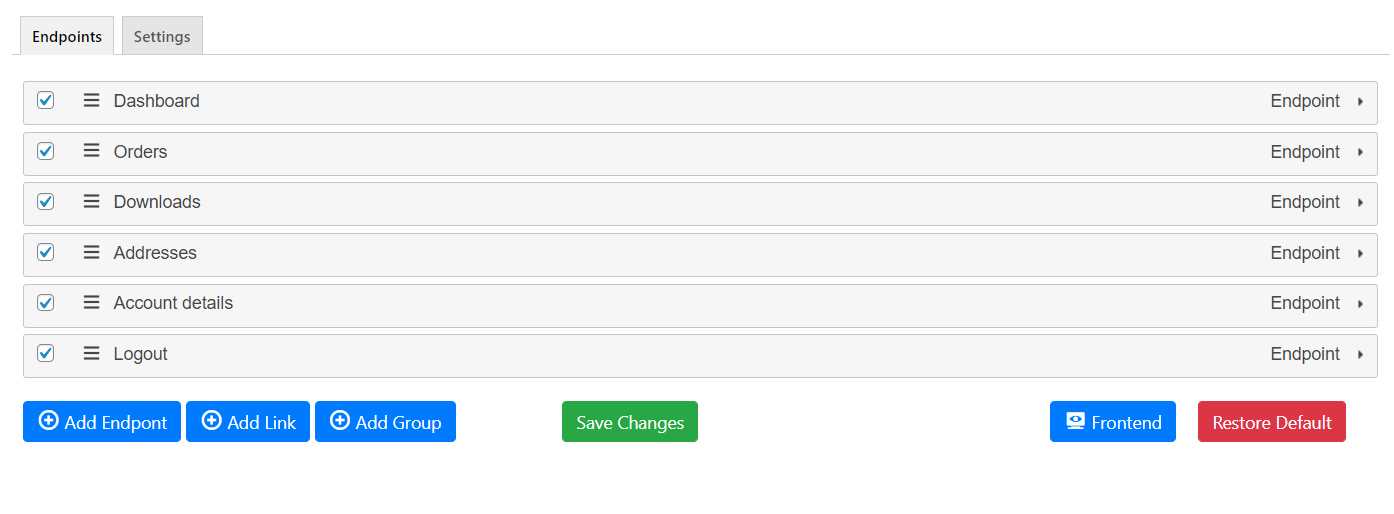
Customize My Account for WooCommerce Backend 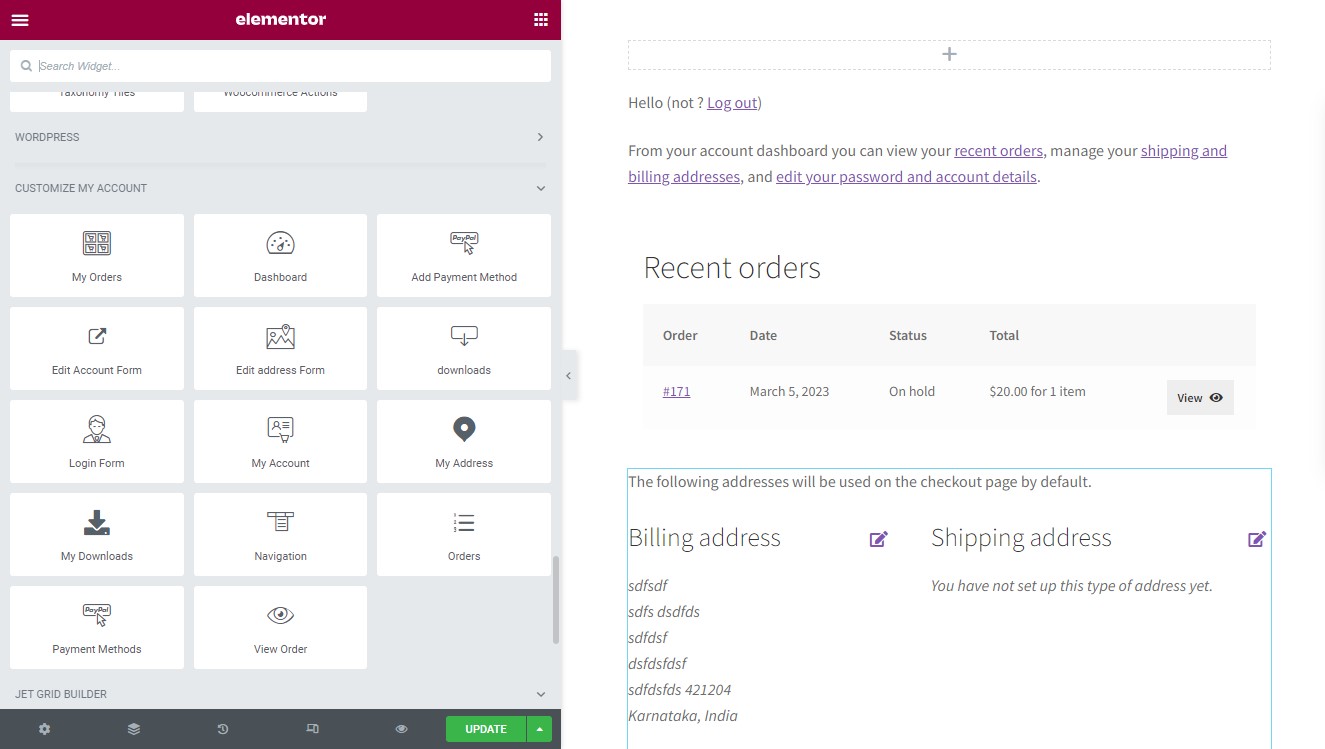
Customize My Account for WooCommerce Elementor 
Customize My Account for WooCommerce Each Endpoint 
Customize My Account for WooCommerce Customizer 
Customize My Account for WooCommerce Free 
Customize My Account for WooCommerce Frontend 

安裝方式
Use automatic installer.
常見問題集
-
How to override endpoint url?
-
Plugin has inbuilt hook which you can use to override my account endpoint url. Only use this if your setup is somehow not returning correct endpoint url.
add_filter('wcmamtx_override_endpoint_url','wcmamtx_override_endpoint_url',10,2);

function wcmamtx_override_endpoint_url($core_url,$key) {

    $new_url = ''.site_url().'/my-account/'.$key.'/';

    if ($key== "customer-logout") {
        $new_url = wp_nonce_url($new_url);
    }
    return $new_url;
}
You may use Code Snippets plugin to inject any extra php code.
-
Is plugin compatible with WPML ?
-
yes. you can use this plugin with WPML and locotranslate both.
For WPML visit WPML/Theme and plugins localization menu and search for this plugin and click on “scan the selected plugins for scan” button.
Now visit WPML/string translation and click on “Translate texts in admin screens” link at the bottom.
There search for wcmamtx_advanced_settings and wcmamtx_plugin_options and check the fields you want to translate. Then apply the changes.
Now visit WPML/String translation and translate your strings there.
-
Is plugin compatible with WPML Sticky links ?
-
Yes
-
Can plugin used without elementor or with other page builders ?
-
Yes
使用者評論


參與者及開發者

變更記錄
Version 2.2.17 – 25 January 2024
- Version 2.2.17 – (25 January 2024) – Fix – Styling issues with oceanwp theme.
- Version 2.2.16 – Enhancement – Improved css compatibility with third party themes.
- Version 2.2.15 – Enhancement – Improved css compatibility with third party themes.
- Version 2.2.14 – Enhancement – Added reminder notice to review plugin.
- Version 2.2.13 – Fix – Visibility not working with dashboard links.
- Version 2.2.12 – Enhancement – Make endpoints visible to specific users or show only to specific users.
- Version 2.2.11 – Fix – styling issue with woodmart theme.
- Version 2.2.10 – Fix – Wrong link shown when endpoint key is changed.
- Version 2.2.9 – Fix – Mobile specific css issue.
- Version 2.2.8 – Fix – Navigation styling improvement
- Version 2.2.7 – Fix – styling issues with flatsome theme.
- Version 2.2.6 – Fix – Styling issues with flatsome theme.
- Version 2.2.5 – Fix – removed view order widget. can be reinstroduced post bug fix and through testing.
- Version 2.2.4 – Fix – Debug error.
- Version 2.2.3 = Enhancement – Updated readme plugin tags.
- Version 2.2.2 – Enahncement – Updated readme plugin tags.
- Version 2.2.1 – Enahncement – User placeholder incase image is not uploaded.
Version 2.2.0 Release date 27 December 2023
– Enhancement – Add your own svg/png/jpeg icon for dashboard links and endpoints.
– Enhancemnt – Improvement in css for popular themes for navigation.
– Ehnancement – Improved styling of backend inputs.
Version 2.1.25 – 27 December 2023
- 2.1.25 – 27 December 2023 – Fix – Noicon not working.
– Enhancement – Redirecting users to settings page after activation. - 2.1.24 – 26 December 2023 – Fix – Another set of debug errors.
- 2.1.23 – 26 December 2023 – Fix – Fatal error.
- 2.1.22 – 26 December 2023 – Updated Appsero SDK as wp.org requirements.
- 2.1.21 – 26 December 2023 – Added more options to my account menu widget.
- 2.1.20 – 26 December 2023 – Updated wpml-config.xml
- 2.1.19 – 26 December 2023 – Enhancement – Option to hide endpoints/links into dashboard links and my account widget menu.
- 2.1.18 – 26 December 2023 – Fix – Appsero issue.
- 2.1.17 – 26 December 2023 – Fix – Icon opacity issue.
- 2.1.16 – 26 December 2023 – Fix – Default theme icons not showing.
- 2.1.15 – 25 December 2023 – Fix – My Account link visible by default.
- 2.1.14- 25 December 2023 – Fix – Appsera class conflict.
- 2.1.13 – 25 December 2023 – Enhancement – Css improvemnt with popular third party themes.
- 2.1.12 – 25 December 2023 – Fix – Compatibility issues with flatsome theme.
- 2.1.11 – 15 December 2023 – Fix – Hide submenu for my account widget if user not logged in.
- 2.1.10 – 15 December 2023 – Enhancement – Styling improvments to popular themes.
- 2.1.9 – 25 December 2023 – Enhancement – Added compatibility of header my account widget for astra theme.
- 2.1.8 – 23 December 2023 – Fix – Improved navigation style for astra theme.
- 2.1.7 – 23 December 2023 – Fix – Order endpoint override not working properly.
- Fix – – Bug with previous release.
Version 2.1.1 – 21 December 2023
* Enhancement – – Added wcmamtx_Appsero client.
Version 2.1.0 – 15 December 2023
* Enhancement – Added options to override elementor widgets.
Version 2.0.13 – 14 December 2023
- Version 2.0.13 – Fix – Tabs not getting hidden in dashboard links.
- Version 2.0.12 – Fix – Debug errors.
- Version 2.0.11 – Enhancement- Removed feature of overiding endpoint content temporarily, could be added after full testing and fixing known issues.
- Version 2.0.10 – Fix – woodmart navigation appears on product single page.
- Version 2.0.9 – Enhancement – Added plugin deactivation survey.
- Version 2.0.8 – Enhancement – Improved author support links.
- Version 2.0.7 – Enhancement – Removed changelog.txt instead use https://wordpress.org/plugins/customize-my-account-for-woocommerce/#developers.
- Version 2.0.6 – Enhancement – Added Changelog.
- Version 2.0.5 – Fix – Bug related to previous release.
- Version 2.0.4 – Fix – Updated plugin author url.
- Version 2.0.3 – Enhancement – Improvements in backend links and button css.
- Version 2.0.2 – Fix- Debug Errors.
- Version 2.0.1 – Fix- issue with previous release.
- Enhancement – Allows users to try 2 endpoint and 2 groups.