
外掛說明
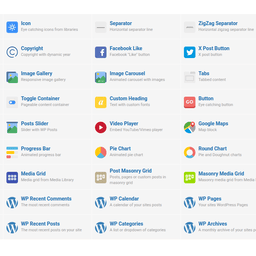
This WordPress plugin adds a module to WPBakery Page Builder plugin, bringing back the old school style of editor elements icons that WPBakery used in versions prior to 8.0.
If, like me, you fall in love with interfaces you’ve used for decades, then this plugin can be useful for you if you don’t feel comfortable with the new ‘Add Element’ popup icons in WPBakery Page Builder introduced after version 8.0.
After installing the plugin, you can enjoy the old icon style again in both the backend and frontend WPBakery Page Builder editors. You can always switch it on or off in the Module interface on the WPBakery Page Builder settings page.
Source file code you can find on our GitHub plugin page
螢幕擷圖


安裝方式
- Upload the plugin folder to the ‘/wp-content/plugins/’ directory.
- Activate the plugin through the ‘Plugins’ menu in WordPress admin dashboard.
使用者評論

參與者及開發者
以下人員參與了開源軟體〈Add Old School Elements Icons Module for WPBakery Page Builder〉的開發相關工作。
參與者
變更記錄
1.0
- Initial release.